

Field Service Management Software — From Dispatch to Invoice
Assign jobs, route technicians, track every service call, and collect payment on site. One platform to run your entire field operation.
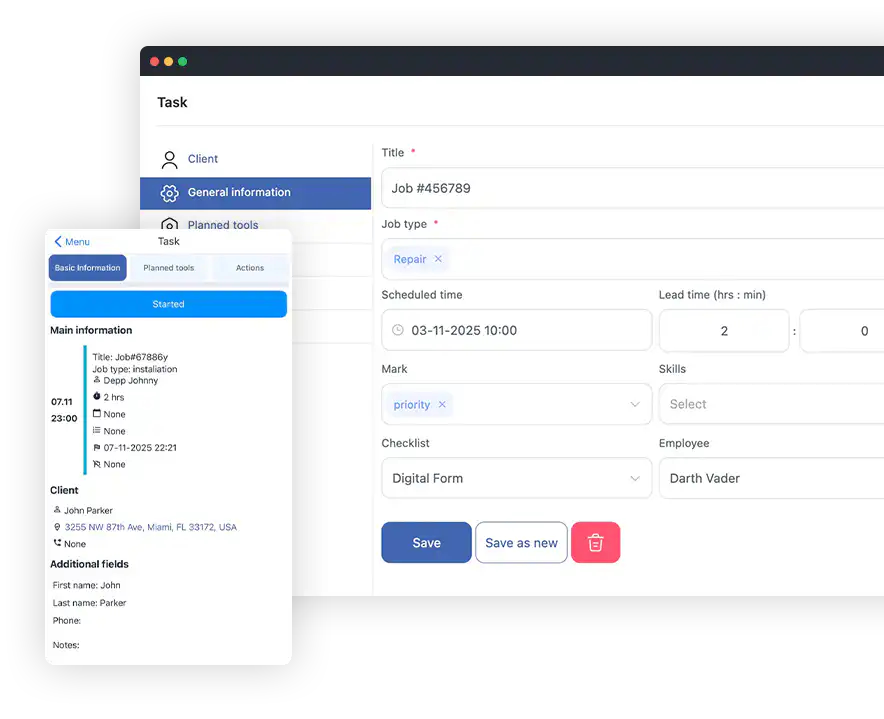
Route tracking and optimization
- Track every technician's route, working hours, and location through Shifton's FSM software dashboard
- Receive instant in-app notifications about new jobs, schedule changes, and client updates
- Snap photos, write notes, and capture client signatures right in the app
- Start tasks, complete jobs, and sync every update in seconds
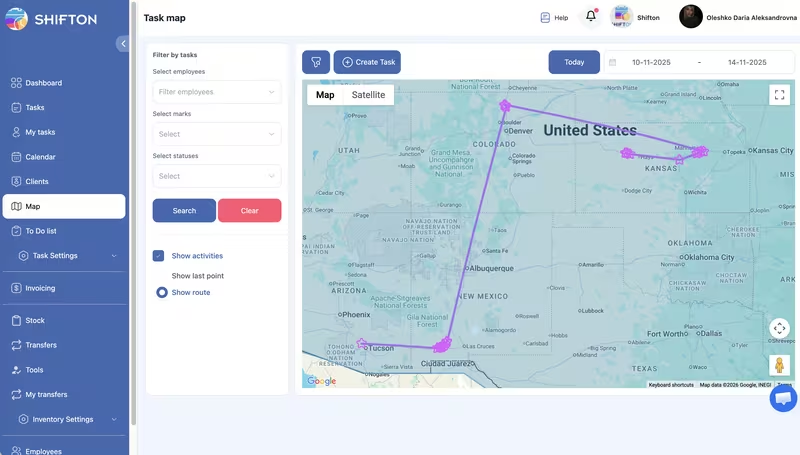
Work order and task management
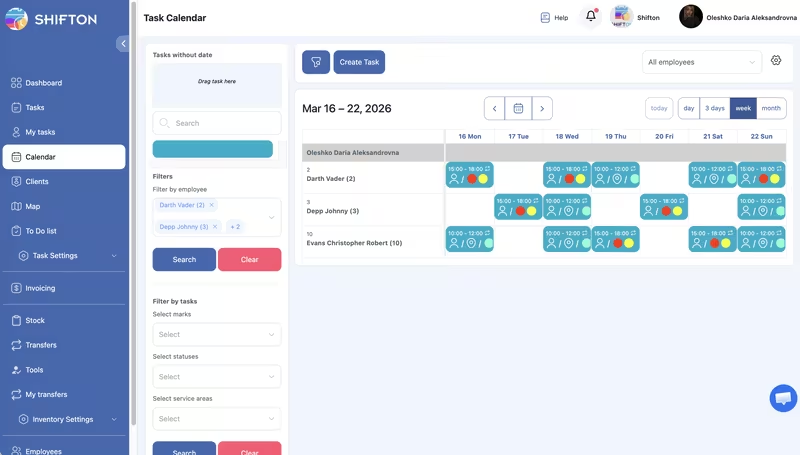
- Drag-and-drop calendar with AI-powered auto-assign based on skills and availability
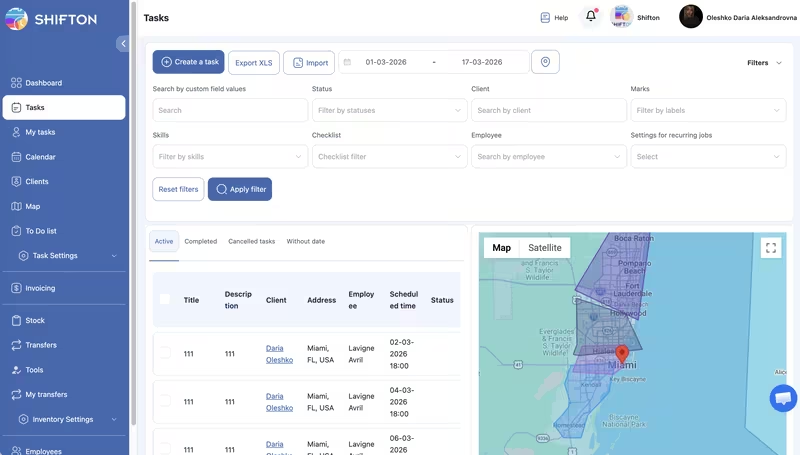
- Monitor every job from creation to completion with real-time status updates
- In-app messaging, file sharing, and notes keep your whole team aligned
- Build reusable checklists to ensure compliance and consistent quality on every job
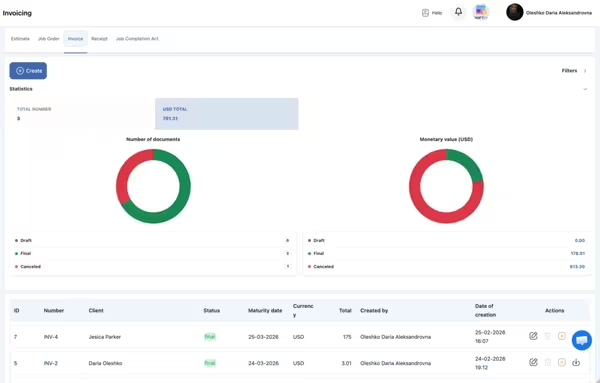
Field service reporting and analytics
- Real-time dashboards with revenue tracking, and team performance metrics
- Custom reports by technician, service type, region, or time period
- Export data to PDF, Excel, or integrate with your accounting software
- Identify trends, optimize scheduling, and make data-driven business decisions
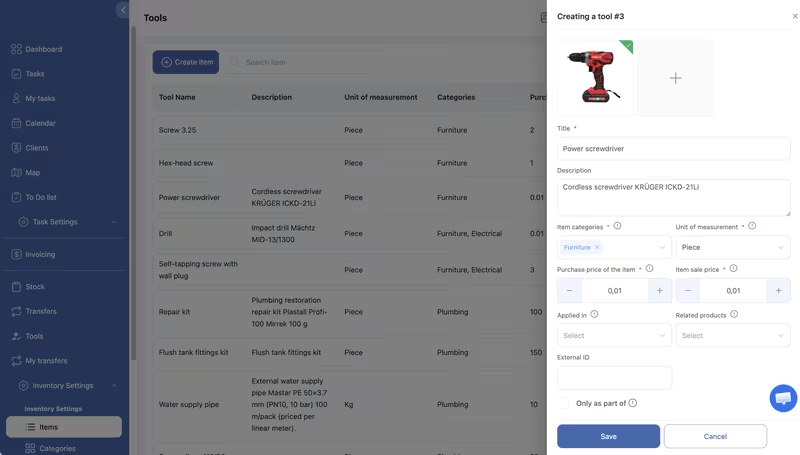
Parts and inventory management
- Monitor stock levels across all warehouses and technician vehicles in real time
- See which parts are used most, by whom, and on which job types
- Scan parts in and out with your phone for fast, error-free inventory management
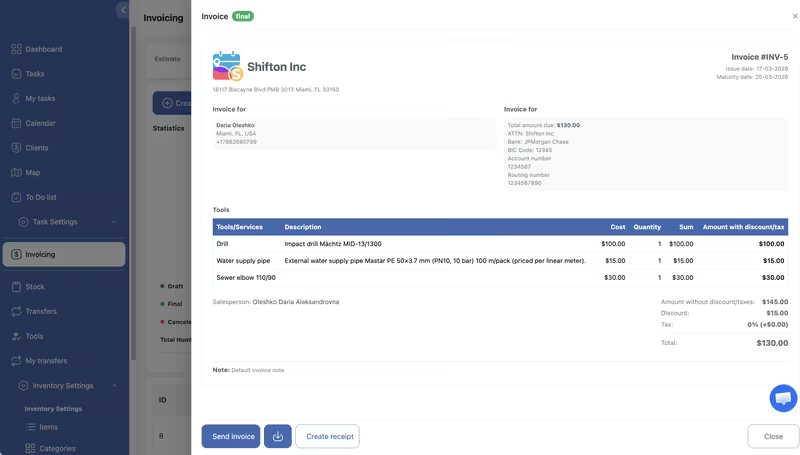
Field service invoicing and documents
- Create invoices and other documents based on completed work
- Edit document contents: add services, tools, labor costs, taxes, and additional line items
- Automatically populate company details and logo on every document
- Generate and send invoices, quotes, receipts, work orders, and completion reports to clients
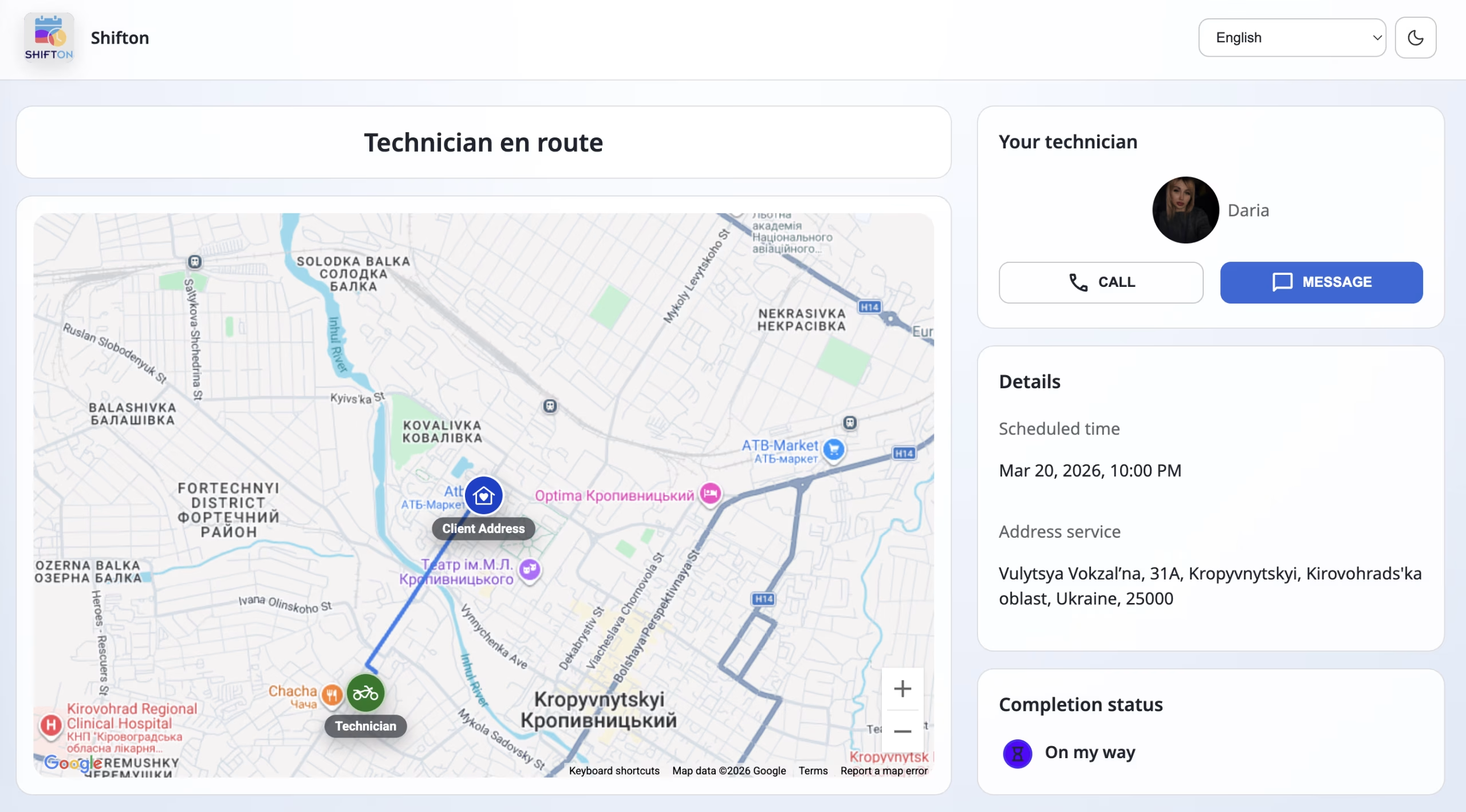
Customer portal and communication
- Clients automatically receive reminders about the upcoming technician visit
- Live tracking link shows the technician location on the map and estimated arrival time
- Tracking page includes buttons to start a chat or call the technician directly
- After the job is completed, clients receive a link to rate the service and leave a review
Why Choose Shifton FSM?
Built specifically for field service companies that need reliable, scalable tools
Start with the Free Plan
No time limits. Get full access to core features and upgrade when you're ready.
How It Works
Get your team up and running in minutes, not weeks
Sign Up & Set Up
Create your account in seconds. Add your team members, service areas, and customer list using our quick-start wizard.
Schedule & Dispatch
Use the drag-and-drop calendar or let AI auto-assign jobs based on technician skills, location, and availability.
Track & Manage
Monitor your team live on the map. Get instant status updates and keep customers informed with automated notifications.
Invoice & Grow
Generate invoices on the spot, collect digital payments, and use analytics to optimize operations and scale your business.
Purpose-built for 20+ industries
Tailored workflows and features for every type of field service business
Ready to transform your field operations?
Join thousands of field service companies that trust Shifton to run smarter every day.
More about Shifton Field Service Management
What is field service management software?
Field service management is the daily work of running jobs that happen away from your office. A customer calls, someone decides which technician goes and when, the technician needs the right parts and the address, and once the work is finished somebody has to bill for it. Field service management software is the system that holds all of that in one place instead of spreading it across a whiteboard, two spreadsheets and a phone that never stops ringing.
Every FSM software platform answers four questions: who is going, when, with what, and what happened on site. A field service management system that answers them properly retires the paper work order, the messenger thread where technicians report in, and the end-of-day phone round where a dispatcher tries to reconstruct the day.
Shifton is service management software built around the job rather than the calendar slot. Dispatchers watch every crew on a live map. Technicians open the app and find the address, the customer history, the checklist and the parts list already waiting. Office staff see statuses change while the work is happening instead of the next morning, so a job that is running late gets noticed at 11 am and not at 6 pm. That single change removes most of the calls between office and field, which is where service teams lose their afternoons.
As a field service management platform Shifton runs today in more than 100 countries and 40 languages, for teams from two technicians to several hundred. The same FSM system serves a two-van crew and a national contractor, because the modules switch on separately.
Scheduling, dispatch and work orders
Job scheduling and dispatching
The scheduling board is a drag-and-drop calendar. Assign a job by moving it onto a technician, or let auto-assign pick the nearest qualified person by skill, current location and workload. Urgent calls get flagged and routed first. Field service dispatching stops depending on who remembers what.
Scheduling stops being a memory exercise. Most teams start shopping for field service scheduling software at one specific moment: two emergency calls land in the same hour, and nobody can say out loud who is free. Dispatch and scheduling software closes that gap by making availability visible instead of remembered. Planned work goes on the calendar the same way, weeks ahead, so a quarterly inspection sits in the schedule instead of in somebody's memory.
Work order management
Every job becomes a structured digital work order that carries its own history: who created it, who accepted it, what was done, which materials went in, how long it took. Technicians update it on site, attach before-and-after photos and collect a signature. Managers get work order tracking without chasing paper.
Digital work orders also settle arguments. When a customer says the visit never happened or the wrong thing was fixed, field service work orders with timestamps and photos turn that into a two-minute lookup.
Forms, checklists and compliance
Digital job forms replace the clipboard. Build the checklist your trade actually needs, make the critical fields mandatory, and the technician cannot close the job without filling them. Safety checks, meter readings, equipment serial numbers and customer sign-off all land in the same record, searchable, and dated to the minute.
The mobile side: technicians and tracking
Mobile workforce management software is the half of the system your technicians touch every hour, and a mobile app for field technicians is judged on it more than on anything in the office. The field service management app for technicians runs on iOS and Android and carries the schedule, the job details, navigation and the customer notes. Technicians fill the checklist attached to each job on the phone, with photos and a signature where the form asks for them, so nothing is retyped at the end of the day.
Work location control puts the team on a map. Live. Technician location tracking records the route, the stops and the time on each site, which gives dispatchers real-time technician tracking instead of guesswork when an urgent call comes in. Route planning for service technicians runs on the same data. Less driving between appointments, and an arrival window the customer can plan around instead of a vague afternoon.
Knowing who is qualified for what is half of field technician management, and it is where field workforce management software earns its keep. Skills sit on the technician, service areas sit on the map, and one click sends the nearest technician who has the right ones. The dispatcher stops holding that table in their head.
Invoicing, contracts and parts
The money side is where field service software either pays for itself or does not. Field service invoicing builds the document straight from the finished job: labour hours, parts used, travel, taxes and any extra line items, with your company details and logo already on it. Invoicing from work orders removes the retyping step that usually costs a day or two per billing cycle, and on-site payment collection means the technician can close the job and the invoice in the same visit.
Service contract billing works off the same documents: the visit is a job, the job produces the invoice, and the agreement stays priced the way you set it.
Parts and inventory tracking closes the other leak. Warehouse and van stock live in one register: what is in each warehouse, what is in each vehicle, what was issued, what came back, what moved from one van to another. Low stock is visible before it delays a job rather than after.
Preventive maintenance scheduling is what turns reactive work into planned revenue, and it is ordinary scheduling done early: put the season's inspections on the board before the season starts, assign them by area, and the calendar stops being a queue of emergencies.
Who runs on field service business software
Any company that sends people to customer addresses needs software for field service companies, whatever the trade is called. The field service solutions below all run on the same core, with the modules each trade actually uses.
- HVAC contractors run installations, seasonal servicing and emergency callouts from one board
- Plumbing and electrical teams handle same-day emergencies alongside planned work
- Cleaning companies route crews across many sites per day
- Pest control operators schedule seasonal treatments and log chemical usage per site
- Landscaping and construction teams coordinate crews, equipment, subcontractors and delivery windows
- Telecom and on-site IT teams manage installations, repairs, support tickets and the asset record behind each of them
- Facility management and medical service providers keep compliance records attached to every visit
Field team management software has to fit the trade, not the other way round. Shifton ships job forms, statuses and service types that you configure yourself, which is why the same platform works for a five-van plumbing crew and a national HVAC operation. The full list runs to more than a hundred trades on the industries page.
What changes after the switch
Technician management software earns its place in four measurable ways.
Response times drop because dispatchers always know who is closest and free. Shifton customers report cutting average response time by 40% after the switch.
First-time fix rate climbs when the technician arrives with the right parts, the full job history and a checklist that matches the equipment on site. Every return visit costs twice: a second trip with fuel and hours attached, and a customer who has to take a second morning off work to let somebody in. On a team of ten technicians, moving the first-time fix rate by ten points is worth more than any other change on this page, because it removes work rather than speeding it up. The history is what does most of the lifting here. A technician who can see that the same unit failed in March, what was replaced then and which part number went in arrives with the right thing in the van instead of ordering it from the customer's kitchen.
Paperwork disappears. Office staff stop retyping notes from crumpled forms, field crews stop carrying clipboards, and every record is searchable and timestamped. Audits take minutes.
Customers stop calling to ask where the technician is. Automated appointment reminders go out before the visit, and the customer portal shows the technician on a map with an arrival estimate and a button to call or message them. Customer self-service replaces the "where is he" phone call, which is the call your office takes most. After the job, the review request goes out on its own.
You also get the numbers to manage by, which is what field service automation software is for. Reporting dashboards show jobs per technician, time on site, travel time, repeat visits and revenue per service type, and service tracking software makes bottlenecks visible before they become complaints.
Free plan, modules and what you pay
Shifton is an all-in-one field service software platform sold in modules, so you pay for the parts you use. The base module is tasks and scheduling, and it is what the free plan runs on: up to two team members, digital job forms, the iOS and Android app and reports, with no time limit and no expiry date attached.
Everything beyond that is a module you switch on when you need it, at $5 per employee a month each. There are four: work location control with GPS, inventory, invoicing and the customer portal. A five-technician crew that wants GPS and invoicing pays $50 a month and nothing for the features it does not use.
Each paid module comes with up to 55 days of free trial, which is long enough to run a season of recurring work before deciding. Annual billing takes 20% off. Above 50 employees the price is quoted per company.
Annual billing takes 20% off. Teams above 50 employees get volume pricing from the sales team. The full calculator sits on the pricing page, where you can tick the modules you want and see the monthly figure before you sign up for anything.
How to choose field service management software
Lists of the best field service management software rank the same dozen names in a different order every year, so start with your own Tuesday instead of with a feature list. Map what happens from the moment a request arrives until the invoice is paid, then check whether the platform covers each step without a workaround. Any field service management tool looks capable in a demo; the question is whether it survives an ordinary week. Field service management software features are easy to list and hard to live with.
Four things separate field service management solutions that stick from the ones your team abandons in month three.
- The mobile app. Technicians live in it all day, so it has to load fast and take a photo, a signature and a status change in a few taps. A clunky app is the most common reason a rollout fails.
- Integrations. Your accounting, CRM and payment tools should exchange data automatically, through native connectors or an open API, or somebody ends up entering everything twice.
- Honest pricing. Ask what a module costs, what happens when you add a technician, and whether storage or API calls are billed separately. Cloud based field service management software should be predictable from the first month.
- Configuration without a consultant. Job types, statuses, forms, permissions and notification rules have to be things your own manager can change on a Monday.
When you compare field service management software companies, look at what each one is built for rather than at feature counts, since most vendors list the same forty features. Enterprise field service management vendors price for enterprise workflows. Trade-specific field service tools fit one industry and fight you in the second. Shifton sits between them: a field service platform with the modules a service business actually runs on, priced per module. We keep the head-to-head breakdowns on the comparison page, including the platforms teams usually shortlist alongside us.
Then run one real job through it before you commit. Create it, assign it, do it on a phone, close it, invoice it. Any step that needs a workaround on day one will still need it in year two.
Frequently Asked Questions
What is field service management software?
It is a cloud based platform that keeps scheduling, dispatching, GPS tracking, work orders and invoicing in one system. It covers the whole service lifecycle, so a company can move off spreadsheets and phone coordination without stitching four tools together.
What features does field service management software include?
Job scheduling and dispatching, work order management, a mobile app for technicians, GPS and route tracking, digital forms, inventory, invoicing, a customer portal and reporting. Shifton sells these as modules, so you switch on what you use.
Which industries use field service software?
HVAC, plumbing, electrical, cleaning, pest control, landscaping, construction, telecom, IT support, solar, security and medical services, among others. Any business that sends technicians or crews to customer locations benefits from dedicated scheduling and dispatch tools.
Can I track my field technicians with GPS?
Yes, with the Work location control module. With the employee's permission it shows the team on a live map, records the route with timestamps and gives customers an accurate arrival estimate. GPS is a paid module and is not part of the free plan.
Does Shifton offer a free field service management plan?
Yes. The free plan covers up to two team members with task management and scheduling, digital forms, the iOS and Android app and reports. It has no time limit.
How does FSM software help with invoicing?
The invoice is generated from the completed work order, with labour, parts, taxes and line items filled in automatically and your company details applied. Documents are stored in the system, linked to the job, and can be sent to the customer as a PDF or by email.
What are the benefits of field service management software?
Faster dispatch, a higher first-time fix rate, no paper work orders, shorter billing cycles and customers who stay informed without calling. Teams also get the reporting to see where the day actually goes.
How long does it take to get started?
Most teams create an account, add their technicians and schedule the first jobs the same day. Paid modules come with up to 55 days of free trial, which is enough to run a full season of recurring work before deciding.