

HVAC Scheduling Software for Technicians and Crews
HVAC scheduling software for service calls and installs: assign technicians by site, hold hours inside their limits and see what every after-hours shift costs.


Build the week and send it out at once
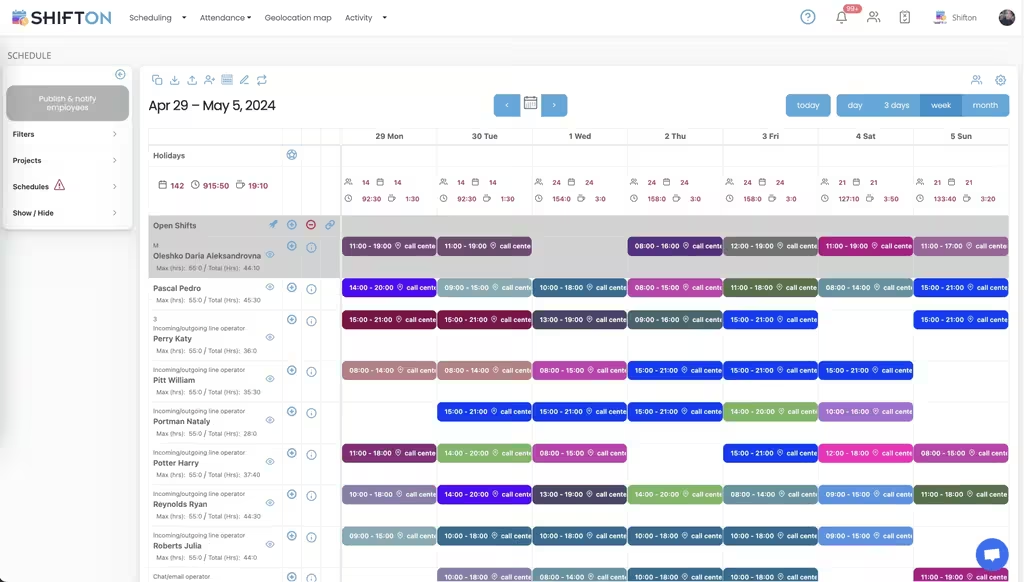
The weekly board holds the whole crew on one screen: technicians as rows, days as columns, each assignment colour-coded with its start and end time. Work with nobody on it yet sits in the Open Shifts row, so an uncovered day is visible while there is still time to fix it.
Hour caps and overtime you can see coming
Every technician row carries two numbers: the maximum hours allowed and the running total already assigned. Shifts are tagged with the work location they belong to, and each day column totals headcount and hours, so the week is checkable on hours as well as on names.
The next three days, site by site
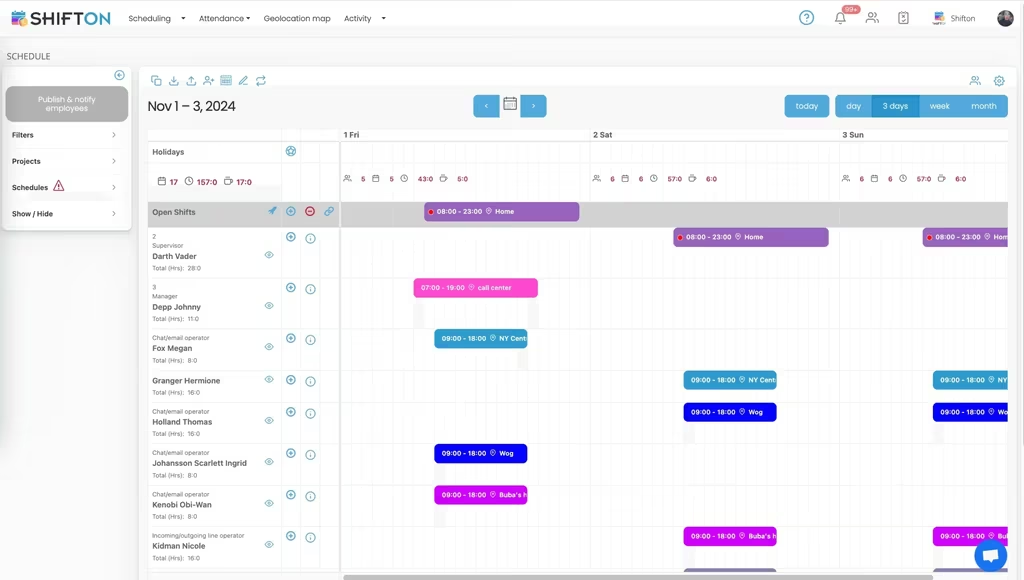
The short-range view zooms into the next few days and shows each assignment with the location attached to it, alongside running hour totals per technician. It answers the question a dispatcher asks twenty times a day: who is where, and who has room for one more job.
What the shift actually cost
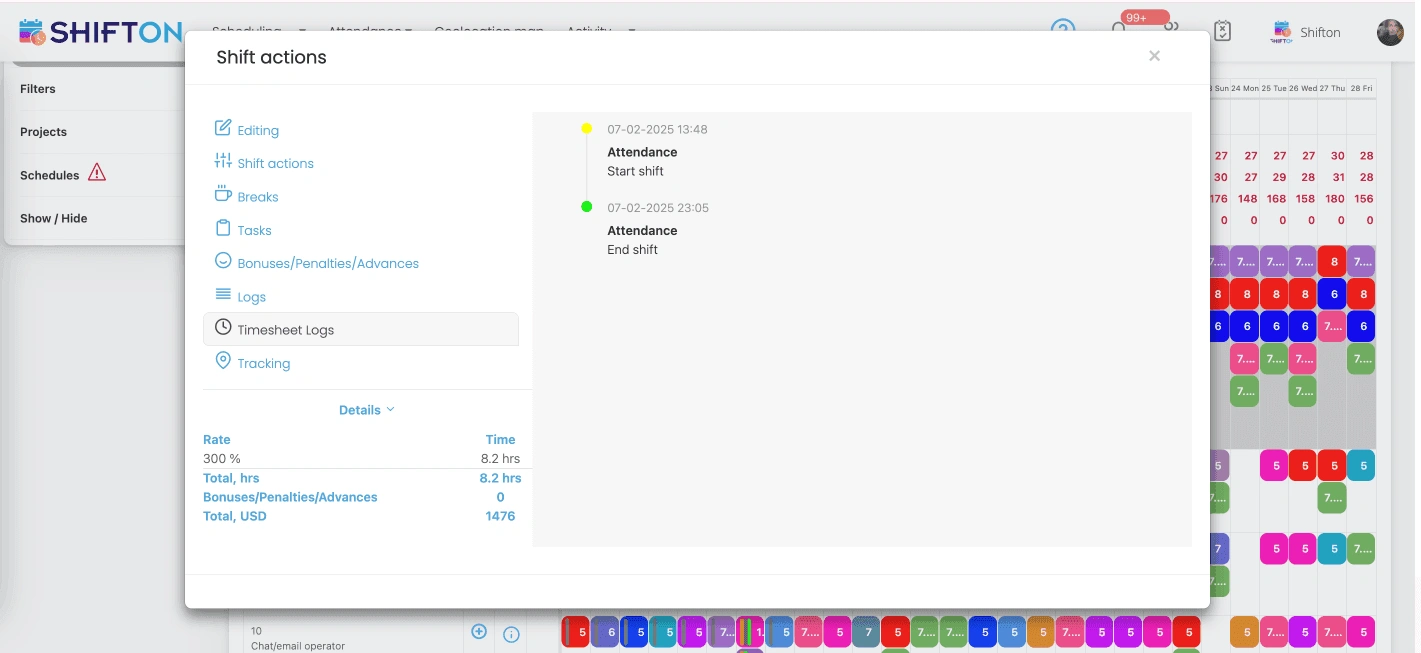
Open any shift and the attendance panel shows the real clock-in and clock-out against the plan, with breaks, tasks, bonuses, penalties and the timesheet log on their own tabs. The details line carries the applied rate, the hours counted and the money total, so an evening callout is priced the moment it closes.
Start with the Free Plan
No time limits. Get full access to core features and upgrade when you're ready.
Read the full guide to HVAC crew scheduling
HVAC work does not arrive evenly. A mild fortnight turns into a heat wave and the board that looked comfortable on Monday is oversubscribed by Wednesday, with emergency calls landing on technicians who are already at their hour limit. HVAC scheduling software is what keeps that from being managed entirely by phone and memory, because the schedule is where labour cost, response time and technician goodwill are all decided at once.
The people building these schedules are usually owners or service managers who also quote work and answer the phone. Anything that needs a week of setup does not survive contact with a busy season. The tool has to be faster than the whiteboard, honest about hours, and available on a phone at seven in the morning.
What HVAC scheduling software actually has to do
Four jobs. Get the crew assigned across the week quickly, with the site attached to each assignment. Keep individual hours inside their limits so overtime is a decision rather than a discovery. Push every change to the technicians who are affected, immediately. And record what actually happened accurately enough to pay from.
Shifton is built around those four. Day, three-day, week and month views, open shifts, swaps, reusable templates, hour caps, availability and time-off requests, a mobile time clock, per-shift rates and bonuses, and reports that separate worked hours from overtime. Contractors comparing hvac service scheduling software against a shared calendar usually find the difference on the last two points rather than the first.
The label varies by market. Some owners search for scheduling software for hvac crews, others for air conditioning scheduling software or heating and cooling scheduling software, and firms installing both sides of the system tend to describe it as air conditioning staff scheduling software or air conditioning shift scheduling software. The requirement underneath is identical: one board, real hour totals, and a phone in every van showing the same thing.
What dispatch really means on an HVAC board
Dispatch covers two different things, and the distinction matters before you buy. One is deciding who takes which job, at which address, in which order, and telling them. The other is routing vehicles, predicting arrival windows and watching a live map. Shifton does the first thoroughly and does not attempt the second.
So if what you need from hvac dispatch software is a board where every technician's day is visible, work can be reassigned in seconds, and the affected person hears about it before they set off, that is exactly what this is. Assignments carry their location, the three-day view shows spare capacity per person, and unassigned work sits in a row nobody can miss. Contractors looking for hvac service dispatch software with turn-by-turn routing are looking for a different category of product, and it is better to know that now.
Seasonal peaks and the on-call rotation
Demand in this trade is weather-driven, so the schedule has to flex without collapsing. Two things carry most of that load. Templates let a known pattern be rolled forward instead of rebuilt, which matters when a peak week is largely last year's peak week with different names. Open shifts turn extra capacity into something the crew can opt into, rather than a sequence of calls made in the order the manager remembers people.
On-call rotations work the same way. Build the rotation once, save it, apply it forward, and let swaps between technicians run through the app with a manager approving before anything is final. An hvac technician scheduling software that cannot express a rotation makes someone rebuild it every month by hand. A saved rotation works like an hvac schedule template that already knows the pattern, and applying it forward takes a minute rather than an evening. Firms that run plumbing crews on the same kind of rota will find the specifics on our plumber shift scheduling page.
Overtime and after-hours rates on the shift itself
Emergency work is the profitable end of the business and the expensive end of the payroll, often in the same week. The only way to manage that is to see the rate on the shift rather than in a monthly total.
Every shift in Shifton can carry its own rate multiplier, and the shift detail shows the applied rate, the hours counted and the money total. Across a period, pay rate reports split hours into base and premium tiers, per technician and per project. That is the difference between knowing the wage bill went up and knowing which callouts did it. Combined with hour caps that show a running total while you assign, hvac business scheduling software stops being a calendar and starts being cost control. An hvac scheduling platform that hides rates until payroll runs has left the most useful number off the screen.
Time tracking when the work is never at the office
Technicians start and finish at sites, so paper timesheets arrive late, rounded and occasionally imaginative. In Shifton they clock in and out from the mobile app and the timestamps attach to the shift they belong to, with breaks recorded separately and a timesheet log kept for anything queried later. Our time tracking feature page covers the mechanics.
Where more assurance is wanted, the paid geolocation module records the location of a clock-in and can show a technician's recorded stops for a period. It is a paid add-on, not part of the free plan, and it records positions rather than planning routes. For most contractors, hvac time tracking software earns its place simply by ending the weekly argument about when a job really finished. Whether the requirement is written down as hvac contractor time tracking software or air conditioning timesheet software, the test is the same: does the recorded hour match the shift it was worked on, and can you prove it three weeks later. The ac technician schedule app and the office board read from one record, so there is nothing to reconcile. Reports keep worked hours and overtime hours in separate columns, which is the only reason ac technician time tracking software beats a shared spreadsheet at the end of a busy month.
Maintenance contracts and the work you already know about
Planned maintenance is the part of the year you can schedule properly, and the part most often left to memory. Recurring visits can be built as templates and applied across the months they belong to, so contract work is placed before reactive work fills the board. Filters by project keep one contract's coverage separable from general service, which also makes it possible to see whether a given agreement is consuming more labour than it earns. Contractors who also handle building systems on site can compare our facility management page, which deals with the same problem from the building's side.
One crew, several depots, or a mixed operation
A two-van operation needs speed and nothing else. A multi-branch contractor needs crews kept apart, managers who only see their own patch, and totals that roll up for the owner. Shifton handles both without changing product: projects and schedules separate crews, branches or contracts, permissions control who can edit what, and technicians who cross branches still see one calendar. Free hvac scheduling software of the spreadsheet variety does the first case badly and the second not at all. Firms that arrive from an ac technician rostering software search usually stay for the same reason: install crews and service technicians sit on one board instead of two systems that disagree.
What to test before you choose
Put any hvac scheduling app through a real week before deciding. Build the full board from scratch and time it. Reassign an emergency call and check how fast the notification lands and what the technician sees. Push a technician past their hour cap on purpose and see whether the tool warns you or lets it through silently. Then pull the hours and pay rate reports for that week and check they separate premium hours instead of totalling everything.
Lists of the best hvac scheduling software rarely survive that exercise in the published order, because the differences that matter only appear under load. Shifton is free for up to ten people with no time limit, which covers a small hvac contractor scheduling software requirement outright, and paid plans are per employee per month as the crew grows. The pricing page sets out where each module sits. Import the crew, build one week, publish it, and see how many phone calls disappear.
Frequently Asked Questions
What does HVAC service scheduling software do?
It holds the crew schedule in one place and keeps it accurate as the week changes. Technicians are assigned to shifts tagged with a work location, the board publishes to their phones, hour caps and overtime stay visible while planning, and actual clock-in and clock-out times are recorded for payroll reporting. Shifton handles the labour side rather than customer records or billing.
Does Shifton handle dispatch for HVAC technicians?
Shifton covers the assignment and scheduling part of dispatch: deciding which technician takes which work, at which site and at what time, then notifying them instantly. It does not plan driving routes, calculate arrival times or run a live map of vehicles, which is what larger hvac business dispatch software packages add. Contractors who need the schedule and the hours accurate, rather than turn-by-turn routing, are the right fit.
Can it handle after-hours and weekend premium rates?
Yes. Each shift can carry its own rate multiplier, and the shift details show the rate applied, the hours counted and the resulting total. Pay rate reports then split a period's hours into base and premium tiers, so the cost of emergency and weekend cover is visible per technician and per site rather than appearing as one payroll number.
Is there a free HVAC scheduling software plan?
The free plan covers up to 10 team members with no time limit and includes shift scheduling, a basic time clock, the mobile app and reports. That suits a small contractor outright. Above 10 people, paid plans are charged per employee per month, and optional modules such as the geolocation map are paid additions.
How do technicians see their schedule?
Each technician uses the Shifton app on iOS or Android and sees only their own shifts, with the location and time on each one. Push and SMS notifications go out when work is added, moved or reassigned, so nobody drives to a job that changed that morning. They also clock in and out and submit time-off requests from the app.
Can one account cover several branches or crews?
Yes. Branches, crews and contracts are set up as separate projects and schedules inside one account, each with its own board and reports. Access levels decide which manager can edit which crew, and a technician working across more than one branch sees every assignment in a single calendar.




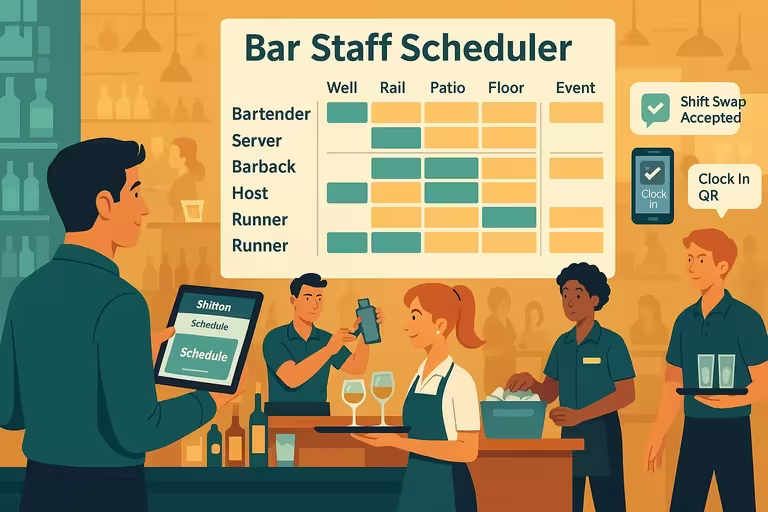

Put your HVAC crew schedule in one place
Build next week's board, send it to every technician's phone, and keep overtime visible before it reaches payroll.