

Solar Workforce Management Software for Install and Service Crews
Plan install and maintenance crews across every site, keep hours and overtime inside limits, and confirm the team reached the job before the day is lost.


Build the Week and Fill Open Crew Shifts
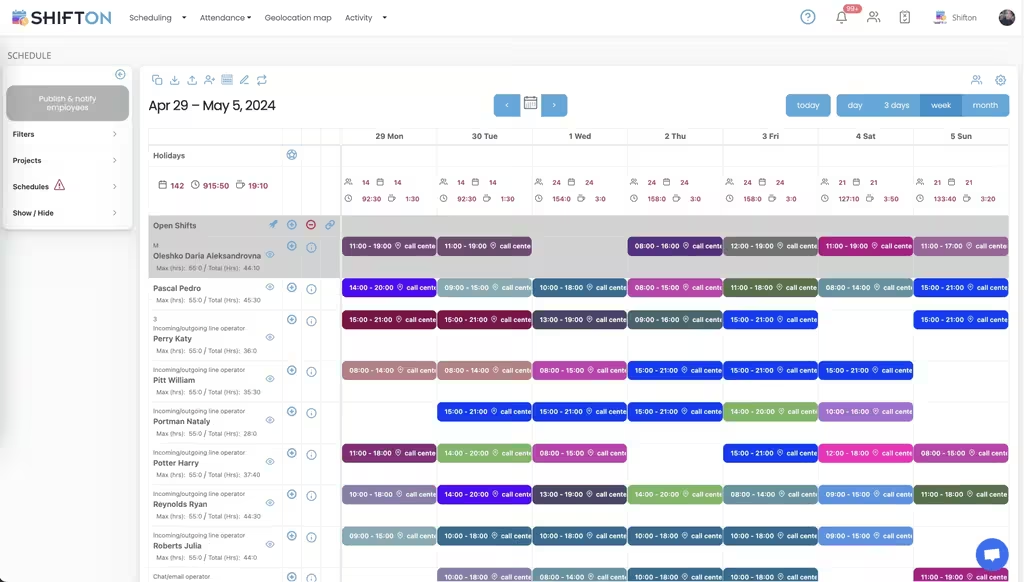
Install and service work is planned crew by crew, day by day. The weekly grid holds every installer, electrician and technician on their own row with colour-coded shifts and start and end times, so an under-staffed day shows up while the week can still be changed.
Hour Caps, Overtime and Site-Tagged Shifts
Every crew member row carries a maximum and a running total of hours for the week, so the plan is measured against a limit rather than a hope. Each shift is tagged with the work location it belongs to, and the day columns total headcount and hours across the whole operation.
Month-Long Rosters Across Every Project
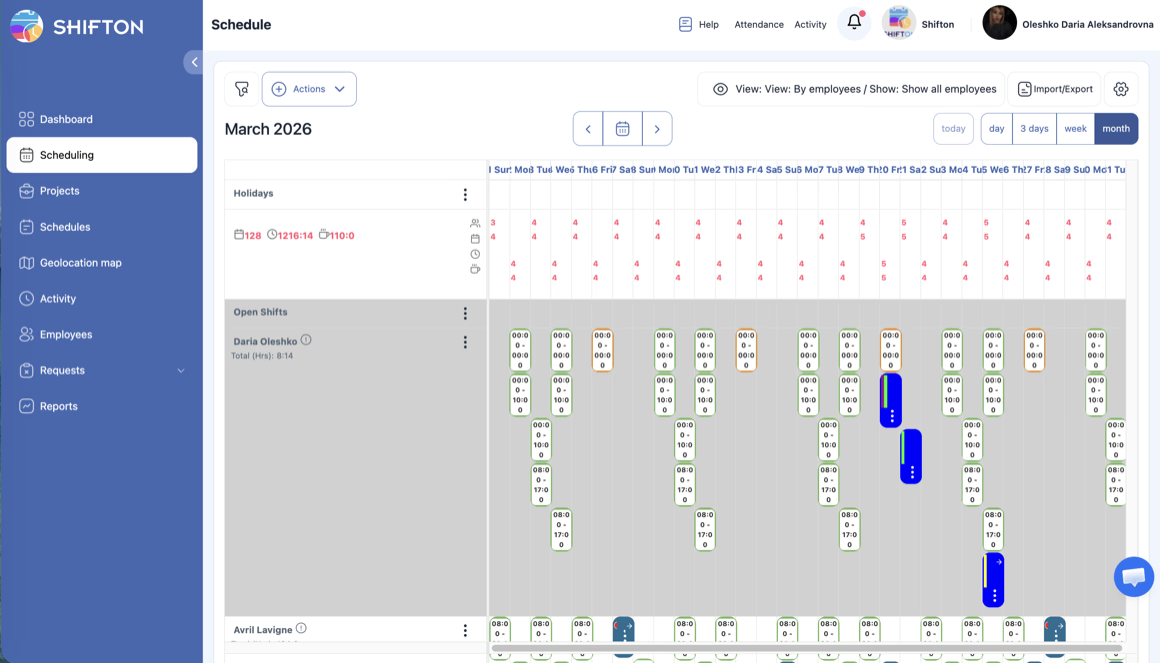
An install pipeline is committed months ahead, and the crew plan has to reach that far too. The month view lays out the whole period with open shifts still visible, and the view switch moves between one crew member and the full roster without rebuilding the schedule.
Confirm Crews Reached the Site
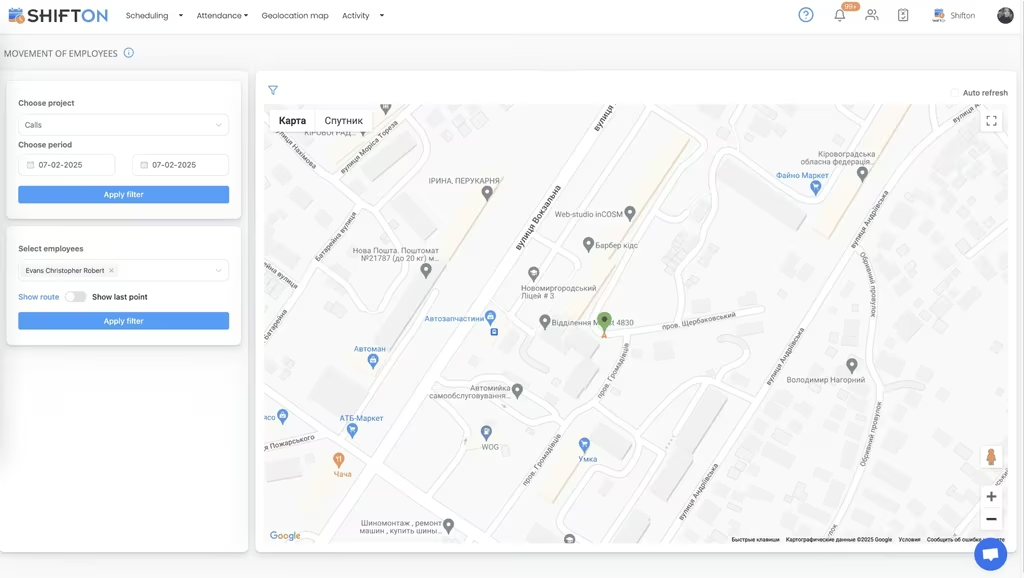
Solar work happens on rooftops and sites that nobody from the office visits. The geolocation map, available as a paid module, plots employee movement for a chosen project and period, with route playback for a selected crew member and pins on the points they reached.
Start with the Free Plan
No time limits. Get full access to core features and upgrade when you're ready.
Read the full guide to solar workforce scheduling
Solar operations lose money in the gap between a plan and a site. Crews are booked a month out, permits and inspections move the dates, weather takes a roof out of play, and by Monday morning three trucks are heading to jobs that were rearranged on Friday afternoon. Solar workforce management software exists to close that gap, because the coordination problem is not one of intent but of information reaching the right people fast enough.
Workforce management software for solar has to start from the site rather than the office, because that is where the day is won or lost. The workforce itself makes it harder. Installers, electricians, roofers and service technicians all hold different qualifications, work in different crew combinations, and rarely set foot in the office from one week to the next.
What solar workforce management software has to cover
The requirement list is shorter than most vendors suggest. Build crews for multiple sites without losing track of who is committed where. Keep hours inside contractual and safety limits before the roster is published. Get the current version of the schedule onto every phone, immediately, including for people already in the field. And record what actually happened, so hours, cost and site attendance can be checked afterwards rather than argued about.
The best solar crew scheduling software does those four cleanly and outperforms a heavier system that adds modules the operation will never open. Teams searching for employee scheduling software for solar installers are almost always solving a coordination problem rather than a payroll one.
Crew rosters across multiple sites
Residential installs, commercial arrays and maintenance rounds each run to a different rhythm, and most companies do all three at once. Held in separate spreadsheets, each one looks fine, and the double-booked electrician is invisible until the morning of the job.
Running them as projects inside a single schedule fixes that. Every shift carries the work location it belongs to, so a coordinator can filter to one contract or scan the whole board, and a crew member appears once regardless of how many sites they cover in a week. That single view is the main thing solar crew management software has to get right, because everything downstream depends on it. Rostering software for solar lives or dies on whether a coordinator can trust one board.
Communication follows the same logic. When a job moves, the update has to reach a crew already on a roof, not sit in an inbox nobody opens until the evening. Push and SMS notifications go out the moment the schedule changes, and the version in the app is always the current one, which removes the familiar situation of two crews working from two different plans.
Hour caps, overtime and the cost of an install day
Labor is the biggest controllable cost on almost every install, and it moves faster than any other line. Long summer days, travel between sites and jobs that run past their estimate all push crews toward overtime, and on a spreadsheet none of that is visible until payroll.
Two controls do most of the work here. Each employee carries a maximum hours figure with a running weekly total beside it, so a coordinator sees the cap being approached while the roster is still editable. Overtime rules can then require explicit confirmation before extra hours are assigned, or block them for a period. Afterwards, budget and pay rate reports show what each schedule cost by position and period, which is how the best solar installation scheduling software turns labor from a monthly surprise into a managed number.
Getting the right skills on the right crew
Headcount alone tells you nothing about whether a crew can complete a job. A roof team without a licensed electrician cannot finish the interconnection, and a maintenance visit without the right technician becomes a second trip.
Positions solve this at the roster level. Every person is recorded with a position and an authority level, so schedules are built and read by role rather than by name. A coordinator can confirm the mix on each crew before publishing, and crew leads can be given rights over their own team without access to the whole account. Companies running mixed trades on the same sites often use this alongside construction crew scheduling, since the staffing patterns overlap closely.
Confirming arrival and time on site
Field work is the part of the operation nobody in the office can see. A crew that arrived at ten instead of eight, or spent two hours travelling between sites, produces exactly the same timesheet entry unless something records it.
Clock-in from the mobile app is the first layer: the real start and end of every shift, against the work location the shift belongs to, with breaks recorded. The geolocation map adds the second layer for companies that need proof of site attendance, showing employee movement and route history for a chosen project and period. That module is paid, priced per employee per month rather than included in the free plan, and our work location page covers how it fits with site-based scheduling.
Handling pipeline swings and seasonal demand
Solar demand does not arrive evenly. Incentive deadlines, weather windows and financing cycles push installs into bursts, and crews are hired, subcontracted or reassigned around them. A rigid roster cannot absorb that, and neither can a spreadsheet that has to be rebuilt from scratch each time headcount changes.
Templates and import make the swings manageable, and free solar scheduling software is rarely the constraint at that point, headcount is. A proven weekly pattern can be applied to a new crew rather than typed out again, new starters can be imported in bulk with their positions, and a whole month's roster can be exported when a client or a contractor needs the record. When the pipeline slows, the same patterns wind hours back down.
Availability matters just as much at this stage. Collecting who is on leave, who is away and who is willing to take extra hours before the roster is built removes most of the rework that otherwise follows a published schedule.
Timesheets, reporting and payroll-ready hours
Every scheduling decision eventually shows up as a number someone has to reconcile. The best solar crew time tracking software is simply the one that keeps this honest. Timesheet logs hold the full trail behind each shift, including edits, breaks, bonuses and penalties, so an hours dispute is settled from the record. The reports layer then covers working hours by person and position, minimum hours, late arrivals, confirmed shifts, vacation balances and pay rates, each exportable by month.
That reporting is also what makes cost per install visible over time. The detail on clock-in, attendance and timesheet handling sits on our time tracking page.
Choosing the best solar company scheduling software
Test any solar crew scheduling app against a real week, not a demo. Build a roster across three sites with mixed roles and time yourself. Publish it and see how fast the notification lands on a phone in the field. Move one crew to a different site and check that everyone affected knows without a call. Then pull a working hours report for the week and see whether payroll could use it as it stands.
Shifton is built around those steps: weekly and monthly roster views, open shifts and swaps, reusable patterns, per-employee hour caps and overtime rules, location-tagged shifts, time clock with timesheet logs, an optional geolocation map, and reporting on hours, budget and pay rates. Teams of up to 10 run free with no time limit, which for a single install team amounts to free solar crew scheduling software rather than a trial, and paid modules are per employee per month as the crew count grows.
Jobs will keep moving. What you control is how quickly the crew knows, how many hours the change costs, and whether you can show where everyone was. Build next week's roster and see the whole operation on one board.
Frequently Asked Questions
What is solar workforce management software?
Solar workforce management software plans, publishes and tracks the shifts of installers, electricians and maintenance technicians working across multiple sites. Shifton covers crew rosters, open shifts, hour caps and overtime rules, time clock and attendance, and reporting on hours and labor cost.
Can I schedule crews across several solar sites at once?
Yes. Each site or contract can be set up as a project, and shifts are tagged with the work location they belong to. A coordinator can filter to one site or view the whole operation, and crew members who move between sites are scheduled without duplicate records.
How do I make sure only qualified crew are scheduled?
Every team member carries a position in the employee roster, such as installer, electrician or technician. Shifts are built and read by role, so a coordinator can see at a glance whether each crew has the mix of qualifications the job requires before the schedule is published.
How do I confirm a solar crew arrived on site?
Crews clock in from the mobile app, which records the real start of the shift against the work location. The geolocation map, a paid module, adds employee movement and route history for a chosen project and period, so arrival at a site can be confirmed from records rather than phone calls.
Does Shifton control overtime on install crews?
Yes. Each employee has a maximum hours figure and a running weekly total visible while you build, and overtime rules can require confirmation before extra hours are assigned. Budget and pay rate reports then show what the completed schedule actually cost.
Is there a free solar crew scheduling software for a small team?
Shifton is free for up to 10 team members with no time limit, and that plan includes shift scheduling, basic time clock and attendance, the mobile app and reports. Larger teams and add-on modules such as the geolocation map are priced per employee per month.






Get every solar crew on the right site this week
Build crew rosters, publish shifts to every phone and track hours across all your sites from one platform. Free for teams of up to 10.