

Pest Control Scheduling Software for Technician Teams
Plan technician days around recurring treatments and callouts, keep hours and licences visible, and staff the seasonal peak with pest control scheduling software.


Build the Technician Week and Publish It
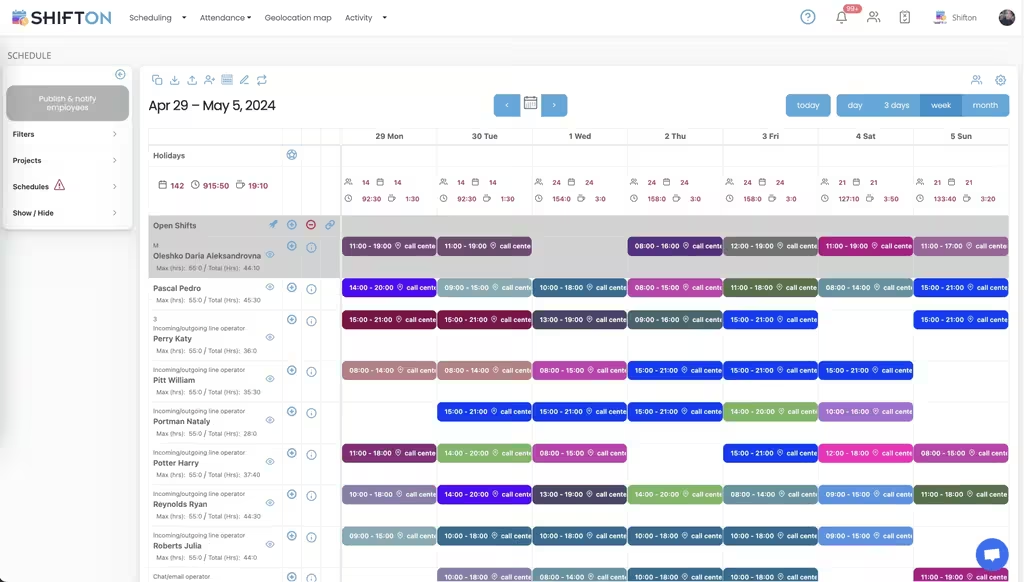
A pest control week mixes recurring treatments booked months ago with callouts that appeared this morning. The weekly grid gives every technician a row and every assignment a colour-coded block with start and end times, so a coordinator can see who is loaded and who has room before the week goes out. Filters, projects and schedules keep contracts and branches apart on the same screen.
Hour Caps, Locations and Weekly Totals
Technicians spend the day away from the office, which is exactly why hour control has to sit in the plan rather than be reconstructed afterwards. Each row shows the maximum hours set for that person against the total already assigned, and every shift carries the work location it belongs to. The day columns total the headcount and the hours the business has committed.
The Clock-In Record Behind Every Job Day
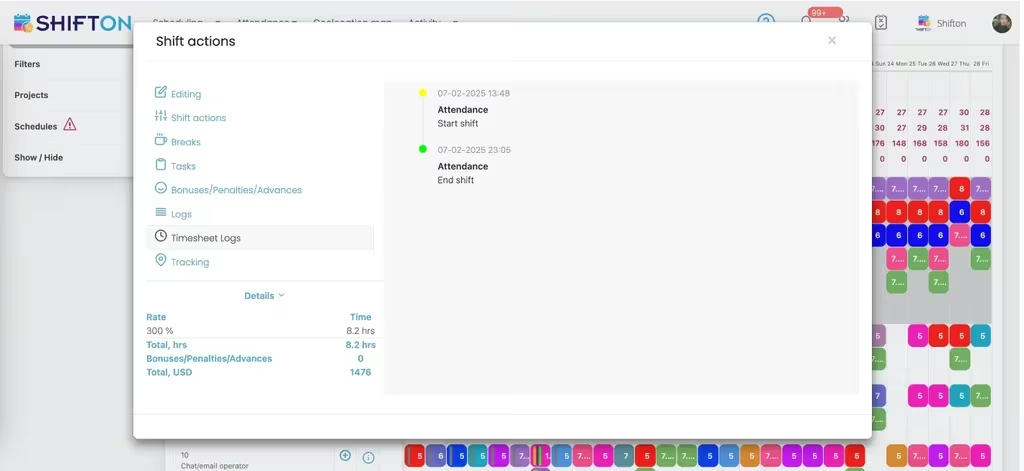
What a day cost is settled by the times that were logged, not the times that were planned. Every shift keeps its own attendance trail, the start and the end with their dates, next to the rate that applied, the hours counted and the total in money. Out-of-hours and weekend work carrying a premium rate is priced where it happened.
Confirm Where a Technician Worked
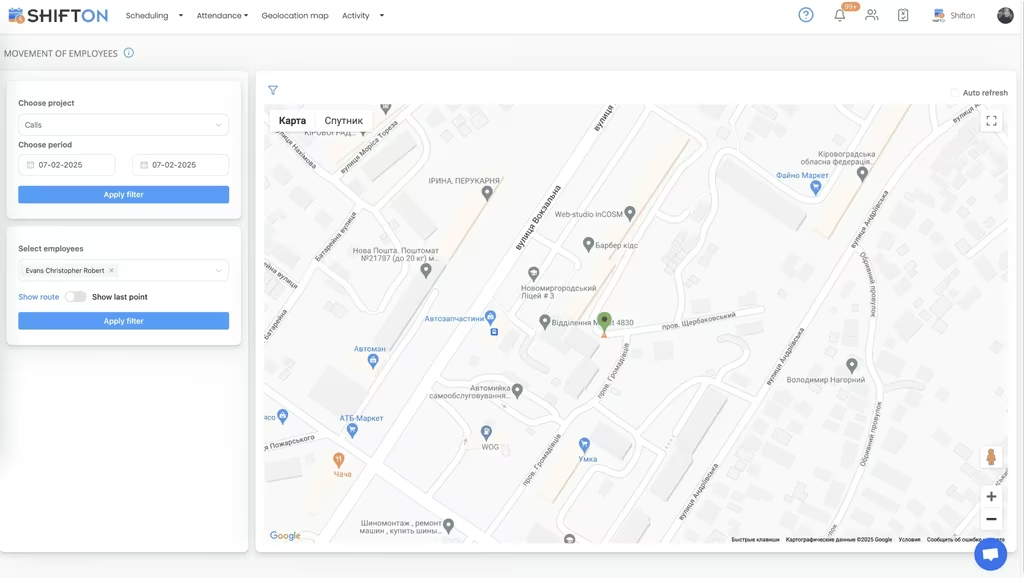
Treatments happen on somebody else's property, so the question after a disputed visit is always the same: was the technician there, and when. The geolocation map plots recorded positions for a chosen employee across a chosen period and can show the route history on the map. This is a paid module rather than part of the free plan.
Start with the Free Plan
No time limits. Get full access to core features and upgrade when you're ready.
Read the full guide to pest control scheduling
Pest control runs on two clocks at once. One is slow and predictable: quarterly contracts, monthly commercial accounts, annual inspections, all agreed long in advance. The other is immediate, because a restaurant with a live infestation will not wait for the technician's next scheduled visit. Pest control scheduling software has to hold both without one wrecking the other.
Add the fact that demand climbs sharply when the weather turns, that most of the workforce is out of the office all day, and that certain treatments can only be carried out by somebody holding the right licence, and scheduling stops being clerical work. It becomes the ceiling on how much work the business can accept.
What pest control scheduling software actually has to do
Strip the category back and four jobs remain. Put the right technician on the right day with enough hours in it. Get the plan onto the phones of people who will never open a laptop. Absorb the callouts that arrive after the week has been published. And keep an honest record of hours worked so payroll and job costing are not estimates.
Anything else is secondary. Scheduling software for pest control lives or dies on the second point in particular, because if the field team will not open the app, nothing else about the system matters.
Recurring treatments and the callouts that interrupt them
Most of the revenue in this industry is contracted and repeating. A commercial kitchen on a monthly cycle, a warehouse on a quarterly one, residential accounts on an annual inspection: the same properties at intervals fixed at signature. That predictability is the coordinator's main asset, and it should never be retyped from scratch each month. Templates carry the repeating shape of the week, and only the exceptions need a decision.
Then the phone rings. An emergency treatment has to fit into a day that is already committed, and somebody has to decide whose day absorbs it. The quickest version of that decision is not a round of phone calls, it is an open shift posted to every technician who could take it, claimed by whoever is available, with the published schedule updating for everyone at the same moment. Push notifications carry more weight here than in most industries, because the people affected are in a van or under a floor rather than at a desk. A change nobody sees is not a change.
Seasonal pest pressure and the staffing that follows it
Demand is weather-driven and therefore lumpy in a way that is broadly predictable. Ants and wasps through the warm months, rodents as the temperature drops, stored product pests around harvest. Volume can double between a quiet month and a peak one, and a team that was comfortably staffed in February ends up turning work away in July.
Handling that means planning headcount by season rather than by month. Historic hours per technician show where the pressure actually landed and how much of it was covered with overtime instead of with people, which is the number that justifies a seasonal hire. Extra technicians go onto the schedule for the peak and their availability keeps them off it outside the season, so what you are looking at reflects who is genuinely working this week.
Licences, positions and who can be sent where
Technicians are not interchangeable. Certification differs by jurisdiction, some treatments demand a specific qualification, and a trainee working towards a licence has to be scheduled alongside somebody who already holds one. That constraint needs to be visible at the moment of assignment rather than checked afterwards.
Each employee record carries a position and an authority level, so whoever builds the week can see the roles they are working with before committing anyone. Training schedules as work in its own right, under its own project, and those hours land in the same reports as everything else. Over a year that gives a manager a defensible answer to how much time the business put into development, without a second spreadsheet being maintained beside the first.
Hours, overtime and what a day of visits really cost
A technician's day is measured in hours and hours are the cost base of the whole operation. The distance between the day that was planned and the day that happened is where margin quietly disappears: a treatment that ran two hours long, an emergency callout at a weekend rate, a late finish that tipped somebody into overtime nobody authorised.
Recording a real start and end against the scheduled shift closes that distance. Our time tracking tools hold the attendance trail on the shift itself, together with the rate applied, the hours counted and the resulting total, so a weekend callout is priced as a weekend callout rather than averaged into the week. Reports then split hours by rate across technicians and projects, which is what turns a payroll figure into a management figure. This is the part of workforce management software for pest control that pays for itself first.
Confirming where a technician was
Work carried out on a customer's property occasionally gets questioned, and the answer needs to be better than somebody's recollection. The geolocation map shows recorded positions for a chosen technician across a chosen period, with route history available on the map, which answers whether a person was where the schedule said they would be. It is a paid module rather than part of the free plan, and it is a record of where somebody has already been rather than a planning tool.
Pest control dispatch software and where Shifton draws the line
Two neighbouring categories are worth separating out. Pest control management software, sold as a field service suite, carries customer records, job histories and treatment documentation. Shifton does none of that. And people searching for pest control dispatch software usually mean one of two different things: software that orders the stops in a driving route, or software that decides which technician is working and gets the assignment in front of them. Shifton is firmly the second. It schedules the person, it does not sequence the journey.
Companies already running a field service suite for the customer side still need a workforce layer for availability, time off, hours and cost. That is usually the piece still living in a spreadsheet long after everything else has been modernised.
Choosing a pest control schedule app
Test it in the field rather than in the office. Install it on the oldest phone in the fleet, publish a week, then break that week deliberately: add two emergency callouts, take a technician out sick, and time how long recovery takes and how quickly everyone affected knows. Ask a technician to file a time off request and count the taps. Confirm the hours export into whatever payroll runs on, because a report nobody can move is a report nobody uses.
Shifton is free for up to ten team members with no time limit, which covers a small operator or a single crew outright, and paid plans add multi-project structure, deeper reporting and the geolocation module. Paid plans are charged per employee per month above that threshold. Businesses sending technicians on recurring visits to many properties often read our pool service scheduling page as well, since the staffing shape is close. If the schedule currently lives in a shared spreadsheet and a group chat, the thing to fix first is not the spreadsheet. It is how fast a change reaches the van.
Frequently Asked Questions
What is pest control scheduling software?
It is a system for planning which technician works which day, publishing that plan to the field team, and recording the hours they actually worked. Shifton builds the week or the month, posts open shifts for callouts, tracks worked and overtime hours per technician, and reports what each shift cost at the rate that applied to it. It plans the people rather than the paperwork of a job.
How do you schedule recurring pest control treatments?
Recurring work is built once as a template and applied forward, so the standard technician week repeats without being retyped and only the exceptions need attention. A pest control schedule template also keeps the structure in the system rather than in one coordinator's head, which means the week survives handover to somebody else.
Can the software show which technicians are qualified for a job?
Each employee record carries a position and an authority level, so a coordinator can see who holds which role before assigning them to a shift. Shifton does not keep a licence register with renewal dates, but training can be scheduled as its own project so the hours accumulate in the standard working-hours reports and can be evidenced later.
How does a pest control scheduling app handle seasonal peaks?
Seasonal pest pressure is planned with hours rather than guesswork. Historic working-hours reports show which months absorbed the most time and how much of it ran into overtime, which is the basis for hiring seasonal technicians ahead of the peak. Extra staff go onto the schedule for the busy months and availability settings keep them off it the rest of the year.
Is pest control scheduling software the same as pest control management software?
No. Pest control management software is a field service suite holding customer records, job histories and treatment paperwork. Shifton covers the workforce layer instead: who works when, availability and time off, hours worked against hours planned, and the cost of those hours. Many companies run both, because one manages the customer and the other manages the team.
Is there a free plan for a small pest control team?
Yes. Shifton is free for up to ten team members with no time limit and includes shift scheduling, the basic time clock, the mobile app and standard reports, which covers a small operator outright. Larger teams move to paid plans charged per employee per month, and the geolocation map is a paid module rather than part of the free tier.





Schedule Your Pest Control Technicians With Shifton
Build the week around recurring treatments, fill callouts from an open shifts list and see the hours as they are worked.