

Telecom Workforce Management Software for NOC and Field Crews
Cover the NOC around the clock, keep field and fiber crews inside their contracted hours, and publish every rotation to the phones your technicians already carry.


Build the Rotation and Publish It to Every Crew
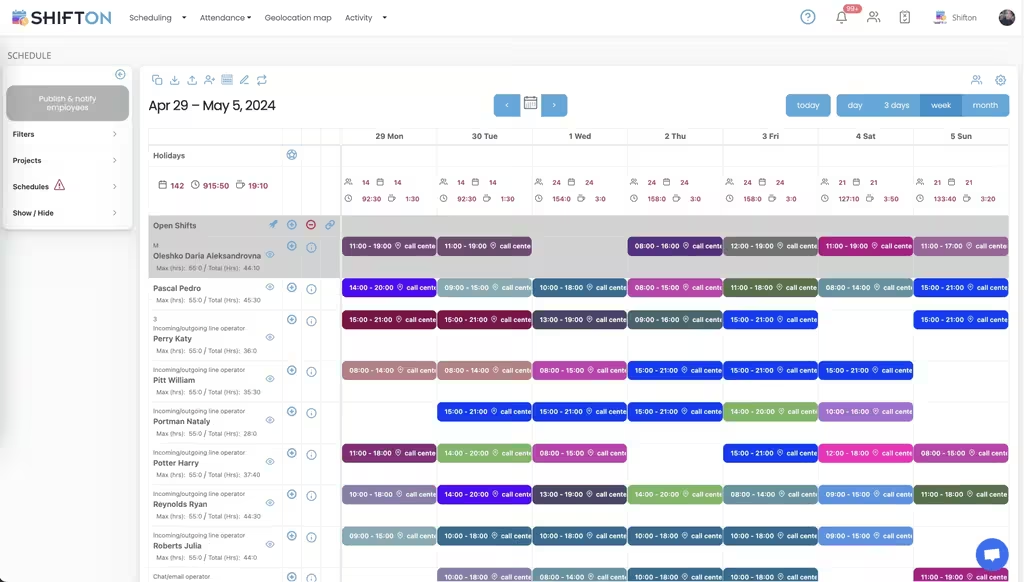
The weekly calendar holds every technician and operator on their own row, with colour-coded shifts carrying exact start and end times. Anything still uncovered sits in the open shifts row, where the whole team can see it rather than one supervisor working through a call list.
Hour Caps, Overtime and Site-Tagged Shifts
Telecom rotations push against hour limits faster than most sectors, especially during an outage or a build deadline. Each row carries a maximum next to a running weekly total, so an overload is visible while the schedule can still be changed.
24/7 NOC Coverage and Overnight Rotations
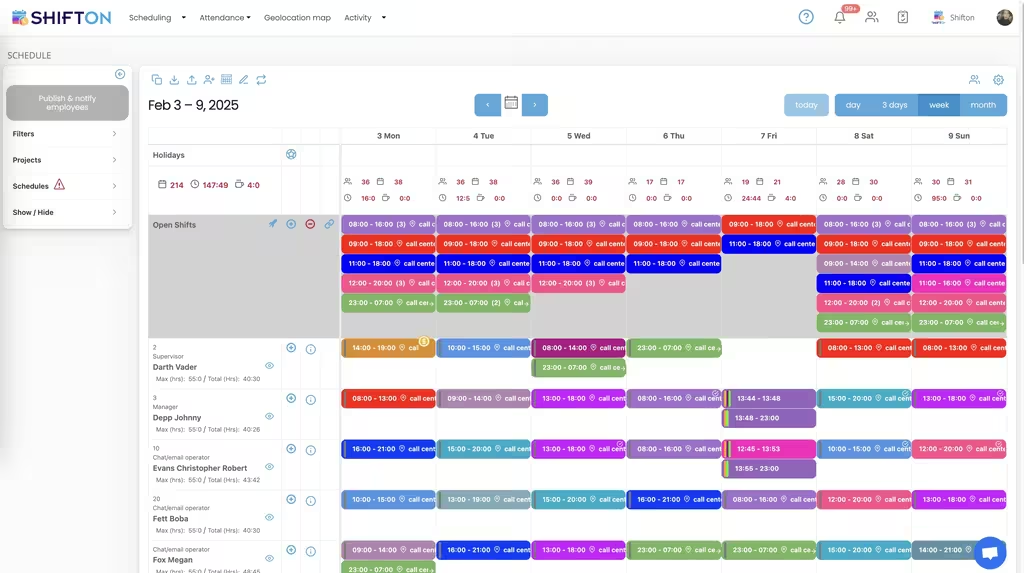
Networks do not observe office hours. The week view carries several shifts on the same date, including overnight cover from 23:00 to 07:00, with the role shown beside each name so a supervisor, a manager and an operator are never confused for one another.
One Roster With Roles, Access and Time Zones
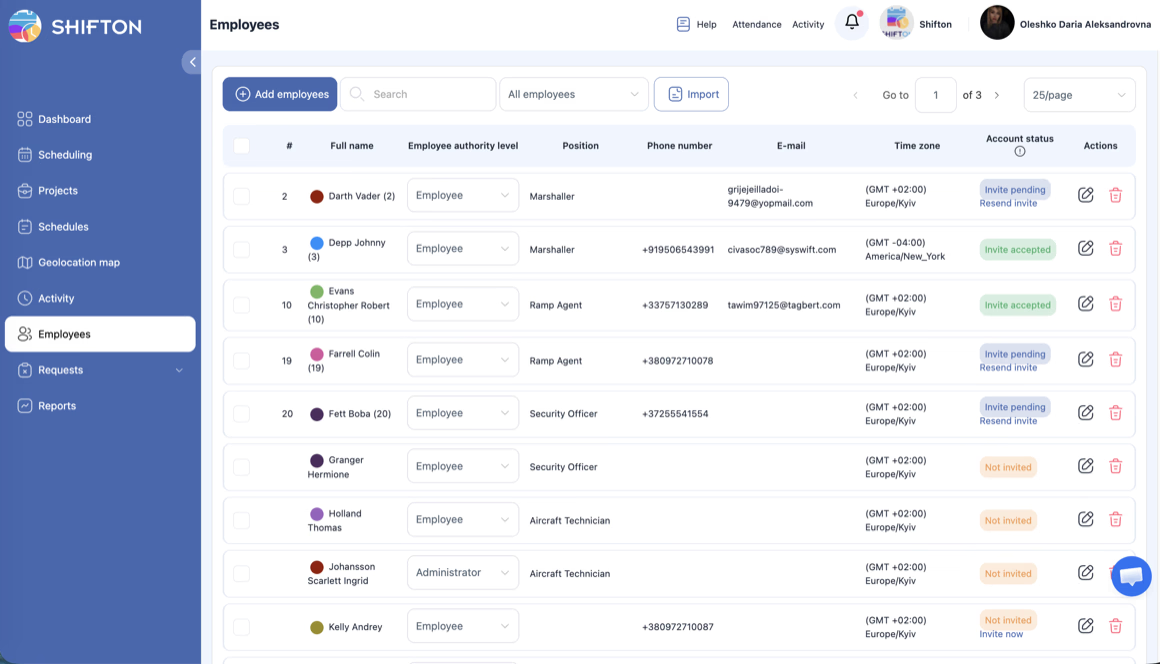
The employees screen is the single list of everyone who can be scheduled. Each person carries a position, phone number, email, time zone and an authority level that decides whether they see their own shifts or manage the whole rotation.
Start with the Free Plan
No time limits. Get full access to core features and upgrade when you're ready.
Read the full guide to telecom workforce management
Telecom operations run on two clocks at once. The network needs somebody watching it every hour of every day, and the field side needs crews at sites that are rarely near each other, on work that overruns as often as it finishes early. Telecom workforce management software has to hold both patterns in one schedule without forcing either team into the other's shape.
Neither side tolerates a rota built on a spreadsheet for long. A NOC rotation has fixed coverage rules and legal rest requirements. A fiber crew has weather, permits and a build programme that moves weekly. The plan is only as good as how fast it can be changed and how quickly the change reaches people.
What telecom workforce management software has to cover
Four requirements decide whether a platform survives its first outage. Continuous coverage, including shifts that cross midnight and count correctly. Hour limits that are visible before the rotation is published rather than after payroll. A mobile app that works for technicians who are never at a desk. And roles and permissions that keep a supervisor's view separate from a technician's.
Anything beyond those four is preference. Telecom workforce management is unusual in that the failure cost is immediate: an uncovered night in the NOC or a crew that never arrived at site is a customer-facing problem within hours.
The NOC never closes
Round-the-clock cover is the hardest schedule to build by hand. Every hour needs a minimum headcount, night shifts have to be shared fairly, and rest periods between rotations cannot be broken because a supervisor was working from memory. A weekly grid that holds several shifts on the same date, including a 23:00 to 07:00 window, is the minimum any NOC scheduling software has to manage. Teams comparing the best noc scheduling software with the best noc rostering software are usually testing the same thing: whether continuous cover survives a rest-period rule without manual policing.
Templates do the heavy lifting once the pattern is stable. A rotation that took an afternoon to design is applied to the next cycle in seconds, with only the exceptions edited. Shifton's shift scheduling module supports day, week and month views, automatic distribution for larger operator pools and demand forecasting where load is predictable enough to plan against.
Field technicians, fiber crews and tower work
The field side is a different problem wearing the same uniform. Crews are dispersed, skills are not interchangeable, and a shift is tied to a site rather than a building you own. Tagging every shift with its work location keeps that legible, so a planner can see who is where without opening a second system. Weighing up the best fiber crew scheduling software against the best cable technician scheduling software comes down to how each one treats a shift that belongs to a site rather than to a building you own.
This is where the categories blur, so it is worth being precise. Telecom dispatch software assigns jobs and work orders to a technician who is already on shift, and a telecom workforce dispatch software sits in that same bracket. What telecom staff scheduling answers is the earlier question: who is on shift at all, for how long, and under which cap. The two run alongside each other, and the best telecom scheduling software is the one that gets the roster right so the dispatch layer has somebody to dispatch. The customer support side of the same operator is planned against call volume, which our call centre staff scheduling page covers.
Hours, overtime and fatigue
Overtime in telecom is rarely a decision, it is an accumulation. An outage runs long, a build slips, a technician covers a colleague, and by Thursday somebody is well past a limit nobody was watching. Each row in the weekly view carries a maximum beside the running total, which turns a compliance problem into a number on the screen. The best telecom shift scheduling software shows that number while the roster is still editable, not in a report a fortnight later.
- Set a cap per technician and see it next to hours already assigned
- Require confirmation before overtime is added to a shift
- Check daily headcount and hour totals before publishing the week
- Record actual clock-in and clock-out against the planned shift
Broadband workforce management software that only shows planned hours misses half the story. Recording the actual clock-in and clock-out against the planned shift is what the best telecom company time tracking software adds to a roster. The gap between planned and worked is where cost and fatigue both hide, and location-based clock-in through the geolocation module is available as a paid add-on where confirming arrival at a site matters.
Multi-region rosters and time zones
Operators rarely work in one place. A NOC in one region supports crews in another, and a technician who reads a start time in the wrong zone is a missed appointment. Every person carries their own time zone, so shifts display locally while the planner keeps a single consistent view. Filters by project or region let a regional manager work on their own patch without losing the wider picture.
Utilities face the same geography with different assets, and our utility workforce scheduling page covers that overlap for teams that maintain both networks. A broadband workforce management system that cannot separate regions cleanly turns every rotation into a negotiation, which is why the best broadband scheduling software and the best isp scheduling software are judged on filters as much as on the calendar itself.
Contractors, subcontracted crews and onboarding
Build programmes bring in people who are not permanent staff, often at short notice and for a defined window. The people screen keeps that controlled: each person gets a position, contact details, a time zone and an authority level, then an invite by email that moves from pending to accepted. Importing a list is faster when a subcontractor arrives with a full crew, which is the practical difference between the best broadband staff scheduling software and a tool that assumes a stable headcount.
Access levels matter more here than in most sectors. A contract technician should see their own shifts and nothing else, while a supervisor manages the rotation. The best telecom crew scheduling app makes that distinction obvious rather than configurable in five places, and the best telecom field technician scheduling software applies it the moment an invite is accepted.
Reaching technicians who are never at a desk
A schedule nobody reads is a schedule that fails. Field staff do not check email during a shift, and a NOC operator coming off nights will not log into a portal to find out about Tuesday. Push and SMS notifications carry the rotation and every later change to the phone, which is the only channel that reliably works for a distributed workforce. The best telecom schedule app is the one a technician opens once and understands, and the best telecom rostering software is the one a supervisor still trusts in month six.
Swaps and time-off requests travel the same way. A technician requests, a supervisor approves in a tap, and the published rotation updates for everyone at once. That loop is what separates the best telecom staff scheduling software from a shared file that is already out of date when it is opened.
Choosing telecom scheduling software
Test any platform against your worst week rather than a quiet one. Build a full 24/7 rotation with two overnight crews and a fiber build running in parallel, the kind of week the best fiber crew rostering software should absorb without a rebuild. Change a shift and time how long it takes to reach the affected technician. Ask what happens when a shift crosses midnight, when a contractor joins mid-week, and when two regions need different views of the same roster, because those are the three places cheap tools break. Judge the best telecom employee scheduling software on that test rather than on a feature list.
Under ten people, Shifton is free with no time limit, which covers a small ISP or a single crew testing whether a telecom workforce management system is worth the switch. As headcount grows, paid plans add multi-location planning, deeper reporting and the modules the best telecom company workforce management software is expected to carry at scale. The goal stays constant: every hour of the network covered, every crew inside its limits, and a rotation the whole team can read.
Frequently Asked Questions
What is telecom workforce management software?
Telecom workforce management software plans, publishes and tracks shifts for network and field teams. Shifton covers weekly and monthly rotations, open shifts, hour limits, availability, time clock and attendance, roles and permissions, and a mobile app for iOS and Android. It manages the people side rather than network operations.
How do you schedule a NOC around the clock?
Build the rotation from the coverage each hour needs, then place operators into day, evening and overnight shifts on the same weekly grid. Shifts that cross midnight are counted correctly, and anything unfilled is published as an open shift. Save the pattern as a template so the next cycle takes minutes.
Can field technicians see their shifts on a phone?
Yes. The mobile app shows each technician only their own upcoming shifts, with the site or work location attached. Technicians request swaps, claim open shifts and submit time-off requests from the app, and schedule changes arrive as push notifications.
Does it help control overtime for field and fiber crews?
It does, as long as the limits are set before the rotation is published. Every technician carries a maximum number of hours next to the total already assigned, so an overload is visible while it can still be fixed. Overtime can also be set to require confirmation before extra hours are added.
Can I schedule crews across several regions and time zones?
Yes. Each person has their own time zone, so a technician reads shifts in local time while the planner keeps one consistent view. Shifts are tagged to a site or project, and filters let a manager look at a single region without losing the overall picture.
Is there a free plan for a small telecom team?
Shifton is free for up to 10 team members with no time limit, which suits a small ISP or a single crew. Shift scheduling, open shifts, shift swaps, the mobile app and reports are included. Larger operations move to paid plans priced per employee per month.





Put your NOC and field crews on one rotation
Start free for up to 10 team members and build a full week of telecom shifts before the next rotation starts.