

Construction Crew Scheduling Software for Site Teams
Build the week site by site, send it to every phone, and keep the hours that payroll and the client both rely on.

Plan every site on one board
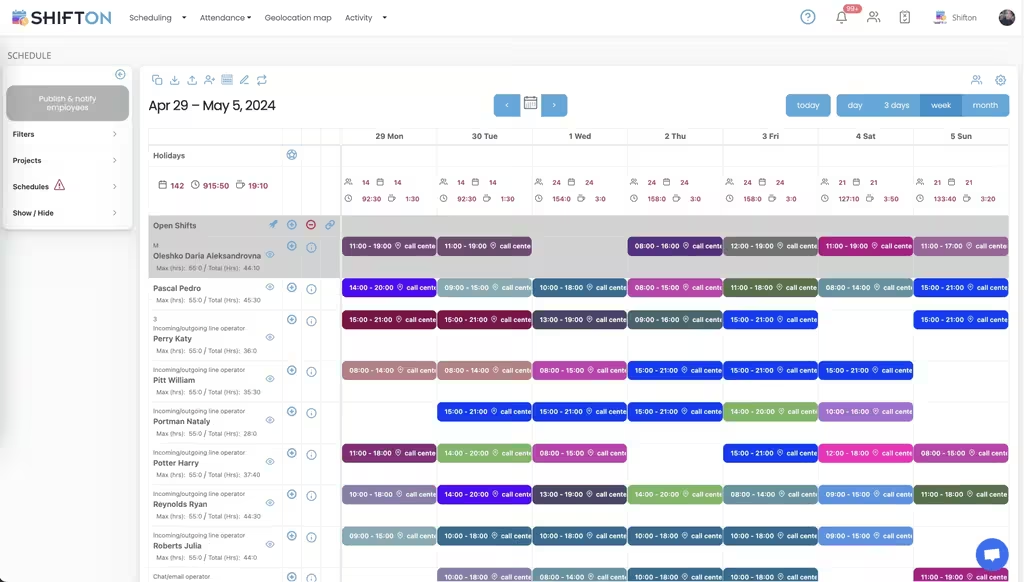
A builder rarely runs one job. Three sites, a framing crew that moves between two of them and a subcontractor who only turns up on Thursday all belong on the same week, and a calendar that shows one project at a time hides the clash until the morning it happens.
Record hours the way the site actually runs
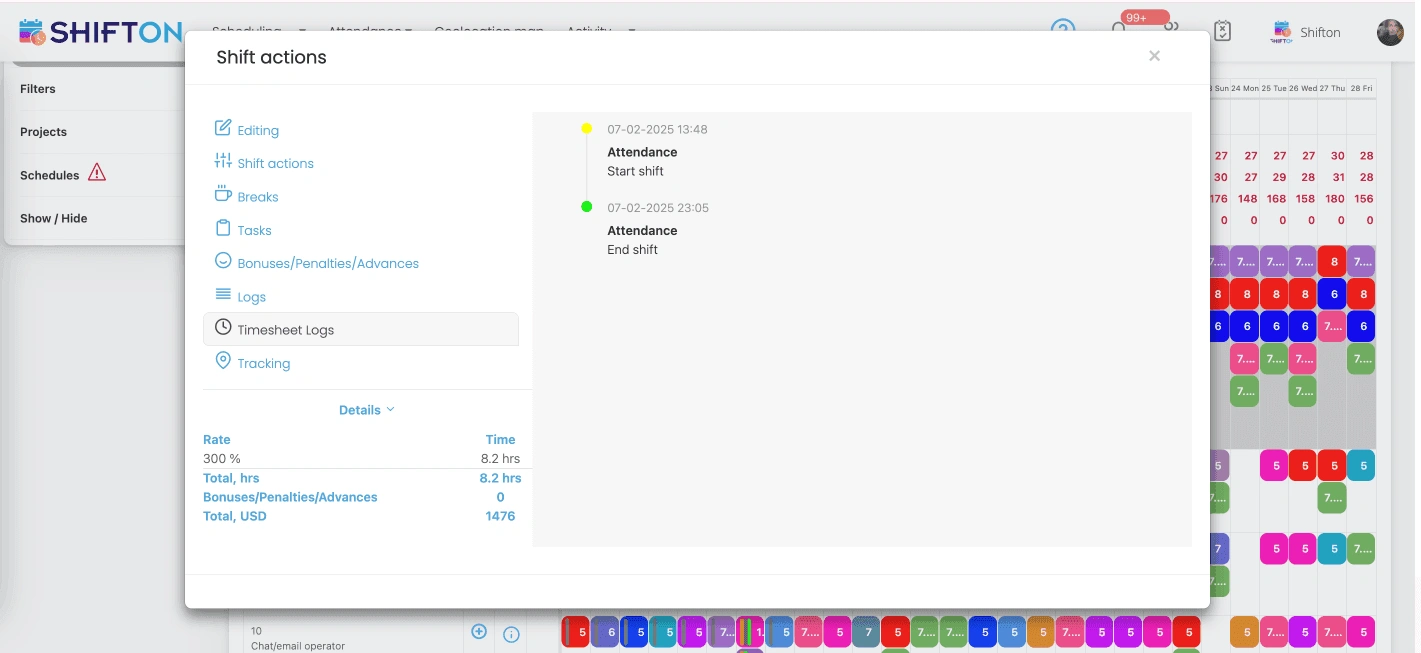
Clock-in happens at the gate, not at a desk. The app records the real start, the real finish and the breaks in between, and holds them next to what you planned, so the gap between eight hours booked and six hours worked is visible on Friday rather than at month end.
Give the foreman the same view as the office
The person deciding who does what is usually holding a level an hour later. Everything a foreman needs sits in the phone app: today on site, who confirmed, who has not, and the one tap that fills a gap when somebody calls in.
Turn hours into cost per project
Labour is the number that moves a construction margin, and it is also the number nobody has until the invoices arrive. Reports group recorded hours by project, by crew and by person, so the cost of a job is known while the job is still running.
Start with the Free Plan
No time limits. Get full access to core features and upgrade when you're ready.
What construction crew scheduling software is for
Construction schedules break for reasons office schedules never see. Concrete arrives late and a framing crew has nothing to do until Wednesday. Rain moves a roof by two days and the trade booked behind it has to move as well. An inspector reschedules and four people who were supposed to be on site are suddenly free. None of that is a planning failure. It is the job, and the software has to survive it rather than pretend it will not happen.
That is the difference between a construction crew scheduling tool and a generic staff rota. A rota assumes the same people in the same place every week. A construction week assumes movement between sites, trades that depend on each other, and a plan that will be edited on the morning it starts.
Weather is the other half of it, and no tool fixes weather. What a tool can do is make the reshuffle cheap.
Planning by project instead of by person
The useful unit on a building site is the project, not the employee. Once every shift carries the job it belongs to, three questions answer themselves: who is on this site tomorrow, which sites is this person on this week, and what has this job cost in labour so far.
It also makes the awkward cases easy. A worker who spends the morning on one site and the afternoon on another gets two shifts, not one long one, and both jobs carry their share of the day. A crew that is committed to a site but not yet assigned to a specific person sits in the open shifts row until somebody takes it.
Trades that wait on each other
Sequencing is where construction scheduling earns its keep. Electricians cannot start until framing is closed, and the drywall crew cannot start until the electricians have gone. When each trade is a project filter on the same week, the overlap is visible before anybody drives out.
Hours that hold up on a payroll dispute
On a site the difference between the planned shift and the worked shift is routine. Somebody stays two hours to finish a pour. Somebody leaves at lunch because the material never came. A schedule that only records what was planned produces a payroll run built on guesses and a monthly argument about whose figure is right.
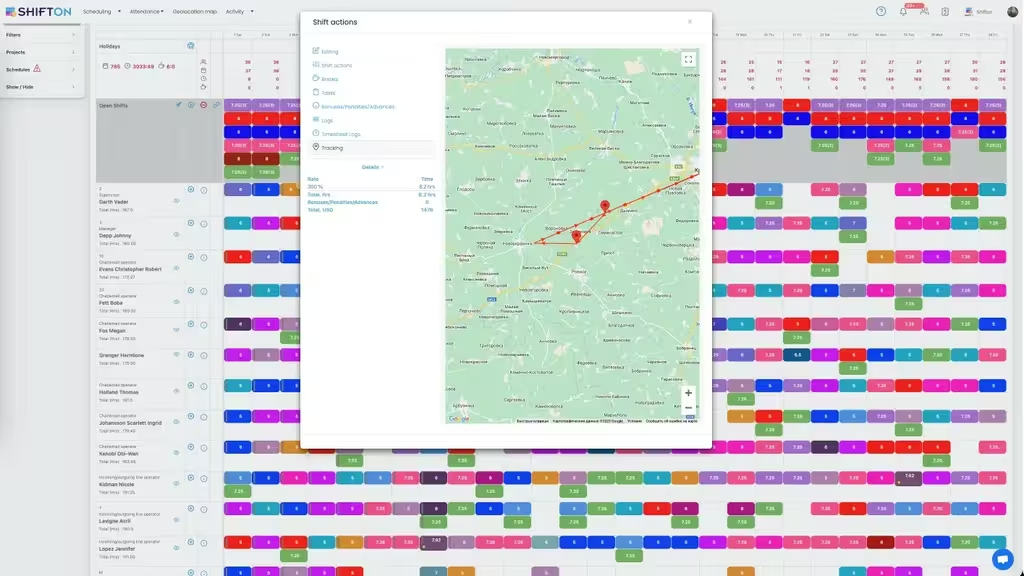
Recording the real clock-in and clock-out beside the planned time removes the argument. The row shows both, the breaks are logged separately so paid and unpaid do not merge, and overtime appears the day it is earned rather than in the payroll export three weeks later. For companies that need clock-in tied to the site itself, work location control is available as a paid module.
Subcontractors on the same board
Subcontractors are not on your payroll, but their days shape yours. Keeping them on the same schedule as a separate project gives the coordination without the mess: you see when they are due, they see the site they are booked for, and their hours stay out of your payroll figures.
Two numbers, one row. That is the whole idea.
What the numbers are for
Labour is the largest controllable cost on most jobs and the slowest one to measure. A weekly report that groups recorded hours by project turns that around. A job that is eating more hours than it was bid at surfaces in week two, not at close-out, and there is still time to move people or renegotiate scope.
The same figures answer the quieter question of utilisation. One crew running consistent overtime while another finishes early most days is a scheduling problem, not a staffing problem, and it is invisible until the hours sit side by side.
Where a construction schedule actually goes wrong
Ask a project manager what broke last month and the answer is rarely the plan itself. It is the version of the plan somebody was working from. A crew drives to the wrong site because the change was made after they left the yard. A subcontractor turns up on a day that was moved on Tuesday. Two trades arrive to the same room. Every one of those is a distribution failure rather than a planning failure, which is why publish and notify matters more than any clever scheduling algorithm.
The second common failure is quieter. Hours get recorded once, on paper, by the person who was busiest that day, and by the time they reach the office nobody can reconstruct them. That single habit produces most payroll disputes on a site and almost all of the arguments about what a job really cost.
The week that gets rebuilt every Friday
Smaller builders often rebuild the whole schedule from scratch each week because last week is not reusable. It usually is. Most sites run a stable core of people and hours with a moving edge of subcontractors and deliveries. Saving the core as a template and editing the edge turns an afternoon into twenty minutes and removes the transcription errors that come with retyping.
What to look for when comparing tools
Construction software splits into two families that are easy to confuse. Project scheduling tools plan the build itself, in tasks and dependencies and critical paths. Crew scheduling tools plan the people, in shifts and hours and cost. A Gantt chart will not tell you who is on site tomorrow, and a rota will not tell you whether the roof can start.
If the problem is labour, the questions worth asking are narrow. Can a person be on two sites in one day without duplicating their record. Does the foreman get the same schedule as the office, on a phone, offline if the site has no signal. Are planned and actual hours stored as two numbers rather than one. Does a report group hours by project without an export to a spreadsheet first.
Free plans and where they stop
Most tools in this category advertise a free tier and cap it somewhere useful to them. Some cap users, some cap jobs per month, some withhold the mobile app. Shifton caps at 10 team members and does not put a clock on it: scheduling, open shifts, shift swaps, the app and reports stay available at that size indefinitely. Beyond ten people it becomes a per employee cost, and the modules are chosen individually rather than bundled into a tier.
Starting without a purchase
Shifton is free for up to 10 team members with no time limit, which covers a small builder or a single crew outright. Scheduling, open shifts, shift swaps, the mobile app and reporting are in the free plan. Paid modules start at $0.50 per employee a month, are chosen one at a time, and each carries a trial of up to 60 days (10 days for Work location control), so a company can test payroll on a real project before committing to it.
Frequently Asked Questions
Can I schedule crews across several active construction sites?
Yes. Each site is set up as a project, people are assigned to shifts inside it, and the same person can work on two sites in one week without duplicating their record. More than one project takes the Departments, projects module, at $1 a month with one project free. Filtering by project gives the view of a single job; removing the filter gives the whole company.
Does it handle trade crews, electricians, plumbers and HVAC, on one schedule?
It does. Trades are separated by project or by tag rather than by separate calendars, so a general contractor sees every trade on one week and each crew sees only what concerns them in the app.
Can the foreman change the schedule from the job site?
Yes. The mobile app carries the same schedule the office edits. A foreman can publish a change, approve a swap or open an emergency shift from the site, and the crew is notified straight away.
How do I track hours for workers who move between sites in one day?
Each shift carries its own project and its own time window, so two shifts on the same day are recorded against two different jobs. Reports then split the day between them instead of assigning the whole day to one site.
Can I manage subcontractor schedules alongside my own crews?
Yes. Subcontractors go on the same board as a separate project or department, which keeps their days visible for coordination without mixing their hours into your payroll export.
Is there free construction crew scheduling software to start with?
Shifton is free for up to 10 team members with no time limit. Scheduling, open shifts, shift swaps, the mobile app and reports are included. Paid modules start at $0.50 per employee a month and each one carries a trial of up to 60 days (10 days for Work location control).






Put next week on one board
Free for up to 10 workers, with a schedule the crew can check without phoning the office.