

Event Staff Scheduling Software for Catering and Banquet Crews
Build the crew for every event in one place, confirm who is available before you book them, and see the real hours and cost behind each catering shift.


Build the Week and Publish the Crew List
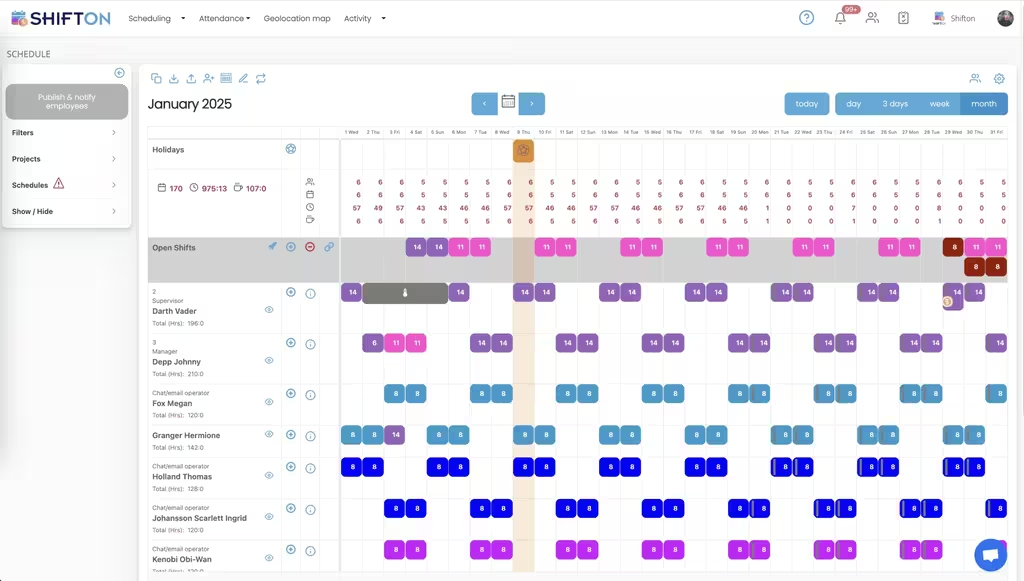
The weekly calendar carries every crew member on their own row, with colour-coded shifts and the exact start and end times each event needs. Roles you have not filled yet sit in the open shifts row, visible to the whole team rather than buried in a message thread.
Plan a Full Month of Events Ahead
Catering work is booked months in advance and clusters into seasons. The month view puts every date on one screen with a running hour total per person, so a heavy wedding or conference run is balanced across the team instead of landing on the same four people.
Know Who Is Available Before You Book Them
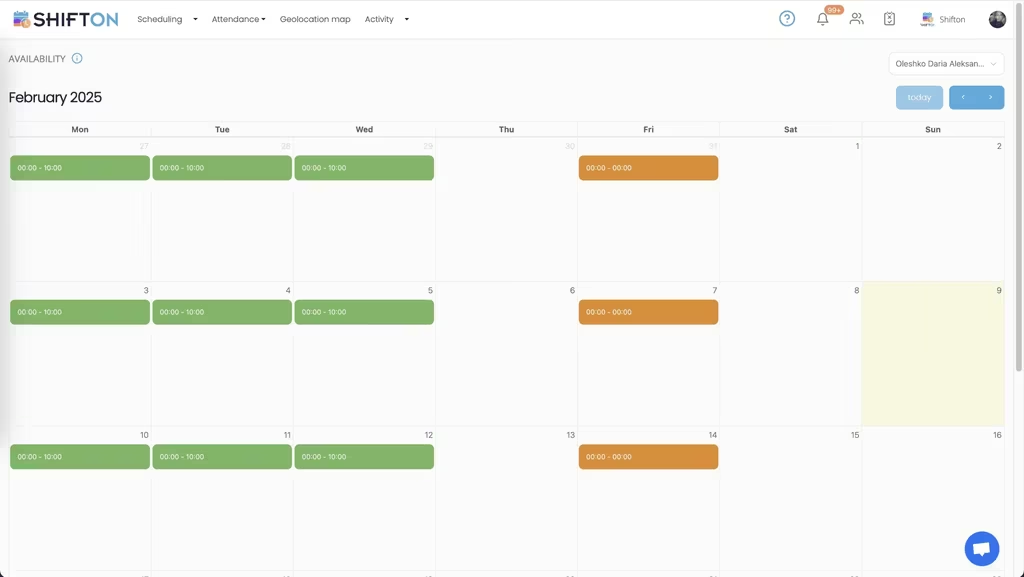
Catering runs on casual and freelance crew who work elsewhere between events. The availability calendar shows a month per person, green for the hours they can take and orange for the hours they cannot, so an offer goes to somebody who is genuinely free.
What Each Event Shift Actually Cost
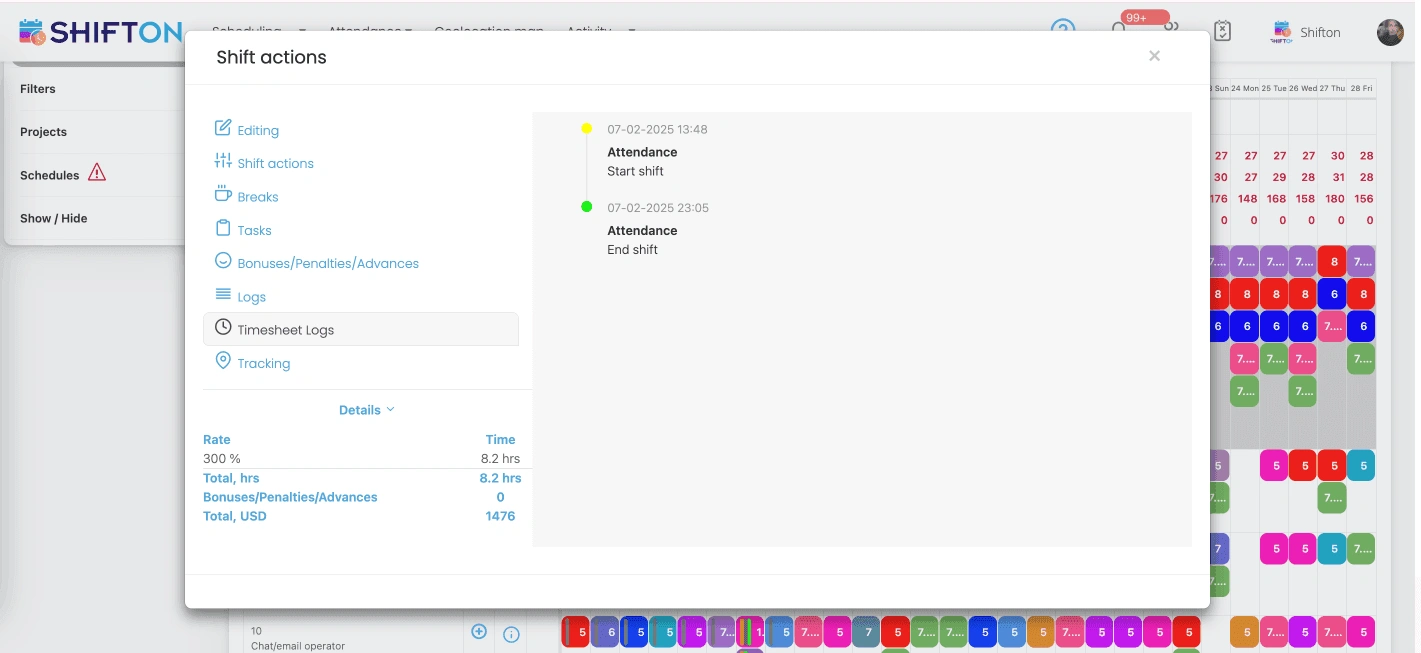
Events overrun. The shift card holds the planned times next to the real ones, with a start at 13:48 and an end at 23:05 recorded against the same shift, plus breaks, bonuses, penalties and the pay rate applied to those hours.
Start with the Free Plan
No time limits. Get full access to core features and upgrade when you're ready.
Read the full guide to event staff scheduling
Catering does not run on a repeating weekly rota. It runs on bookings that each need a different crew, a different venue and a different set of hours, confirmed weeks ahead and then changed twice before the day arrives. Event staff scheduling software exists because a spreadsheet cannot hold that shape for long without somebody losing track of who was confirmed for what.
The workforce makes it harder. Off-premise catering leans on casual and freelance crew who work for two or three companies at once, so the person you booked on Tuesday may already be committed by Thursday. Scheduling has to start from availability, not from a blank grid. The same crews often cover build-up and breakdown at trade shows, a pattern described on the page about crewing a convention centre.
What event staff scheduling software has to handle
Four things decide whether a tool survives a busy season. It has to build a crew for a specific date and venue rather than a generic week. It has to reach freelance staff on their phones and record the answer. It has to capture the hours that were really worked, because events overrun almost as a rule. And it has to show what a booking cost in labour while there is still time to price the next one properly.
Event staffing software that covers those four beats a heavier platform whose menus a coordinator never has time to explore during wedding season. The label matters less than the fit: event staffing scheduling software, event staffing management software and crew rostering tools all describe the same job once you look past the marketing.
Crewing an event instead of filling a week
A catering shift is tied to an event, not to a department. Set-up starts hours before guests arrive, service runs to an unpredictable finish, and breakdown can push past midnight. Building that in a weekly calendar works when each shift carries its own exact start and end time and can be tagged to the venue or client project it belongs to.
Anything you have not filled goes into the open shifts row, where every qualified crew member sees it at once. That is the difference between event staff management software and a phone list: the offer goes out once, in one place, and the response is recorded rather than remembered. Shifton's shift scheduling module handles open shifts, swaps and reusable templates, so a standard 120-cover wedding pattern is rebuilt in seconds rather than typed out again. On the crew side the same information arrives as an event staff scheduling app on their phone, which is the only channel freelance staff reliably check. An event staff management app is judged on one thing: whether a crew member can see call time, venue and finish time without messaging anybody.
Freelance crew and the availability bottleneck
The hardest part of catering scheduling software is not the calendar, it is knowing who can actually work. A crew member marks the hours they are free on a monthly availability calendar and updates it themselves, which means the roster is built against a live picture instead of a form somebody filled in six weeks ago.
That single change removes most of the back and forth. Offers land with people who are free, confirmations come back faster, and the coordinator stops working through a contact list in descending order of reliability. A catering scheduling app that starts from availability produces far fewer declines than one that starts from a blank week. Growing operators usually reach for catering company scheduling software at the point where the contact list outgrows one person's memory.
Planning a season, not a week
Catering demand arrives in waves. Corporate season, wedding season and the December run all concentrate bookings into a few weeks, and the risk shifts from finding staff to overloading the same reliable few. The month view puts the whole booking calendar on one screen with a running hour total beside each name, so the load is spread before anyone burns out.
- See every confirmed date and the hours each person is already carrying
- Spot the dates that still show unfilled hours and act early
- Mark public holidays that will carry a premium rate
- Keep long-range bookings visible instead of parked in a separate diary
Banquet scheduling software that only shows a week hides exactly the pattern you need to manage. A banquet schedule app that opens on the month rather than the day gives supervisors the same long view, and a banquet scheduling system that holds hour totals per person stops the season being carried by three people.
Hours, breaks and premium rates on the night
Planned hours and worked hours are rarely the same in catering. A service that was meant to end at ten finishes at eleven, and the difference has to reach payroll without a chain of text messages the next morning. Crew clock in and out from the app against their scheduled shift, breaks are logged separately, and the real times sit next to the planned ones on the same shift card.
Pay rates are set on the shift itself, so a night, a public holiday or an overrun can carry a higher rate than a standard daytime booking. Bonuses and penalties are recorded in the same place. Banquet staff scheduling software that captures all of this at shift level removes the reconciliation work that otherwise eats the first day of every month. Banquet staff attendance software bolted on separately creates a second record to argue with, which is the opposite of the point. Banquet time tracking software also has to cope with two events in twenty-four hours, which day-level timesheets never do.
What a crew really costs per booking
Labour is the margin in off-premise catering. When hours, rates, bonuses and penalties are attached to shifts rather than typed into a timesheet afterwards, the cost of a booking is a number you can pull rather than an estimate you defend. Working-hours, budget and pay rate reports are filtered by month and position and exported for payroll or for a client review, which is where catering staff management stops being guesswork and starts informing what you quote. Catering staff scheduling software that keeps hours and rates on the same shift gives you a cost per booking instead of a cost per month.
Venues, projects and multi-site crews
Most catering companies work across venues they do not own, often two or three on the same weekend. Tagging shifts to a project or location keeps the crews separate while the totals stay in one account, so a coordinator can see that Saturday is short two servers at one site and over-staffed at another. Teams that also service fixed sites can plan them alongside event work, which is covered on our conference venues page. Banquet crew scheduling software has to keep venue, call time and crew together, because the address is the detail people get wrong. Banquet rostering software that treats every shift as if it happened at head office causes exactly that mistake. Location-based clock-in through the geolocation module is available as a paid add-on where confirming arrival at an unfamiliar venue matters.
Choosing catering scheduling software
Test any platform against your worst weekend, not your easiest one. Build a Saturday with three events at three venues and see how long it takes. Open the app on a crew member's phone and check how quickly they find call time and address. Change a start time by an hour and count how long it takes to reach everyone booked. A banquet roster app is worth nothing if the update lands after the crew has already left home, and banquet shift scheduling software that needs a laptop to publish will not be used on a Saturday.
Anything that still depends on a printed event staff schedule template, a banquet schedule template or a shared file will drift within a fortnight. Under ten people, Shifton is free with no time limit, which suits a small catering company moving off a catering schedule template in a spreadsheet. As you take on more bookings, paid plans add multi-location planning, deeper reporting and the modules a larger event staffing operation needs. The aim does not change: every event crewed, every hour accounted for, and a labour cost that matches what you quoted.
Frequently Asked Questions
What is event staff scheduling software?
Event staff scheduling software builds and publishes the crew list for each booking, then tracks the hours that crew actually worked. Shifton covers weekly and monthly schedules, open shifts, availability, clock-in and clock-out, breaks, pay rates and reporting, with a mobile app for iOS and Android.
How do you schedule casual and freelance catering staff?
Collect availability first, then offer the open roles for an event to everyone who is free rather than calling people one by one. Crew claim the shifts that suit them and a manager confirms. Everyone works from the same published schedule, so nobody arrives at the wrong venue.
Can staff confirm availability for events months ahead?
Yes. Each person marks the hours they can work on a monthly availability calendar and updates it whenever their other commitments change. Because catering bookings are confirmed weeks or months in advance, building against live availability removes most of the last-minute replacement work.
Does the software track real hours worked at an event?
It does. Crew clock in and out from the mobile app against their scheduled shift, and the real start and end times are stored next to the planned ones. Breaks are logged separately, so the hours that reach payroll match the hours that were worked.
Can I apply premium pay rates to night or holiday events?
Yes. A pay rate is set per shift, so overnight service, public holidays and overruns can carry a higher rate than a standard daytime event. Bonuses and penalties are recorded on the same shift and the total feeds the pay rate and budget reports.
Is there a free plan for a small catering company?
Shifton is free for up to 10 team members with no time limit, which covers a small catering operation or a single banquet crew. Shift scheduling, basic time clock and attendance, the mobile app and reports are included. Larger teams move to paid plans priced per person per month.





Crew your next event without a spreadsheet
Start free for up to 10 team members and put the crew list for your next event on one shared schedule.