

PR Agency Scheduling Software for Press Office and Client Work
Cover the press office, staff out-of-hours and crisis duty and see which client every hour landed on with PR agency scheduling software.


Set the Week Across Every Client Account
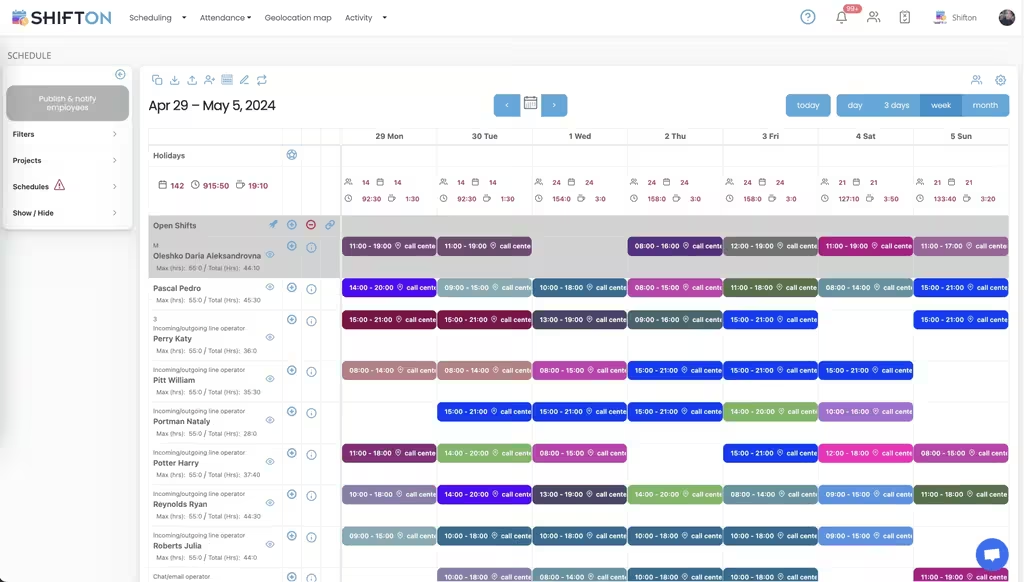
A communications team's week is a set of commitments to different clients plus whatever the news does to them. The weekly grid gives each person a row and each assignment a colour-coded block with start and end times, so the load across the team is readable before the week is committed. Projects and filters keep separate accounts apart on one screen instead of in separate documents.
Hour Caps, Overtime and Where the Hours Sat
Retained work is sold in hours, and a team that quietly gives one client half again as much as it billed is the most common way an account stops being profitable. Each person's row carries a maximum against the total already assigned, and shifts are tagged with the work location they belong to. Day columns total headcount and hours, so a week drifting into overtime is visible while it can still be changed.
Duty Cover Outside Office Hours
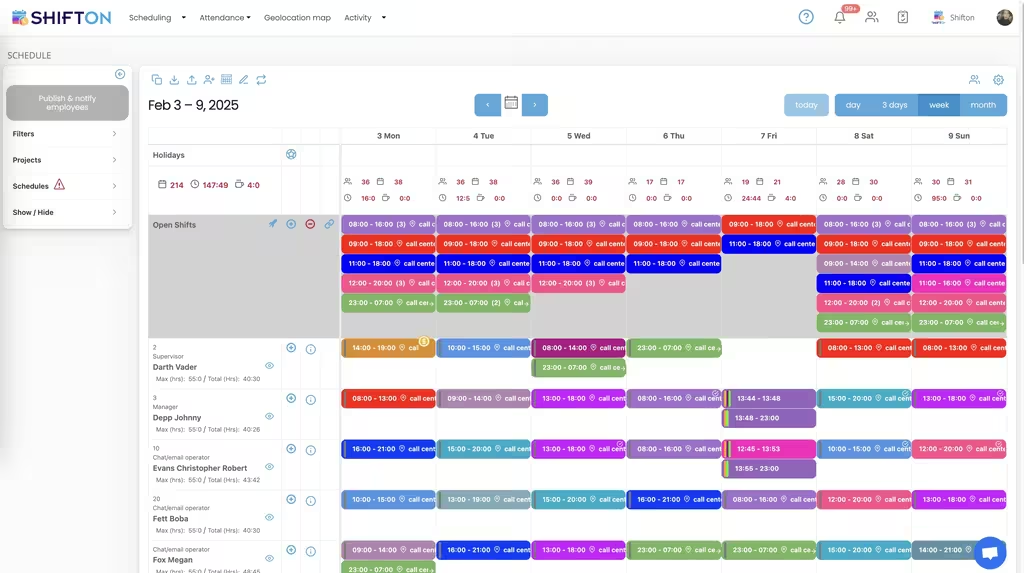
News does not keep office hours, and neither does a press office. Broadcast bids arrive before breakfast, international media work to another clock, and a live issue can need somebody reachable from 23:00 to 07:00. The week view holds several shifts a day with roles beside names, so a senior person is on every period of cover rather than the whole rota falling to whoever answered last time, with each person's maximum and total hours in view as it is built.
Your People, Their Roles and Freelance Support
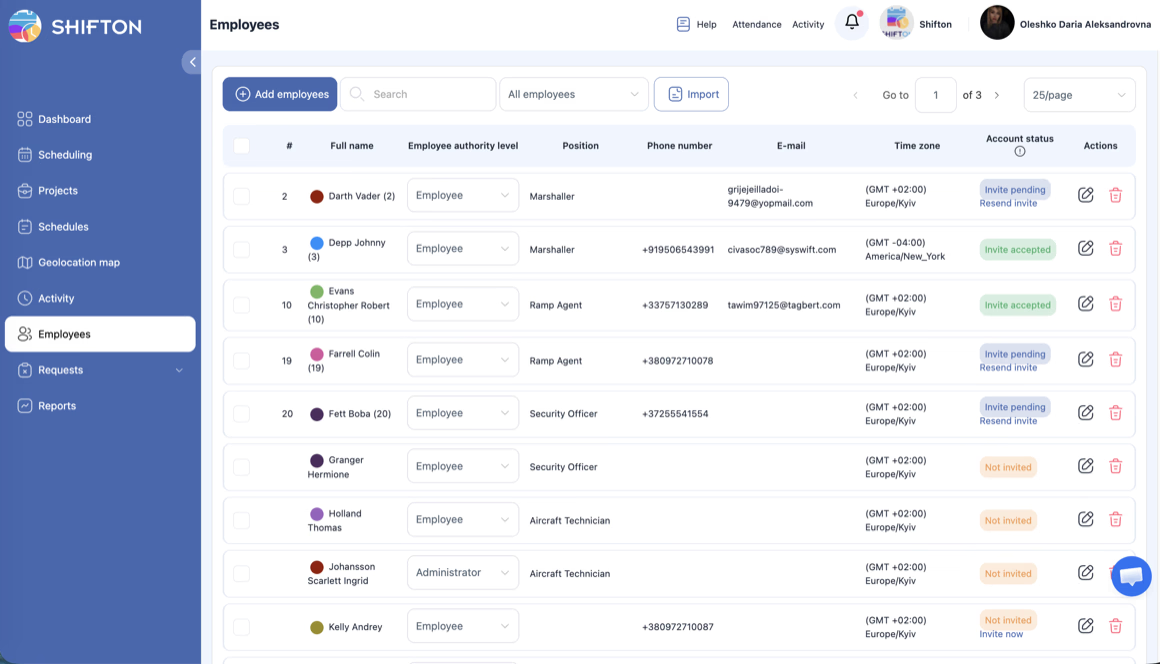
PR teams grow and shrink around launches, and the roster has to keep up. The employees table holds everyone in one place with their position, contact details, time zone and authority level, split between ordinary access and administrator rights. Account status shows who has been invited and who has actually accepted, which is how you find the freelancer who never made it onto the rota before a launch week.
Start with the Free Plan
No time limits. Get full access to core features and upgrade when you're ready.
Read the full guide to PR team scheduling
A PR team sells two things it cannot manufacture more of: judgement and hours. The retainer says a certain amount of senior attention per month, the client expects somebody reachable when a story breaks at eleven at night, and the launch that has been in the diary for six weeks will still need three extra pairs of hands the week it lands. PR agency scheduling software is what keeps those promises visible as a plan rather than as an assumption about who is around.
The awkward part is that most communications work is not shift work in the usual sense, right up until the moment it is. Duty cover, crisis rotas, event days and launch weeks all behave like shifts, and they are exactly the parts a shared calendar handles worst.
What PR agency scheduling software is actually for
The scope is narrow on purpose. It plans who is on duty and when, holds the cover nobody has picked up yet, collects availability and time-off requests, records real start and finish times, and reports the hours by person and by account. That is the operational spine underneath the work, and in most agencies it is currently held together by a spreadsheet, a group chat and one person's memory.
It is not a media database, it does not distribute releases and it does not measure coverage. Those are separate categories with their own vendors, and a scheduling system that claimed to do them would do all four badly.
Retainer hours and knowing which client an hour landed on
Retainers fail quietly. Nobody decides to give a client 60 hours when 40 were sold; it happens through a run of small favours, an unbilled crisis weekend and a launch that overran. By the time it becomes obvious, the account has been unprofitable for a quarter and the conversation with the client is much harder than it needed to be.
Attaching every shift to a client project is what makes the drift visible while something can still be done about it. Scheduled hours show what was intended, worked hours show what actually happened, and the difference between them is the number worth looking at each month. Our working hours reports break the period down by person and by pay rate, so senior time and junior time are not read as the same cost. The billing decision stays with the agency; what changes is that it is made from a record rather than from a recollection.
Press office duty and the rota nobody wants to own
Every press office ends up with a duty rota, and it is almost always the least loved document in the agency. It gets built late, it is amended by message, and the person who is meant to be on cover finds out from a colleague. When it goes wrong, it goes wrong in public.
Planning duty as proper shifts fixes the mechanics. Each period of cover has a defined start and end, it appears on the phone of whoever holds it, and a change reaches everybody at once instead of travelling by word of mouth. Cover that nobody has taken can sit in the open shifts row until somebody claims it, which is a far better mechanism than a partner asking the room on a Friday afternoon. A public relations scheduling system does not make duty popular, but it does make it fair and visible, and those two things are what stop it landing on the same three people every month.
Out-of-hours, weekends and crisis cover
Crisis work is unpredictable in timing but not in shape. Somebody senior has to be reachable, somebody has to be able to escalate, and the hours involved need recording because they are frequently the most expensive hours the agency delivers all year.
Scheduling those hours as shifts, including overnight blocks and weekend cover, gives the team a fair rotation and gives the agency a real cost. Worked hours can be reported at their own rate, so a weekend of crisis handling shows up as what it cost rather than being averaged into the month. Lateness and attendance are recorded the same way, which matters less for the report than for the fact that the record exists at all when a client asks who was covering at two in the morning.
Launch peaks and freelance support
Launches, results days, conferences and campaign moments create short, sharp demand for people the agency does not employ the rest of the year. Freelance support is normal in this industry, and the practical problem is always the same: getting them onto the plan quickly, making sure they know where to be, and taking them off cleanly afterwards.
A single team list with positions and access levels handles most of it. Freelancers get ordinary access to their own shifts, account leads get administrator rights over their own accounts, and an intake of several people can be imported rather than typed in one at a time. Account status shows who has actually accepted an invitation, which is how you avoid discovering on the morning of a launch that two of your extra hands never received the rota.
A team across offices and time zones
Communications work rarely sits in one place. Consultants work from client sites, launch days happen at venues, and international accounts mean colleagues in markets several hours ahead. A rota that displays the same time to everybody regardless of where they are creates errors that only surface on the day.
Holding a time zone against each person means shift times read correctly for the person looking at them, and tagging shifts with a work location means the schedule records where the work was, not just that it happened. It also gives an honest answer to the question of how much of the team is actually in the office on any given day.
Where this sits next to marketing and campaign planning
The boundary with adjacent teams is worth drawing. Campaign capacity planning for marketing departments and agencies is a related but different problem, and our marketing staff scheduling page covers it. What this page is about is the communications-specific part: press office duty, crisis and out-of-hours cover, and retainer hours per client account.
The other boundary is with PR tooling proper. Media databases, distribution services and monitoring platforms deal with journalists and coverage. Shifton deals with the people delivering the work: schedules and templates, open shifts, availability, time off, the time clock, breaks, worked and overtime hours, task assignment, notifications and hour exports. Agencies run both, and they answer different questions.
Choosing a scheduling system for a communications team
Test it on the week you dread. Build a launch week with freelance support, add overnight duty cover, then move a senior person off it at short notice and see how quickly the gap is reposted and filled. Check how a monthly hour report reads when three accounts are running at once, since that is the report a managing director will actually look at. Open the app on a phone, because that is where duty cover is checked.
Shifton is free for up to 10 team members with no time limit, which suits a boutique consultancy or a small in-house press office, and paid plans are charged per employee per month as the team grows. If your duty rota currently lives in a message thread and your retainer hours live in somebody's head, both are worth moving somewhere they can be read.
Frequently Asked Questions
What is PR agency scheduling software?
It is the system that decides who is on duty, for which client, across which hours, and gets that to them. For a PR team that means the press office rota, out-of-hours and crisis cover, freelance support during launches, and a record of worked hours that can be read by client account. It handles people and hours, not media contacts or coverage.
How do you track retainer hours per client?
Each client account is set up as its own project and shifts are assigned to it, so scheduled and worked hours accumulate against the right account rather than into one pool. Working-hours reports then show how the month was distributed, which is the number a team needs when a retainer is being renewed or renegotiated. Shifton reports the hours; billing stays in whatever finance system you use.
How do you staff out-of-hours and crisis cover?
Duty cover is planned as real shifts with real times, including overnight and weekend blocks, instead of an informal understanding about who picks up the phone. Cover can be posted as an open shift for the team to claim, and when it is published everybody involved gets a notification. Hours worked on out-of-hours duty are recorded like any others and can be reported at their own pay rate.
Can freelancers be added for a launch and taken off afterwards?
Yes. Freelance and contract support goes on the roster the same way permanent staff do, with a position and an access level, and can be brought in as an import when several people join at once. They see their shifts in the mobile app and clock in and out from it. Availability settings keep people off the schedule for the periods they are not working with you.
Does Shifton include a media database or monitoring?
No. Media databases, distribution and coverage monitoring are a different product class, and that is what most public relations management software refers to. Shifton covers the workforce side: shift scheduling and templates, open shifts, availability and time off, the time clock, breaks, worked and overtime hours, task assignment and hour reports, with integrations to Zapier, QuickBooks, Intercom and Usedesk.
Is there a free scheduling app for a small PR team?
Shifton is free for up to 10 team members with no time limit and includes shift scheduling, the basic time clock, the mobile app and standard reports, which covers a boutique consultancy or a small in-house press office. Beyond that, paid plans are charged per employee per month. Geolocation and work location are a paid module rather than part of the free plan.






Plan Your PR Team's Week With Shifton
Set the duty rota, post out-of-hours cover as open shifts and keep worked hours attached to the client they belong to.