

Shifton AI Assistant for Workforce Management: It Does the Work

The AI assistant for workforce management in Shifton is a side panel in the web app. Tell it in plain English what you need and it does the work: it answers questions about a company's own data and makes changes for you, such as creating a shift, deleting it or renaming the company. Each change appears on a card first and is applied when you press Confirm. A counter beside the chat, "Changes 0 of 50 today", tracks the applied changes.
Every example comes from live sessions on 10 November 2026, in one test company, in the Shifton (workforce) mode. The capabilities table comes from a separate Russian-language answer. Claims that rest on what the assistant said about itself are marked as such.
What the AI Assistant Is and Where to Find It
Entry is a button labelled "AI Assistant", with a sparkle icon, in the top bar of the web app. It opens a side panel with the subtitle "AI · answers about your data" and four controls: new chat, history, expand and close.

AI Assistant button in the top bar.
Its greeting introduces it as the "Shifton Agent assistant" and says "I'm not an operator." After a page reload, the panel showed the previous chat. See also the guide to an employee scheduling app for shift workers.
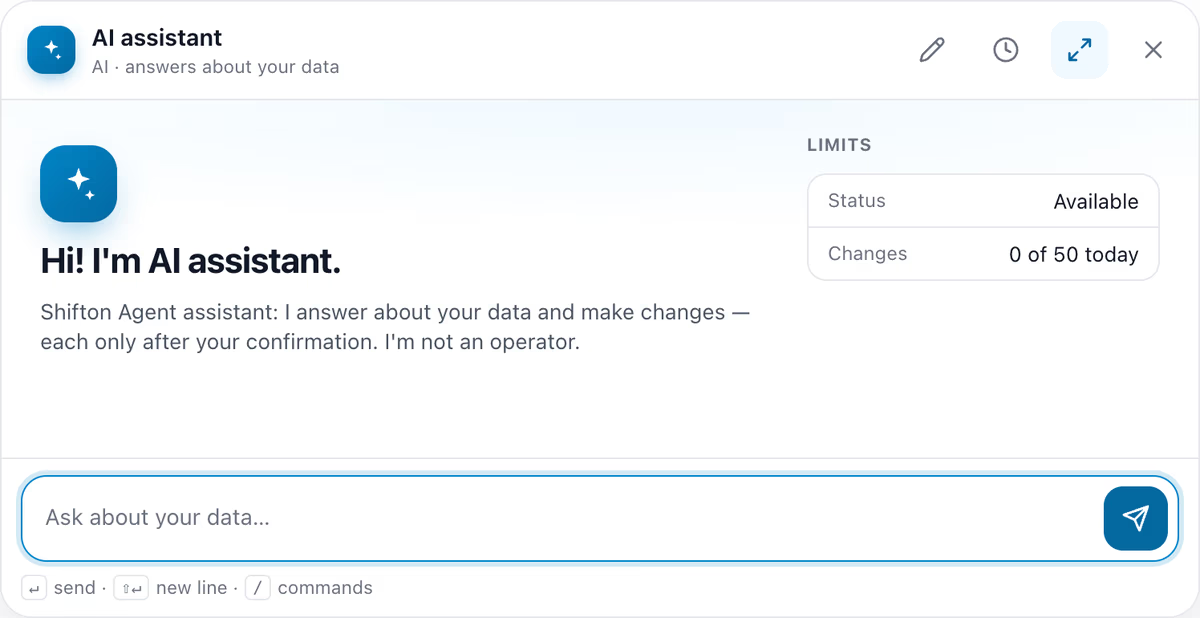
A new chat, with the LIMITS box at 0 of 50.
What the AI Assistant Can Read From Your Data
Read-only questions needed no confirmation. Three are shown here, on modules, time off and hours, each ending with "Please don't change anything".
Modules, answered with a table
Asked which modules are enabled, the assistant named two for the test company: departments and projects, and Basic functions, which holds core scheduling settings. It stated "I have not changed anything.", added an "Enabled modules" table and listed the switched-off modules.
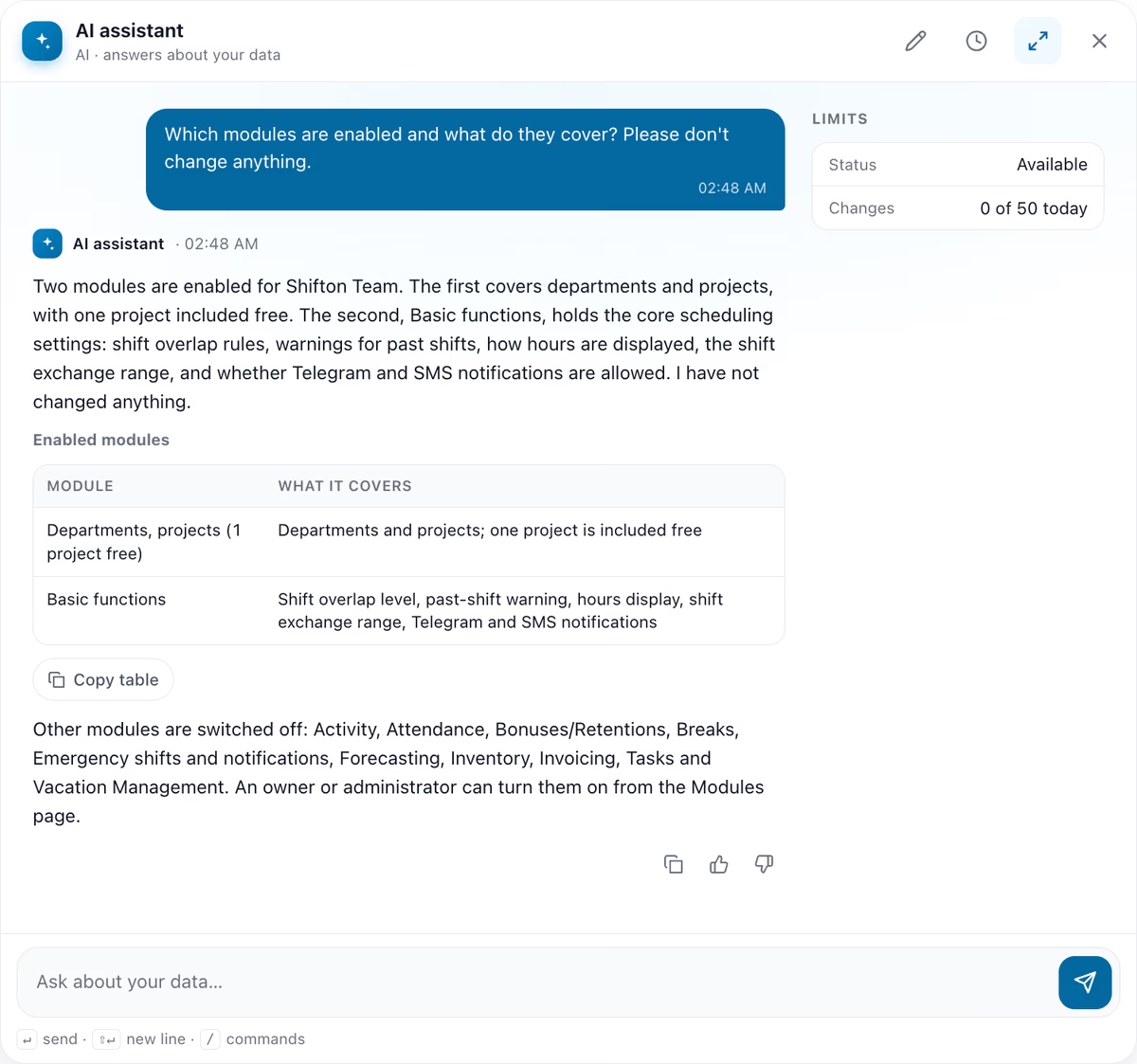
Module answer, with its table.
Time off: a switched-off module reported as a gap
Next, a request for this month's time off requests and the vacation statistics. The progress panel named the checks it ran. The answer reported no requests, pending or resolved, and said the statistics could not be retrieved because the "Time off requests" module is switched off. It added that the owner or an administrator can turn the module on, and closed with "No changes were made."
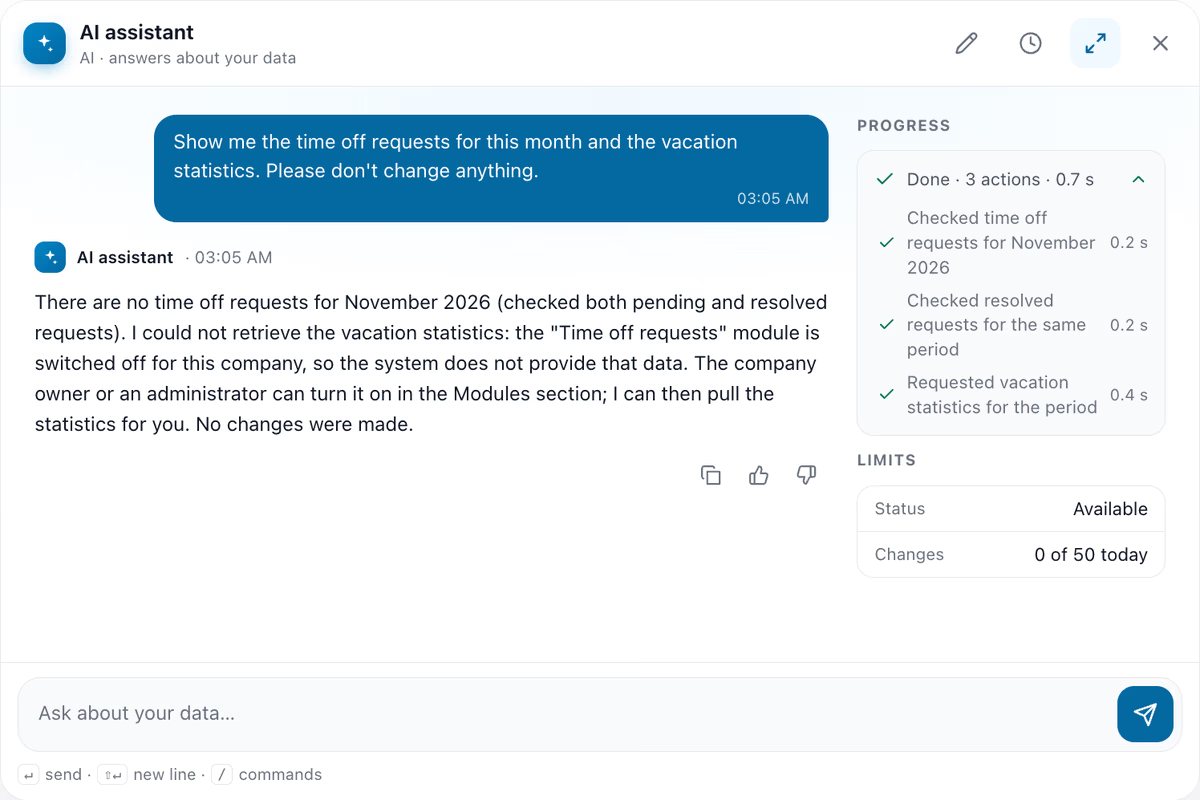
The named checks, and why the statistics are missing.
Hours: which report was used
Last, the assistant was asked how many hours were worked this week and which report it used. For Monday 9 to Sunday 15 November, Kyiv time, it gave 0 hours. It said it used the scheduled working time totals, not the "Working hours" report, because that report's module is switched off.
How the AI Assistant for Workforce Management Makes a Change
A change starts as a plain-English request: "Create a test shift for tomorrow, 10:00-12:00, in My project, with no employee. Put AI test in the note. Show me what you are going to create before you do it." The progress panel then showed "Preparing the change" and "Waiting for your confirmation".
The card, line by line
One sentence was enough: the card turned "tomorrow" into 2026-11-11 and added the time zone.
What the afternoon card showed
- Object: Shift. Action: create.
- Schedule: My schedule. Time zone: Europe/Kyiv.
- Start time 2026-11-11 10:00, end time 2026-11-11 12:00. Note: AI test.
- A collapsed line, "Other settings — default (1)".
Under the rows sit "50 of 50 changes left today · Shifton Agent applies immediately", "Confirm" and "Cancel" with an Esc key badge, and "Buttons stay active for 10 minutes". The input box reads "Confirm with the button on the card", and below it: "Words in chat don't count as confirmation."
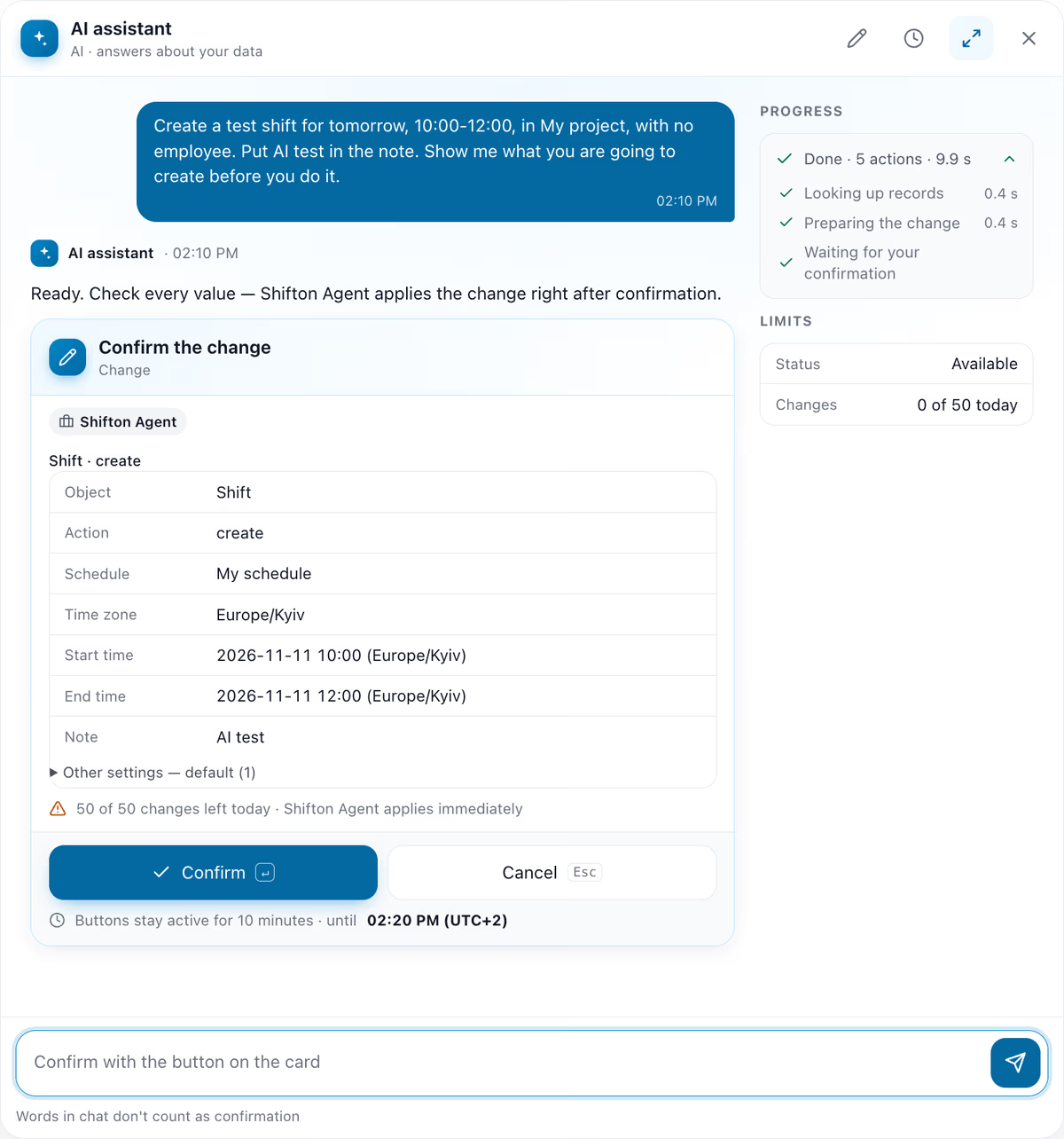
The afternoon card before Confirm: the rows, the counter line and the ten-minute notice.
When the system says no
In the morning session, Confirm on the first card, which had an empty Employees row, did not create a shift. It showed "Change not applied" in red. The assistant then explained: "The system requires at least one employee on a shift, and the request without anyone was refused with a validation error. Nothing was created." It offered to try again with the only employee on the schedule. In the afternoon session the same request went through: the card closed with "Done", the counter moved to 1 of 50, and the assistant reported a shift with no employee assigned.
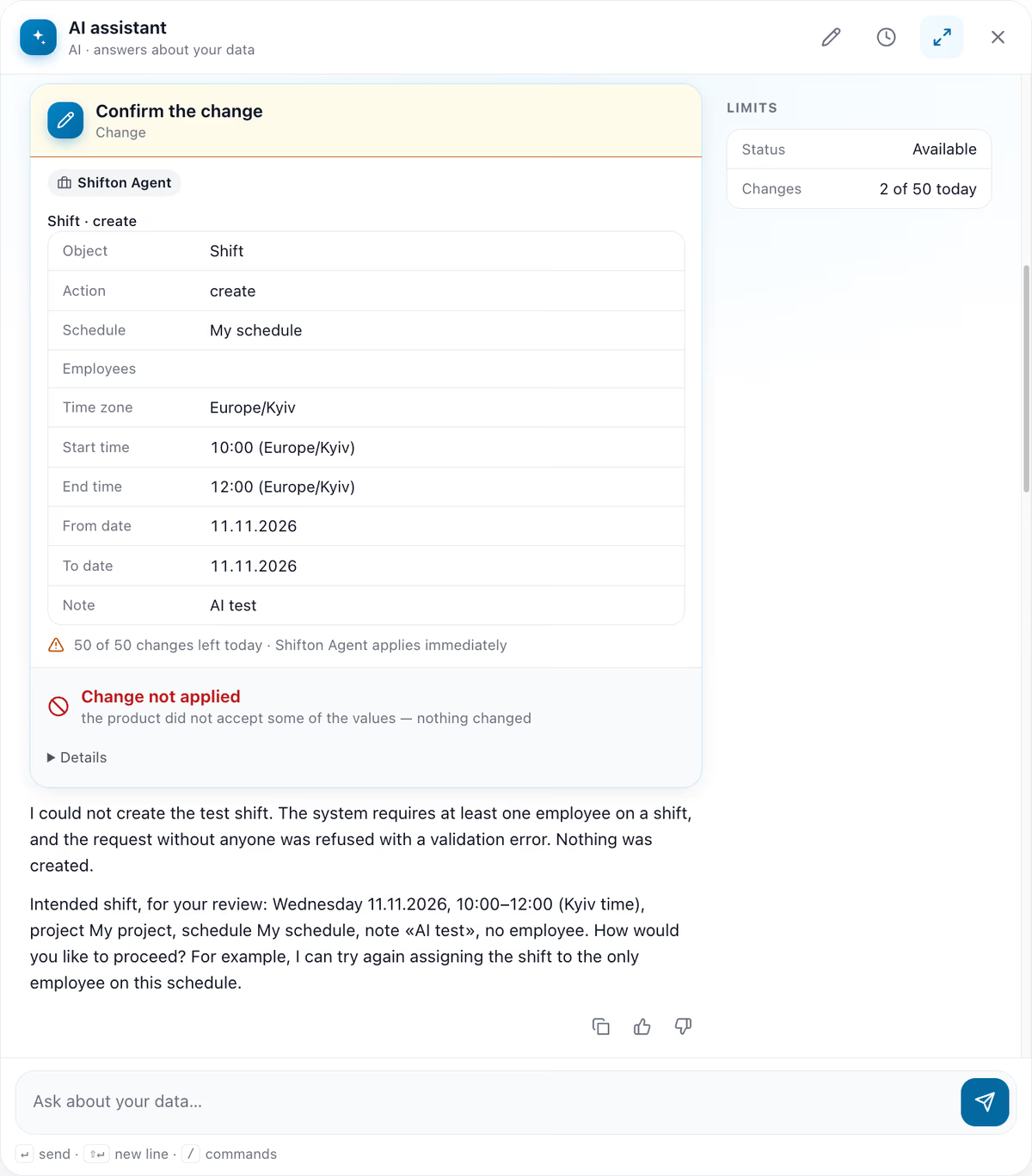
The morning chat reopened from history. The LIMITS box shows the counter at the time of viewing.
A change that went through
In a separate afternoon session the request said "assigned to my own employee", so the card had Employees filled in. After Confirm the card closed with "Done", "Confirmed by you at 02:15 PM (UTC+2)" and "Shifton Agent applied it". In the morning session, a second card with an employee filled in created a shift that appeared in the shift schedule as a 10:00-12:00 block on Wednesday 11, two hours in total. "Publish & notify employees" was not pressed, so nothing was published or sent.
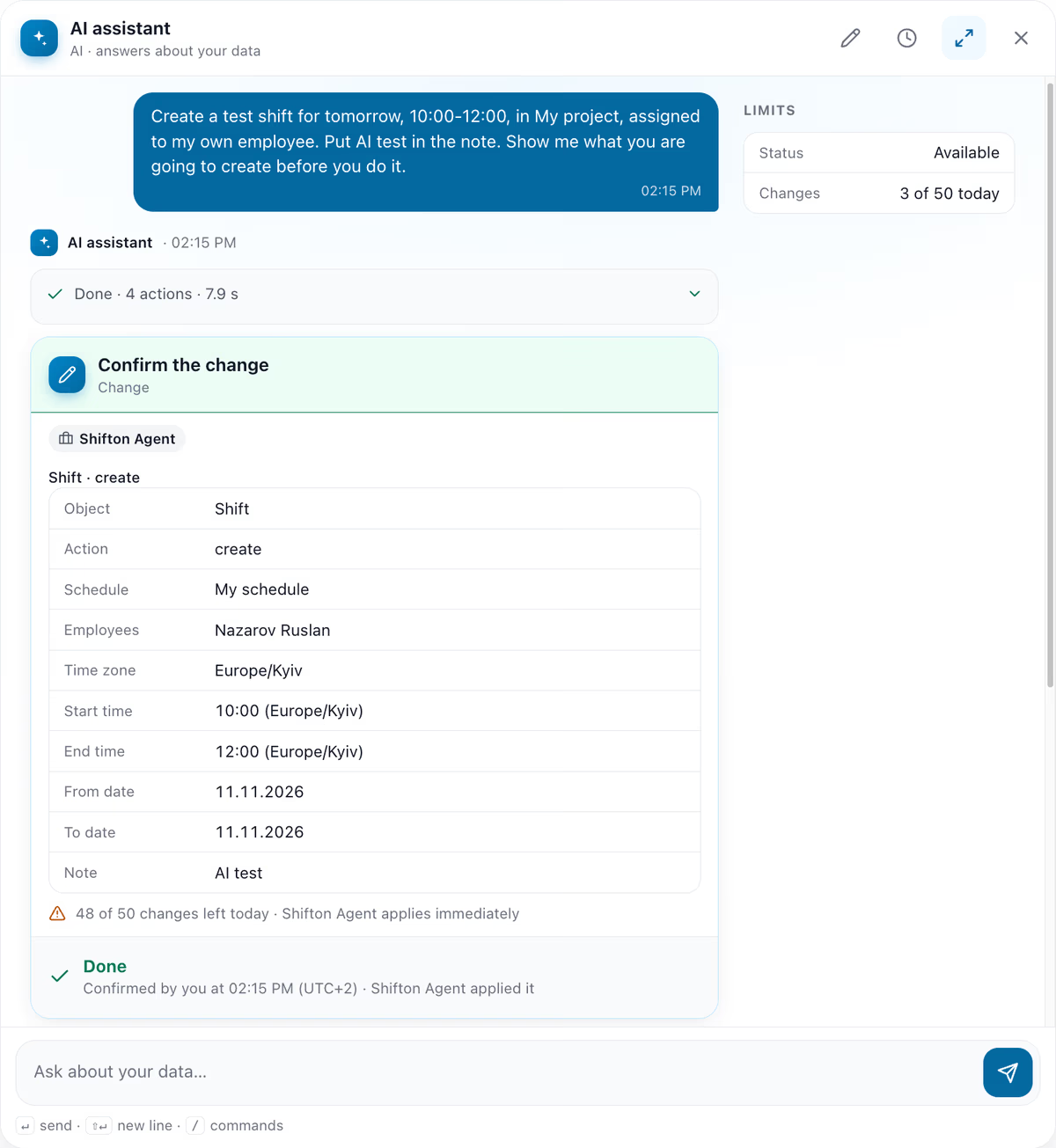
A card with an employee filled in, closed with Done.
Irreversible Actions Get a Red Card
Asked to delete the test shift, the assistant answered that it is irreversible, "it can't be restored, only created again", and presented a card.
The deletion card
This card is red, headed "Deletion — irreversible", with a warning: "This can't be undone: Shifton Agent deletes it immediately, without its own preview." The buttons are "Delete" and "Cancel", with the same ten-minute notice.
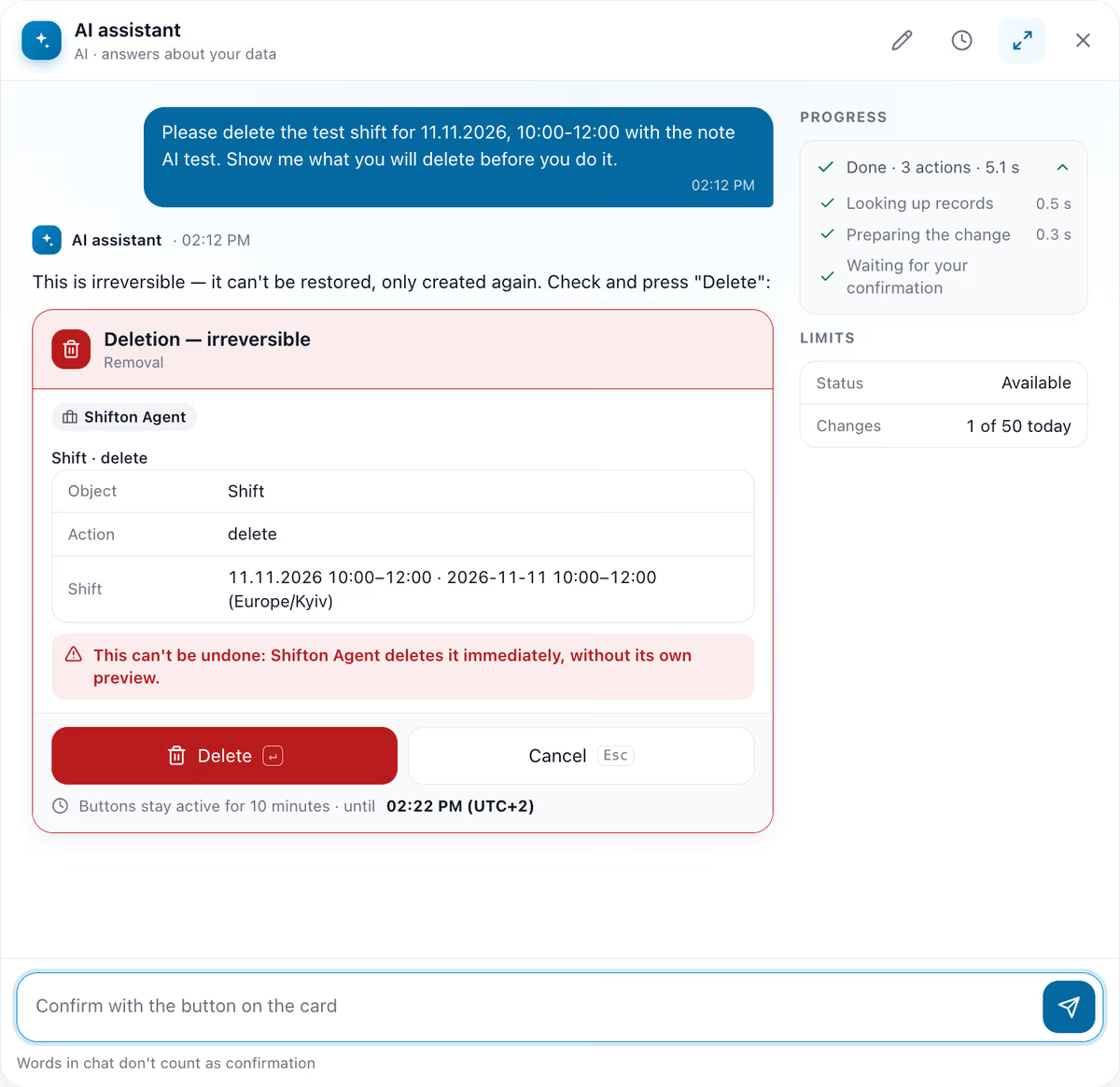
Red deletion card and its warning.
In the morning session, ten minutes passed before the button was pressed, and the card changed to "Confirmation time is over. Nothing changed." with a "Show the card again" button. After a new card and Delete, the assistant added: "The shift cannot be restored from this conversation." The counter moved to 2 of 50.
Changing Company Settings and Counting Changes
A rename request produced a card labelled "Company settings · change general" with the old and new name. After Confirm the counter read 3 of 50, and after a reload the new name showed in the top bar. In the morning the LIMITS box beside the chat moved only on applied changes: 1 after the created shift, 2 after its deletion, 3 after the company rename. The refusal, the expired card and the read-only questions left the counter unchanged. The afternoon session started at 0 of 50 and read 4 of 50 after two created and two deleted shifts.
For a buyer, the pattern is the point: one plain sentence produced a card to confirm, a refusal came with an explanation, an expired card changed nothing, and a deletion looked different, in red and marked irreversible.
Explore Shifton
Create an account to explore Shifton, or book a demo and ask whether the AI Assistant is included in your plan.
What the Assistant Says It Covers
This section is the assistant's own description, given in a separate Russian-language answer. The Shifton Service (field service) mode of the app was not tested. Creating a shift, viewing hours and changing general settings were also seen above.
| Area | It says it can | It says needs a person |
|---|---|---|
| Shifts and schedules | Show shifts, create a shift, view worked hours, find unfilled shifts | Mass moves and cancellations are confirmed separately |
| Employees | Find and list employees, positions, skills | Deleting employees and changing access rights need the owner or an administrator |
| Company settings | Read and change general settings, payroll settings, module parameters | Turning modules on or off is for the owner or an administrator |
| Field service tasks, clients, invoices | Work with tasks and invoices if the module is enabled | The owner or an administrator enables the module |
Asked what it would refuse, the assistant said it helps only with Shifton and the user's own data and would redirect unrelated topics and changes the user's role does not allow. These are its statements, not observed behaviour. For the wider picture, see how AI is used in field service management.
FAQ
Is there an AI that helps with scheduling?
In the Shifton web app, the AI assistant answers questions about your data, such as modules, time off, hours and employees, and does the work for you: in the observed sessions it created and deleted a shift and renamed a company on request.
Can AI create schedules for employees?
In the observed sessions the assistant created single shifts on request. The sessions did not show whether it can build a whole schedule.
How can AI be used in the workforce?
Within Shifton, the observed uses were answering questions about modules, time off and hours, creating and deleting a shift, renaming a company in the settings, and explaining a refusal.



Start making changes today!
Optimize processes, improve team management, and increase efficiency.