

Call Center Workforce Management Software for Support Teams
Cover every interval, keep overtime under control and put each agent rota on a phone with call center workforce management software built for 24/7 support queues.


Build the Week and Publish It to Agents
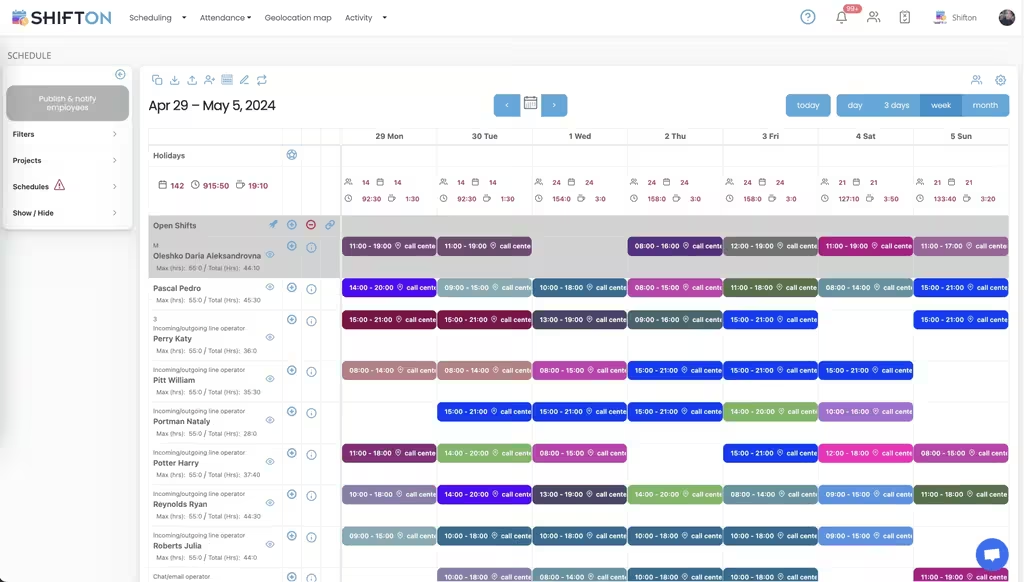
A support week is built interval by interval. The weekly calendar gives every agent a row, shifts are colour-coded with their start and end times, and an Open Shifts row holds the slots still waiting for someone. Filters by project and schedule let you plan one queue or one team without the rest of the floor in the way.
Hour Caps, Overtime and Weekly Totals
Support teams mix full-time, part-time and student contracts, and each of them has a ceiling. Every row on the week shows max hours next to hours already assigned, shifts carry the work location they belong to, and each day column totals headcount and hours. Overtime becomes something you decide on rather than discover in payroll.
Your Agent Roster, Roles and Time Zones
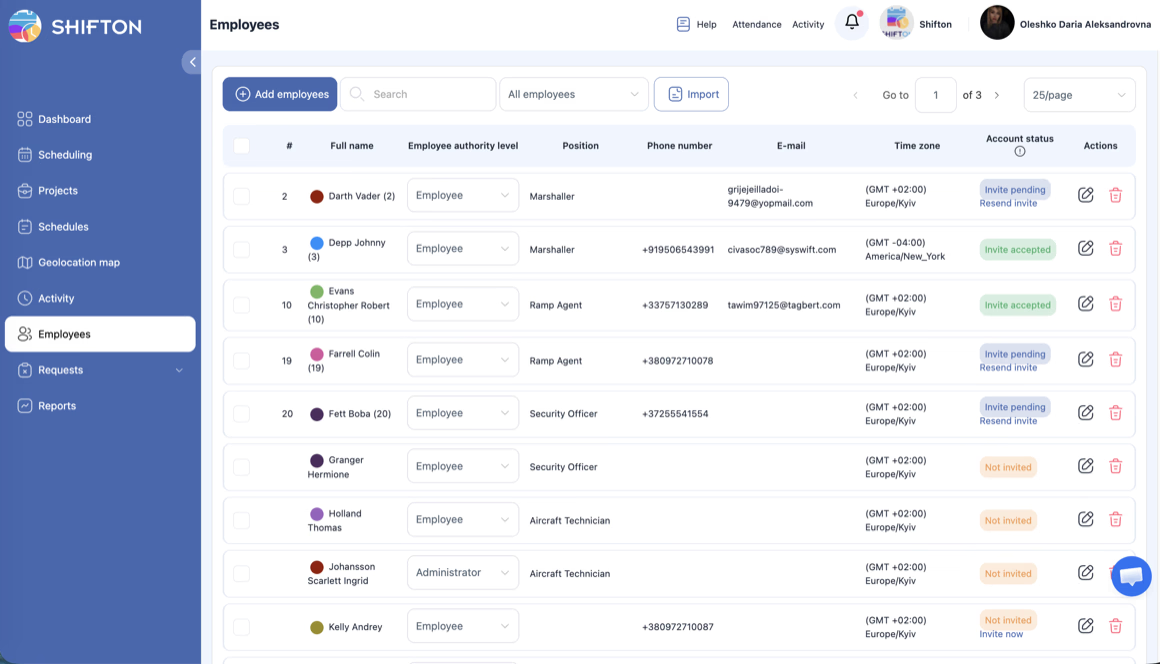
Contact centres churn, expand for peak season and often sit across several countries. The Employees table keeps the whole team in one list: full name, authority level, position, phone, email and time zone, with account status showing who has accepted their invite and who has not. New starters are added one by one or imported in bulk.
Worked Hours, Breaks and Lateness in One Report
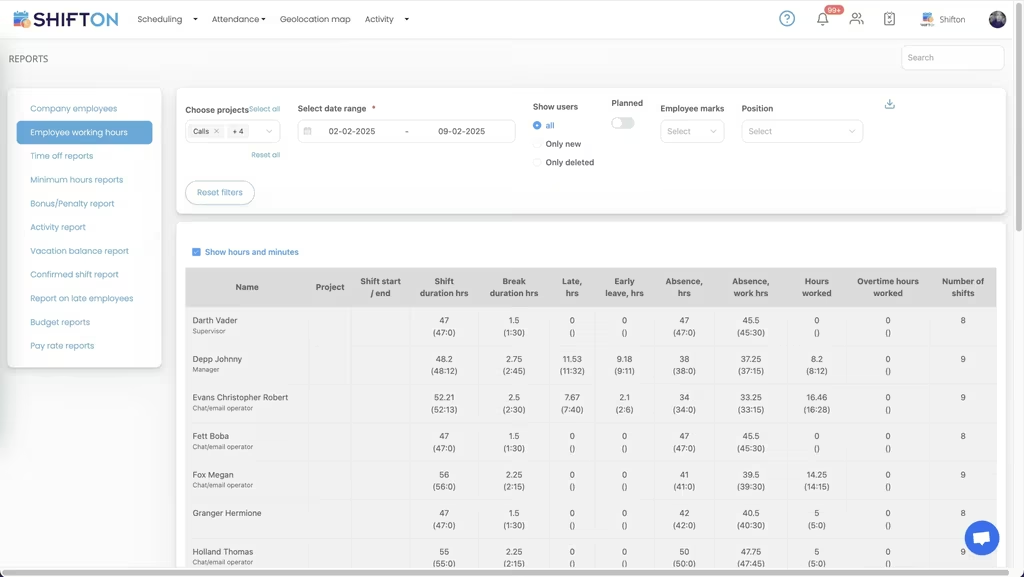
The working hours report is where the plan meets reality. For every agent it lists project, shift start and end, shift duration, break duration, late hours, early leave, absence, hours worked, overtime worked and the number of shifts. That is adherence in numbers: what was scheduled against what actually happened.
Start with the Free Plan
No time limits. Get full access to core features and upgrade when you're ready.
Read the full guide to call center scheduling
Contact centre staffing is a curve, not a headcount. Volume climbs through the morning, peaks somewhere before lunch, dips, climbs again, and drops off a cliff at the end of the working day in whichever market you serve. Everyone on the floor knows it. The difficulty is turning that curve into a rota that real people with contracts, preferences and childcare will actually work, which is the job call center workforce management software is built to do.
Most generic schedulers assume a nine to five office. Support does not run that way. Cover is planned in half hours, agents are part-time and student-heavy, queues stay open at night and at weekends, and half the team may sit in a different time zone from the person building the schedule. Any call centre scheduling software that ignores those facts gets abandoned within a quarter.
What call center workforce management software has to get right
Four things carry most of the value. Build a full week fast, without redrawing the same repeating pattern every Monday. Show hours and overtime while the rota is still editable rather than after payroll runs. Get the schedule onto agents' phones, with changes landing the moment they are approved. And record what actually happened, shift by shift, so the plan can be compared against reality.
Everything else is preference. A contact center scheduling software that handles those four beats one with a longer feature list aimed at problems your floor does not have.
Cover by interval, not by day
The unit of work in a contact centre is the interval. A day that looks fully staffed in total can be short of five agents between 10:00 and 11:30 and overstaffed by six after 16:00, and the daily headcount hides both. Building on a grid where each shift shows its exact start and end time makes the shape of cover visible, and staggered starts stop being a spreadsheet exercise.
Part-time patterns are what fill the awkward gaps. Short evening shifts, weekend-only slots, split cover across the lunch peak. Call center employee scheduling software has to treat those as normal rather than as exceptions, because in support they are the majority of the roster.
In practice a support week is assembled from a handful of shift shapes:
- Full-day cover that carries the core of the queue
- Staggered starts that thicken the morning and early-afternoon peaks
- Short evening and weekend slots worked by part-time and student staff
- Overnight cover for markets in other time zones
Held on one grid those shapes can be compared week to week, and a pattern that worked can be saved as a template and rebuilt instead of typed out again. That is most of what a call center schedule template is for, without the version control problem a shared spreadsheet brings with it.
Shrinkage, breaks and the hours you never get
Planned hours and productive hours are two different numbers, and the gap between them is where support operations lose control of cover. Breaks, training, team meetings, holiday, sickness and lateness all take hours out of a schedule that looked complete when it was published.
The way to manage that is to record it rather than estimate it. Time-off requests and availability live in the same system as the rota, so the person building next week already knows who is unavailable. Breaks are tracked on the shift itself, and lateness and early leave land in the hours report. Call centre workforce management software that only shows the plan will always flatter you; one that shows the plan and the outturn is the one worth having.
Peak season makes the gap wider. Hiring for a busy quarter means adding, inviting and rostering a group of temporary agents in a matter of days, then standing most of them down again afterwards. Keeping the roster, the invitations and the schedule in one place stops that churn from turning into an annual spreadsheet excavation.
Adherence: the plan against what actually happened
Adherence is a simple idea with an awkward measurement problem. Agents clock in and out through the mobile app or the web, so each shift carries an actual start, an actual end and actual break time against what was scheduled. The working hours report then lays out shift duration, break duration, late hours, early leave, absence, hours worked and overtime worked for every agent across the period.
That is enough to answer the questions team leads actually raise in one to ones: who is consistently starting late, which shift patterns produce the most absence, and where overtime is being generated. Our time tracking feature page covers the clock-in side in more detail if that is the part you need first.
Multi-site, homeworking and time zones
Very few support operations now sit in one room. There is usually an in-house team, a homeworking group, sometimes an outsourced site in another country, and one manager trying to see all three. Shifts can be tagged with a work location, so the rota shows where each person is meant to be working, and each employee record holds their own time zone so a 09:00 start means 09:00 where they live.
Roles and access levels matter just as much at that size. Team leads get administrator rights over their own team, agents see their own schedule and requests, and the roster stays a single list instead of one spreadsheet per site. That is the difference between a call center scheduling tool and a wall chart with more columns.
Where the telephony platform stops and workforce software starts
Search results blur two categories that do very different jobs. Call center management software, contact center management systems and helpdesk management systems handle contacts: routing them, queuing them and reporting on handle time. They do not build the rota, they do not hold time-off balances, and they do not tell payroll how many overtime hours an agent worked in March.
Shifton is the workforce half. It plans and publishes who is on shift, collects requests, records attendance and produces the hours. Teams run it alongside their contact platform, and integrations with Intercom and Usedesk connect the two sides of the support desk. If you also handle branch or back-office teams, our bank workforce management page covers the same problem in a regulated environment.
Reporting that survives a payroll query
Month end is the test. Someone asks why the wage bill is higher than forecast, and the answer has to come from data rather than memory. Working hours reports show hours worked and overtime worked per agent and per project, time-off reports show what was taken and what is left, and pay rate reports break the month into base and premium hours. Each of them exports, so finance gets a file instead of a conversation.
This is also where a call center time tracking software earns its place. Not because anyone enjoys tracking, but because a disputed timesheet with a clock-in record attached takes two minutes to settle instead of two days.
Choosing a system your team will keep using
Test any contact centre platform the way agents will use it. Open it on an average phone, not a new one. Build a full week and time yourself. Send a shift change and see how quickly it arrives. Ask what happens when someone requests leave on a day that is already thin, and whether the rota everyone sees updates at the same moment.
Under 10 people, Shifton's free plan runs the whole job with no time limit, which covers a small support desk outright. As the floor grows, paid plans are billed per employee per month and add deeper reporting and control, with geolocation and work location available as a paid module. Either way the target is the same: cover that matches the curve, overtime you chose rather than inherited, and a schedule every agent can trust.
Frequently Asked Questions
What is call center workforce management software?
Call center workforce management software plans which agents work which hours, publishes that plan to the team and records what they actually worked. Shifton covers shift building, open shifts, availability and time-off requests, clock-in and clock-out, and reports on worked and overtime hours. It manages the people side of the operation rather than the phone system.
Does Shifton replace call center management software?
No. Call center management software usually means the telephony platform that routes and logs contacts. Shifton sits next to it and answers a different question: who is rostered on for each interval, whether they started on time, and how many hours the period produced. Most teams run both, one for the contacts and one for the workforce.
Can Shifton handle 24/7 queues and part-time patterns?
Yes. Several shifts a day, overnight blocks, weekend-only patterns and short part-time slots all sit on the same weekly grid, and each agent has their own hour ceiling. Saved templates let you rebuild a repeating week instead of starting from an empty schedule every time.
Is there free call center scheduling software?
Shifton's free plan covers up to 10 team members with no time limit, which suits a small support desk or a single team. It includes shift scheduling, the mobile app, basic time clock and reports. Larger contact centres move to a paid plan billed per employee per month, and the geolocation and work location module is paid on every plan.
How do agents request time off or swap a shift?
Agents send availability, time-off requests and swap requests from the mobile app, and a team lead approves or declines them. Once approved, the published rota updates for everyone at once and a notification goes out. Open shifts can also be released to the team so agents claim spare cover themselves.
Can I export contact centre hours to payroll?
Yes. Working hours, overtime, time off and pay rate reports export from Shifton for the period you choose, and a QuickBooks integration is available for accounting. Zapier connects Shifton to the rest of your stack, and Intercom and Usedesk integrations are available for support teams.





Plan Your Contact Centre Week in Shifton
Build the rota around your busiest intervals, publish it to every agent, and get clean hours at the end of the month.