

Consultant Time Tracking and Scheduling Software
Hours recorded against the client they belong to, consultants planned across engagements, and utilisation you can read on a Friday.


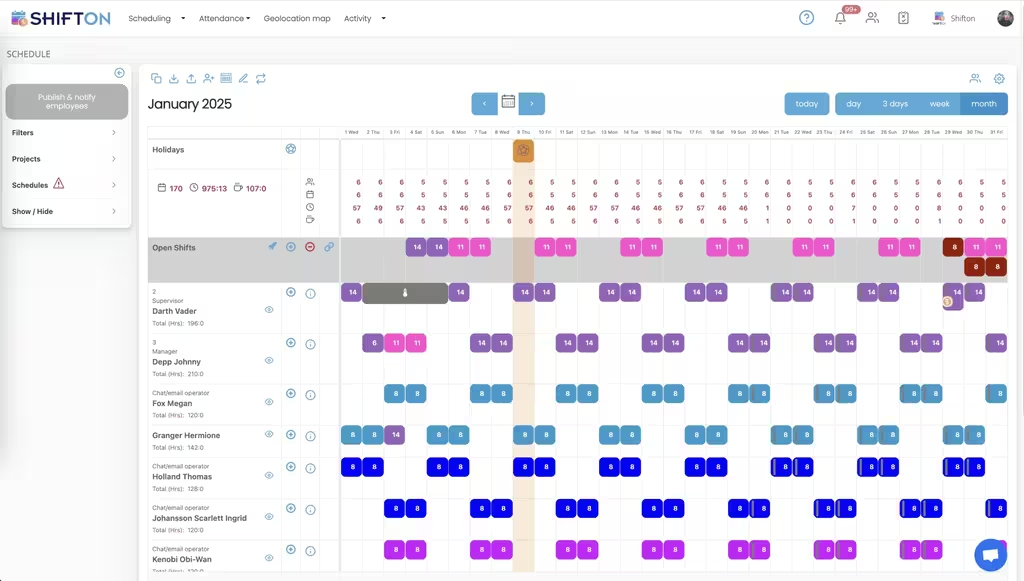
Plan people across engagements, not across days
A consultant rarely works on one thing. Two clients, an internal project and a proposal all compete for the same week, and a calendar that shows only appointments cannot answer whether anybody is free on Thursday.
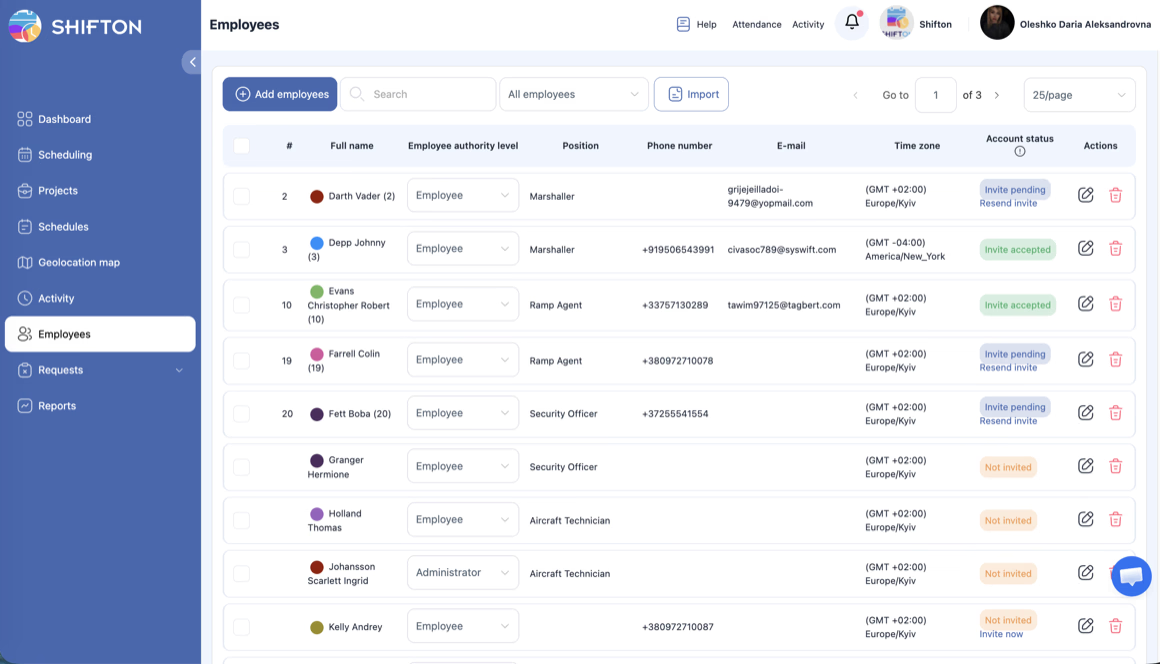
Record billable hours where they belong
The gap between hours worked and hours billed is where a consulting margin disappears. Recording the real start and finish against a client project closes it, because the number on the invoice and the number in the timesheet come from the same place.
Keep the bench visible
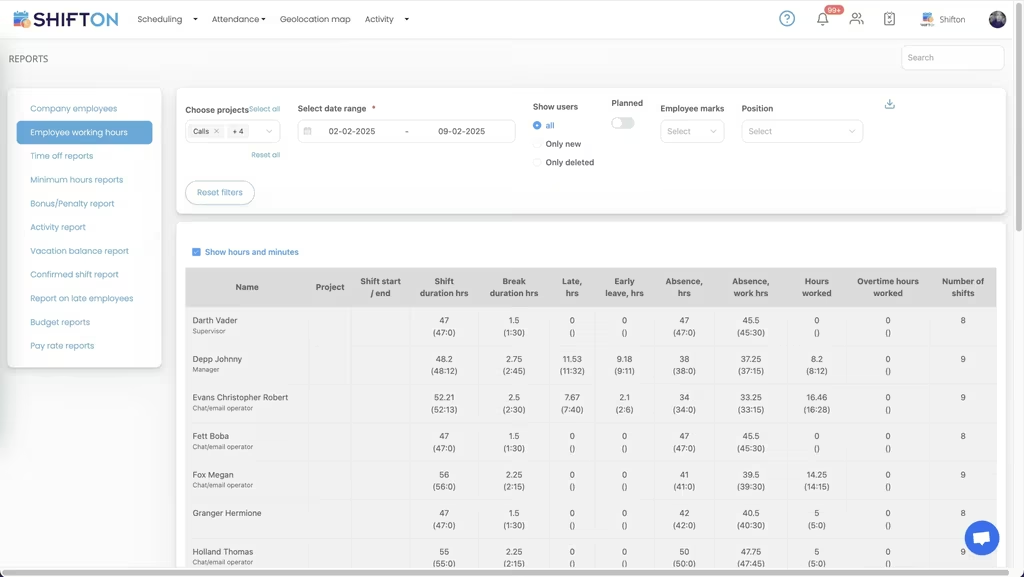
Utilisation is the number a practice lives on, and it is usually discovered in arrears. Weekly hours by person, planned against actual, show who is oversubscribed and who is between engagements while the week can still be changed.
Give consultants their own week on their phone
Consultants work from client sites, from home and from the road. The published week has to travel with them, and time has to be recorded from wherever they actually are.
Start with the Free Plan
No time limits. Get full access to core features and upgrade when you're ready.
The number a consulting practice runs on
Consulting has one metric that decides everything downstream. Utilisation, the share of available hours that is actually billable, sets revenue, sets hiring, and quietly sets whether the team is about to burn out. Almost every other decision in the practice is a consequence of it.
The awkward part is that most firms measure it late. Timesheets arrive at the end of the month, get reconstructed from memory and calendar entries, and produce a figure that is roughly right and three weeks old. By then the underused week has already happened and the overloaded consultant has already worked it.
Recording time where the work happens
The reconstruction problem is the one worth solving first. An hour remembered on the last Friday of the month is not an hour, it is an estimate, and estimates drift towards round numbers and towards whichever client is easiest to defend.
Recording start and finish against the engagement at the time it happens removes the drift. It also removes the argument. When a client queries a line on an invoice, the answer is in the same system that produced it, with a planned figure and an actual figure sitting next to each other.
Days that belong to two clients
The common case breaks naive time tracking. A consultant spends the morning on one engagement and the afternoon on another, and a system that thinks in days rather than shifts has to guess. Two shifts on two projects, each with its own hours, keeps the split honest without anybody filling in a form.
An estimate written on a Friday is not an hour.
Planning around the bench
Scheduling in a consultancy is not a rota problem, it is an allocation problem. The question is which people are committed to which engagements over the next six weeks, and where the gaps are. Those gaps have two names depending on when you notice them: available capacity if you see them in advance, and bench cost if you see them afterwards.
Sold work that has not been assigned to anybody deserves the same visibility. Keeping it as an open shift on the schedule makes it a decision rather than an omission, which matters more in a small practice where one unstaffed engagement is a large share of the month.
Overload has a shape in the data
Utilisation above target is not a success story. A consultant billing sixty hours a week for two months is an attrition risk and a quality risk, and both of those cost more than the extra revenue. The pattern is visible in the same weekly report that shows the bench, as a persistent gap between planned and actual hours in one direction.
Look at it alongside the client mix. One engagement that reliably consumes more hours than it was scoped for is a pricing conversation, not a personnel one.
Sixty billable hours a week is not a win.
Internal work counts too
Proposals, recruitment, training and the internal projects nobody bills for are real hours, and leaving them out of the record makes utilisation look worse than it is while hiding where the non-billable time actually goes. Scheduling them as their own project keeps both numbers honest.
What to look for in a tool
This category is crowded with products built for other jobs. Professional services automation suites do resourcing, billing and CRM together and are priced accordingly. Timer apps record hours beautifully and know nothing about who is scheduled next week. Project management tools track tasks and treat people as a field.
For a small or mid-sized practice the practical questions are few. Can one person hold two engagements in a day. Are planned and actual hours stored separately. Does the report group by client without an export first. Can a consultant record time from a client site on a phone.
Forecasting the next six weeks
The scheduling question in consulting is rarely about tomorrow. It is about the six weeks after the current engagements finish, and whether the pipeline covers them. A schedule that only shows the current week answers the wrong question.
Holding sold work as assignable shifts, including the pieces nobody has been named to yet, turns the schedule into a forecast. The gaps are visible far enough ahead to be sold into rather than absorbed as bench cost, and the overcommitted weeks are visible far enough ahead to be renegotiated.
Subcontractors and associates
Most small practices use associates for peaks. Keeping them as a separate department on the same schedule shows real capacity without mixing their hours into the employee payroll export, and it makes the cost of the peak measurable afterwards.
Starting small
Shifton is free for up to 10 people with no time limit, which covers an independent practice or a small team outright. Scheduling, open shifts, shift swaps, the mobile app and reporting are included. Paid modules are chosen one at a time from $0.50 per employee a month, each with a trial of up to 60 days (10 days for Work location control).
Frequently Asked Questions
Can I track hours separately for each client?
Yes. Each engagement is a project, and every shift carries the client it belongs to. More than one project takes the Departments, projects module, at $1 a month with one project free. Reports group recorded hours by client, so the figure that goes on an invoice comes from the same record as the one payroll reads.
How do I handle a consultant working for two clients in one day?
Two shifts on the same day, each against its own project, each with its own hours. Reports split the day between the engagements instead of assigning the whole day to whichever client was scheduled first.
Can I see utilisation across the team?
Weekly reports show hours by person and by project, planned against actual, which is what utilisation is made of. Somebody consistently over their planned hours and somebody consistently under both show up in the same view.
Does it separate billable from non-billable time?
Breaks are logged separately from worked time, and internal work is scheduled as its own project rather than being mixed into a client engagement. The split then carries through into the reports.
Can consultants record time from a client site?
Yes. The time clock works from the mobile app or a browser, so hours are recorded where the work happens. For firms that need clock-in tied to a location, work location control is available as a paid module.
Is there a free plan for a small consultancy?
Shifton is free for up to 10 people with no time limit, including scheduling, open shifts, shift swaps, the mobile app and reports. Paid modules start at $0.50 per employee a month, each with a trial of up to 60 days (10 days for Work location control).






See where the week actually went
Free for up to 10 consultants, with split days handled and utilisation you can read weekly.