

Scheduling Software for Utilities, Crews and Standby Duty
Build crew rotas, rotate standby and callout duty fairly and keep hour limits under control with scheduling software for utilities and field operations.


Build the Week and Publish It to Every Crew
A utility week is agreed on a Friday and amended twice before Monday. The weekly calendar gives every employee a row, with colour-coded shifts showing start and end times, and an open shifts row holding the cover nobody has picked up yet. Filters, projects and schedules narrow the board to one depot or one crew at a time.
A Month of Rotation With Balanced Hours
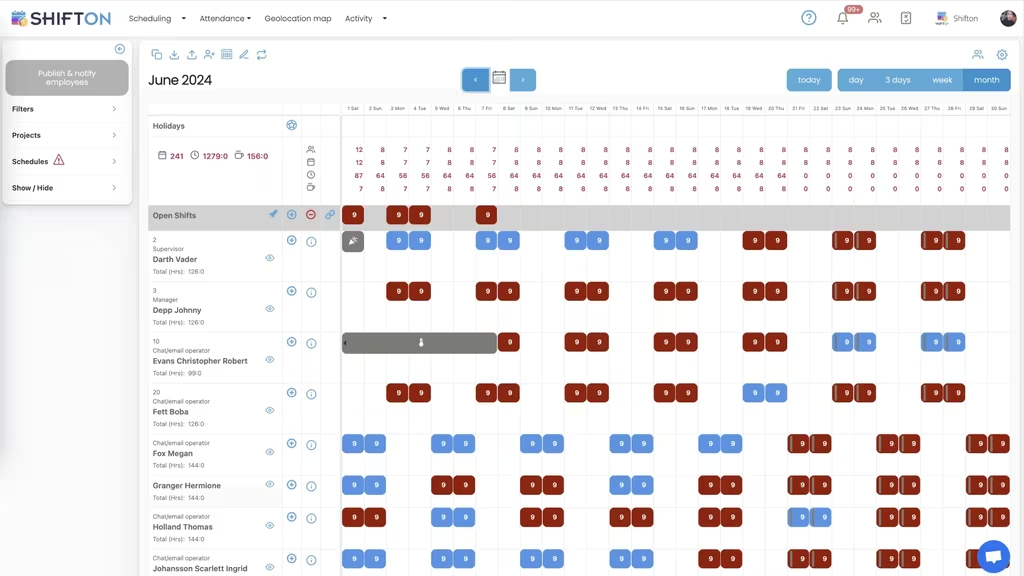
Continuous cover is planned in months, not days. The month view lays out the rotating pattern across the period, alternating blocks so day and night duty move around the team instead of settling on the same people. A monthly hour total sits beside each person, which is how an even period is checked before it is published.
The Next Three Days, Site by Site
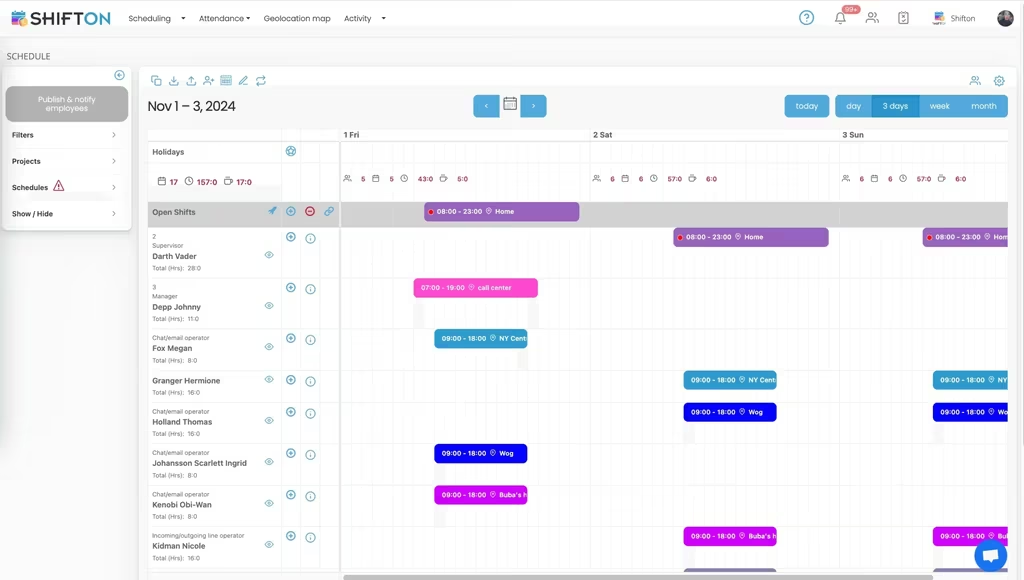
Planning a month is one job, running the next seventy-two hours is another. The three-day view shows shifts tagged with the work location they belong to, so the schedule says where each crew is expected as clearly as it says when. Per-employee hour counters and an open shifts row sit on the same screen.
What Every Hour Cost, Tier by Tier
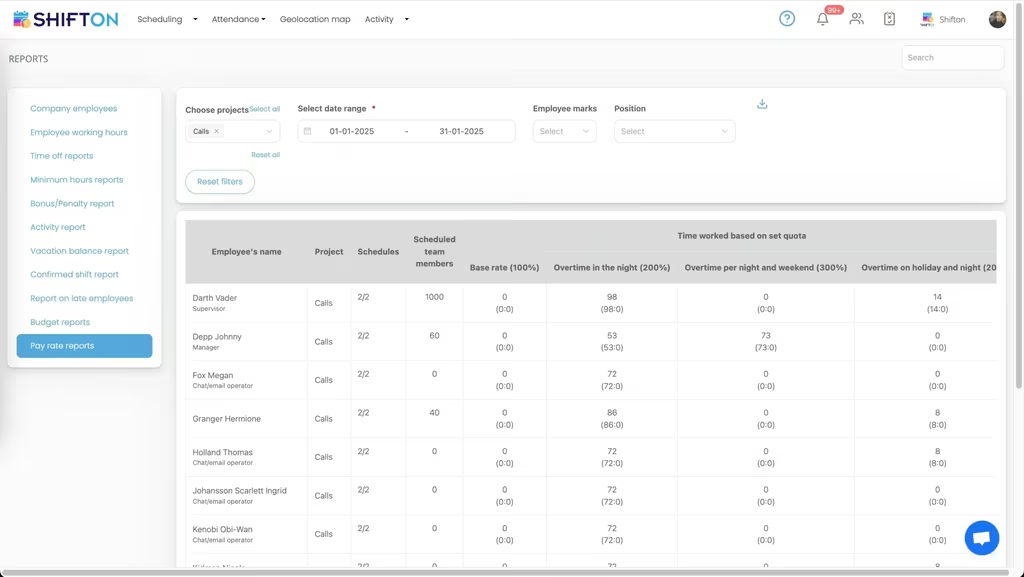
Callout-heavy months only make sense when the hours are broken apart. The pay rate report lists employee, project, schedule and team members, then splits the period into base rate hours, overtime at night, overtime on a night that falls at the weekend and overtime on a public holiday. What looked like one overtime figure becomes four lines you can act on.
Start with the Free Plan
No time limits. Get full access to core features and upgrade when you're ready.
Read the full guide to utility workforce scheduling
Utility work is planned around obligations rather than preferences. The network has to be staffed overnight, standby crews have to be reachable, planned maintenance has to land inside windows agreed months earlier, and one bad storm can invalidate the whole plan by Tuesday afternoon. Scheduling software for utilities exists to hold that plan together and to leave behind an accurate record of who worked, when, and at what rate.
The pressure is rarely a shortage of work. It is visibility. Who is rostered tonight, who carries standby this weekend, who has already run past their hour limit, and what the last round of callouts added to the wage bill. Those questions get answered slowly on a spreadsheet, and slowly is expensive when a fault crew is waiting for an answer.
What scheduling software for utilities has to handle
Four jobs carry most of the value. Build a week or a month of crew cover fast and change it without redrawing the grid. Keep standby and callout duty rotating fairly instead of landing on whoever answers the phone. Put the current schedule on every phone, because crews are at depots and job sites and not at a desk. And record real hours against the plan, since night, weekend and holiday work is paid differently and questioned more often.
A utility scheduling system that does those four well is worth more than a longer feature list. Searches for utility dispatch software usually come back to the same practical need: knowing which crew is on duty and getting a change onto their phones before it costs anybody anything.
Standby, callout duty and storm response
Standby is the part most operators handle worst. Duty has to rotate evenly, people need to know weeks ahead which nights are theirs, and swaps have to be recorded somewhere other than a group chat. Planned on a month view, the rotation becomes visible: you can see the pattern across the whole team, spot the technician who has taken three weekends in a row, and correct it before it turns into a grievance.
Cover nobody has claimed sits in an open shifts row rather than in a blank cell, so next month's hole in standby is obvious while it is still easy to fill. When an event escalates, extra shifts go onto the same grid as ordinary work and are published to everyone at once. That is most of what utility workforce management software is actually asked to do during a storm week.
Hour limits, fatigue rules and overtime control
Utilities run tighter hour rules than most industries, and for good reason. A crew that has worked eighteen hours is not the crew you want at the top of a pole. The weekly and monthly views carry a maximum against a running total for every person, so the planner sees who is approaching their ceiling while the schedule is still a draft.
Overtime then becomes a decision rather than a discovery. Hours can be balanced across a month instead of piling onto the same three people, and a rotation that alternates day and night blocks keeps the load even over a full period. Utility shift planning software earns its keep in the gap between noticing a problem and being forced to solve it at two in the morning.
Crews across depots, substations and job sites
Very few utility teams work in one place. Shifts get tagged with the site they belong to, so a three-day view answers the practical question of who is where over the next seventy-two hours rather than just who is working. Filters by project and schedule narrow the board to one depot, one contract or one crew, which is what makes a large roster readable at all.
Multi-site planning is a shared problem across field industries, and the same pattern shows up in our construction crew scheduling setup. For utilities the difference is that the sites are fixed and the rules around them are stricter, so the schedule has to say where a person is expected as clearly as it says when.
Roles, positions and who can be put on a shift
Not everyone on the roster is interchangeable. Certain tasks need a qualified name on site, a trainee cannot be sent alone, and a shift is only genuinely covered when the right position is on it. Positions sit on the team roster alongside access levels and contact details, and roles are shown against names on the schedule, so cover is checked by capability instead of by headcount.
That also fixes a quieter problem. A shift with four people and no supervisor looks full on a spreadsheet and is not full in reality. On a utility rostering platform it reads as the gap it is.
Where the back-office systems end and the rota begins
It is worth being direct about the boundary, because the search results mix two very different products. Utility management software runs billing, customer accounts and network records, it is bought by a different department, and Shifton does none of it. Shifton is the workforce layer underneath: who is rostered, who is on standby, who clocked in, how many hours were worked and how many of those hours were overtime.
Most operators run both, and the split is clean. The back-office platform owns the network and the customer. Utility staff scheduling software owns the rota and the timesheet. Teams that only need the second half often find it replaces more spreadsheet work than they expected.
Time tracking and hour reports for utility teams
Crews clock in and out from the mobile app, so each shift stores an actual start, end and break against what was planned. Working hours reports then show hours worked, overtime worked, lateness, early leaving and absence per person and per project, and the period exports for payroll instead of being retyped.
Pay rate reporting is where the cost picture closes. Hours are split across tiers - base rate, overtime at night, overtime on a night that falls at the weekend, overtime on a public holiday - so a heavy callout month is broken down rather than arriving as one number. Time tracking software for utilities is only useful if the output is something finance can act on, which is what the reporting tools are built for. QuickBooks, Zapier, Intercom and Usedesk connect from the integrations screen when those figures need to move somewhere else.
Choosing a utility scheduling system your crews will use
Adoption is decided on a phone, not in a demo. If the schedule in the app is the true schedule every single time, crews stop ringing the depot to check. That means changes published to everyone at once, availability and time-off requests handled in the same place as the rota, and recorded hours that match what people actually worked.
Test it the way the team will use it. Build a full month of rotation and see how long it takes. Change one standby night and check how fast the notification lands. Pull an hours report for a week that included a callout and see whether the overtime tiers come out separated.
Under 10 team members, Shifton is free with no time limit, which covers small operators and contractor crews outright. Larger workforces move to paid plans billed per employee per month, with geolocation and work location available as a paid module. Either way the target is the same: cover you can trust at three in the morning, and an hours figure nobody has to argue about.
Frequently Asked Questions
What is scheduling software for utilities?
Scheduling software for utilities plans which crews and technicians work which shifts, publishes that plan to the team and records the hours worked afterwards. Shifton covers shift building and templates, open shifts, standby rotations, availability and time-off requests, clock-in and clock-out, breaks and hour reports. It handles the workforce, not the network.
Can Shifton plan standby and callout duty for utility crews?
Yes. Standby and callout duty is planned as shifts on the same calendar as ordinary work, including overnight and weekend blocks, and rotated across the team over a full month so the same people do not carry every night. Unclaimed cover sits in an open shifts row, and everyone sees a change the moment it is published.
Does Shifton track working hours and overtime for utility field crews?
It does. Crews clock in and out from the mobile app, so each shift holds an actual start, end and break against the plan. Working hours reports show hours worked, overtime worked, lateness and absence per person and per project, and pay rate reports split the period into base and premium tiers. Reports export for payroll.
Does Shifton replace a utility's billing or back-office systems?
No, and it is not meant to. Billing, customer accounts and network record platforms are a separate product class bought by a different department. Shifton is the workforce layer that sits underneath: rosters, standby duty, attendance, worked and overtime hours, and the reports that come out of them. Most operators run both.
How do utility crews see their shifts and schedule changes?
Every employee has the schedule in the Shifton mobile app on iOS and Android, together with their own hours, requests and any tasks attached to a shift. Push notifications go out when a schedule is published or amended, so a crew leaving the depot at six is working from the current version rather than last week's printout.
Is there a free plan for a small utility workforce?
Shifton is free for up to 10 team members with no time limit, which covers small operators, contractor crews and single-depot teams. Shift scheduling, the mobile app, basic time clock and reports are included. Larger workforces pay per employee per month, and the geolocation and work location module is paid on any plan.





Run Your Utility Crew Schedule on Shifton
Plan the week once, publish it to every crew, and know exactly which hours fell into which pay tier.