

Remote Workforce Management for Distributed Teams
Shared schedules across time zones, hours recorded from any device, and a workload picture that does not depend on watching screens.


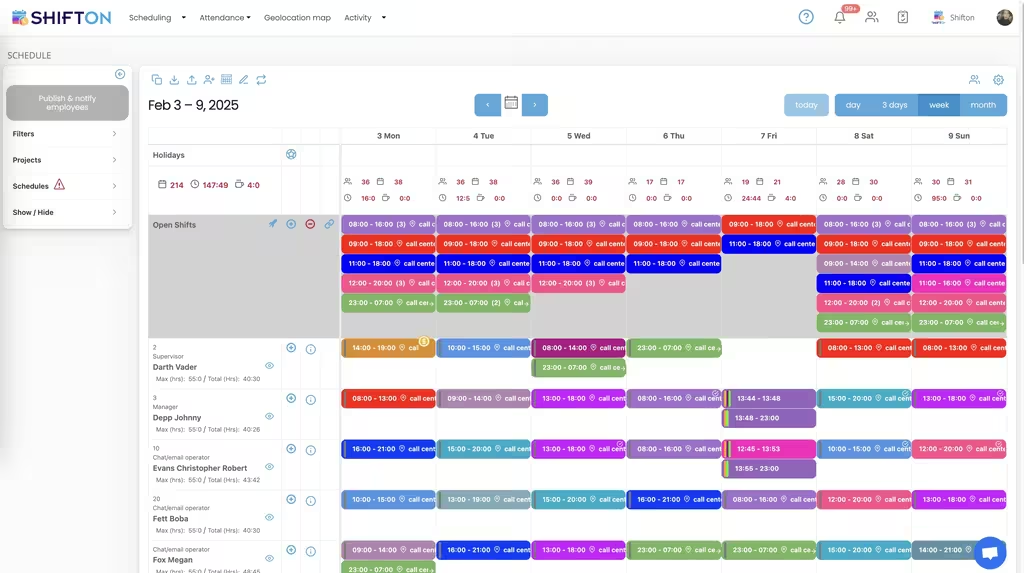
One schedule that reads correctly in every time zone
A distributed team does not share a working day. The same meeting is nine in the morning for one person and eleven at night for another, and a schedule that shows only one clock hides the cost of that until somebody quietly stops attending.
Record hours without watching screens
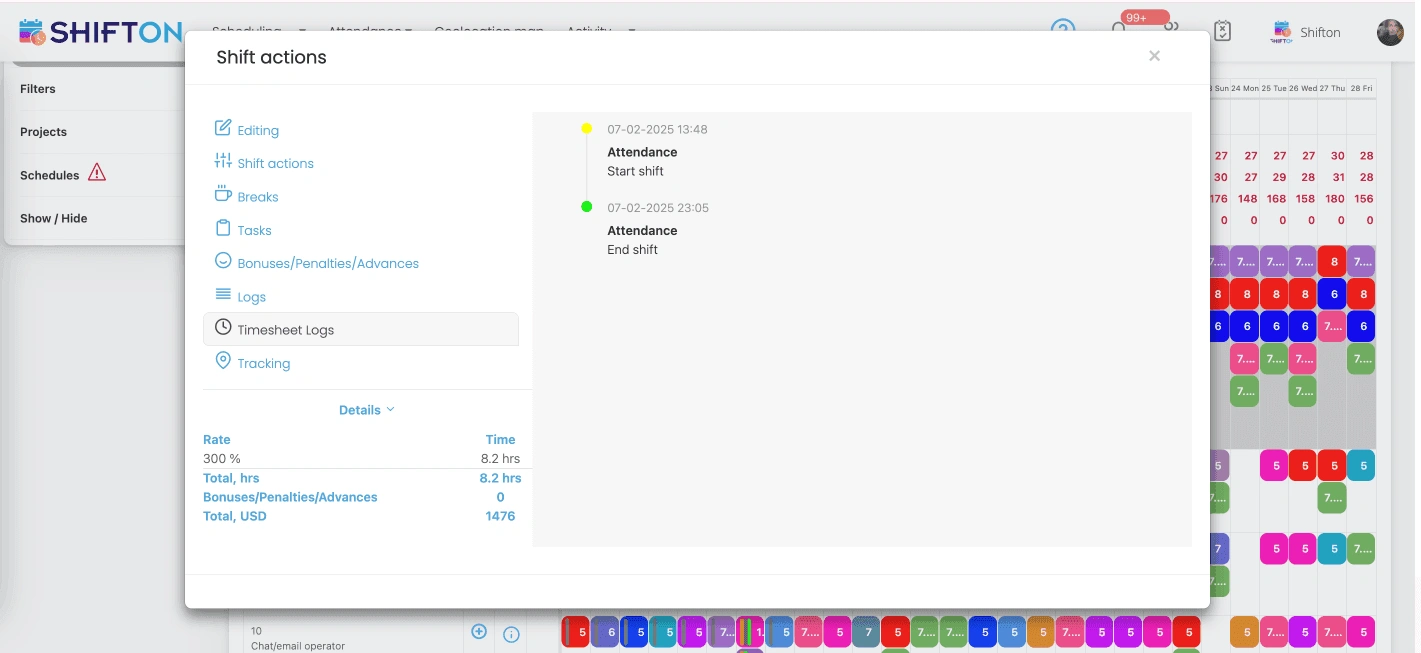
Monitoring software measures keystrokes and produces resentment. A time record measures start, finish and breaks, and produces payroll. The second is what a remote team needs, and it works from any device without anybody being filmed.
Assign work so that nothing lands twice
Distance removes the corridor conversation that used to keep two people from doing the same job. Tasks attached to a shift, with a status anybody can read, put that information back where the team can see it.
See workload before somebody burns out
Remote overwork is invisible. Nobody watches a colleague stay until eight, so the first sign is often a resignation. Weekly hours by person, planned against actual, make the pattern visible while it is still a scheduling problem.
Start with the Free Plan
No time limits. Get full access to core features and upgrade when you're ready.
What remote workforce management actually covers
The phrase covers two very different products, and confusing them is expensive. One family watches people: screenshots, keystroke counts, activity scores, idle timers. The other family coordinates people: who is working when, what they are working on, and how many hours the week actually contained.
The first family sells to managers who have lost trust. The second sells to managers who need a schedule and a payroll figure. Shifton is the second kind, and the distinction is worth making early because the two are usually shelved together.
Time zones are the first real problem
A colocated team shares a working day without thinking about it. A distributed team does not, and the gap appears in small, corrosive ways. A meeting that is convenient for four people and brutal for the fifth. A handover that assumes an overlap which does not exist. A deadline set in a time zone nobody named.
Storing shifts against one timeline and displaying them in each person local hours removes an entire class of misunderstanding. The manager plans once. Everybody reads the same week correctly. Nobody has to do arithmetic before a meeting.
Availability before the plan, not after
Asking people to mark the hours they can work before the week is built saves the round of corrections that otherwise follows publication. It also surfaces the quiet constraints: school runs, second jobs, the four hours of overlap somebody actually has with the rest of the team.
Hours without surveillance
Monitoring is the default answer to remote hours and it is usually the wrong one. It measures activity rather than output, corrodes trust in weeks rather than months, and in several jurisdictions creates legal exposure nobody costed. Meanwhile the actual requirement is narrow: a defensible record of when somebody started, when they finished, and what they took as a break.
That record works from a browser or a phone, needs no office hardware, and gives payroll everything it needs. Where a company genuinely does need clock-in tied to a place, for example for staff who visit client sites, work location control exists as a separate paid module and stays switched off until it is chosen.
Nobody has to do arithmetic before a meeting.
Coordination replaces the corridor
Most of what a colocated team knows was never written down. Who is picking up the customer issue. Whether the report went out. Which of the two people looking at the same problem is actually solving it. Distance removes that channel, and the common substitutes, longer meetings and more messages, replace it badly.
Attaching tasks to shifts puts the information where the schedule already is. The day is more than a block of hours: it carries what the hours are for, with a status anyone can read and notes where the context used to be spoken. It is a smaller intervention than a project management rollout and it fixes the specific thing that distance broke.
Hybrid is the normal case now
Very few teams are entirely remote. Most are a mix: some in an office, some at home, some in another country, and the proportions change month to month. One schedule holding all three, with locations attached where they matter, is easier to run than separate systems for separate groups.
Trust is cheaper than monitoring, and it survives longer.
Burnout is a scheduling signal
Remote overwork does not announce itself. Nobody sees a colleague still at the desk at eight, so the pattern runs for months and then arrives as a resignation. The data to catch it earlier already exists in the time record.
Hours by person, planned against actual, read weekly. Somebody whose actual consistently exceeds their planned hours is not more committed, they are scheduled wrong, and that is fixable while it is still a scheduling problem rather than a retention one.
The reporting that answers a board question
Distributed teams generate a specific kind of scepticism from people who do not work in them. Is anybody actually working. The plain answer is usually yes, and the useful answer is a report rather than an argument: hours by person and by project, planned against actual, for the last month.
That report does something more valuable than reassurance. It shows which projects consumed the time, which is the question nobody could answer when the team sat in one room either. Colocation hid the problem behind visible presence; distance simply removed the disguise.
Contractors and employees in one view
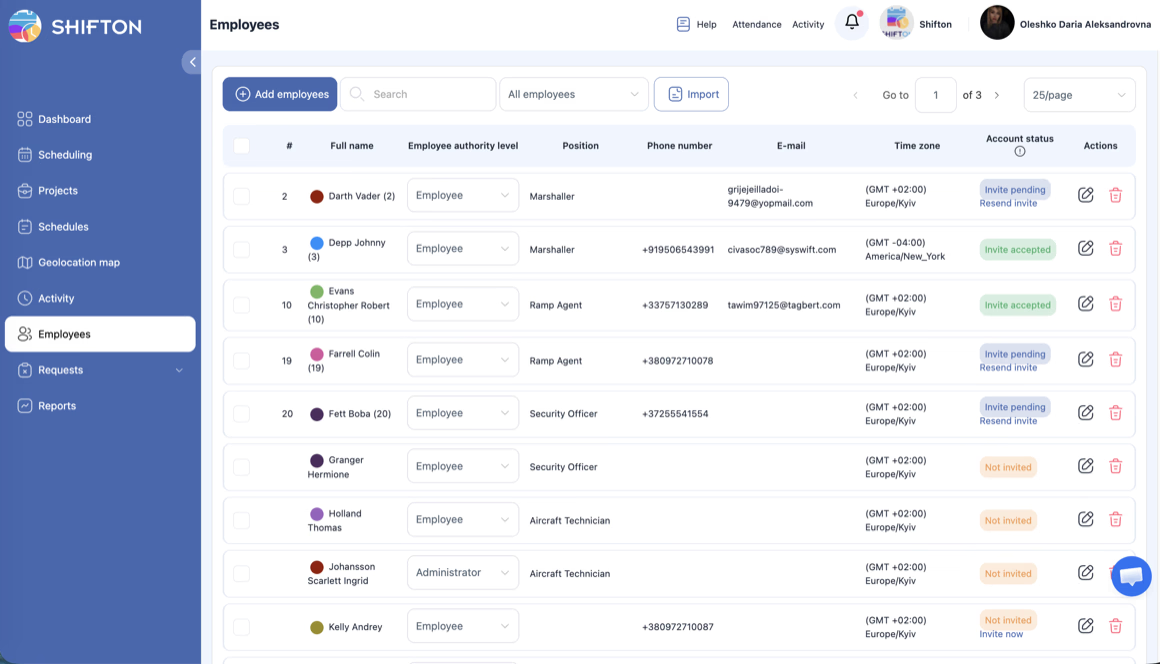
Most distributed teams are mixed. Employees on a payroll, contractors on invoices, and often a few people in a third arrangement that finance has opinions about. Keeping them as separate departments on the same schedule preserves the operational picture while keeping the payroll export limited to the people the company actually pays.
What to check when comparing tools
The category divides on one question: does the product measure activity or record time. Products that screenshot, count keystrokes or score idle minutes are answering a trust problem. Products that record start, finish and breaks are answering a payroll and planning problem. Buying the first when you needed the second costs morale on top of the licence.
Beyond that the checks are practical. Does the schedule display in each person local hours rather than one fixed office zone. Can somebody clock in from a browser without installing anything. Are planned and actual hours stored as two numbers. Does time off sit in the same calendar as the shifts, or in a separate system that approves without seeing cover.
Starting without a rollout
Shifton is free for up to 10 people with no time limit, which covers most small distributed teams outright. Scheduling, the basic time clock, the mobile app and reporting are included. Paid modules are added individually from $0.50 per employee a month, each with a trial of up to 60 days, so a team can test payroll or time off management before committing to it.
Frequently Asked Questions
How does scheduling work across several time zones?
Shifts are stored against a single timeline and shown to each person in their own hours, so a manager plans once and everybody reads the same week correctly. Availability and time off sit in the same calendar, which keeps handovers honest.
Do I have to monitor screens to track remote hours?
No. The time clock records start, finish and breaks from a browser or the mobile app. There is no screenshotting or keystroke logging. Work location control, which ties clock-in to a place, is a separate paid module that stays off unless you enable it.
Can remote and office staff share one schedule?
Yes. Hybrid teams are the common case: the same week holds people in the office, people at home and people in another country, with locations attached to shifts where that matters.
How do I stop two people doing the same task?
Tasks are attached to shifts with a status anyone on the team can read, so assignment and progress are visible without a status meeting. Changes notify the person concerned.
Can I see whether somebody is consistently overworking?
Weekly reports show hours by person, planned against actual, and flag overtime on the day it is worked. The pattern of somebody finishing late every evening appears in the report rather than in an exit interview.
Is there a free plan for a small remote team?
The first 10 people cost nothing and there is no time limit, which covers most small distributed teams: the schedule, the basic time clock, the mobile app and reports. Paid modules are $0.50 per employee a month, each with a trial of up to 60 days.






Give the team one week they can all read
Free for up to 10 people, with time zones handled, hours recorded from any device and no screen monitoring.