

Property Maintenance Scheduling Software for Site Teams
Roster caretakers, cleaners, security and on-call engineers across every building with property maintenance scheduling software made for property teams.


Build the Week and Publish It to Every Building
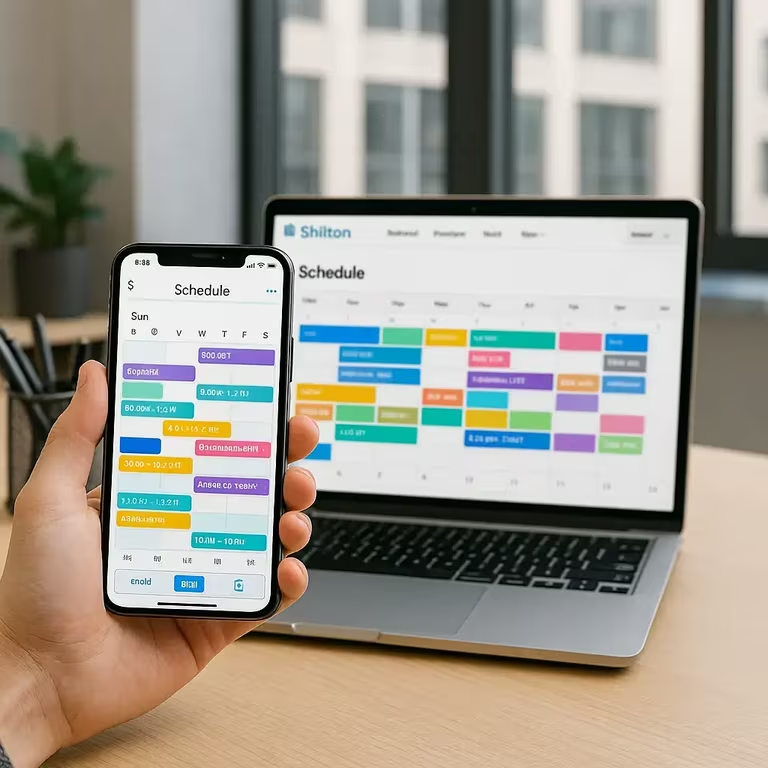
Portfolio rotas are agreed late and amended often. The weekly calendar gives every employee a row, with colour-coded shifts showing start and end times, and an open shifts row holding cover nobody has claimed yet. Filters, projects and schedules narrow the board to one building or one trade before you publish.
The Team Roster, Roles and Access Levels
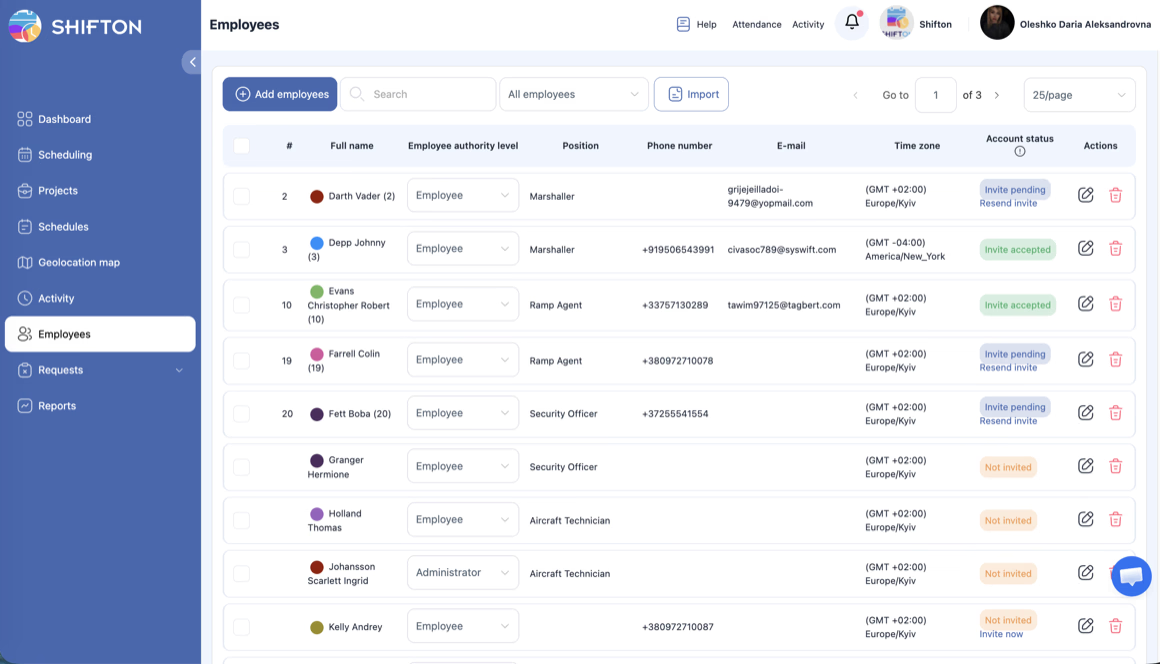
A rota is only as reliable as the list behind it. The employees table holds full name, position, phone, email, time zone and authority level, so a manager sees who can be put on a shift before creating it. New staff and contractors are added one at a time or imported in bulk, and account status shows whether an invite is still pending.
Breaks and Swaps Inside a Live Day
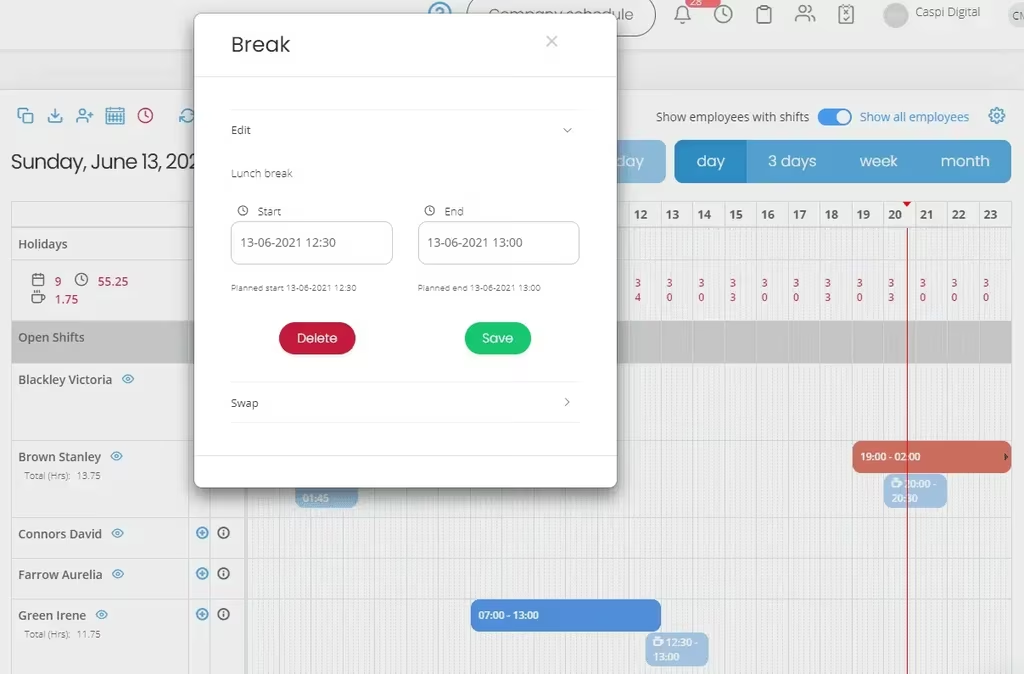
The day rarely runs exactly as written. On the day view each shift, including an overnight 19:00 to 02:00 security block or an early 07:00 to 13:00 start, carries its break chips underneath and a running hours total per person. Opening a break gives you the lunch break start and end, with the planned start and planned end recorded beneath them.
Connect Shifton to the Tools You Already Run
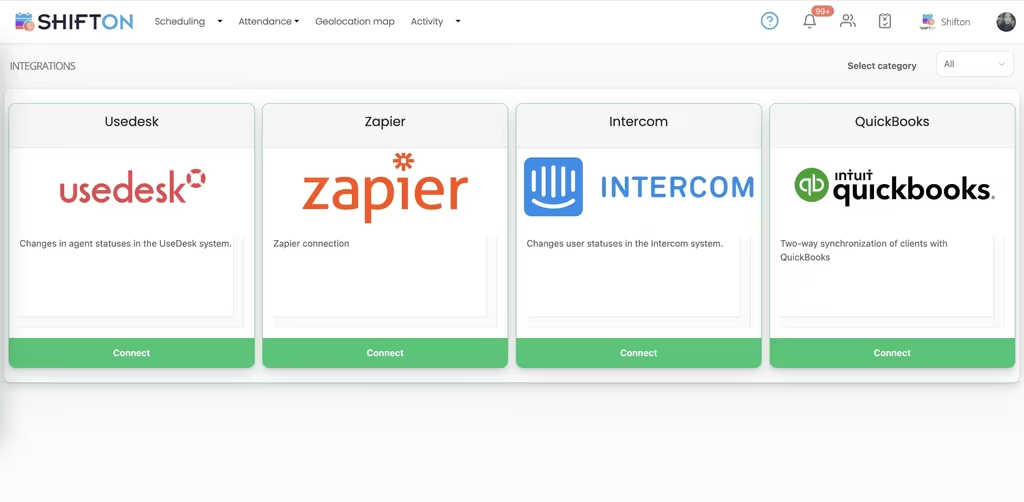
Scheduling data is more useful when it does not stay in one place. The integrations screen lists the available connectors with a category filter and a connect button on each card, so a portfolio team can wire Shifton into the systems already in daily use without exporting anything by hand.
Start with the Free Plan
No time limits. Get full access to core features and upgrade when you're ready.
Read the full guide to property manager scheduling
A managed building is only as good as the people standing in it. Someone opens the doors, someone covers reception, someone walks the plant room, someone is reachable when a riser floods at midnight. Spread that across a portfolio and the hard part stops being the work itself and becomes knowing who is on duty where. Property maintenance scheduling software is what turns that from a set of separate arrangements into one schedule.
Most teams start with a spreadsheet per building. It survives until the first sick day, the first holiday clash and the first weekend that needed two engineers instead of one. After that, the person holding the portfolio spends more time rebuilding rotas than reviewing sites.
What property maintenance scheduling software has to do
Four jobs matter more than the rest. Build a week across several buildings quickly and change it without redrawing anything. Keep out-of-hours and on-call duty rotating fairly across the team. Put the current rota on every phone, because site staff are in corridors and plant rooms rather than at a desk. And record what was actually worked, since paid hours, breaks and lateness are the numbers that get challenged.
A property management scheduling app that handles those four is worth more than a longer feature list. It is also the difference between a caretaker who checks their phone and one who rings the office every Sunday evening.
A portfolio week is assembled from a few repeating pieces:
- Fixed daytime cover for reception, cleaning and site engineering
- Overnight and weekend security shifts that run across midnight
- Planned rounds and recurring checks that repeat week after week
- On-call duty rotating between the engineers who can attend at short notice
Once those four sit on the same grid instead of in four separate files, the rota stops depending on anybody's memory.
Caretakers, cleaners and security on one schedule
A portfolio is staffed by several trades that rarely overlap. Cleaning teams start before the building opens, security runs overnight, engineers work daytime rounds, and reception covers the hours in between. Each has its own pattern, its own cost and its own idea of a normal day.
Holding all of them on one grid, with buildings kept apart as projects, means a manager can plan one site in isolation and still see whether the portfolio is covered. Filters do the narrowing. A property staff scheduling system that cannot separate sites forces everything back into one unreadable sheet within a month.
From a maintenance schedule template to a published rota
Recurring upkeep is the predictable half of the job, which is why so many teams start from a property maintenance schedule template. A template is a good starting point and a poor operating system: it says what should happen in a normal week and nothing about who is off, who is covering, or what changed on Tuesday.
Saved schedule templates close that gap. A proven week for a building is reused rather than rebuilt, then adjusted for holidays and absence before it is published. The plan stays repeatable, and the exceptions stay visible instead of living in one manager's head.
On-call and out-of-hours cover across a portfolio
Out-of-hours duty is where fairness and coverage collide. It has to rotate evenly, people need to know weeks ahead which nights are theirs, and swaps have to be recorded somewhere other than a group chat.
Planned as shifts on the same calendar as daytime work, standby duty becomes something you can inspect. Nights nobody has taken sit in an open shifts row and reach the whole team at once instead of travelling down a call list. Cover for a late finish or an early start is added to the same grid, and everyone sees the change the moment it is published. That is most of what property management workforce software is asked to do on a bad night.
Time off pulls in the same direction. Holiday requested through the app sits against the rota, so whoever is planning August can see who is already booked away before committing a building to continuous cover.
Roles, access levels and a roster head office can see
The rota is only as reliable as the list behind it. Every person carries a position, an authority level, a phone number, an email address and a time zone, so a manager knows who can be put on a shift before creating it. Contractors and seasonal staff are added individually or imported in bulk, invited by email, and their account status stays visible until the invite is accepted.
Access levels matter once a portfolio grows. A site manager needs to build and publish their own building's rota. Head office needs to look across all of them. Setting that per person, rather than by handing round a file, is what keeps a property maintenance scheduling tool usable at twenty buildings instead of two.
Breaks, swaps and the shift that changes on the day
Plans move. A break is taken later than planned because a lift engineer arrived late, an overnight security shift running from 19:00 to 02:00 gets handed to somebody else, a morning cleaner starts early. Each of those is editable on the day view, with a planned start and end recorded against the actual times, so the record reflects the shift that happened rather than the shift that was written down.
Swaps are handled in the same place. Tasks can also be attached to a shift, which is how a round or a recurring check travels with the person doing it, and our task management tools cover that side in more detail.
Where the portfolio platforms end and the staff rota begins
The search results mix two products that have almost nothing in common, so it is worth being blunt. Commercial property management software runs leases, rents and the financial side of a portfolio, it is bought by a different part of the business, and Shifton does none of it. Shifton is the workforce layer: who is rostered at which building, who is on call, who clocked in, how many hours were worked and how many were overtime.
Almost every managing agent runs both, and the split is clean. The portfolio platform owns the buildings and the money. A property manager scheduling app owns the people and the hours. Teams that also run mixed facilities sites will find the same shape on our facility management page.
Choosing a scheduling system your site teams will use
Adoption is decided by the staff, not the buyer. If the rota in the app is the true rota every time, people stop ringing the office to check the weekend. That means changes published to everyone at once, availability and time-off requests handled in the same place as the schedule, and recorded hours that match what was worked.
It helps if the software sits alongside what is already in use. Usedesk, Zapier, Intercom and QuickBooks connect from the integrations screen, so hours and status changes can move on rather than sitting in one system.
Under 10 team members, Shifton is free with no time limit, which covers a small managing agent or a single large building. Bigger portfolios move to paid plans billed per employee per month, with geolocation and work location available as a paid module. The target does not change with size: every building covered, every out-of-hours night owned by somebody, and an hours figure nobody has to argue about.
Frequently Asked Questions
What is property maintenance scheduling software?
Property maintenance scheduling software plans which caretakers, cleaners, security officers and engineers work which shifts across a portfolio, publishes that plan to the team and records the hours afterwards. Shifton covers shift building and templates, open shifts, availability and time-off requests, breaks, clock-in and clock-out and hours reports.
Can Shifton schedule staff across several buildings?
Yes. Each building is planned as its own project or schedule, and filters let a manager work on one site or review the whole portfolio. Staff who cover more than one address sit on a single roster, so a shift can be assigned wherever they are needed and the totals still add up per person.
Does Shifton handle on-call and out-of-hours cover for property teams?
It does. Standby and out-of-hours duty is planned as shifts on the same calendar as daytime work, including overnight blocks, and rotated across the team so the same people do not carry every night. Nights nobody has taken sit in an open shifts row that the whole team can see and claim.
Does Shifton replace a property management platform?
No. The platforms that run leases, rents and portfolio finances are a separate product class and Shifton does not touch them. Shifton is the workforce layer beside them: rotas, roles and access levels, attendance, breaks, worked and overtime hours, and the reports that come out of it. Managing agents run both.
How does Shifton handle breaks and shift swaps?
Breaks are planned inside the shift and can be edited on the day view, with the planned start and end kept alongside the times actually recorded. A shift can be swapped to another team member from the same screen, so a handover is a change to the schedule rather than a message nobody else sees.
Is there a free plan for a small property management team?
Shifton is free for up to 10 team members with no time limit, which covers a small managing agent or a single large building. Shift scheduling, the mobile app, basic time clock and reports are included. Larger portfolios pay per employee per month, and the geolocation and work location module is paid on any plan.



Schedule Your Property Team With Shifton
Build the week once, publish it to every building, and always know who is on duty tonight.