

Fitness Studio Scheduling Software for Gyms and Clubs
Fitness studio scheduling software for trainers, instructors and front desk: build the week, send it to every phone, and keep hours and labor cost in check.


Build the week and publish it to every phone
The weekly grid holds the whole operation on one screen: trainers, instructors, front desk and floor staff as rows, shifts colour-coded with their start and end times. Anything still uncovered sits in the Open Shifts row at the top, so gaps are visible while there is time to fill them rather than on the morning they bite.
See what each shift actually cost
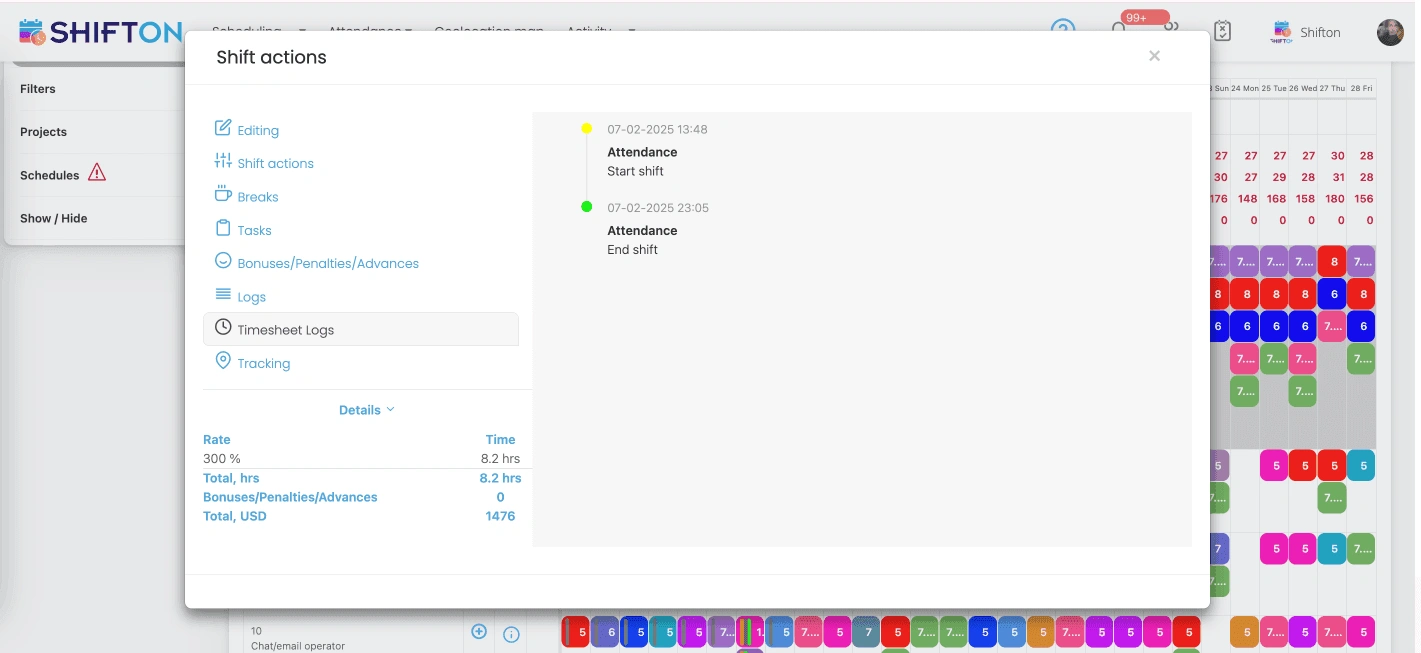
Open a shift and the attendance panel shows the real clock-in and clock-out against what was planned. The details block converts those hours into money at the rate applied to that shift, so premium pay for holidays or unsocial hours is priced in before it reaches payroll.
Schedule around who is genuinely free
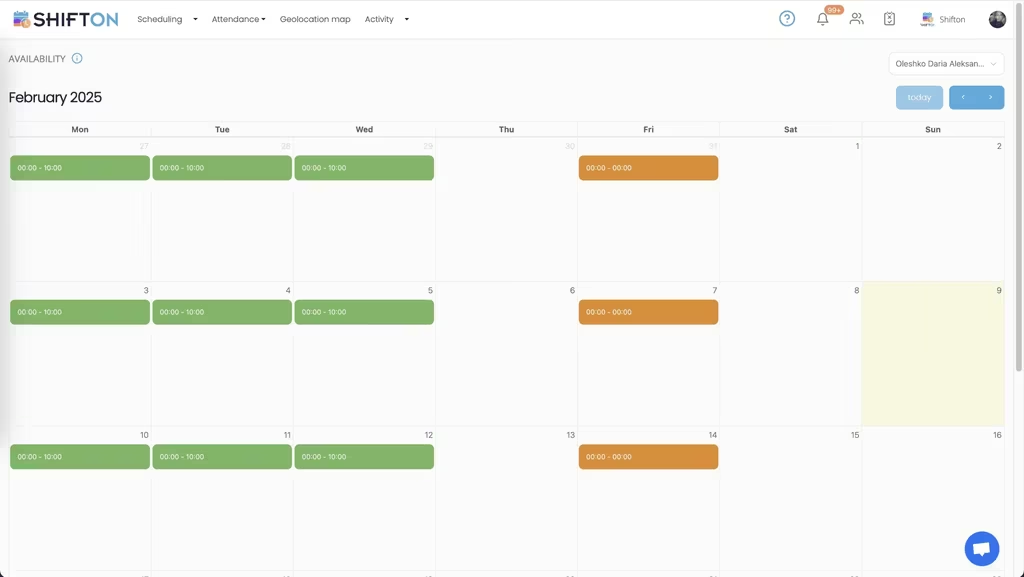
Instructors teach across more than one place and trainers protect their own client hours, so guessing availability burns a morning and still produces refusals. The availability calendar collects it in advance: green marks the hours a person can work, orange marks the hours they cannot.
Reports that settle the month-end questions
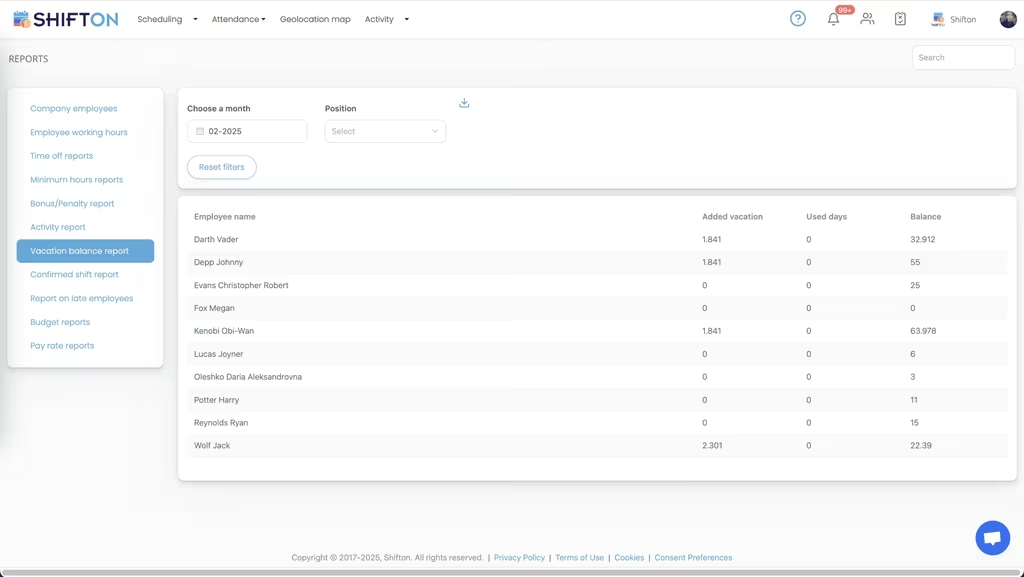
Everything an owner needs to check at the end of a period already exists as a report. Working hours, time off balances, lateness, bonuses and pay rates each have their own view, filtered by month and position, and each one exports for payroll or accounting.
Start with the Free Plan
No time limits. Get full access to core features and upgrade when you're ready.
Read the full guide to fitness studio scheduling
Fitness businesses run on people arriving at fixed times. A class without an instructor turns into a refund conversation, an unstaffed reception at six in the morning costs you a sign-up, and a trainer booked against a floor shift is an hour nobody can charge for. Fitness studio scheduling software exists so the rota stops living in one manager's head and starts behaving like a system that other people can run.
The staffing pattern in a gym is genuinely awkward. Demand piles up at both ends of the day and thins out in the middle. The team mixes salaried floor staff, part-time reception, and instructors who teach across several sites and hold their own client hours. Generic office rota tools assume a flat nine to five, and they break on the first split shift.
What fitness studio scheduling software has to handle
Strip out the marketing and the job is short. Build a week of shifts quickly, including the awkward early and late blocks. Know before you publish whether the hours you have just assigned fit the budget. Reach staff on their phones, because that is the only place they will reliably look. And absorb change without a rebuild, since cover requests, illness and last-minute class swaps are a weekly event rather than an exception.
A gym staff management software that clears those four does more for a club than one with fifty features aimed at a different problem. Everything else is a preference.
Trainers, instructors and front desk are three different scheduling problems
A fitness team is not one workforce. Front desk needs continuous cover from open to close and rarely more than one or two people at a time. Instructors are tied to specific slots and specific rooms, and an empty slot is visible to members immediately. Personal trainers work around their own client load and treat floor hours as the flexible part of the week.
Good personal trainer scheduling software keeps those groups distinct without splitting them into separate systems. Positions are set per person, so you can plan reception on its own, then switch the filter and plan the instructor timetable, then look at the whole week together to check that total hours and total cost still land where you wanted. Scheduling software for personal trainers that cannot show the rest of the building alongside them is only half a tool.
Why a gym scheduling app beats the shared spreadsheet
Plenty of clubs still run on a sheet in a cloud drive plus a group chat for changes. It feels free. The cost is hidden in friction: a swap takes four messages and an edit half the team never sees, a version drifts out of date the moment two people open it, and nobody can tell you what time a shift actually started.
Moving to a gym scheduling app removes that layer entirely. Swaps are requested and approved in the app, and the moment one is approved everyone sees the corrected week. Open shifts go out to every qualified person at once instead of a round of individual calls. The shift schedule people look at is the schedule that is actually true, and it is the same one payroll will read later.
Controlling labor cost in a fitness business
Wages are the largest controllable line in almost every club, and most of the waste is small and repeated rather than dramatic. An extra body on a quiet mid-afternoon. A shift that ran forty minutes past close. An overtime threshold crossed because nobody was counting hours across two sites.
A gym scheduling system makes that visible while it can still be changed. Per-employee hour limits sit next to the running total, so an approaching cap is obvious as you build. Clock-in and clock-out are recorded against the planned shift, which means the gap between rostered and worked hours is a number rather than a suspicion. Budget and pay rate reports then show what a period really cost, broken down by person and position. Fitness centre scheduling software that only produces a pretty grid leaves the expensive half of the job undone.
Availability, cover and the last-minute swap
The reason rotas get rebuilt three times is almost always availability. Instructors teach elsewhere, students study, and trainers guard their client blocks. Collecting all of that by message is slow and it goes stale.
Shifton collects availability up front on a monthly calendar, with the hours somebody can work marked separately from the hours they cannot. Time-off and holiday requests run through the same place, so approved absence is already on the grid before you start planning. Handling time off management inside the scheduling tool rather than in a separate inbox is what stops the same conflict being discovered twice.
When cover is still needed, the shift goes into the open shifts row and anyone qualified can pick it up from the app. That is a considerably faster route to a covered class than working down a contact list.
Yoga, pilates and small studio operations
Smaller studios have the opposite problem to a large club: not too many staff, but too few, and every one of them matters. With five or six instructors, one unfilled slot is a visible hole in the timetable. Yoga studio scheduling software and pilates studio scheduling software here are less about optimisation and more about certainty, so that the person opening on Saturday knows they are opening on Saturday.
Scheduling software for yoga studio teams tends to be judged on two things. Can the owner build next month in one sitting, and does everyone get told without a separate round of messages. A fitness studio scheduling app that handles both, on a phone, is doing what a small studio needs. The same applies to a boutique pilates studio scheduling system or an independent strength gym.
Running more than one club
Coordination becomes the real work as soon as a second site opens. Staff are shared, one location is short while another is over-covered, and head office has no picture until the numbers land. A fitness club scheduling software that treats each site as an island recreates the problem it was bought to solve.
Multi-location scheduling puts every club on one account, with shifts tagged to a specific site and totals rolling up per person across all of them. A schedule that works can be saved as a template and applied to the next location instead of starting from an empty grid, which is a faster route than any gym schedule maker built around a single site. Health club scheduling software at this size earns its place on reporting as much as on planning.
Choosing a gym staff scheduling system
Most shortlists of gym scheduling software look identical on a feature page, so test any platform the way the team will actually use it. Build a full week on a phone and time yourself. Send a shift change and see how quickly it lands. Ask what an instructor sees when they open the app for the first time, since adoption dies on a confusing first screen. Check that hours leave the system in a form your accountant can use, and that gym time tracking data ties back to the shift it came from.
Under ten employees, Shifton's free plan covers scheduling, the basic time clock, the mobile app and reports with no time limit, which is enough for a single studio. Beyond that, pricing is per employee per month for the modules you switch on. Either way the aim is the same: a timetable that reflects who is really free, hours that match what was worked, and a wage bill that lands where you planned it.
Frequently Asked Questions
What is gym staff scheduling software?
It is a system for planning and publishing the working hours of the people who run a fitness business: trainers, instructors, front desk and floor staff. It builds the rota, sends it to everyone's phone, records clock-in and clock-out, and reports the hours back for payroll. Shifton is a staff scheduling platform, so it manages your team rather than selling classes to the public.
Can Shifton schedule personal trainers and front desk staff in the same rota?
Yes. Positions and roles are set per employee, so a scheduling app for personal trainers, reception cover and floor staff all live in one weekly grid. You can filter the view down to a single position when you are planning that team, then publish the whole week at once. That is the difference between a personal trainer scheduling app and gym staff scheduling software that covers the entire site.
Is there a free gym scheduling app?
Shifton is free for up to 10 team members with no time limit, which covers most single studios. The free plan includes shift scheduling, a basic time clock, the mobile app and reports. Paid modules are charged per employee per month once the team grows past that, and geolocation-based clock-in is one of them.
How do trainers and instructors see their shifts?
Through the Shifton mobile app for iOS and Android, and in the browser. When you publish the week, everyone scheduled gets a push notification with their own shifts, and any later change reaches them the same way. Nobody has to check a printed sheet in the staff room.
Can one account cover several gym locations?
Yes. Locations and projects separate the schedules, so each site has its own grid while head office keeps one view across all of them. Staff who work at more than one club can be assigned in either place, and their total hours are counted once across the whole account.
Is this better than a gym schedule template in a spreadsheet?
A template is fine until the first swap request. A spreadsheet cannot notify anyone, cannot record what time a shift really started, and cannot show whether an instructor is already booked elsewhere. A fitness studio scheduling system keeps one live version that staff and managers see the same way.





Get your studio schedule running in Shifton
Start free with up to 10 team members and see how quickly a full week of trainer, instructor and front desk shifts comes together.