

Time Tracking Software for Lawyers and Legal Teams
Time tracking software for lawyers and support staff: record hours against each project, keep court and office cover planned, and export figures you can bill from.


Plan office cover a week at a time
The weekly grid shows the whole team on one screen: names as rows, days as columns, each block of cover colour-coded with its start and end time. Anything still uncovered sits in the Open Shifts row, so a reception desk with nobody on it on Thursday is visible before Thursday.
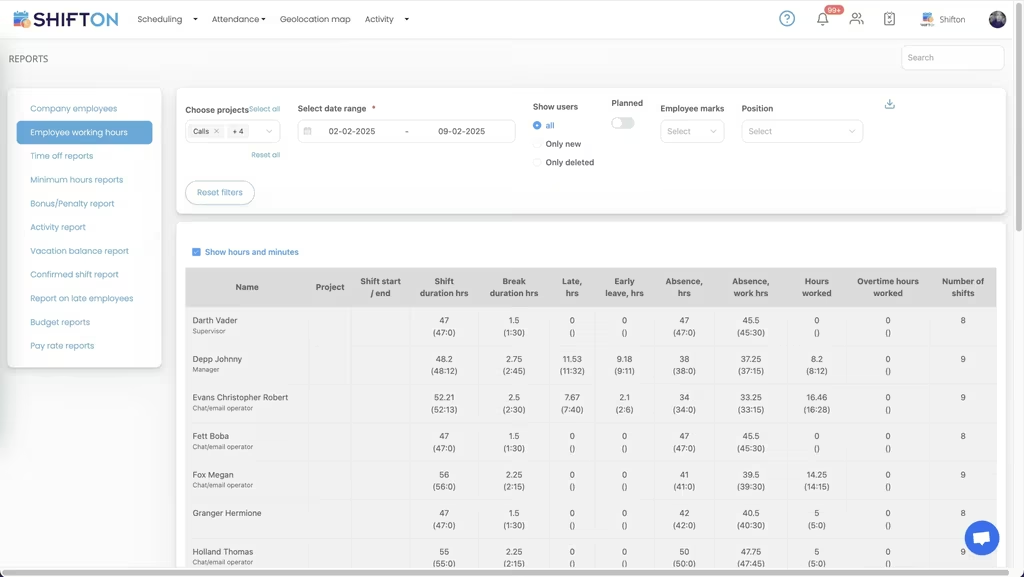
Hours worked, to the minute, per person
The working hours report lists every person's shift start and end, shift duration, break time, late hours, early leave, absence hours, hours worked, overtime hours and the number of shifts in the period. Filter by project, position or date range and export the result for payroll or for billing figures.
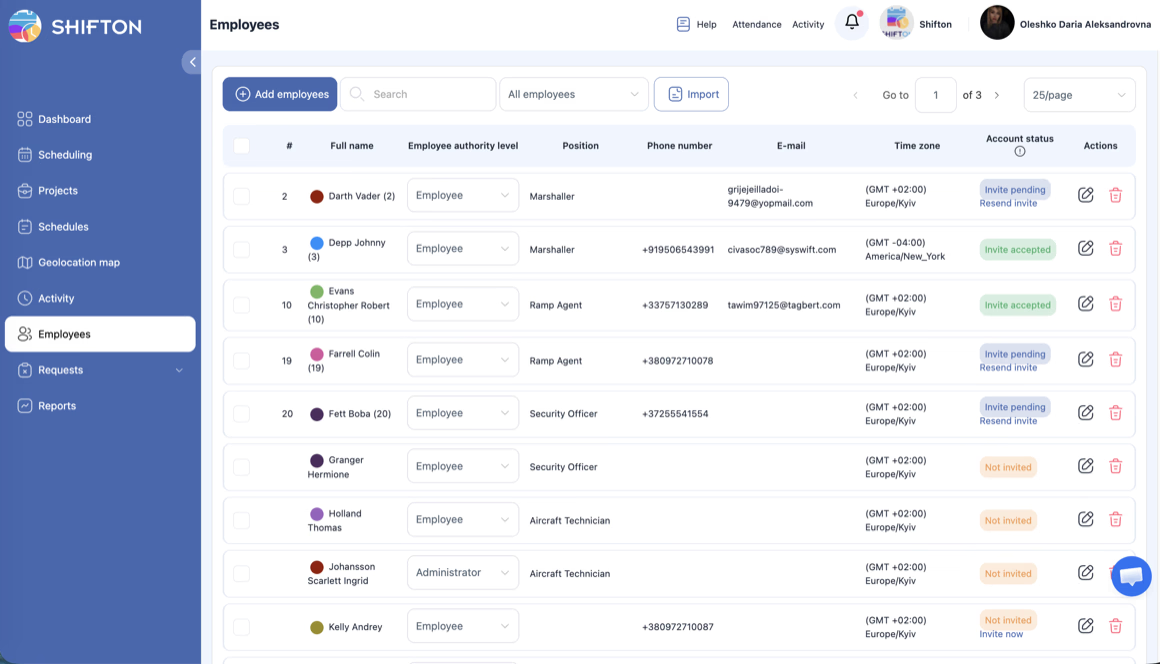
Your team, their roles and their access
The employees screen is the firm's roster: full name, authority level, position, phone, email and time zone, plus the account status showing who has been invited, who accepted and who has not been set up yet. Add people one at a time or import the list.
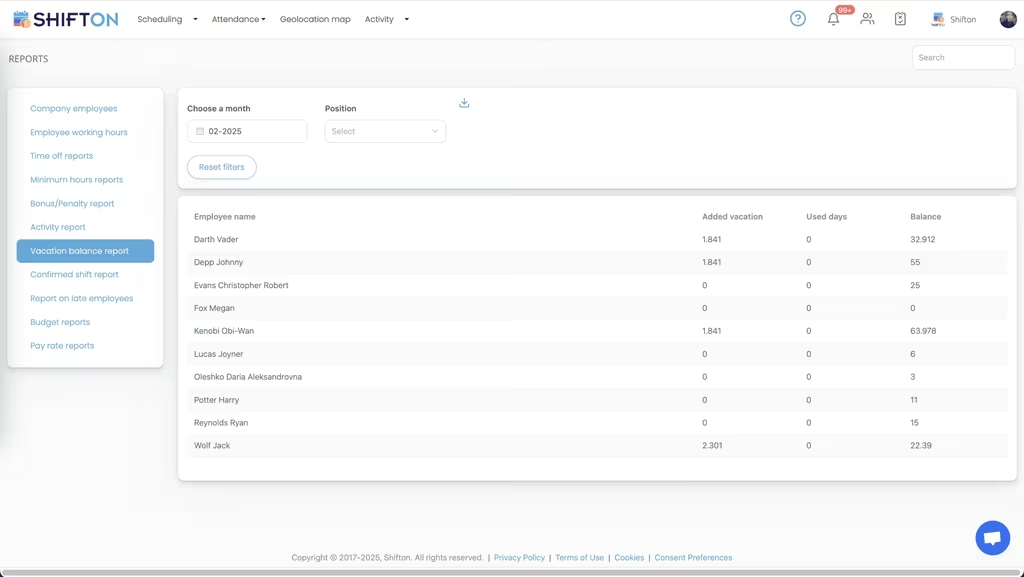
The report library partners actually ask for
The reports panel holds working hours, time off, minimum hours, bonus and penalty, activity, vacation balance, confirmed shifts, late employees, budget and pay rate reports. The vacation view shows added days, used days and remaining balance per person, so leave questions are answered from a table rather than from memory.
Start with the Free Plan
No time limits. Get full access to core features and upgrade when you're ready.
Read the full guide to legal time tracking
In a law firm, recorded time is revenue. Every hour that goes unlogged, or gets written down from memory at the end of the week, is either money the firm never bills or a figure nobody can defend. That is why time tracking software for lawyers is bought long before anyone worries about rotas: the hours are the product, and the accuracy of the record decides both what the firm earns and what it can prove.
The second problem is quieter. Somebody still has to make sure reception is staffed, that a paralegal is available on a court day, and that two people are not on leave in the same week. That work usually lives in a wall planner and somebody's head.
What time tracking software for lawyers actually has to do
Three things, and they are not evenly weighted. Capture hours as they happen rather than in a Friday reconstruction. Attribute those hours to the right project so a per-engagement total exists. And report them in a form that survives being questioned, with worked and overtime hours separated and a trail behind every entry.
Shifton does that in the same product that keeps the office covered: a mobile and web time clock, hours recorded per project, breaks logged separately, timesheet logs kept per shift, and a reporting panel that returns working hours, overtime, absence, lateness, budget and pay rate figures. Firms comparing lawyer time tracking software against a shared spreadsheet find the difference in the third point rather than the first.
The label varies with who is buying. Partners search for time tracking software for attorneys, practice managers for law firm timesheet software, and administrators simply want the hours to arrive without chasing. Attorney timesheet software, attorney time and attendance software and a timesheet spreadsheet all claim the same job; only one of them keeps a log you can check later.
Hours attributed to the right project
A total number of hours worked is nearly useless on its own. What matters is which engagement absorbed them. Projects in Shifton are how that separation happens: each shift and each recorded entry belongs to a project, and every report can be filtered by project, by position and by date range.
Run that filter and you have a per-engagement figure for hours worked, overtime hours and absence, per person, for whatever period you choose. This is what most firms are really looking for when they search for attorney time tracking software: not a stopwatch, but a defensible total attached to a name and a piece of work. Law firm time tracking software that only produces one grand total leaves the finance conversation exactly where it started, and attorneys time tracking software that cannot break a period down by project is the same problem with a different name.
Worked hours, overtime and the numbers behind a bill
The working hours report is the centre of the system. For any period it returns shift start and end, duration, break time, late hours, early leave, absence hours, hours worked, overtime hours and shift count for every person.
Keeping worked and overtime hours in separate columns matters more in a legal setting than most, because the two get paid and charged differently and get argued about at the end of every quarter. Add the bonus, penalty and budget reports and a partner can see what a project consumed rather than estimating it. Our time tracking feature page covers how entries are captured. Shifton produces the hours; it does not raise the invoice.
Cover for court days, reception and support staff
Fee earners are not the only people whose week has to be planned. Reception, paralegals, secretaries and clerks need cover through business hours, and a court day removes someone from the office with a day's notice. Scheduling software for lawyers is really about that support layer.
The weekly grid puts the whole team on one screen with uncovered slots in a dedicated row, so an unstaffed reception desk is visible days ahead. Cover can be posted as an open shift for anyone eligible to claim, swaps run through the app with manager confirmation, and every change pushes to the affected phones. Attorney scheduling software of this kind will not build a court diary, but it will stop the office being uncovered because two people booked the same Friday. Whether the requirement is written as lawyers scheduling software, attorney staff scheduling software or an attorney schedule app, the mechanism is the same grid, the same open shifts and the same notifications. An attorney scheduling app is judged on whether support staff open it, not on how many views it offers.
Roles, access levels and who can see what
Confidentiality shapes everything in a firm, including its administrative tools. Every person in Shifton has an authority level, either employee or administrator, a position and a time zone. Staff see only their own shifts and their own hours. Administrators see the teams they are given, which means an office manager can run a rota without gaining visibility of the whole firm.
Onboarding is a list rather than a project. Invite people by email, import an existing list, and the account status column shows who has accepted and who is still pending, which keeps a lawyer staff scheduling software rollout from stalling halfway through. Attorney rostering software fails on adoption far more often than on features, so the invite list matters as much as the calendar. An attorney workforce management software rollout that stops at the administrators has changed nothing.
Time off, balances and the reports that get asked for
Holiday in a small firm is a scheduling problem disguised as an HR one, because two absences in the same week can leave a court date uncovered. Requests are submitted in the app and approved by a manager, and approved leave appears in the schedule at once so it is factored into the next week rather than discovered.
The vacation balance report gives added days, used days and remaining balance per person. Time off reports, minimum hours reports, confirmed shift reports and a late employees report sit beside it, all filterable and exportable. That combination is what turns a law office time tracking software purchase into something the managing partner actually reads.
What Shifton is and is not
Being direct saves time. Shifton is workforce software: rotas, hours, attendance, absence, reporting. It holds no files, no client data, no billing and no court diary. It will not draft anything or store a single document.
What it replaces is the spreadsheet of hours, the paper cover rota and the end-of-month reconstruction. Firms usually run it alongside the system that holds their files, which is why a lawyer timesheet software decision tends to be quick: it is not competing with the tools the practice already depends on. Professional practices outside law can compare our professional services scheduling page, which handles the same billable-hours question for consultancies.
Choosing an attorney time tracking app
Test any attorney time tracking app on a real week. Have three people clock in and out for five days, then pull the report and see whether the totals match what actually happened, whether overtime is separated, and whether you can filter to one project without exporting everything. Open the app on a phone and see how many taps a clock-in takes, because a lawyer time tracking app that takes six will quietly stop being used. Rankings of the best law firm time tracking software rarely hold up under that test, since adoption is decided on a phone rather than in a feature table.
Shifton is free for up to ten team members with no time limit, which covers a small practice outright, and paid plans are charged per employee per month above that; the pricing page shows where each module sits. Import the team, record one week of hours against a project, and pull the report to see the difference between an estimate and a record.
Frequently Asked Questions
What does attorney time tracking software do?
It records when people started and finished work, how long they spent, and which project the time belongs to, then reports those hours in a form finance can use. Shifton logs hours, breaks, overtime, lateness and absence per person and per project, and exports the result. It does not raise invoices or manage files.
Can time be recorded against separate projects?
Yes. Projects are the unit Shifton uses to separate work, so hours can be attributed to a client engagement, a department or an office. Reports filter by project and by date range, which gives a per-project total of hours worked and overtime hours for any period you choose.
Does Shifton replace our case and file systems?
No. Shifton is workforce software: rotas, hours, attendance, time off and reporting. It holds no files, no client records and no invoicing, and firms normally run it alongside whatever system holds their files. What it replaces is the spreadsheet of hours and the paper cover rota.
How do staff log their hours?
From the Shifton app on iOS or Android, or from the web. They clock in and out, breaks are recorded separately, and each entry attaches to the shift and project it belongs to. Timesheet logs keep the trail, so a query raised weeks later can be checked rather than reconstructed.
Does it handle holiday and time-off requests?
Yes. Staff submit time-off requests in the app and a manager approves or declines them, with the approved absence appearing in the schedule immediately. The vacation balance report shows days added, days used and days remaining per person, so entitlement questions are answered from a single table.
Is there a free plan for a small practice?
The free plan covers up to 10 team members with no time limit and includes scheduling, a basic time clock, the mobile app and reports. A small office can run on it outright. Above 10 people, paid plans are charged per employee per month, and optional modules such as the geolocation map are paid additions.






Track legal hours and office cover in one place
Set up your team, record hours against each project, and pull a clean report at the end of the month.