English
  Español
  Português
  Deutsch
  Français
  Italiano
  日本語
日本語  中文
中文  हिन्दी
  עברית
עברית  العربية
  한국어
한국어  Nederlands
  Polski
  Türkçe
  Українська
  Русский
  Magyar
  Română
  Български
  Čeština
  Ελληνικά
  Svenska
  Dansk
Dansk  Norsk
Norsk  Suomi
Suomi  Bahasa
  Tiếng Việt
  Tagalog
  ไทย
ไทย  Latviešu
  Lietuvių
  Eesti
Eesti  Slovenčina
  Slovenščina
  Hrvatski
  Македонски
  Қазақ
Қазақ  Azərbaycan
  Afrikaans
  বাংলা
বাংলা 
When a request comes in, you have two options. You either capture it clearly and route it to the right person, or you let it bounce around in messages, spreadsheets, and sticky notes until someone finally handles it. Most teams do not choose the messy option on purpose. It happens because the process is not built to handle real life.
Facility and operations work is full of moving parts. A door closer breaks, a light goes out, a leak shows up, a tenant reports an issue, a safety check is due, or a contractor needs access. Each request sounds simple until you have twenty of them, and everyone asks for an update at the same time.
That is why work order software matters. It gives you one place to collect work requests, approve them, assign jobs, track progress, and prove the work was done. Shifton Field Service supports this workflow for teams that manage on-site tasks, mobile technicians, and recurring maintenance.
Work order software that turns requests into finished jobs
A good work order flow has a clear start and a clear finish. The start is the request, with the right details. The finish is a completed job, with notes, proof, and a record that can be reviewed later. Without that, the same problems return because the details get lost.
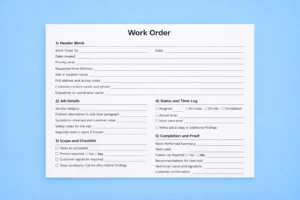
With Shifton, work orders are not just titles in a list. Each job can include the location, priority, contact person, task steps, and status updates. When a request is approved, it becomes a job that can be assigned to the right employee or technician. From there, progress is visible to the office without constant calls and messages.
This approach also protects your team. If someone claims a task was never handled, you have a timeline, notes, and completion details. That reduces arguments and helps you improve the process instead of replaying old issues.
Work requests that are easy to submit and impossible to lose
Most delays start at the request stage. People report an issue with missing details, unclear location, or no urgency level. Then the office spends time asking follow-up questions, and the technician arrives without the right context.
Work request intake should be simple for the person submitting it, but structured enough for the person doing the job. Shifton helps you keep requests consistent by using clear job fields and task steps. When every request arrives in a similar format, triage becomes faster and mistakes drop.
It also keeps repeat work under control. If the same unit, room, or equipment keeps generating requests, you can spot it and decide whether it needs deeper maintenance, parts replacement, or a vendor change.
Approvals and prioritization without slow back-and-forth
Not every request should become a job right away. Some need approval, some need a budget check, and some are low priority and can wait. The problem is that many teams do approvals in a way that creates a bottleneck.
With a work order system, approvals become part of the workflow. A manager can review the request, set priority, and assign it without losing context. You do not need to hunt down the latest message thread. Everyone sees the same status and the same decision.
This is also where you reduce urgent surprises. When prioritization is clear, you stop treating everything as an emergency. Technicians can plan their day, and requesters get realistic expectations.
For teams that handle after-hours requests, emergency callouts, or 24/7 coverage, prioritization also affects fatigue. This guide on a 12-hour night shift sleep schedule is a helpful reference when you build sustainable rotations.
Assignments that match skills, location, and workload
Operations teams often assign work based on who is available first. That works until the wrong person shows up, the job takes longer than expected, or a specialist is needed.
Shifton helps you assign tasks with a clearer view of workload and scheduling. You can set who owns what, and you can plan assignments in a way that respects time windows and team capacity. When the right person gets the job the first time, you reduce rework and keep your schedule stable.
For mobile teams, clear assignments also reduce driving and idle time. Dispatch is not only about speed. It is about sending the right technician to the right place with the right information.
How work order software supports mobile teams and on-site work
When technicians work across multiple sites, the office needs live visibility. Otherwise, every update becomes a phone call. A good system shows what is in progress, what is blocked, and what is done, so the dispatcher can make better decisions.
Mobile access matters too. Technicians should be able to open a job, see task steps, add notes, and close the job from the field. That keeps the work order clean and complete, and it prevents “end of day memory” updates that miss important details.
If your team works in building operations and maintenance, you can explore how Shifton fits this workflow on the facility management industry page.
Status updates that keep everyone aligned
A work order is not useful if nobody trusts the status. Teams often use vague updates like “working on it” or “almost done,” which lead to more questions, not fewer.
A clear status flow solves this. Shifton allows teams to track jobs through stages like new, assigned, in progress, and completed. The specific labels can follow your internal process, but the idea stays the same. Everyone should know what is happening without guessing.
This is especially helpful when multiple people touch the same job. For example, one person inspects, another repairs, and a supervisor confirms completion. With clear statuses and notes, handoffs become smoother.
Proof of work, notes, and a history you can trust
One of the biggest problems in operations is repeating the same work because the details are missing. A technician closes a job, but the next person cannot tell what was done, what parts were used, or what the root cause was.
Work order history prevents that. When you keep notes, photos, checklists, and completion details inside the job record, your team learns over time. Repeat issues get easier to diagnose. Preventive maintenance becomes smarter. Audits become less stressful.
This also supports better vendor control. If you use contractors for certain tasks, you can keep the same level of documentation and review outcomes based on real records, not memories.
Reporting that helps you plan, not just react
Operations teams often feel busy every day, but still struggle to show what improved. Work order reporting makes outcomes visible. You can see backlog size, average completion time, common issue types, and which locations create the most requests.
Once you can see the patterns, you can make changes that reduce work instead of just managing it. That might mean adding preventive maintenance, adjusting staffing, changing routing, or fixing recurring equipment problems.
Shifton helps by turning daily actions into structured data you can review weekly and monthly. The goal is simple: fewer surprises, faster decisions, and a process that scales as you grow. When teams can measure improvement consistently, it also becomes easier to design fair incentives—this article on performance-based team rewards explains why shared metrics often drive better follow-through.
One practical way to make those metrics fair is to be clear about who owns what. If you want a simple framework for defining responsibility (so the same people don’t end up carrying everything), this guide on clear role ownership and job scope pairs well with work order workflows.
Modules that matter for work orders and operations
Below are Shifton modules that support the work order lifecycle from request to completion. Each one helps reduce manual steps and improve clarity.
Tasks
Create standardized task steps for each type of work order. This helps teams avoid missed checks and makes job quality more consistent across sites.
Schedule Management
Plan team schedules around real workload, time windows, and recurring maintenance. This helps prevent overload and keeps assignments realistic.
Time Tracking and Timesheets
Track time spent on each work order and across shifts. This supports payroll accuracy and helps you understand which tasks take longer than expected.
Mobile Access
Give field teams a simple way to view job details, update status, add notes, and close work orders on-site without waiting to return to the office.
Notifications
Send reminders for assignments, updates, and deadlines. This reduces manual follow-ups and helps keep urgent tasks from being forgotten.
Reports and Analytics
Review performance and bottlenecks using real work order data. Use insights to reduce backlog, improve response time, and plan maintenance smarter.
Pricing is typically based on your team size and the modules you choose, so you can start with the essentials and add more as your process matures. Shifton also offers up to 55 days free trial so you can test the workflow with real requests before committing.
How to start with a simple work order process
You do not need a perfect system on day one. Start with a clean flow and improve it as the team gets comfortable.
Step 1: Define your work order stages
Keep it simple at first, such as new, assigned, in progress, completed.
Step 2: Set up request details
Decide which fields must be included, like location, priority, and contact.
Step 3: Add your team and roles
Make sure managers, dispatchers, and technicians have access to what they need.
Step 4: Begin assigning real work orders
Start with your most common request types and track updates daily.
Step 5: Add checklists and proof of work
Introduce task steps, notes, and completion standards to reduce rework.
Step 6: Review reports weekly
Use the data to improve prioritization, staffing, and recurring maintenance plans.
When you are ready to replace scattered requests with a clear workflow, create an account and start building your work order process.
FAQ
What is work order software used for?
It is used to capture work requests, approve them, assign jobs, track progress, and document completion. The goal is to keep work organized and make results easy to prove and report on.
How is a work order different from a ticket?
A ticket is often just a message about a problem. A work order is a structured job with details, steps, status, and completion records. Work orders are built for execution, not just communication.
Do I need approvals in my work order process?
Not always, but approvals are useful when requests affect budget, safety, or priority. A simple approval step can prevent low-value tasks from blocking urgent work.
Can work order software help reduce backlog?
Yes. When requests are structured and status updates are clear, teams waste less time searching for information and duplicating work. Reporting also helps you see which issues cause delays.
What should a good work order include?
At minimum: location, issue description, priority, contact person, assigned technician, and completion notes. Many teams also add checklists, photos, and time tracking for better accountability.
Is work order software only for facilities teams?
No. Any team that handles repeat tasks, on-site service, maintenance, or mobile jobs can use it. The workflow is useful wherever you need clear requests and reliable execution records.
How long does it take to implement a work order process?
A basic workflow can be started quickly if you keep the first version simple. The key is to begin with real work orders, then refine fields, stages, and checklists as the team learns what it needs.