English
  Español
  Português
  Deutsch
  Français
  Italiano
  日本語
日本語  中文
中文  हिन्दी
  עברית
עברית  العربية
  한국어
한국어  Nederlands
  Polski
  Türkçe
  Українська
  Русский
  Magyar
  Română
  Български
  Čeština
  Ελληνικά
  Svenska
  Dansk
Dansk  Norsk
Norsk  Suomi
Suomi  Bahasa
  Tiếng Việt
  Tagalog
  ไทย
ไทย  Latviešu
  Lietuvių
  Eesti
Eesti  Slovenčina
  Slovenščina
  Hrvatski
  Македонски
  Қазақ
Қазақ  Azərbaycan
  Afrikaans
  বাংলা
বাংলা 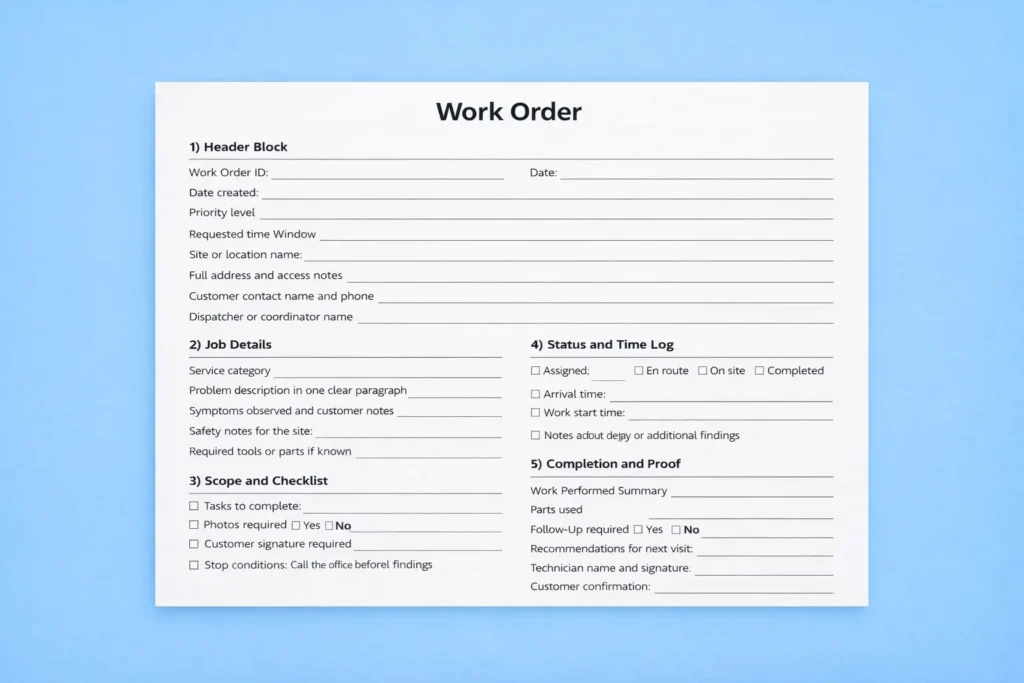
A work order is the moment a request becomes a job your team can execute. If the work order is clear, a technician arrives prepared, the office can answer questions without guessing, and the customer gets a consistent experience. If it is unclear, the same job creates three problems at once: missing details, wasted trips, and confusion about what was actually done.
When dispatch is under pressure, the difference between a smooth day and a messy day is usually the quality of the job record, which is why your guide on dispatching urgent jobs while keeping ETAs realistic connects well with work orders and templates.
If you are building a template that includes a short safety section, it helps to keep it practical and aligned with common workplace guidance, and many teams use CDC NIOSH resources as a baseline for what should be treated as a real field risk versus noise.
The point of a template is consistency, and teams usually get the biggest win when they also keep a clean job timeline, which is exactly what this overview of mobile-first documentation in the field explains in a simple, non-technical way.
Why a work order template reduces repeat visits and disputes
Field work breaks down when information is incomplete. A customer describes the problem one way, a dispatcher writes a shorter version, and the technician arrives with a different picture in their head. That gap is what causes repeat calls, missing parts, and second trips. A consistent template fixes this by forcing the same core questions every time: where is the job, what exactly needs to happen, what counts as done, and what proof should be captured.
Templates also protect the business. A simple status and closeout section creates a timeline managers can trust, so billing questions, warranty follow-ups, and partner checks stop turning into arguments. The best part is that you do not need a complicated document to get these benefits, you need a consistent one.
The best work order template is boring and consistent
Many teams try to build a perfect form with too many fields, and it usually backfires. People skip sections, dispatchers improvise, and the template stops being a standard. A good template is boring in a useful way. It captures the same core details every time, so the job stays clear and the record can be trusted later.
The goal is not to write a long document. The goal is to make it hard to miss key information like location, access notes, job type, priority, and what completion means. If you can achieve that, you will see fewer repeat visits, fewer delays caused by missing context, and fewer calls from customers asking for updates.
Ready-to-copy work order template
You can paste the template below into Google Docs, Word, Notion, or a spreadsheet. Keep the wording short so people actually fill it in, and make the core fields required in your process.
1) Header block
Work Order ID
Date created
Priority level
Requested time window
Site or location name
Full address and access notes
Customer contact name and phone
Assigned technician or team
Dispatcher or coordinator name
2) Job details
Service category
Problem description in one clear paragraph
Symptoms observed and customer notes
Safety notes for the site
Required tools or parts if known
3) Scope and checklist
Tasks to complete as short bullet points
Photos required yes or no
Customer signature required yes or no
Stop conditions such as call the office before proceeding
4) Status and time log
Status values such as assigned, en route, on site, completed
Arrival time
Work start time
Work end time
Notes about delays or additional findings
5) Completion and proof
Work performed summary
Parts used
Follow-up required yes or no
Recommendations for next visit
Technician name and signature
Customer confirmation
Filled example table you can copy
This table shows how a completed work order can look in practice. It is short on purpose, but it includes the details that prevent wasted trips and reduce disputes.
| Field | Example value |
|---|---|
| Work Order ID | 10492 |
| Priority | High |
| Time window | Today 2 PM to 5 PM |
| Location and access | 14 King Street, Unit 3, side entrance, call on arrival |
| Problem description | Water pooling under kitchen sink with damp smell, likely slow leak |
| Tasks | Inspect trap and supply lines, confirm source, replace worn washer if needed, test after repair |
| Stop condition | If cabinet damage or mold is suspected, notify office before proceeding |
| Status flow | Assigned → En route → On site → Completed |
| Proof captured | Photo of leak source and repaired connection, note of parts used, customer confirmation |
| Completion notes | Leak at compression fitting tightened and resealed, tested for 10 minutes with no drip |
Work order template variations for common field scenarios
One universal template is a good start, but many teams get better results when they keep the same core structure and add a few scenario-specific fields. The goal is not more paperwork, it is fewer mistakes. Below are variations you can copy as small add-ons, depending on the job type.
Variation A: Emergency call and after-hours work
Add these fields when the job is urgent and the risk of misunderstanding is high. Include an emergency reason, the safest access route, who approved the call-out, and a short customer update plan such as call before arrival and again if ETA changes. Many teams also add a single line for site hazards observed because emergency jobs often happen in poor lighting or unsafe conditions.
Variation B: Preventive maintenance and scheduled visits
Add a maintenance checklist section with a pass or fail mark for each key check, plus a place for measurements or readings if applicable. Include next due date and follow-up actions so the work order becomes a simple maintenance log that is easy to repeat across visits.
Variation C: Commercial sites and multi-approver jobs
Add site contact for access, permit or security requirements, and approval required before additional work. Commercial jobs often fail because technicians arrive without access or because extra work is completed without formal approval, so a short approval section prevents delays and billing disputes.
Variation D: Multi-tech jobs and complex installations
Add fields for crew roles, task ownership, and handoff notes, so each technician knows what they own and what they should not touch. Include a dependencies field such as parts must arrive before install because complex jobs fail when the schedule ignores dependencies.
Variation E: Return visit and warranty follow-up
Add previous work order reference, what was tried last time, and what changed since the last visit. Return visits become expensive when the second technician starts from zero, so this variation forces job history into the request itself.
How to make the template consistent without adding admin work
Templates fail when people skip fields, so the biggest improvement is making key fields hard to miss. Many teams move from a document to structured forms because required fields reduce missing data and create cleaner job history, and the overview of digital job forms for field teams shows how that structure stays consistent across job types.
If your team wants documentation to stay consistent across technicians and locations, it helps to follow simple quality principles, and the plain-language overview from ASQ on quality management systems is a strong non-competitor reference for traceability and repeatable process habits.
Once your template is stable, it is easier to connect it to the full job lifecycle, and your piece on how work order software keeps job records clean explains what changes when tracking, closeout, and history are handled in one consistent flow.
Work order vs invoice vs service report
These three documents often get mixed up, and that confusion causes process problems. A work order is the job plan and execution record. It answers what needs to be done, who will do it, what happened on site, and what proof was captured. An invoice is a financial document that asks for payment and lists charges, and it can reference a work order but it does not replace the work order. A service report is the customer-friendly summary of findings and outcomes, which can be written from the work order, but it is usually written in clearer, non-technical language.
The simplest workflow is to treat the work order as the source of truth, then create the service report from that record, and only then issue an invoice that references the job. When teams flip this order and try to invoice first, they often lose job details and create billing disputes.
Common mistakes that make templates useless
The most common mistake is building a template that is too long. When the form feels like a survey, people rush it and the data becomes unreliable. The second mistake is skipping status and closeout fields, which removes visibility and makes customer updates harder. The third mistake is leaving no space for proof of completion, which is where disputes start. Fix these three issues and you will already feel the difference in fewer repeat calls and fewer wasted trips.
A rollout plan your team will actually follow
Start with one job type your team handles often. Use the template for a week, then adjust it once based on real feedback. In week two, require completion notes and a status update for every job. In week three, require proof fields such as photos or signatures only for job types that often lead to disputes. This approach works because it removes friction gradually and builds a standard people actually follow.
A low-pressure way to test a structured workflow
If someone wants to move beyond a document template and test a structured job flow, they can create an account and run a small set of real jobs through consistent intake and closeout steps to see whether it reduces repeat calls and missing details.
FAQ
What is a work order template used for?
It is used to capture job details, assign responsibility, track status, and document what was completed, which reduces missing information and repeat visits.
What should every work order include?
At minimum it should include location, contact details, problem description, priority, assigned technician, status updates, and completion notes.
How detailed should a work order be?
Detailed enough that a technician can complete the job without calling the office for basics, but not so long that people skip fields.
Is a job ticket the same as a work order?
In many businesses, a job ticket is a short version of a work order. A work order usually includes more structure such as statuses, checklists, and proof of completion.
Should work orders include photos and signatures?
If you deal with disputes, compliance, or high-value jobs, photos and signatures help confirm what was done and when.
How do I choose work order statuses?
Keep them simple and consistent. Most teams do well with assigned, en route, on site, and completed, then add one exception status such as blocked when needed.
Can a template reduce repeat visits?
Yes, because it forces consistent intake and makes job history clearer, so technicians arrive prepared and follow the same steps.
What is the fastest way to roll this out to a small team?
Start with one job type, require only the core fields, and review the first week of work orders to remove confusing fields and add only what prevents real mistakes.