

 English
  Español
  Português
  Deutsch
  Français
  Italiano
  日本語
日本語  中文
中文  हिन्दी
  עברית
עברית  العربية
  한국어
한국어  Nederlands
  Polski
  Türkçe
  Українська
  Русский
  Magyar
  Română
  Български
  Čeština
  Ελληνικά
  Svenska
  Dansk
Dansk  Norsk
Norsk  Suomi
Suomi  Bahasa Indonesia
  Tiếng Việt
  Tagalog
  ไทย
ไทย  Latviešu
  Lietuvių
  Eesti
Eesti  Slovenčina
  Slovenščina
  Hrvatski
  Македонски
  Қазақша
  Azərbaycan
  Afrikaans
  বাংলা
বাংলা Painting Contractor Scheduling Software for Crews on Site
Plan crews across multiple jobs, move the week when the weather turns and keep hours against quoted labour with painting contractor scheduling software.


Build the Week Across Every Job
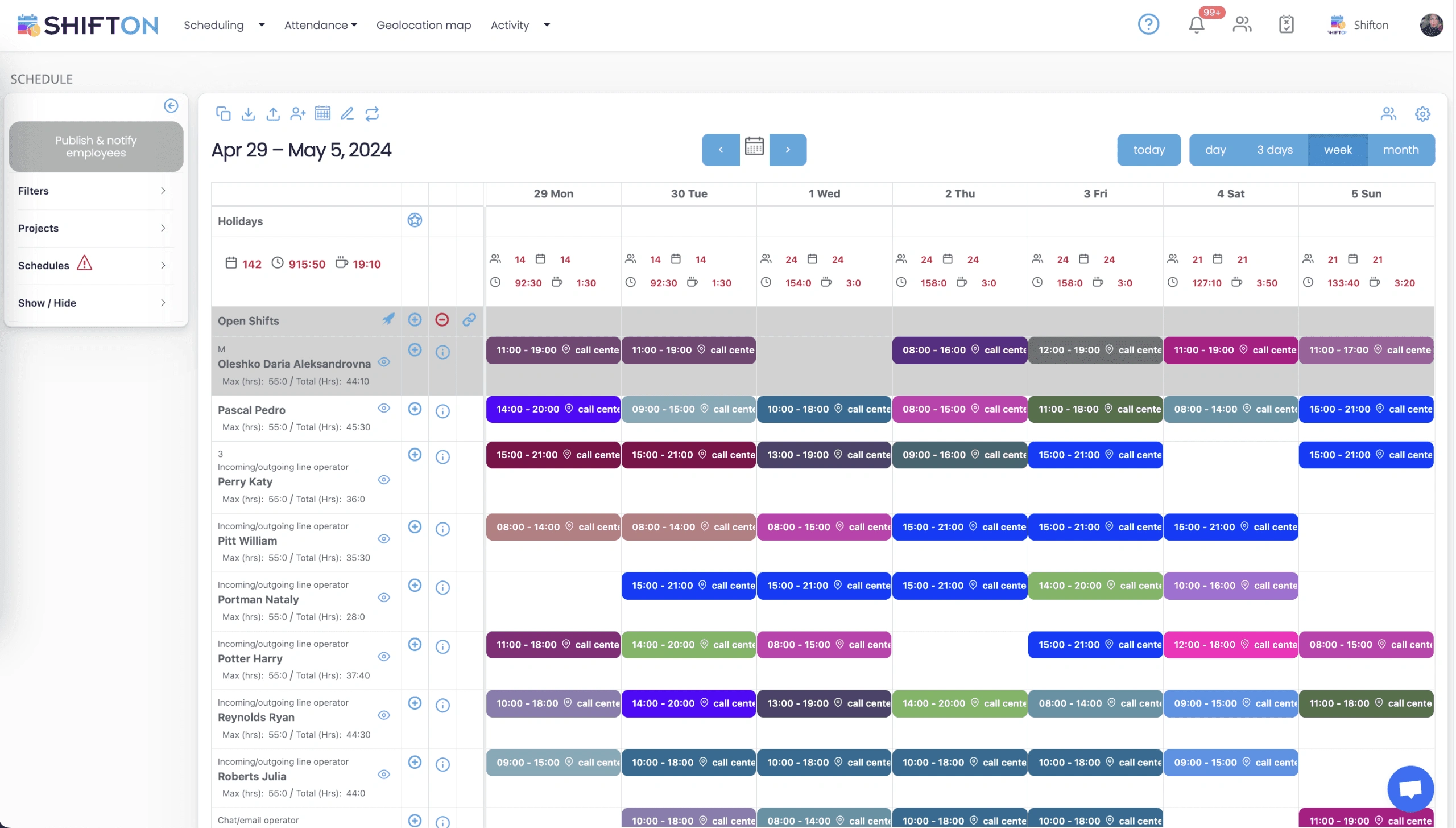
A painting week is several jobs running at once, each needing a different number of hands on a different day. The weekly grid gives every painter a row and every assignment a colour-coded block with start and end times, so the balance across the crew is readable before anything is committed. Filters, projects and schedules keep separate contracts apart on the same screen.
Hour Caps, Overtime and the Site Each Shift Belongs To
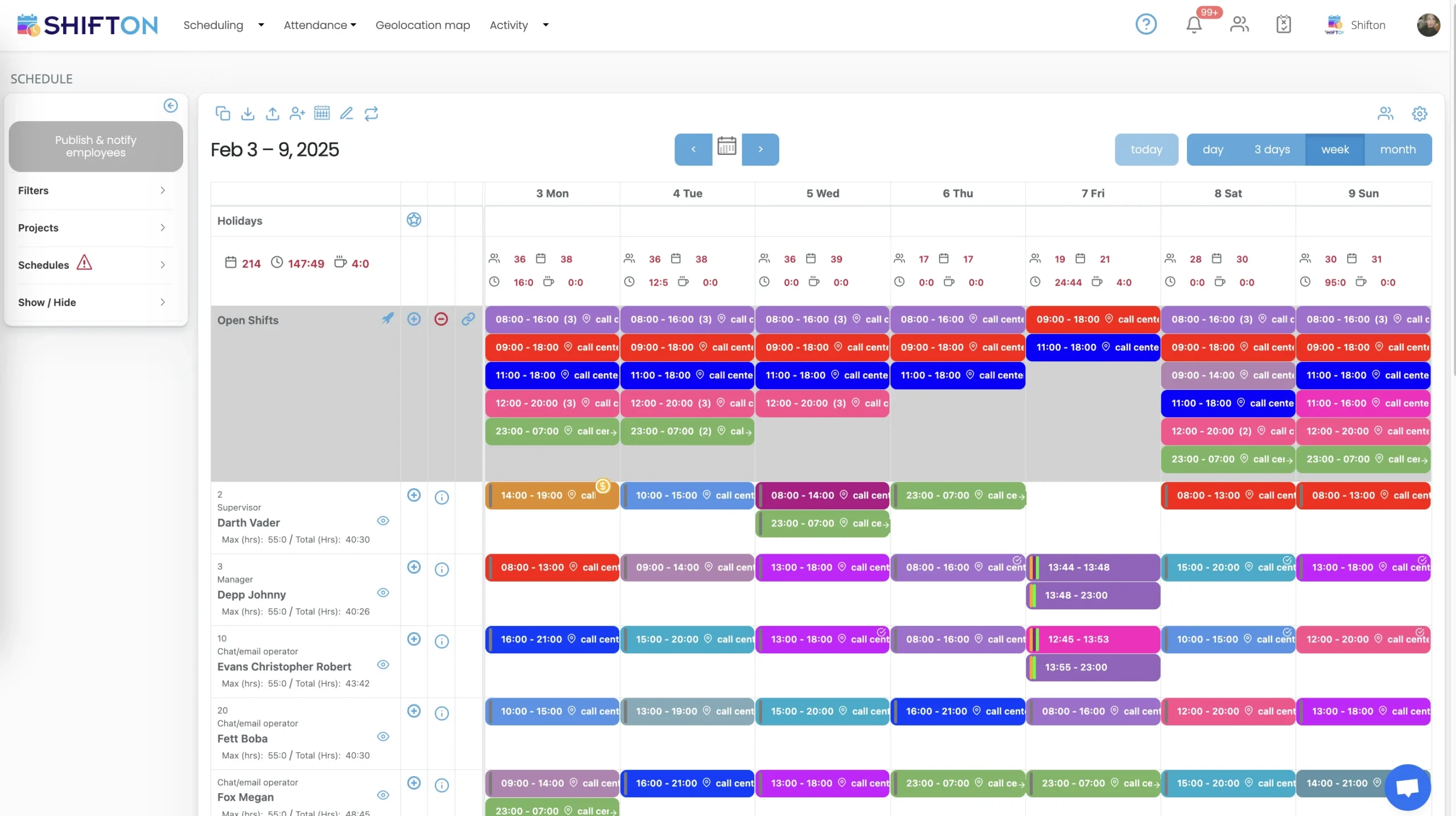
Labour is the cost that decides whether a painting job made money, so the hours need watching while they are being planned rather than after payroll. Each painter's row carries a maximum against the total already assigned, and every shift is tagged with the work location it belongs to. Day columns total headcount and hours, which is how a manager spots the week that has quietly gone into overtime.
Early Starts, Long Days and Overnight Repaints
Not every painting job fits a standard day. Occupied buildings often have to be painted after hours, some commercial work runs overnight from 23:00 to 07:00, and summer exteriors start at first light to beat the heat. The week view holds several shifts a day with roles beside names, so a supervisor is on every crew by design, and each person's maximum and total hours stay in view while the week is packed.
Your Crew List, Roles and Seasonal Hires
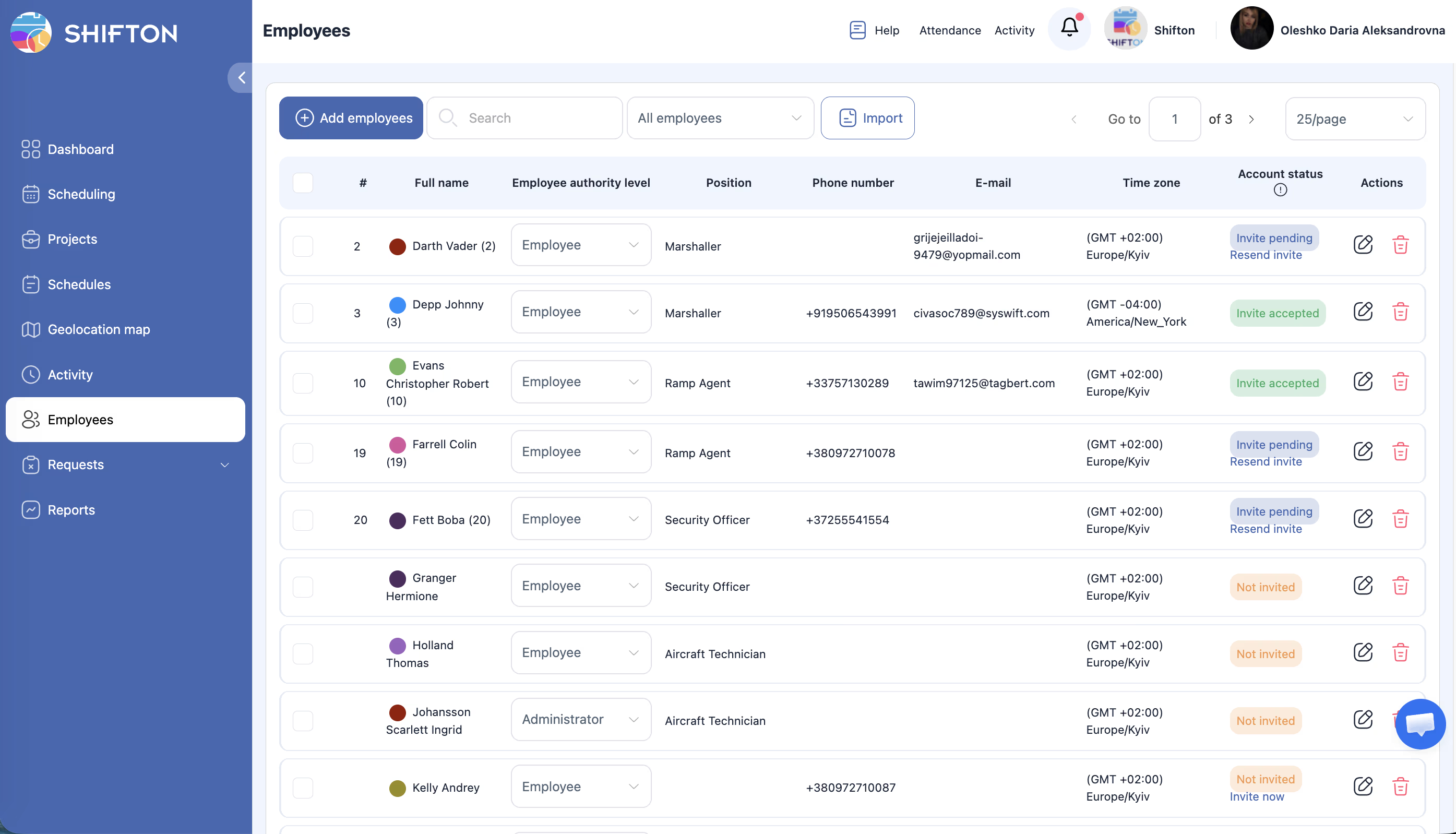
Painting headcount moves with the season, so the crew list is never settled for long. The employees table holds everyone in one place with their position, contact details, time zone and authority level, split between ordinary access and administrator rights. Account status shows who has been invited and who has actually accepted, which is the quickest way to find the seasonal hire who never got onto the schedule.
Start with the Free Plan
No time limits. Get full access to core features and upgrade when you're ready.
Read the full guide to painting crew scheduling
A painting contractor sells hours dressed up as square metres. The quote assumes a certain crew for a certain number of days, and everything after that is a question of whether the people actually turned up in the right numbers, on the right site, for the right length of time. Painting contractor scheduling software is what keeps that assumption connected to reality once three or four jobs are running at the same time.
What makes it awkward is that almost nothing about the work is fixed. Jobs run over, weather cancels a day of exterior work with no notice, a client asks for an occupied building to be painted out of hours, and the crew that was booked for Thursday is suddenly needed on Tuesday somewhere else.
What painting contractor scheduling software has to handle
The job is narrower than it sounds and harder than it looks. It plans which painters work which days, splits them across live sites, holds the shifts nobody has been assigned to yet, records when people really started and stopped, and reports the hours back by job. That is the whole scope, and it is the part of a painting business most likely to still be running on a whiteboard and a group chat.
Everything else a painting company buys software for sits outside that boundary. Estimating, colour specification, materials and invoicing are separate concerns with their own tools. A scheduling system that pretends to do all of it usually does the scheduling badly, which is the part the foremen actually touch every day.
Multi-day jobs and crews split across sites
Very little painting work finishes in one visit. A repaint runs over four days, a new build runs for weeks in phases, and both compete for the same painters. The difficulty is not planning one job; it is planning six at once and knowing, on any given morning, exactly who is where.
Setting each contract up as its own project fixes the two problems that cause the most damage: the same painter being promised to two sites on the same day, and a job quietly running with two people when it was priced for four. When every shift carries the site it belongs to, the schedule stops being a list of names and becomes a picture of how the crew is distributed across the work. Larger contractors running trades alongside each other on the same programme face the same shape of problem, which is why our construction crew scheduling page covers much of this ground for mixed site teams.
Weather, and what it does to next week
Exterior painting is at the mercy of the forecast, and a wet week does not just lose days, it pushes every job behind it. The contractors who cope best are the ones who can move work quickly and tell everybody at once, rather than the ones with the most detailed original plan.
In practice that means two things. Shifts need to be easy to move and reassign without rebuilding the week, and the change has to reach the crew before they drive to the wrong address. A published schedule that updates on the phone with a push notification removes the worst version of this, which is four painters standing outside a rained-off exterior at seven in the morning waiting for someone to answer their phone. Interior work held in reserve becomes genuinely useful when it can be swapped in as an open shift in a couple of minutes.
Seasonal labour and a crew that changes size
Painting headcount rises through the warm months and falls back afterwards, and a good part of the summer crew is seasonal or temporary. That has consequences for scheduling: new people have to be added quickly, they need to see their shifts without training, and they need to come off the roster cleanly at the end of the season without their names cluttering the grid.
A single crew list with positions and access levels does most of that work. Foremen get administrator rights so they can handle their own crew, painters get ordinary access to their own shifts, and account status shows at a glance who has actually accepted an invitation. An intake of seasonal painters can be imported as a list rather than typed in one by one, which matters when the whole hire happens in a fortnight.
Hours against the labour allowed in the quote
Every painting job is priced with a number of labour hours behind it, and the gap between that number and the real one is where the margin lives. Most contractors only discover the gap when the job is finished and the timesheets are added up, by which point nothing can be done about it.
Recording an actual clock-in and clock-out against the scheduled shift closes that delay. Hours accumulate against the project while the job is still running, breaks are logged rather than assumed, and lateness shows up in a report instead of in a foreman's memory. Hours also break down by pay rate, so a Saturday or an overnight repaint is priced at what it really cost rather than at an average. Our time tracking records the hours and reports them; the comparison against the quoted labour is a decision that stays with you, and it is a far quicker one when the hour count is already accurate.
The crew's half of the system
Painters are not going to log into a desktop system, and any process that depends on them doing so will fail within a month. The whole exchange has to work on a phone: today's shift, this week's schedule, the address, clocking in and out, requesting a day off, saying which days they cannot work.
When that side works, a surprising amount of office work disappears. Time-off requests stop arriving as text messages and start landing in a queue that can be approved or declined. Availability comes from the painter rather than being guessed at. Open shifts get claimed rather than allocated call by call. A painters scheduling app is judged almost entirely on whether the crew will actually use it, not on how much the office can configure.
Where scheduling stops and painting contractor software starts
Worth being clear about the boundary, because the search results mix the two constantly. Painting contractor software and painting business management software usually mean estimating, takeoff, quoting, job costing and invoicing. Shifton does none of those. It covers scheduling and templates, open shifts, availability and time-off requests, the time clock, breaks, worked and overtime hours, task assignment, notifications, hour reports and exports, and integrations with QuickBooks, Zapier, Intercom and Usedesk.
Most established painting companies end up with one of each and are better off for it. The estimating tool prices the work, the scheduling system decides who does it, and the hours flow from the second into the accounting the first feeds.
Choosing a painting crew scheduling system
Test it against a bad week rather than a good one. Build a week with four live jobs, then cancel the exterior work on the Tuesday and see how long it takes to move those painters onto other sites and tell them. Check how a foreman adds a new starter mid-season. Open the app on the oldest phone on the crew, since that is the real test of whether the schedule will be read.
Shifton is free for up to 10 team members with no time limit, which covers a small painting company running a crew or two, and paid plans are charged per employee per month as the team grows past that. If your schedule today is a whiteboard photographed and sent to a group chat, the change worth making first is how quickly Tuesday's rain reaches everybody's phone.
Frequently Asked Questions
What is painting contractor scheduling software?
It is the system that decides which painter is working, on which site, for which hours, and gets that onto their phone. It builds the weekly schedule across every live job, posts open shifts, records worked and overtime hours and reports hours by project. It is the labour side of the business, separate from the estimating and invoicing tools most painting contractors also run.
Can painting company scheduling software handle several jobs at once?
Yes. Each contract is set up as its own project, and shifts are assigned to it, so one weekly grid can carry every live job without them blurring together. Filters narrow the view to a single site while it is being planned and open back to the whole crew when the manager checks total cover. Hours then report per project, which shows where the labour actually went.
What happens to the schedule when rain stops exterior work?
The affected shifts are moved or reassigned in the grid and republished, and everyone involved gets a notification rather than a phone call. Painters pulled off an exterior can be dropped onto interior work that was planned for later in the week, and the open shift they leave behind stays visible for whoever can take it. The point is that a weather change becomes one edit instead of a morning of calls.
How do you track painters' hours against the labour in the quote?
The time clock records an actual start and finish against the scheduled shift, and hours report by project and by pay rate. That gives a real hour count for each job that can be compared against the labour allowed when the work was priced. Shifton produces the hours and the reports; the estimate itself stays in whatever estimating tool you already use.
Does Shifton do estimating and invoicing for painting contractors?
No. Estimating, takeoff, quoting and invoicing are a different product class, and that is what most searches for painting contractor software return. Shifton covers scheduling and templates, open shifts, availability and time off, the time clock, breaks, worked and overtime hours, task assignment and hour reports, with a QuickBooks integration so hour data can reach accounting.
Is there a free scheduling app for a small painting company?
Shifton is free for up to 10 team members with no time limit and includes shift scheduling, the basic time clock, the mobile app and standard reports, which covers a small painting company running one or two crews. Above that, paid plans are charged per employee per month. Geolocation and work location are a paid module rather than part of the free plan.




Schedule Your Painting Crews With Shifton
Build the week across every site, fill open shifts in seconds and get the change onto the crew's phones before they set off.