

Warehouse Scheduling Software for Staff and Shift Planning
Build the warehouse schedule around real demand, keep hours and overtime inside limits, and publish every shift straight to the floor from one platform.


Build and Publish the Weekly Warehouse Schedule
A warehouse week is built function by function across goods-in, picking, packing and dispatch. The weekly grid puts every worker on a row and every shift in a colour-coded slot with its start and end time, so a thin spot in coverage shows up while there is still time to fix it.
Day and Night Rotations Across the Month
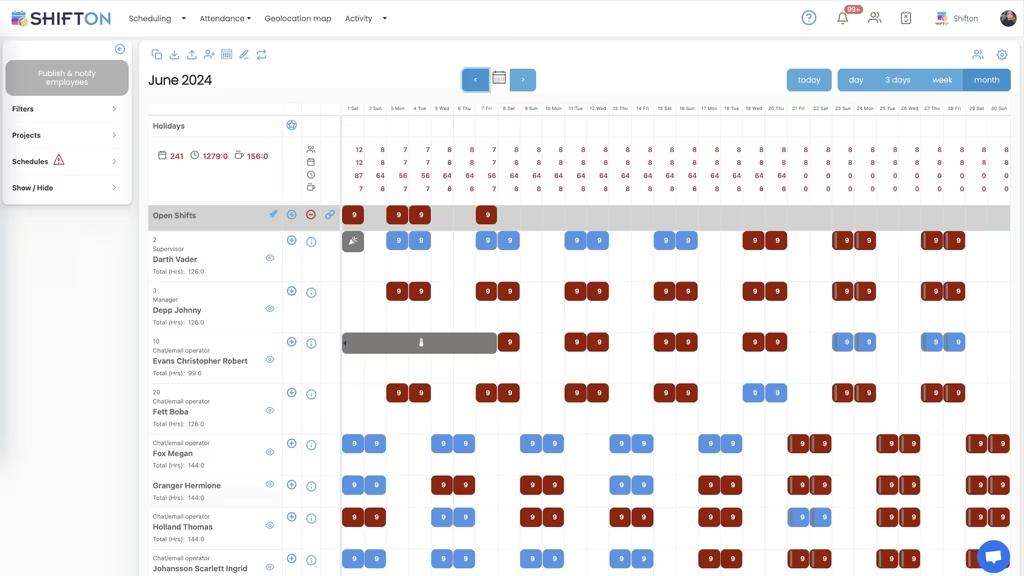
Continuous operations run on rotating crews, and a rotation only holds together when it is planned a month at a time. The month view shows each worker's day and night blocks in sequence, with a running hour total beside the name so the pattern stays balanced instead of drifting.
Forecast Demand, Distribute Shifts Automatically
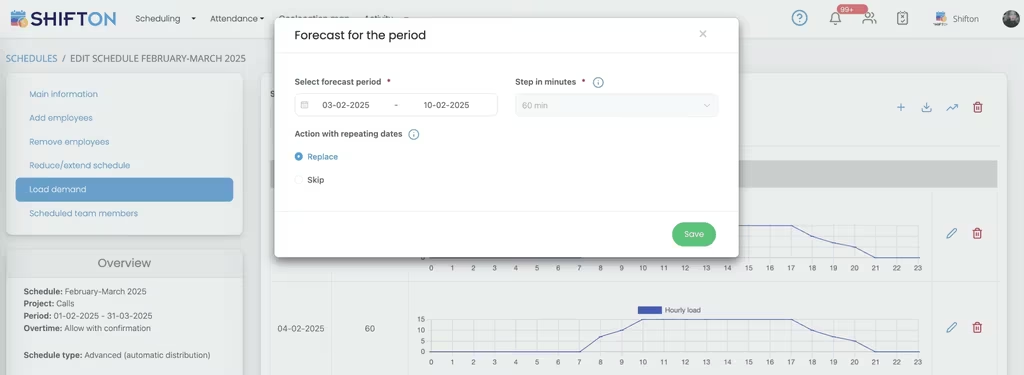
Warehouse workload is never flat across the day. Loading demand for a chosen period draws the hourly curve from midnight to midnight, and the schedule is then built against that curve rather than a fixed headcount that ignores when the volume actually lands.
Reports on Hours, Budget and Pay Rates
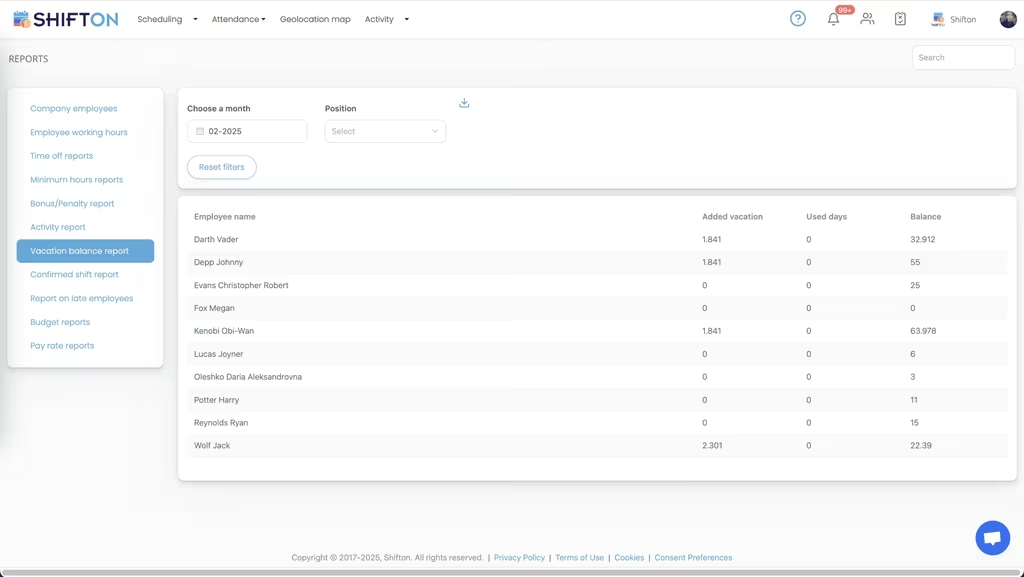
Cost per labor hour is only manageable when the numbers arrive while the month is still open. The reports screen holds working hours, time off, bonus and penalty, budget and pay rate reports in one place, filtered by month and position and ready to export.
Start with the Free Plan
No time limits. Get full access to core features and upgrade when you're ready.
Read the full guide to warehouse staff scheduling
Warehouse labor is planned in weeks and lost in minutes. Inbound volume moves, a trailer arrives three hours late, two pickers call out on a Monday, and the crew that looked balanced on Friday is short on the pack line and overstaffed on receiving. Warehouse scheduling software exists to keep that day from turning into an overtime bill, which is why operations of every size are moving off shared spreadsheets and onto a system built for shift work.
The hard part was never drawing a grid. It is drawing one that survives real volume: rotating crews, temporary labor, mandatory breaks, hour caps and a workforce that does not sit at a desk to read email.
What warehouse scheduling software has to do on the floor
Strip out the marketing and the job comes down to four things. Cover every function on every shift, from goods-in through picking, packing, loading and returns. Keep hours inside legal and budget limits before the schedule is published, not after payroll has run. Reach a workforce that lives on its phones. And absorb change without a rebuild, because in a distribution center the plan changes daily.
A warehouse shift scheduler that handles those four beats a platform carrying fifty modules aimed at problems the floor does not have. Most operations learn that after buying warehouse employee scheduling software on a feature comparison and using about a tenth of it.
A warehouse labor management system or a scheduling tool?
The two categories get confused constantly. A warehouse labor management system is usually sold as a way to measure productivity against engineered standards, tied tightly to inventory and pick paths. Warehouse staff scheduling sits earlier in the chain: deciding who works, when, in which function, and at what cost.
For most operations the scheduling side is where the recoverable money sits, because it is the part a supervisor can change this week. Standards tell you a pick took too long. A schedule decides whether there were enough people on the line at all. The same confusion surrounds warehouse dispatch software, which teams often search for when the real problem is simply knowing who is on the dock at four in the afternoon.
Shift rotations and round-the-clock coverage
Any site running more than one shift ends up on a rotation: two shifts, three shifts, four crews spread across nights and weekends, or a compressed pattern of longer days. Rotations are simple in principle and punishing in a spreadsheet, because one change ripples through the following weeks. Warehouse shift scheduling software holds the pattern as a reusable warehouse schedule template, rolls it forward month after month, and keeps a running hour total next to every name as the schedule is built. Where a site also runs production lines, the same rotation patterns are covered in manufacturing staff scheduling.
Night crews deserve particular care. They are harder to staff, they cost more once premiums apply, and they are the first to suffer when the schedule goes out late. Publishing a full month at once gives night staff the notice they need and removes a large share of the churn that constant last-minute changes create.
Peak season, temporary labor and the ramp
Volume in fulfillment is seasonal and the labor plan has to move with it. Headcount can climb by half for a quarter, then fall back again. The best fulfillment center scheduling software makes that ramp manageable: import new starters in bulk instead of typing them in one by one, set positions and authority levels, then add them to an existing pattern rather than building a parallel plan.
Temporary and agency workers need a schedule they can actually see. Scheduling software for warehouse workers has to assume the reader was hired last week and has no company email address, which is why the shift lands on a phone with a push notification whenever anything moves. Sites with a heavy seasonal swing usually plan alongside our approach to scheduling seasonal workers.
Cost per labor hour and overtime control
Labor is the largest controllable line in almost every warehouse budget, and it is the one a manager can genuinely move week to week. On a spreadsheet the damage stays invisible until the wage bill arrives: a shift that ran two hours long, an extra picker called in for a quiet afternoon, an hour cap crossed without anyone noticing.
Two controls do most of the work. Hour limits per employee show planned against maximum hours as you assign shifts, so overtime becomes a decision rather than an accident. Overtime rules let you allow extra hours only with explicit confirmation, or close them off for a period. Budget and pay rate reports then close the loop, showing what each schedule cost by position and by period. That is the measure the best warehouse crew scheduling software is judged on once the novelty of a tidy grid wears off.
Time tracking, attendance and the timesheet
A published schedule is a plan. The timesheet is what actually happened, and the gap between the two is where money leaks. The time clock records the real start and end of every shift, along with breaks, bonuses, penalties and premium rates, and stores it in the shift log where a supervisor can review it. A warehouse timesheet app that captures those details at the moment they happen removes the end-of-month reconstruction paper timesheets always demand.
For third-party contracts, 3pl time tracking software also has to split hours by client, which projects handle. Clocking in from the mobile app takes seconds and works for crews spread across a large building or several yards. For sites that need proof of where a shift started, the geolocation map is available as a paid module and shows employee movement and route history for a chosen period. Feature detail lives on our time tracking page.
Break and rest rules are not optional in warehousing, and they are the first thing to slip when a schedule is built under pressure. Building breaks into the shift itself, rather than trusting people to remember, keeps the record clean and the timesheet accurate. Hour caps per employee stop a rotation from quietly pushing someone past a weekly limit, and time-off and availability requests are collected before the schedule is built rather than negotiated afterwards.
Reporting is what makes any of this defensible. Working hours, minimum hours, confirmed shift and late arrival reports each export cleanly, so an audit question is answered from records instead of memory.
One platform across zones, sites and 3PL contracts
Few operations stop at one building. A second site, a returns facility, an overflow yard or a cross-dock each carries its own crew and its own rhythm, and third-party contracts add another layer again. Running them on separate spreadsheets means nobody sees the imbalance until the numbers come in at month end.
Multi-location support puts every site on one board, with projects used to separate zones, clients or contracts inside a single building, which is exactly what 3pl scheduling software and any 3pl workforce management software has to do. Roles and permissions decide who can edit what: a shift supervisor manages their own crew, while a site manager sees the whole picture. Operations that also move freight and manage drivers often run this alongside logistics staff scheduling, so the yard and the fleet stay in step.
Choosing the best warehouse scheduling software
The best warehouse scheduling system is the one supervisors still open in month six, and that is rarely the one with the longest feature list.
Test any warehouse scheduling app the way your crew will use it, not the way a demo presents it. The same goes for a distribution center scheduling software you are trialling across two sites. Open it on the cheapest phone in the building, because that is what your seasonal staff carry. Build a full week of shifts and time yourself. Publish it and see how fast the notification lands. Change one shift and check that everyone affected knows within a minute. Then export a working hours report and see whether the numbers match what payroll needs.
Shifton clears those tests with the pieces a warehouse actually uses: weekly and monthly schedule views, open shifts and swaps, reusable rotation templates, demand forecasting with automatic distribution, time clock and timesheet logs, breaks, bonuses and penalties, and reports covering hours, budget, pay rates and time-off balances. Crews of up to 10 run on the free plan with no time limit, and paid modules are priced per employee per month as the operation grows.
The result is what most sites are aiming for: a schedule that reflects real demand, hours that stay inside the budget you set, and forklift operators, packers and dock staff who always know when they are working. Build your first week and see how it looks with the whole floor in one view.
Frequently Asked Questions
What is warehouse scheduling software?
It builds, publishes and tracks shifts for the people who run goods-in, picking, packing, shipping and receiving. Shifton plans a week or a month at a time, posts open shifts, records clock-in and clock-out times, and reports on hours and cost by position.
Can Shifton handle rotating day and night warehouse shifts?
Yes. Save any rotation as a warehouse schedule template, apply it to a crew and roll it forward month after month. The month view shows each worker's day and night blocks with a running hour total, so a 24 7 warehouse shift schedule stays balanced and nobody drifts into excess hours.
How does a warehouse scheduling system help during peak season?
Seasonal hires can be imported in bulk with their positions and access levels, then added to an existing shift pattern instead of a separate plan. Demand forecasting shows the hourly workload curve for the period, so extra headcount lands where the volume actually falls.
Can warehouse associates check schedules and swap shifts on a phone?
Yes. The Shifton mobile app for iOS and Android works as a warehouse schedule app on every phone, showing upcoming shifts, and swaps and open shifts are handled in the app with manager approval. Push and SMS notifications reach people who never open a work email.
Does Shifton track warehouse hours and attendance?
Yes. Shifton doubles as warehouse attendance software: the time clock records the real start and end of each shift alongside breaks, and every entry lands in the timesheet logs. Working hours, late arrival and confirmed shift reports export those records for payroll.
What is the best warehouse scheduling app for a small crew?
For ten people or fewer the practical answer is whatever is free, works on a phone and records hours. Shifton is free for up to 10 team members with no time limit, including shift scheduling, basic time clock and attendance, the mobile app and reports. Larger crews and modules such as the geolocation map are priced per employee per month.





Put your warehouse schedule on solid ground
Set up rotations, publish shifts to the floor and track hours from one warehouse scheduling platform. Free for teams of up to 10.