

Delivery Scheduling Software for Driver Shifts and Coverage
Plan driver shifts around delivery windows, keep hours and overtime under control, and fill gaps fast with a delivery scheduling system your team carries on the phone.


Build and Publish the Delivery Week in One Screen
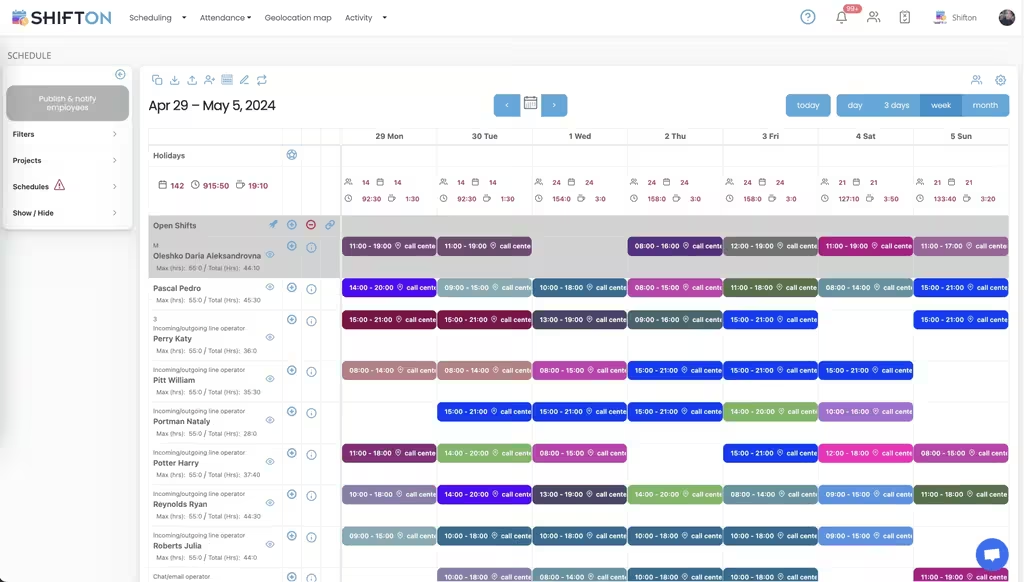
A delivery week is built around vans, cut-off times and the people who cover them. The weekly grid puts every driver on a row and every shift in a colour-coded slot, so a full week takes minutes rather than an evening of spreadsheet edits.
Hour Caps and Overtime Control per Driver
Driving hours are regulated, expensive and easy to lose track of. Each driver row carries a maximum alongside a running weekly total, so the limit stays visible while the schedule can still be changed.
Round-the-Clock and Overnight Delivery Coverage
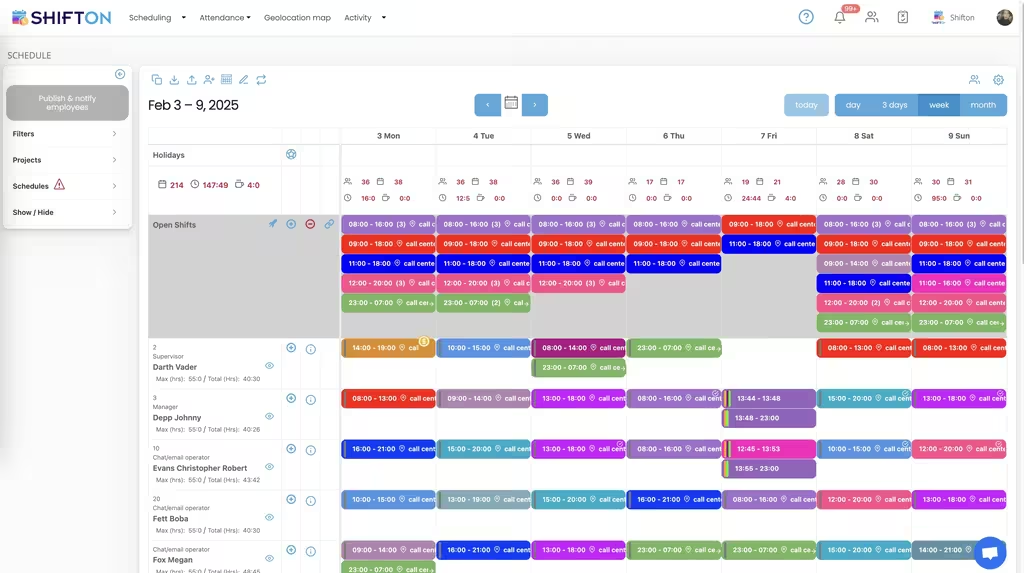
Deliveries do not stop at six in the evening. The week view holds several shifts on the same date, including overnight runs from 23:00 to 07:00, and carries the role beside each name so cover is never assigned to the wrong person.
Reports on Hours, Budget and Pay Rates
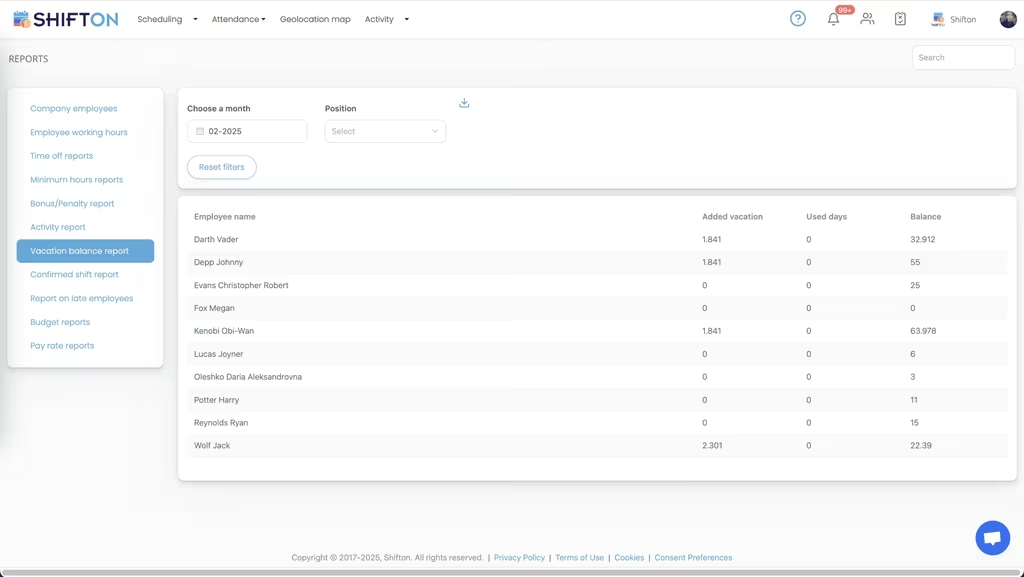
Every scheduled and worked hour lands on the reports screen. Working hours, time off, bonus and penalty, budget and pay rate reports are filtered by month and position, then exported when payroll or a client review needs the numbers.
Start with the Free Plan
No time limits. Get full access to core features and upgrade when you're ready.
Read the full guide to delivery driver scheduling
Delivery operations succeed or fail on whether the right number of drivers start at the right hour. Volumes swing between weekdays and weekends, cut-off times are fixed, and one uncovered van pushes a full day of drops into the next one. Delivery scheduling software turns that daily balancing act into a repeatable process instead of a morning spent on the phone chasing cover.
Most general rota tools were built for fixed office hours. Courier and delivery teams do not work that way. Shifts start before dawn, run past midnight, move with parcel volume, and are worked by a mix of permanent drivers, part-timers and seasonal cover. A scheduling tool that ignores that mix gets abandoned inside a month. Scheduling software for delivery work has to start from the shift patterns the road creates, not from an office calendar.
What delivery scheduling software actually has to do
Strip away the feature lists and the job comes down to four things. Build a full week of driver shifts quickly, without leaving the depot office. Keep every person inside their contracted and legal hour limits before the roster is published, not after payroll flags it. Reach a workforce that spends the day on the road, which means the phone and nothing else. And survive the moment a driver calls in sick at half past five in the morning.
Anything beyond those four is preference. A delivery scheduling system that handles them cleanly beats a heavier platform stacked with functions a depot manager will never open.
Two product categories get sold under similar names, and the difference matters when you are comparing tools. Delivery dispatch software decides which stops go to a driver who is already on shift, and driver dispatch software and courier dispatch software sit in that same bracket. A delivery driver scheduling platform answers the earlier question: who is working tomorrow, for how long, and out of which depot. Shifton does the second job, and the two sit side by side without overlapping.
Where the spreadsheet stops working
Nearly every courier operation begins with a delivery schedule template in a spreadsheet, and it holds up while there are eight drivers and one shift pattern. Then a second depot opens, weekend cover appears, three drivers go part-time, and the file turns into a liability. Edits made on one laptop never reach the printed copy pinned by the loading bay. Two supervisors change the same cell. Hours drift past the cap because a spreadsheet does not warn anyone.
The switch to driver schedule software does not remove the template, it makes it live. A delivery driver schedule template stops being a file somebody has to remember to reissue. A saved weekly pattern is applied to any future week, everyone reads the same version, and the changes made at seven in the morning are on the drivers' phones by five past.
Building the weekly driver schedule
The weekly grid is where the work happens. Drivers sit as rows, days as columns, and each shift carries its own start time, end time and location tag. A run that nobody has been assigned to yet goes into the open shifts row, visible to every qualified driver at once instead of being offered through a round of individual calls.
Speed matters here more than it looks. When a delivery schedule app makes a week cheap to build, managers stop defending a bad roster just because rebuilding it would take another two hours. Shifton's shift scheduling module supports day, week and month views, automatic distribution for larger driver pools, and demand forecasting when volume is predictable enough to plan against. Depots that also run a warehouse team often plan both sides together, which is covered on our warehouse staff scheduling page.
Multi-site operators gain the most here. Courier workforce management software that keeps every depot in one account lets a regional manager see where cover is thin and where it is generous on one screen, then move a shared driver between sites without rebuilding either roster. Delivery fleet scheduling software that needs a separate login per depot loses that view on day one.
Hours, overtime and what a delivery week really costs
Wages are the largest controllable cost in a delivery business, and they move with the roster. The damage from a badly built week rarely shows up on the day. It appears two weeks later as overtime nobody authorised, a driver who quietly crossed a legal limit, and a wage bill that no longer matches the volume delivered.
Good delivery driver scheduling software makes those numbers visible while the schedule is still editable. A maximum sits beside each driver's running weekly total. Overtime can be set to require confirmation before it is added. Delivery driver time tracking software is only useful when it is tied to the roster: clock-in and clock-out data is captured against the planned shift, so the gap between the plan and reality is a number rather than a suspicion. Location-based clock-in through the geolocation module is available as a paid add-on where confirming arrival at a depot or site matters. Crews that travel to one job on one vehicle face the same limits, as our scheduling for moving companies page sets out.
Night runs, weekend cover and peak season
Very few delivery operations run a single day shift. Grocery and pharmacy work starts in the small hours, e-commerce runs late into the evening, and overnight linehauls cross midnight into the next date. Courier scheduling software that cannot hold several shifts on one day, or that miscounts a run from 23:00 to 07:00, creates payroll disputes rather than settling them. Delivery team scheduling software has to treat the night as a normal part of the week.
Peak season adds a second problem. Headcount jumps for six to ten weeks, much of it temporary, and the people arriving have never seen the depot's shift pattern. Roles and permissions keep that manageable: each new driver is invited by email, sees only their own shifts, and is placed into an existing pattern rather than a blank week.
Weekend cover deserves its own rules rather than a copy of the weekday plan. Collecting availability first, then building against it, is what stops a Saturday roster from being rewritten three times.
Keeping drivers informed without a phone tree
Drivers are the hardest workforce to reach. They are not at a desk, they rarely open email, and a notice board only works for the people who walk past it. Any driver schedule app that is going to hold has to work on the phone in a driver's pocket, on a weak signal, in under thirty seconds.
- Published schedules and every later change arrive as push notifications
- Drivers claim open shifts and request swaps in the app, managers approve or decline
- Availability and time-off requests are collected before the week is built, not after
- Each person sees only their own shifts, which keeps the app usable on a small screen
The result is a delivery scheduling solution the team actually checks. When drivers trust that the app is the true version, the flow of calls asking what time they start on Thursday stops.
Reporting that holds up at payroll
Reporting is where delivery staff scheduling software proves itself to finance, because scheduling and payroll argue whenever the numbers disagree. Working-hours reports, time-off and vacation balance reports, bonus and penalty logs, budget and pay rate reports all sit behind the same schedule, filtered by month and position and exported to spreadsheet when finance asks. Late-arrival and activity reports show attendance patterns that are invisible in a weekly grid. Shifton produces the reports and connects to QuickBooks and Zapier, and payroll itself stays in the system you already run.
Choosing a delivery scheduling system
There is no single best delivery scheduling software, and the best courier scheduling software for a two-depot operation is not the right fit for a national fleet. Test any platform the way your depot will use it. Build a real week, with the awkward split shifts and the two part-timers, and time yourself. Open the mobile app on the oldest phone in the building. Cancel a shift and see how fast the affected driver is told. Ask what happens when a driver is added mid-week and when a shift crosses midnight, because those are the two places cheap tools break. Free driver scheduling software is worth trying first with a small team, as long as the free tier is a real plan and not a trial that expires.
Under ten people, Shifton's free plan covers the whole job with no time limit, which suits a small courier team or a single-van operation getting off paper. As the fleet grows, paid plans add multi-location planning, deeper reporting and the modules a larger driver scheduling platform is expected to carry. Either way the aim stays the same: every route window covered, hours inside their limits, and a team that always knows when they are driving.
Frequently Asked Questions
What is delivery scheduling software?
Delivery scheduling software builds, publishes and tracks the shift roster for a driver team. Shifton covers weekly and monthly views, open shifts, hour limits, time clock and attendance, and pushes every change to the driver's mobile app. It handles the workforce side of a delivery operation rather than parcel tracking.
How do you schedule delivery drivers for a full week?
Start from the coverage each day needs, then place drivers into morning, day, evening and night slots on the weekly grid. Anything you cannot fill goes into the open shifts row for drivers to claim. When the week balances, publish it and every driver is notified on their phone.
Can drivers see the schedule and swap shifts from their phone?
Yes. The Shifton mobile app for iOS and Android shows each driver only their own upcoming shifts. Drivers request swaps, pick up open shifts and submit time-off requests from the app, and a manager approves or declines. Approved changes update the shared schedule immediately.
Does a driver scheduling app help control overtime?
It does, provided the limits are set before the roster is published. Each driver carries a maximum number of hours next to the total already assigned for the week, so an overload is visible while it can still be fixed. Overtime rules can also require confirmation before extra hours are added.
Is there a free delivery scheduling app for a small courier team?
Shifton is free for up to 10 team members with no time limit, which covers a small courier operation. Shift scheduling, basic time clock and attendance, the mobile app and reports are all included. Larger teams and extra modules move to paid plans priced per employee per month.
Can I reuse a delivery schedule template every week?
Yes. Recurring shift patterns are saved as templates and applied to any future week or month, so a stable rotation is rebuilt in seconds. You adjust only the exceptions, such as holiday cover or a seasonal volume peak, then publish the updated week.






Put every delivery driver on one shared schedule
Start free for up to 10 team members and build your first week of driver shifts in a single sitting.