

 English
  Español
  Português
  Deutsch
  Français
  Italiano
  日本語
日本語  中文
中文  हिन्दी
  עברית
עברית  العربية
  한국어
한국어  Nederlands
  Polski
  Türkçe
  Українська
  Русский
  Magyar
  Română
  Български
  Čeština
  Ελληνικά
  Svenska
  Dansk
Dansk  Norsk
Norsk  Suomi
Suomi  Bahasa Indonesia
  Tiếng Việt
  Tagalog
  ไทย
ไทย  Latviešu
  Lietuvių
  Eesti
Eesti  Slovenčina
  Slovenščina
  Hrvatski
  Македонски
  Қазақша
  Azərbaycan
  Afrikaans
  বাংলা
বাংলা Home Care Scheduling Software for Caregiver Teams
Home care scheduling software for teams working across clients' homes: plan every visit, cover absences fast and keep worked hours and overtime accurate.


Plan the week and publish it in one move
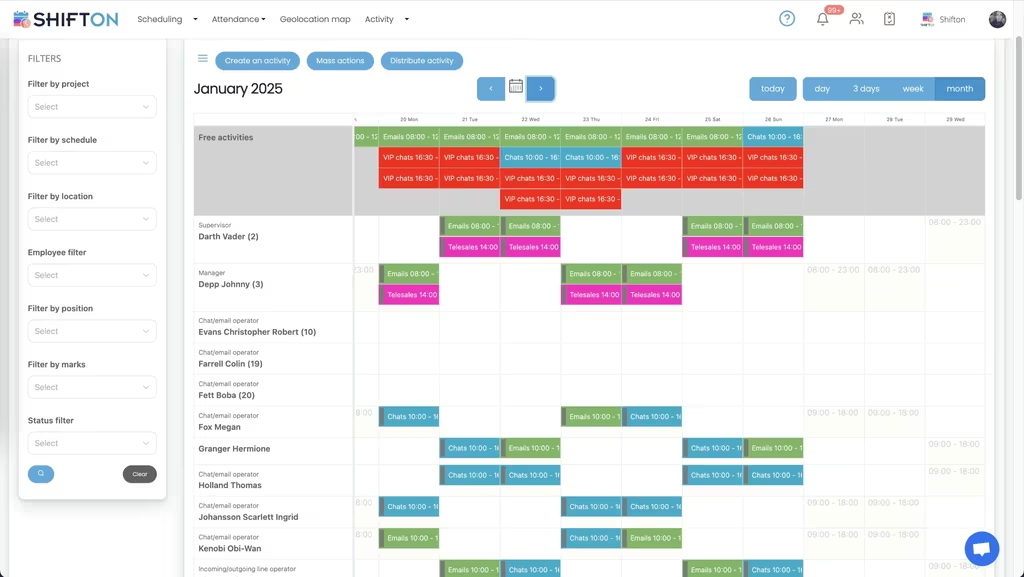
The weekly grid puts every caregiver on one screen: names down the side, days across the top, each block of work colour-coded with its start and end time. Anything still uncovered sits in the Open Shifts row, so gaps in the rota are obvious before the week begins rather than on the morning of the visit.
Break each shift into the visits it contains
A caregiver's day is not one long block, it is a sequence of separate calls. Activities let you split a shift into its individual pieces, each with its own start time and duration, then distribute those pieces across the team in bulk instead of editing one shift at a time.
See where the team actually went
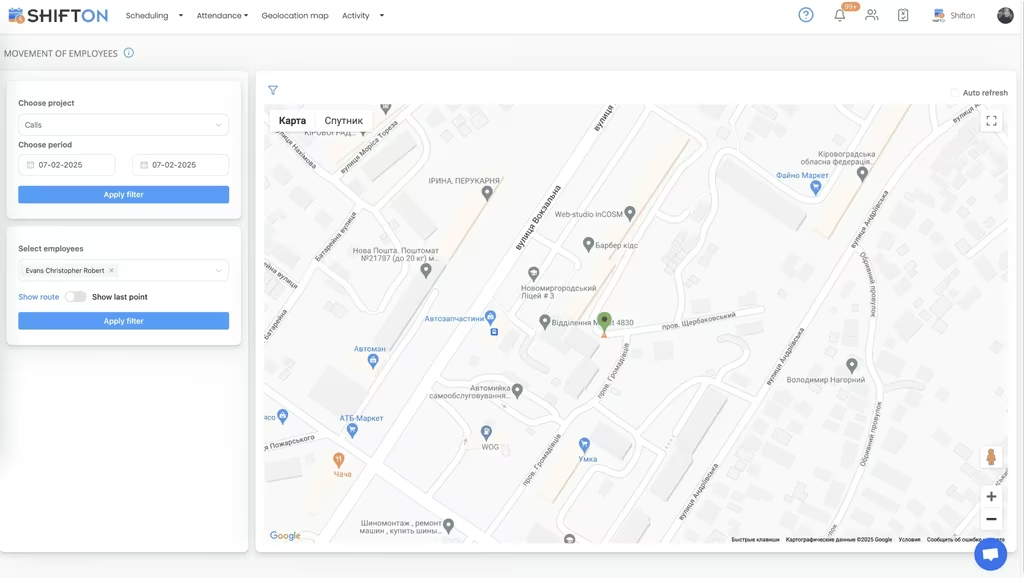
The movement screen plots recorded locations on a map for a chosen employee and period, with a route view that shows the sequence of stops. For work that happens at addresses instead of a fixed site, it answers the question a rota cannot: whether the visit was reached. Geolocation is a paid module rather than part of the free plan.
Working hours reports down to the minute
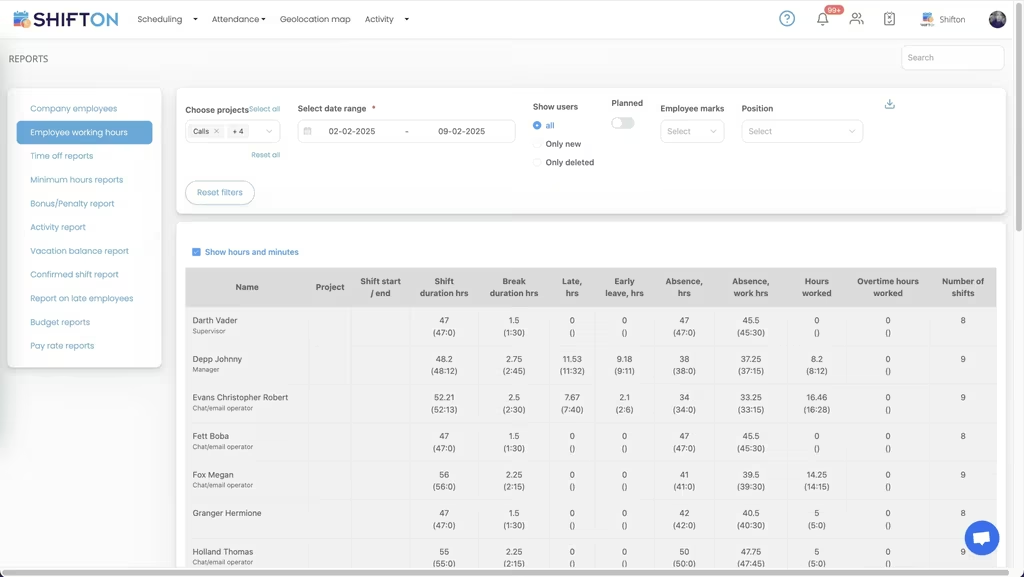
The working hours report lists each person's shift start and end, shift duration, break time, late hours, early leave, absence, hours worked, overtime hours and the number of shifts in the period. Filter by project, date range or position and export the result for payroll.
Start with the Free Plan
No time limits. Get full access to core features and upgrade when you're ready.
Read the full guide to caregiver scheduling
Home care runs on a plan that is wrong by lunchtime. A caregiver calls in sick, a client changes a visit, traffic eats a slot, and a rota built over two careful days needs rebuilding in twenty minutes. Home care scheduling software earns its place by making that rebuild fast and by keeping everyone looking at the same version of the truth, because in this sector the schedule is not an administrative record, it is the service itself.
The other pressure is margin. Hours are the product, travel is unpaid or partly paid depending on the contract, and staff turnover is expensive. An agency that cannot see planned hours against worked hours is guessing at both cost and compliance, which is why scheduling software for home care gets judged on its reports as much as on its calendar.
What home care scheduling software has to get right
Four things, and everything else is optional. Build a week of visits quickly, including several short calls inside one caregiver's day. Reach the team on their phones the moment something moves. Record hours accurately enough to run payroll from. And keep the whole thing usable by a coordinator who is also answering the phone.
Shifton is built to that shape: day, week and month rotas, shifts split into activities, open shifts, swaps, availability and time-off requests, a mobile time clock, and reports that separate worked hours from overtime. It is workforce management, not a clinical system, so it holds the roster and the hours rather than care documentation.
Some agencies arrive looking for caregiver staff scheduling software, others for home care staff management software, and a few for workforce management software for home health. The vocabulary changes with the market; the jobs on the list do not.
Visit-level planning instead of block shifts
Most generic tools assume one person works one continuous shift. Care does not look like that. A morning can hold four separate calls at four addresses with travel in between, and treating that as a single eight-hour block hides everything that matters. Home health scheduling software runs into the same wall with different vocabulary: the unit of planning is the call, not the day. A home health scheduling app that can only show one bar per person per day is not describing the work.
Activities solve it. Each call sits inside the shift with its own start time and duration, so the coordinator sees the real shape of the day and whether it is physically achievable. Work can be created in bulk and distributed across available caregivers in one action rather than shift by shift, which is the difference between home care visit scheduling that takes an afternoon and one that takes half an hour. Filters by area, position and project let a coordinator plan one round at a time without losing the wider picture.
Continuity of care and who can go where
Clients do better with familiar faces, and caregivers hold different skills, languages and travel constraints. Any caregiver scheduling software has to respect that instead of treating staff as interchangeable slots.
In Shifton, positions and marks describe what each person does, availability describes when they can work, and locations describe where. Build a round once and save it as a template, then reuse it week after week so regular clients keep the same caregiver by default and only exceptions need attention. A saved round behaves like a caregiver schedule template that already knows who goes where and at what time, so a stable week costs a coordinator minutes rather than hours. Scheduling software for caregivers should reduce decisions, not multiply them.
Filling last-minute cover without a phone tree
Every agency has the same weak point: the call at 06:40 saying someone cannot make it. The traditional answer is a round of phone calls made in the order the coordinator happens to remember names.
Open shifts replace that. Post the uncovered work and every eligible caregiver sees it at once in the caregiver schedule app, claims it, and the coordinator confirms. A caregiver scheduling app that only displays the rota is half a tool; the useful half is the one that lets staff respond to it. Swaps between staff run the same way with approval before anything becomes final. Push and SMS notifications carry the change, so nobody drives to a call that was reassigned an hour ago. That single mechanism is what most agencies notice first after moving off paper and spreadsheets, and it is a large part of why home care rostering software pays back quickly.
Travel, attendance and knowing the visit happened
Travel between clients is where care rotas break. Shifton keeps visits on a real timeline so gaps between them are visible before publication, which is when a badly built day can still be fixed. Caregivers clock in and out in the app, and those timestamps become the record rather than a handwritten sheet collected weekly.
Where more assurance is needed, the paid geolocation module records the location of clock-in and can plot a caregiver's stops for a chosen period on a map, with the sequence shown as a route. Our work location feature page explains how that is set up. Shifton records where staff clocked in; it does not plan driving routes or predict arrival times. Caregiver time tracking here means a timestamp and, on the paid module, a location, both attached to the shift they belong to.
Hours, overtime and the numbers behind the invoice
The working hours report is where home care time tracking software stops being administration and starts being management information. For any period it gives shift start and end, duration, breaks, late hours, early leave, absence, hours worked, overtime hours and shift count per person, filtered by project, position or date range.
That is enough to answer the three questions agencies actually ask. Did the planned hours get delivered. How much of the week fell into overtime. Which areas are consistently running over. A caregiver timesheet app that only shows totals leaves all three unanswered, and care worker scheduling software without that report leaves the coordinator defending numbers they cannot see. Exports feed payroll, and QuickBooks is available as an integration for accounting. Anything less detailed than this makes the monthly reconciliation a negotiation rather than a check.
From a single round to a multi-branch agency
A small provider needs speed and nothing else. Home care agency scheduling software for a multi-branch operation needs projects per branch, access levels so coordinators only see their own patch, and combined reporting for the owner. Shifton covers both without changing product: projects and schedules separate branches or client groups, permissions control who edits what, and the reports roll up or drill down.
The terminology varies by market. Providers searching for domiciliary care rota software, agencies comparing in home care scheduling software and operators pricing a home care scheduling system are describing one requirement: branches kept apart, hours kept accurate, and a single rota everybody trusts. Domiciliary care rostering software, home care rota software and home health aide scheduling software all sit on the same foundation of shifts, activities, availability and hours. Whoever is buying scheduling software for home care agency use should test that foundation rather than the label.
Agencies that also staff clinical settings can compare this with our healthcare staff scheduling page, which deals with fixed-site cover and shift premiums rather than visits at addresses.
What to test before you commit
Run any home care scheduling app through a real week before deciding. Build a full round with several calls per caregiver and time yourself. Open the mobile app on an older handset, because that is what much of the team carries. Reassign a visit and check how fast the notification lands and what the caregiver sees. Then pull the hours report for that week and see whether it separates overtime, lateness and absence or just gives you a total. Rankings of the best home care scheduling software rarely survive that test in the order they were published, because the differences that matter only show up under a real round.
Shifton is free for up to ten team members with no time limit, which covers a small provider outright, and paid plans are per employee per month as the team grows. The pricing page shows where each module sits. Import your caregiver list, build one round, publish it, and see how much of the week's admin disappears.
Frequently Asked Questions
What is caregiver scheduling software?
It is a system for planning which caregiver goes to which client at which time, then keeping that plan accurate as it changes. The rota lives in one place, caregivers see their own schedule in a mobile app, changes push out as notifications, and worked hours are recorded for payroll reporting. Shifton covers the workforce side of an agency rather than clinical documentation.
Can Shifton schedule several short visits in one shift?
Yes. A shift can be split into activities, each with its own time and length, so a caregiver's day appears as the sequence of calls it really is. Activities can be created in bulk and distributed across the team, which makes home care visit scheduling practical without building a separate shift for every call.
Is there a free home care scheduling software plan?
The free plan covers up to 10 team members with no time limit and includes shift scheduling, a basic time clock, the mobile app and reports. Small agencies often run entirely on it. Beyond 10 people, paid plans are charged per employee per month, and optional modules such as the geolocation map are paid additions.
How do caregivers see their schedule and log time?
Each caregiver has the Shifton app on iOS or Android, showing only their own shifts and activities, with push notifications when something changes. They clock in and out from the app, and those timestamps feed the working hours report. Availability and time-off requests are submitted through the same app for a manager to approve.
Does it help with travel time between clients?
Shifton places visits on a timeline so you can leave gaps between them and see whether a day is physically workable before publishing it. The paid geolocation module records where and when staff clocked in and can display the route for a period. Shifton does not calculate driving routes or optimise them.
Can one account cover several branches or areas?
Yes. Branches, areas and client groups are set up as separate projects and schedules within one account, each with its own rota and its own reports. Managers can be limited to the branches they run through access levels, while caregivers who work across areas see every shift in a single calendar.






Get your caregiver rota under control with Shifton
Build next week's visit rota, publish it to every caregiver's phone, and stop rebuilding it after every change.