

Pharmacy Scheduling Software for Rotas, Cover and Hours
Plan pharmacist and technician cover, fill weekend and holiday gaps and account for every worked hour with pharmacy scheduling software built for busy counters.


Build the Week and Send It to the Whole Branch
Most pharmacy weeks are set on a Friday and amended before they start. The weekly calendar gives every employee a row, with colour-coded shifts showing start and end times, and an open shifts row holding cover nobody has claimed yet. Filters, projects and schedules narrow the board to one branch or one group of staff.
Plan a Month of Cover in Advance
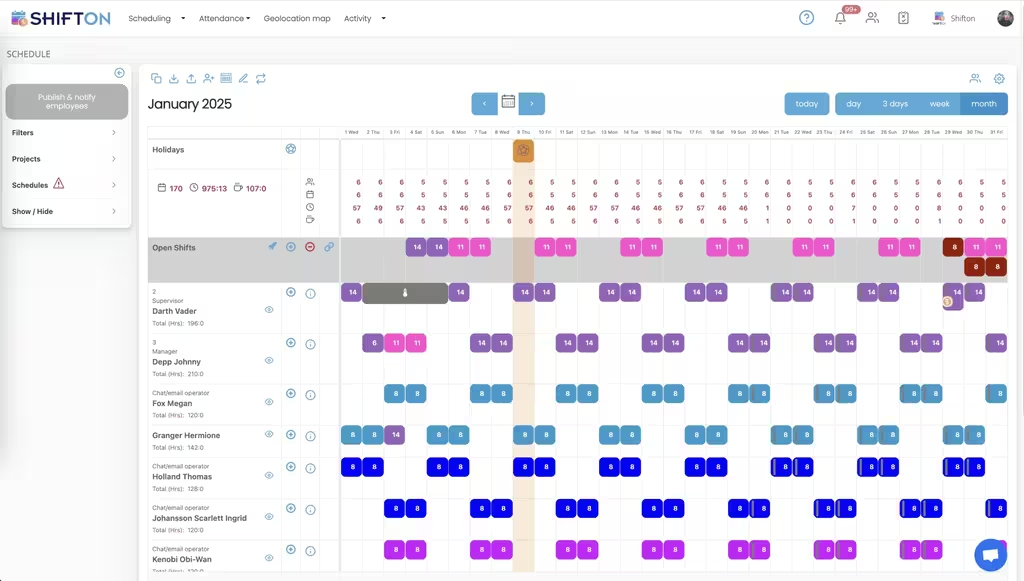
Weekend rotations and holiday cover are decided in months, not days. The month view lays the whole period out per employee with a running total of their hours, marks holidays on the grid, and shows unfilled days as open shifts carrying the hours still needed. A gap in the third week is visible while it is still easy to fill.
The Team Roster, Roles and Access Levels
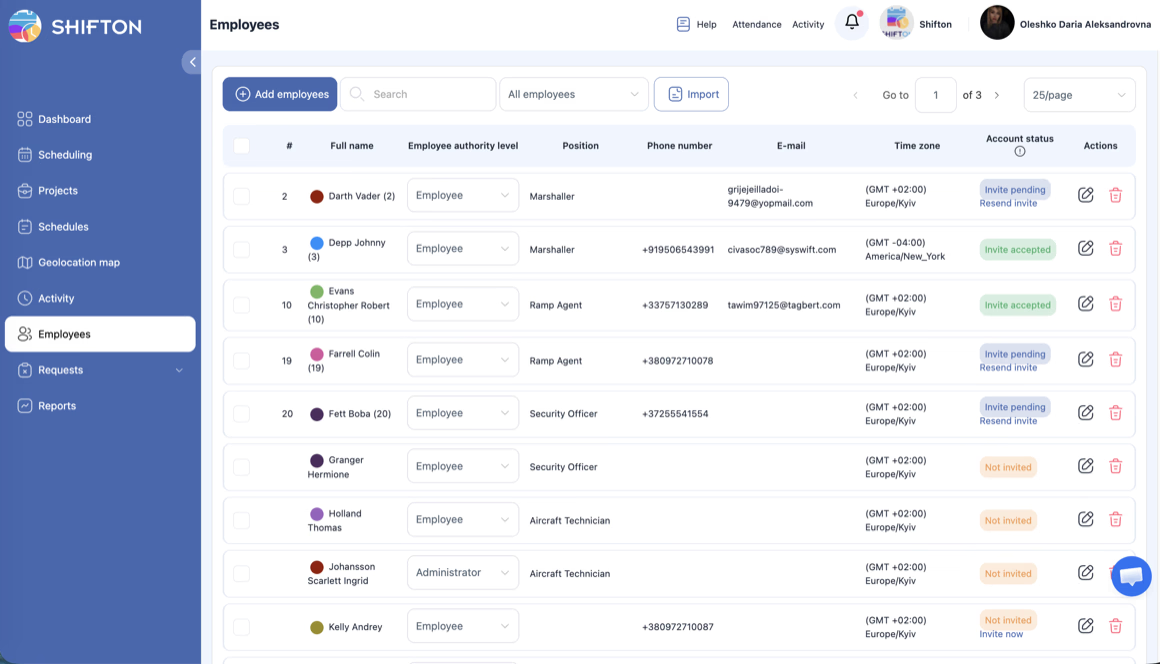
A rota is only as good as the list behind it. The employees table holds full name, position, phone, email, time zone and authority level, so a manager can see who is qualified for a shift before creating it. New starters and locums are added one at a time or imported in bulk, and account status shows whether an invite is still pending.
Worked Hours, Breaks and Lateness in One Report
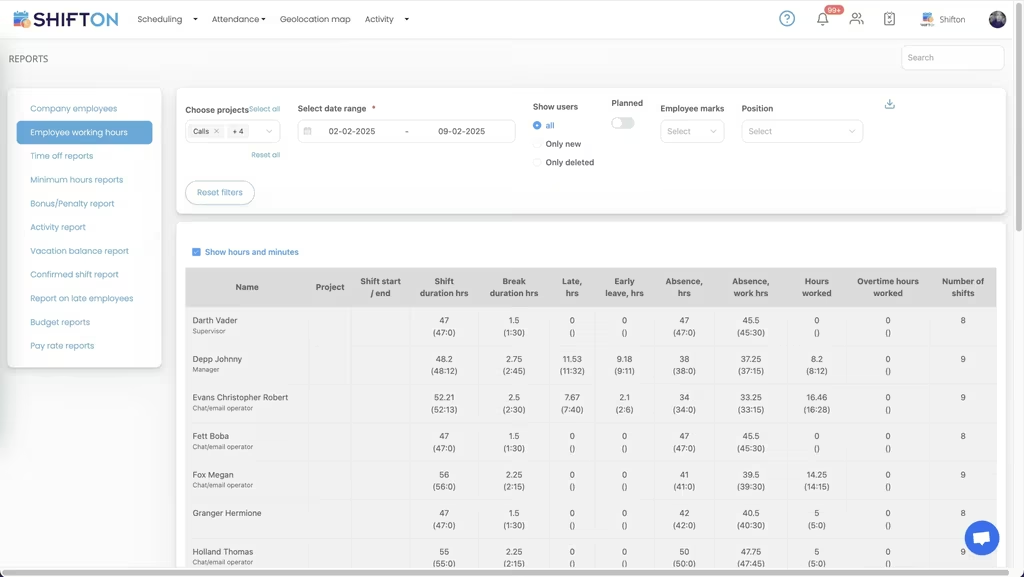
When the period closes, the working hours report answers the questions payroll asks. Each line carries the employee, the project, shift start and end, shift duration, break duration, late hours, early leaving, absence, hours worked, overtime worked and the number of shifts. Ordinary time and overtime arrive separated rather than as one figure.
Start with the Free Plan
No time limits. Get full access to core features and upgrade when you're ready.
Read the full guide to pharmacy shift scheduling
A pharmacy cannot open short. The counter can absorb a quiet morning and a difficult afternoon, but it cannot absorb a missing pharmacist, and everything about the rota follows from that single constraint. Pharmacy scheduling software exists to make cover provable in advance rather than confirmed by phone on the morning it matters.
The work is deceptively fiddly. Part-time contracts, fixed weekday patterns, Saturday rotations, bank holidays, study leave, locum bookings and a chain that shares people between branches. Built by hand, that lands on one manager and eats an afternoon a week. Built once as a template and reused, it takes minutes.
What pharmacy scheduling software has to get right
Four things do most of the work. Guarantee that every trading hour has the cover it legally needs. Build a week or a month quickly and amend it without redrawing the grid. Get the current version onto every phone, because pharmacy staff are on the floor and not at a desk. And record what was actually worked, since paid hours, breaks and lateness are the numbers that end up in dispute.
Everything else is secondary. A pharmacy scheduling tool that covers those four beats a longer feature list, and it is the difference between a rota the team trusts and a printout that stopped being true on Wednesday.
A pharmacy week is built from a handful of repeating pieces:
- Core trading hours with a responsible pharmacist on the premises throughout
- Technician and counter shifts that flex with the busiest part of the day
- A Saturday and bank holiday rotation shared fairly across the team
- Relief and locum cover booked around holidays, training and absence
Once those pieces sit on one grid instead of in four places, the rota stops being a memory exercise. Most of what a pharmacy shift scheduling app does is keep that grid honest.
Pharmacist cover and the rules that cannot slip
Cover is not a headcount question. A shift with three people on it and nobody qualified to be the responsible pharmacist is not a covered shift, however full the column looks. Positions and access levels live on the team roster, and roles show against names on the schedule, so cover is checked by capability rather than by how many rows are filled.
Planning a month at a time makes the exposure visible early. Days where nobody has been assigned show as open shifts carrying the hours still needed, holidays are marked on the grid, and a gap in the third week of next month can be filled while filling it is still cheap. That is the practical case for pharmacy online scheduling software over a sheet pinned in the back office.
Technicians, counter staff and the roles on a shift
A pharmacy is not one team. Pharmacists, technicians, counter assistants and delivery staff run to different patterns, different contracted hours and different hourly costs. Staff scheduling software for pharmacies has to keep them distinct and still show the whole branch on one screen.
Positions are stored against each person along with contact details, time zone and access level, so a manager sees who can be put where before the shift is created. New starters are added or imported into the roster and invited by email, and the invite status is visible until it is accepted. Nobody appears on next week's rota as a name that half the team does not recognise.
Weekends, bank holidays and locum cover
Weekend and holiday duty is the part staff notice most, so fairness matters as much as coverage. Rotating it on a month view shows the pattern across the whole team at once, which makes an uneven run obvious before anyone has to raise it.
Short-notice absence works the other way. Cover released as an open shift is visible to everyone at the same moment instead of travelling down a call list, and a regular locum or relief pharmacist added to the roster can be scheduled like any other member of the team. A pharmacy rota system does not remove the phone call, but it removes most of them.
Rotas across a pharmacy chain
Multi-site is where a spreadsheet finally breaks. Two branches short and one overstaffed on the same Saturday is a problem nobody can see when each rota lives in its own file. Projects and filters let a group build each branch separately and still review coverage across the estate, and a template that works at one site can be reused at the next rather than rebuilt from a blank grid.
Head office also gets something a folder of spreadsheets never provides: one place where every branch rota is current. Cover released at one site can be offered to trained staff at a neighbouring branch, which turns a set of separate rotas into a single pool of people.
Chains that also staff a hospital or clinical site face the same planning shape as our healthcare staff scheduling customers, where mandatory cover and shared staff across sites drive the whole design.
Where the dispensary systems end and the rota begins
The search results mix two very different products, so it is worth being blunt. Pharmacy management software runs the dispensary side of the business and the clinical systems around it, and Shifton does none of that. Shifton is the workforce layer beside it: who is rostered, who is qualified to be on that shift, who clocked in, how many hours were worked and how many were overtime.
Almost every pharmacy runs both, and the split is clean. The dispensary platform owns the professional workflow. A pharmacy staff scheduling app owns the rota and the timesheet. Groups that only need the second half usually find it replaces far more manual work than they expected.
Worked hours, breaks and lateness in one report
Staff clock in and out from the mobile app, so every shift stores an actual start, end and break against what was planned. The working hours report then lays the period out per person and per branch: shift start and end, shift duration, break duration, late hours, early leaving, absence, hours worked, overtime worked and the number of shifts.
Two things follow. Payroll receives an export rather than a conversation, and a disputed hour takes a minute to settle because the clock record is attached to the shift it belongs to. Pharmacy time tracking software is only worth running if the output survives that test, which is what the time clock is built around. QuickBooks, Zapier, Intercom and Usedesk connect from the integrations screen when the figures need to go somewhere else.
Choosing a pharmacy scheduling system your team will use
Adoption is decided by the staff, not the buyer. If the rota in the app is the true rota every time, people stop ringing the branch to check whether Saturday changed. That means changes published to everyone at once, availability and time-off requests handled in the same place as the schedule, and recorded hours that match what was worked.
Test it the way it will be used. Build a full month with a Saturday rotation and time it. Release one open shift and see how fast the notification lands. Pull an hours report for a week that included a late start and check whether it comes out separated from ordinary time.
Under 10 team members, Shifton is free with no time limit, which covers most independent pharmacies outright. Groups and larger branches move to paid plans billed per employee per month, with geolocation and work location available as a paid module. The aim stays the same either way: every trading hour covered by the right person, and an hours figure nobody has to argue about.
Frequently Asked Questions
What is pharmacy scheduling software?
Pharmacy scheduling software plans which pharmacists, technicians and counter staff work which shifts, publishes that plan to the team and records the hours afterwards. Shifton covers shift building and templates, open shifts, availability and time-off requests, clock-in and clock-out, breaks and hours reports. It is the staff rota, not the dispensary system.
Can Shifton plan rotas across several pharmacy branches?
Yes. Each branch is planned as its own project or schedule, and filters let a manager work on one site or review the whole group. Staff who move between branches appear on one roster, so a shift can be assigned wherever they are needed, and a template proven at one site can be reused at the next.
How does Shifton help with weekend, holiday and locum cover?
Weekend and holiday duty is rotated on the month view, where the pattern across the team is visible before anyone raises fairness. Cover that has no owner sits in an open shifts row and reaches everyone at the same moment. Regular locums are added to the roster and scheduled exactly like permanent staff.
Does Shifton replace a pharmacy's dispensary systems?
No. The professional systems that run the dispensary and the clinical side of the business are a separate product class, and Shifton does not touch them. Shifton is the workforce layer beside them: rosters, roles, attendance, worked and overtime hours, and the reports that come out of it. Pharmacies run both.
How does Shifton track hours, breaks and lateness for pharmacy staff?
Staff clock in and out from the mobile app, so each shift holds an actual start, end and break against the plan. The working hours report shows shift duration, break duration, late hours, early leaving, absence, hours worked, overtime worked and shift counts per person, and the period exports for payroll.
Is there a free plan for a small pharmacy?
Shifton is free for up to 10 team members with no time limit, which covers most independent pharmacies. Shift scheduling, the mobile app, basic time clock and reports are included. Larger teams and multi-site groups pay per employee per month, and the geolocation and work location module is paid on any plan.




Put Your Pharmacy Rota on Shifton
Build the week once, publish it to every branch, and see exactly what was worked when the period closes.