

Handyman Scheduling Software for Property Maintenance
Handyman scheduling software for days built from short jobs: plan visits by address, keep hours accurate, and let the crew read the day off their phones.


Lay out the week job by job
Each person takes a row and each booked job a coloured block with its start and end time, so a week made of short visits reads as a plan instead of a list. Work you have accepted but not allocated waits in the Open Shifts row until somebody is put on it.
Know what a visit actually cost
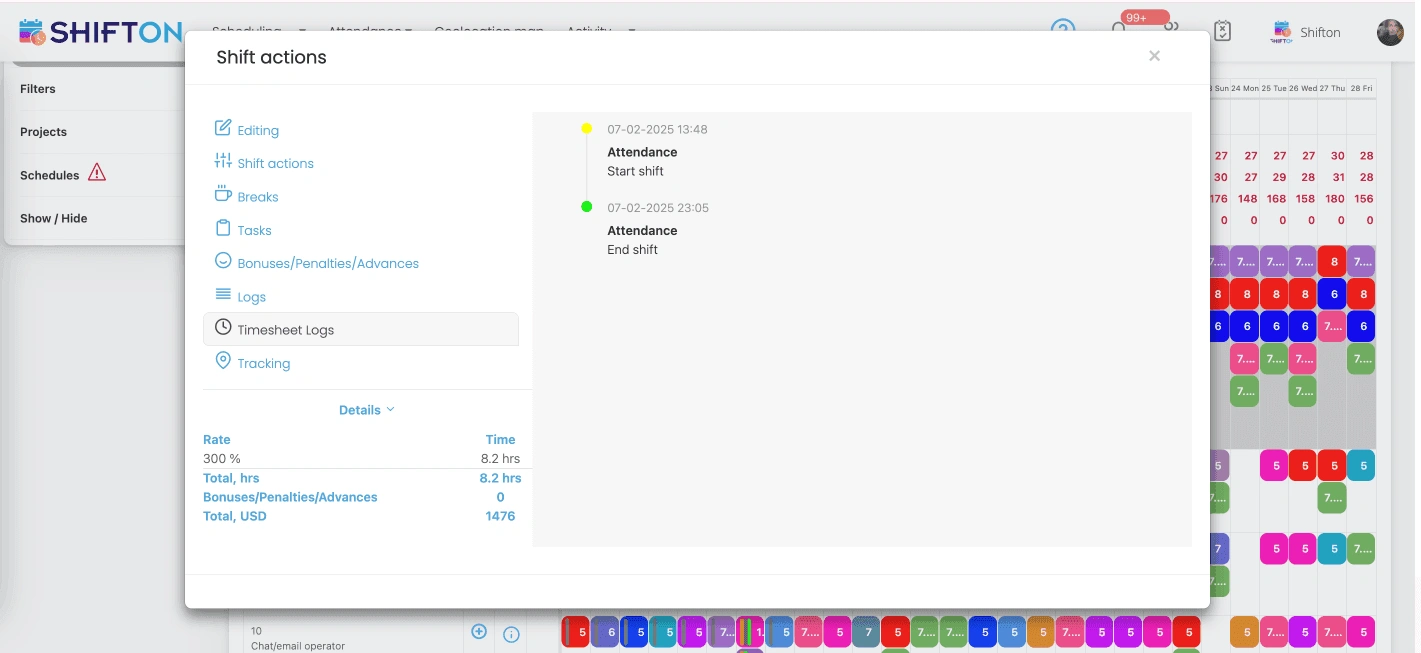
Open a shift and the attendance panel shows the real start and finish against what was booked. The details block prices those hours at the rate applied to that shift, premium evening and weekend rates included, so a job that ran long is costed before it ever reaches payroll.
The next three days, address by address
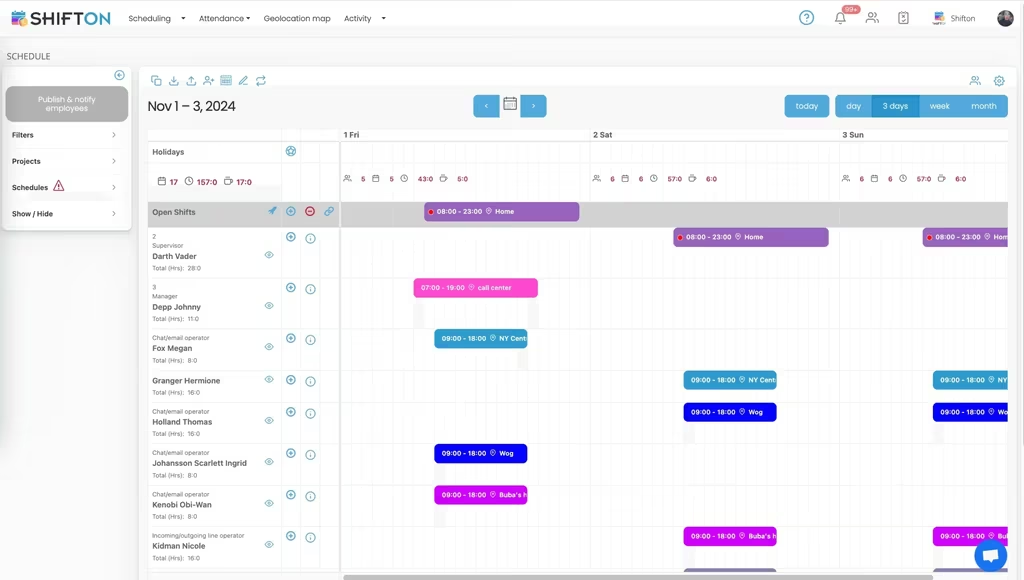
A handyman day is a sequence of addresses, and the short-range view is where that sequence lives. Every shift carries the location it belongs to and each person keeps a running hours counter, so the next three days can be checked without opening the full week.
Reports for hours, cost and time off
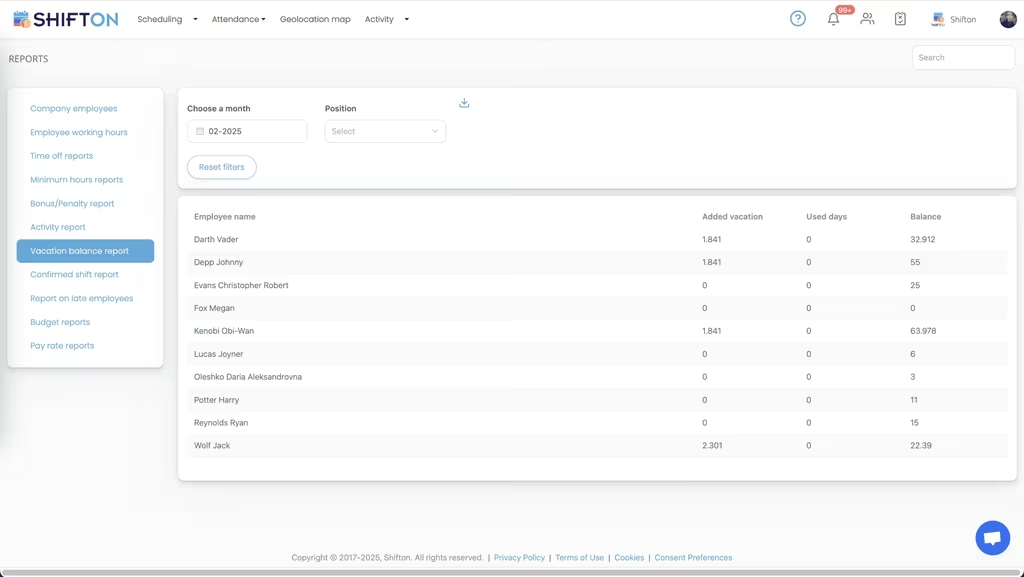
Everything worth checking at the end of a month already exists as a report. Working hours, minimum hours, time off balances, confirmed shifts, late starts, bonuses and pay rates are each their own view, filtered by month and position and ready to export.
Start with the Free Plan
No time limits. Get full access to core features and upgrade when you're ready.
Read the full guide to handyman scheduling
A handyman business is measured in visits, not in shifts. Four or five short jobs at four or five addresses, small home repair calls and odd jobs mixed with contracted work, each one booked for a time a customer agreed to and each one capable of running an hour long and pushing everything behind it. Handyman scheduling software exists because that pattern breaks every tool designed for people who work in one building all day.
The pressure is specific. Margins live in the number of jobs completed rather than the hours available. The crew is small enough that one person off sick is a serious problem. And the person doing the scheduling is often the person holding a drill an hour later, which means the planning has to happen on a phone, quickly, between jobs.
What handyman scheduling software has to handle
Four things decide whether a tool survives past the first month. Work has to be tied to an address, because a job without a location is not an instruction. The day has to be readable at a glance on a phone. Changes have to reach the crew immediately, since customers are waiting at specific times. And the hours coming back have to be accurate enough to pay from and to price the next quote with.
Handyman service scheduling software that covers those four is more useful than a platform with a long feature list aimed at a bigger operation. Anything that adds steps to the daily plan simply stops being used.
Many short jobs, many addresses, one day
The defining difficulty of this trade is density. A day is not one commitment, it is several, and they are linked by travel time nobody wrote down. When the plan lives in a group chat, the crew reconstructs it every morning from a scroll of messages, and the version in the office is never quite the version in the van.
Putting several shifts on one day, each with its own work location and time window, turns that scroll into a readable sequence. The three-day view keeps the near term in front of everyone without the noise of a full month. Because the crew can access it from anywhere, the morning phone call about where to go stops happening. Scheduling software for handyman work only earns its place when it removes those calls rather than adding to them.
From solo operator to a small crew
The point where informal scheduling collapses is the second and third person. One operator can hold a week in their head. Three cannot share a head, and the coordination cost arrives immediately: who is on what, who finished early, who is closest to the emergency callout that just landed.
Running everyone in one account makes that visible instead of verbal. Open shifts let urgent work be posted once and claimed by whoever has capacity rather than assigned through four separate calls. Positions and access levels mean a lead hand can adjust their own day while the master plan stays under office control. Handyman business scheduling software matters most at exactly this size, because it is the stage where growth starts costing more in admin than it adds in revenue. Shift swaps handled in the app rather than by message are part of the same saving, since an approved swap corrects the plan for everybody at once instead of for whoever happened to read it. Longer jobs that hold a crew in one home for weeks belong to renovation crew scheduling, which is a different planning problem.
Property maintenance contracts and recurring visits
Contracted work behaves differently from reactive jobs. It is predictable, it is the income you can count on, and it is the first thing to get squeezed when a busy week fills up with callouts.
Templates are the answer. A pattern of visits built once can be applied forward month after month, so property maintenance scheduling work occupies the calendar before the reactive jobs arrive around it. Projects keep contract work separated from one-off bookings in the same view, which makes it obvious at a glance whether the committed visits are actually being delivered. Property maintenance scheduling software that cannot reuse a pattern hands you the same manual build every month. Handyman staff scheduling software earns most of its keep on contracted work for exactly this reason, since the visits are known in advance and only the people change.
What a visit really cost you
Quoting is guesswork until you have durations. Most small operators price from experience, which drifts, and the jobs that consistently overrun are the hardest ones to notice because each individual overrun feels reasonable at the time.
Recording actual start and finish against the planned shift closes that loop. The gap between booked and worked time becomes a number per job type rather than a feeling. Rates applied to the shift, including premium evening and weekend rates, turn those hours into cost, and the budget and pay rate reports total it for the period. Handyman time tracking software that only counts a weekly total tells you nothing about which work is quietly unprofitable. After a couple of months the pattern is usually clear, and the fix is a pricing decision rather than a scheduling one. That is the sort of thing a maintenance crew scheduling system should be handing you for free.
Hours, lateness and the awkward customer question
Two questions come back after the fact more than any others: how long were you actually here, and why did nobody arrive at the time we agreed. Both need a record rather than a recollection.
Clock-in and clock-out sit against the shift, timesheet logs preserve the edit history behind every entry, and the report on late starts shows where arrival times are slipping as a pattern rather than an incident. That last one is worth running monthly. Home services scheduling software is often bought for the planning and kept for the reporting, because the reporting is what settles disputes and fixes habits.
Getting the schedule out of the group chat
Messaging apps are where most small crews still keep the plan, and they are genuinely good at conversation and genuinely bad at state. A message does not update when the job moves. Nobody can tell which of three similar messages is current. And an accepted job mentioned at nine at night is buried by the following afternoon.
A published schedule has one version. Changes push a notification to the people affected and update the plan everyone sees, so the current state is never a matter of scrolling back. A handyman scheduling app is not replacing the group chat, it is taking the one job the group chat was never built to do.
Choosing the right tool for a handyman business
Test it against a real day, not a demo. Build a full week on a phone and time yourself. Move a job to a different day and see how fast the crew hears. Check what somebody sees the first time they open the app, since adoption fails on a confusing first screen. Confirm that hours export in a form your bookkeeper can use directly.
Terminology varies across the trade. Some firms search for handyman dispatch software, some want handyman workforce management software, and some run a maintenance team across a portfolio of buildings and call it something else entirely. The underlying need is identical: put a named person at a named address at an agreed time and know afterwards what happened. Route planning and billing belong in separate tools, and they are better left there. Businesses working across neighbouring trades often run the same account for HVAC scheduling software needs alongside general repair work.
Shifton is free for up to 10 team members with no time limit, including scheduling, the basic time clock, the mobile app and reports, which covers a solo operator and most small crews. Beyond that, pricing is per employee per month for the modules you switch on, with the geolocation module available for businesses that need arrival at a property confirmed. The result is the same either way: a day everyone can see, hours that match the work, and quotes built on real durations.
Frequently Asked Questions
What is a handyman scheduling app?
It is a system for planning who does which job on which day, tagging the work to a property, sending the plan to the crew and recording the hours that come back. It covers the weekly and daily views, clock-in and clock-out, time off and the hour reports payroll uses. Shifton handles the workforce side of a handyman business.
Can I schedule several short jobs at different addresses in one day?
Yes. Multiple shifts can sit on the same day for the same person, and each one carries its own work location and time window. The three-day view shows that sequence, which is how a crew checks the run of addresses without calling the office.
Does this work for a one-person handyman business?
It does. On your own it works as a scheduling and time record: jobs go on the calendar with their address, hours are recorded against them, and the reports give you accurate totals. The same account grows into handyman crew scheduling software as soon as you take on a second pair of hands.
Is there a free handyman scheduling app?
Shifton is free for up to 10 team members with no time limit, which covers a solo operator and most small crews. Scheduling, the basic time clock, the mobile app and reports are all included. Paid modules are per employee per month, and location-based clock-in is one of them.
How do I handle recurring property maintenance visits?
Recurring work is best built once and reused. A week or a pattern that works can be saved as a template and applied forward, so contracted visits land on the calendar before reactive jobs fill the space. That is a far more reliable method than a property maintenance schedule template kept in a spreadsheet.
Can I see how long a job actually took?
Yes. The shift records the real clock-in and clock-out alongside the planned time, with breaks logged separately, and the details panel prices those hours at the rate that applies. Over a few weeks that gives you real durations for the job types you quote most often.





Get your handyman schedule out of the group chat
Free for up to 10 people, with address-tagged jobs, real clock-in times and a day the crew can check without phoning the office.