

 English
  Español
  Português
  Deutsch
  Français
  Italiano
  日本語
日本語  中文
中文  हिन्दी
  עברית
עברית  العربية
  한국어
한국어  Nederlands
  Polski
  Türkçe
  Українська
  Русский
  Magyar
  Română
  Български
  Čeština
  Ελληνικά
  Svenska
  Dansk
Dansk  Norsk
Norsk  Suomi
Suomi  Bahasa Indonesia
  Tiếng Việt
  Tagalog
  ไทย
ไทย  Latviešu
  Lietuvių
  Eesti
Eesti  Slovenčina
  Slovenščina
  Hrvatski
  Македонски
  Қазақша
  Azərbaycan
  Afrikaans
  বাংলা
বাংলা Electrician Scheduling Software for Electrical Contractors
Electrician scheduling software for crews spread across job sites: build the week, keep hours under the cap, and see who is on which site at a glance.


Build the week and send it to the crew
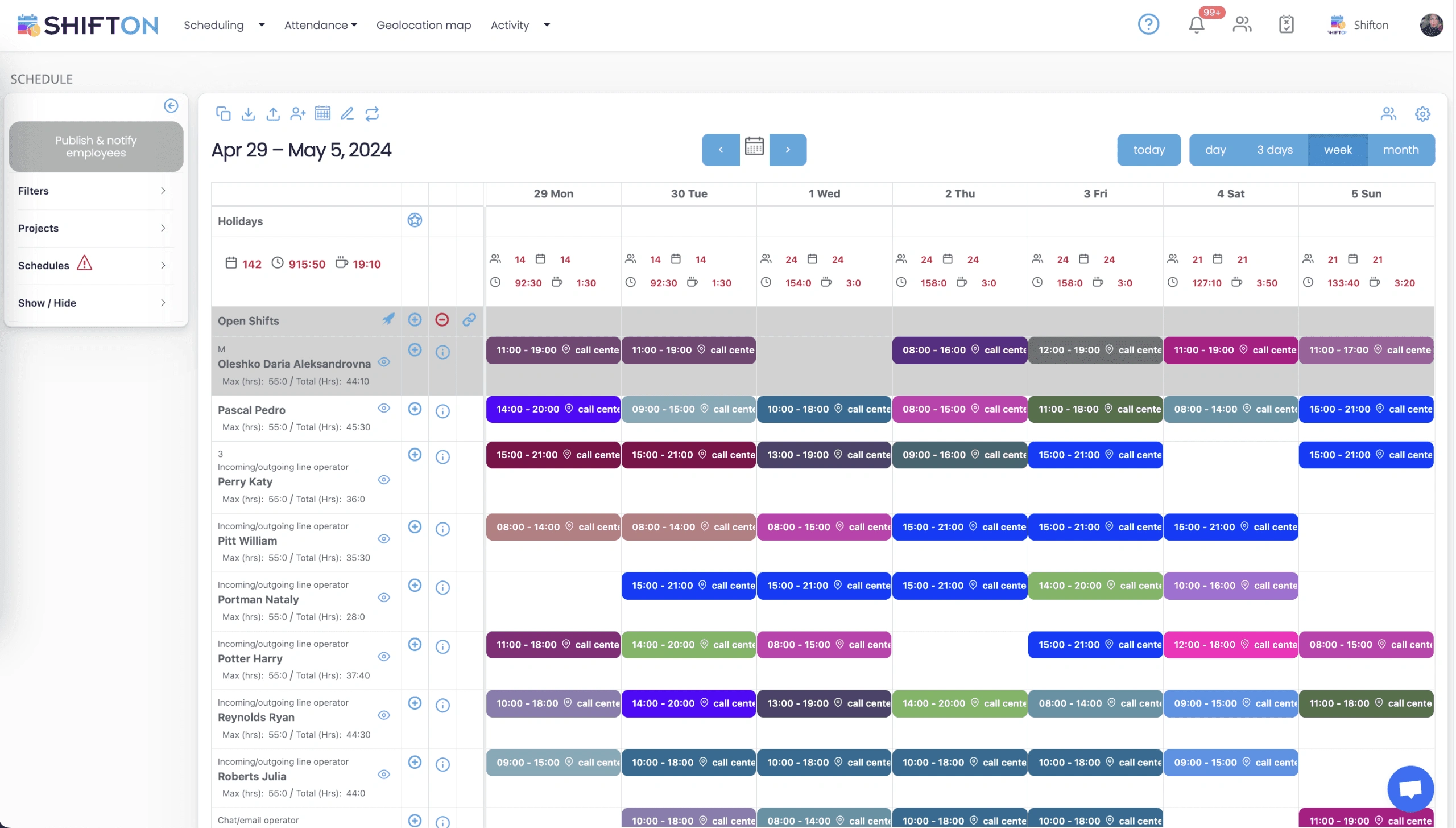
The weekly grid holds every electrician on a row and every shift as a coloured block with its start and end time. Work that has not been assigned yet sits in the Open Shifts row at the top, so the gaps are obvious while there is still time to cover them.
Hour caps and overtime kept under control
Every row on the week view carries two numbers: the hour limit set for that electrician and the hours already assigned to them. Shifts are tagged with the site they belong to, and each day column totals headcount and hours, so the week is costed as you build it instead of after payroll closes.
See who is on which site over the next days
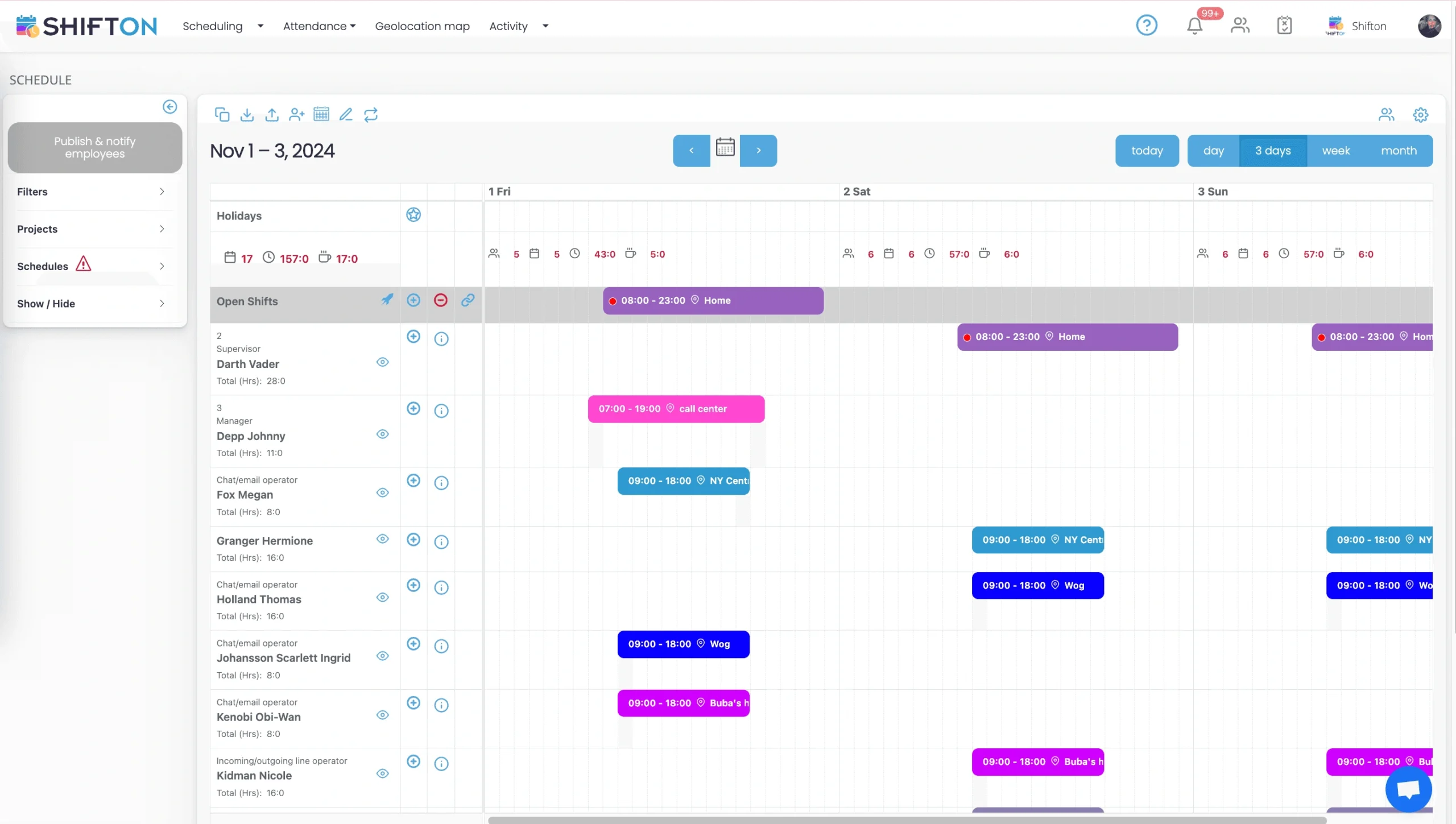
The short-range view cuts the week down to the next few days, with every shift showing the site it is tied to. This is the screen for the questions that arrive on the day: who is on the commercial job, who has capacity left, and how the running hours look for each electrician.
Reports for payroll, hours and time off
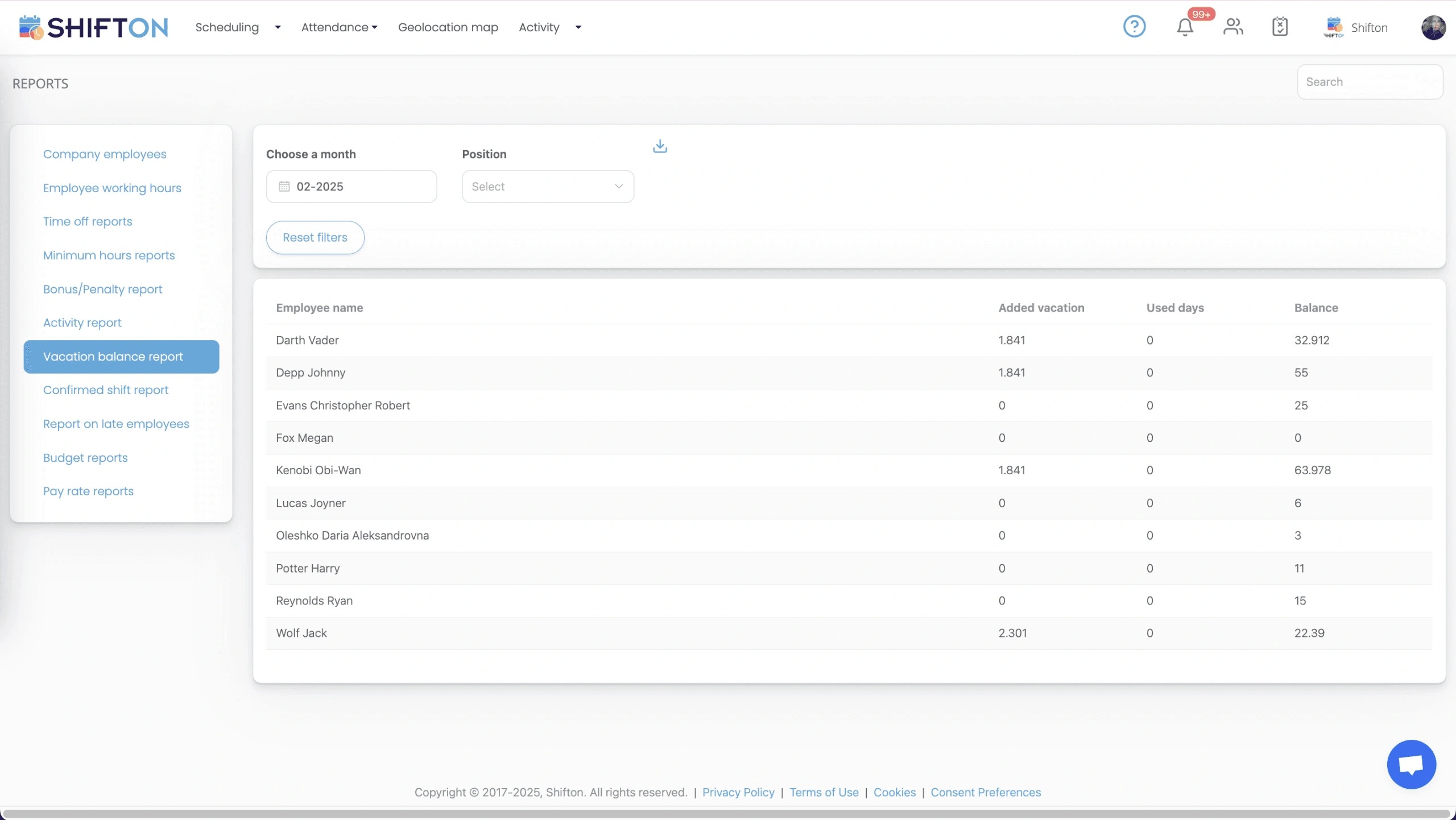
The reports section carries a separate view for each end-of-period question. Working hours, minimum hours, time off balances, confirmed shifts, late starts, bonuses and pay rates all filter by month and position, and every table exports for payroll or accounting.
Start with the Free Plan
No time limits. Get full access to core features and upgrade when you're ready.
Read the full guide to electrician scheduling
An electrical contracting business lives or dies on whether the right people reach the right site on the right morning. A crew sent short a licensed hand cannot legally start. Two vans arriving at the same address means a day billed once and paid for twice. Electrician scheduling software exists to make that allocation a repeatable process rather than a nightly phone exercise for whoever runs the office.
Scheduling an electrical crew is harder than scheduling a fixed workplace. The team moves between addresses, commercial work and residential callouts run on different clocks, licences and qualifications restrict who can be sent where, and a single emergency callout can pull three planned jobs a day to the right. Generic rota tools assume everybody turns up at the same building.
What electrician scheduling software has to handle
The job comes down to four things. Assign people to sites, not just to hours, because a shift without a location is only half an instruction. Keep hours inside the cap, since overtime on an electrical crew is expensive and easy to accumulate quietly. Get the plan to people who are never in the office. And record what actually happened accurately enough to bill from and pay from.
Electrical contractor scheduling software that clears those four is worth more than a platform packed with features aimed at estimating or stock control. Those are separate problems with separate tools.
Job sites, crews and knowing who is where
The question a supervisor is asked most often is simply where somebody is. Answering it from a spreadsheet means opening the file, finding the row, and trusting that the version in front of you is the current one.
In Shifton every shift carries a work location, so the schedule shows the site alongside the person and the time. The three-day view narrows that down to the near term, which is the window that actually matters on a working morning. Scheduling software for electricians without a location on the shift pushes the coordination back into messages, and the messages are where the mistakes live.
Licensed electricians, apprentices and who can be sent alone
An electrical workforce is not interchangeable. Master and licensed electricians, journeymen and apprentices carry different authority, and an apprentice cannot be the only person on a site. That constraint has to sit in the schedule rather than in a supervisor's memory.
Positions and roles are set per person in Shifton, so the rota shows the grade beside the name and the crew composition on a site can be checked before the week is published. Commercial electrician scheduling software has to respect the pairing rules for larger sites, and residential electrician scheduling software has the opposite pressure, with more addresses and fewer people at each. Most contracting businesses run both patterns in the same week, and they should not need two systems to do it. Access levels help here as well, since a supervisor can be given rights to adjust their own crew while the master schedule stays under office control. Multi-week renovations, where several trades follow one another through an occupied home, are covered separately under scheduling renovation projects.
Overtime, hour caps and what a heavy week really costs
Labour is the largest controllable cost in electrical contracting, and most overruns are unremarkable in isolation. An hour past the end of a shift here. A weekend callout there. A crew quietly crossing a threshold because nobody was tracking the running total.
A maximum hour figure per electrician sits next to the assigned total on the week view, which turns overtime into a visible decision rather than a payroll surprise. Overtime can be set to require confirmation, so extra hours are approved rather than assumed. Afterwards, budget and pay rate reports show what the period cost, broken down by person and position. An electrical contractor scheduling app that only produces a grid leaves the expensive half of the work undone.
Callouts, cover and reshuffling the week
Emergency work is not an exception in this trade, it is a weekly certainty, and every callout displaces something that was already planned. The speed of the reshuffle is what decides whether a customer gets told or discovers it themselves.
Open shifts are how cover gets found without a round of individual calls: the work is posted and any qualified electrician can pick it up from the app. When a job moves, the change is published and every affected person gets a notification, so the schedule everyone is looking at stays the same schedule. Electrician job scheduling only works when the plan and the crew's version of the plan never diverge. Contractors who also run larger multi-trade sites often pair this with construction crew scheduling on the same account.
Planned maintenance alongside project work
Most electrical companies carry a base of recurring work underneath the projects: scheduled inspections, testing rounds, service agreements on commercial premises. It is entirely predictable, which is precisely why it gets forgotten until the date arrives and nobody has capacity.
Recurring patterns can be saved as templates and applied forward, so electrical maintenance scheduling software work lands on the calendar before reactive jobs fill the space around it. Templates also make a week that worked reusable rather than rebuilt from scratch, and that is where most planning time disappears. An electrical team scheduling approach that treats contracted maintenance as an afterthought ends up delivering it on overtime rates.
Hour records that survive a payroll query
Two numbers matter after the week closes: hours worked and hours paid. They only match if the recording was tied to the shift at the time rather than reconstructed from notes.
Clock-in and clock-out sit against the planned shift, breaks are logged separately, and timesheet logs keep the edit history behind every entry. The working hours report separates regular hours from overtime per person and exports for the accounting side. An electrician time tracking app that produces a bare weekly total gives you nothing to answer a query with. Electrical service scheduling software should end the month with a table nobody has to argue about.
Choosing a scheduling app for electricians
Test it the way a contracting business actually runs. Build a full week on a phone in a van and time it. Move a job to another day and see how quickly the affected crew hear about it. Check what an apprentice sees when they open the app for the first time, because adoption fails on a confusing first screen. Confirm that hours come out in a format your bookkeeper can use without retyping.
Terminology varies across the trade. Plenty of firms search for electrician dispatch software and mean the same underlying task: getting a named person to a named address at a named time, with a reliable record of it afterwards. Shifton covers that allocation and the hours behind it. Job estimating and route planning are separate software categories, and they are better handled by the tools built specifically for them.
Shifton is free for up to 10 team members with no time limit, covering scheduling, the basic time clock, the mobile app and reports, which is enough for a small electrical company. As the crew grows, pricing is per employee per month for the modules you switch on, including the geolocation module for contractors who need site arrival confirmed. The aim stays constant: everyone knows the site, the hours hold where you planned them, and payroll runs from real numbers.
Frequently Asked Questions
What is an electrician scheduling app?
It is a system for planning which electricians work which hours and on which sites, then getting that plan to the crew and recording what actually happened. It covers the weekly rota, hour caps, time off, clock-in and clock-out, and the hour reports payroll runs from. Shifton handles the workforce side of an electrical contracting business rather than estimating or takeoff.
Can I assign electricians to specific job sites?
Yes. Each shift is tagged with a work location, so the schedule shows not only who is working but where. The three-day and weekly views both display the site on the shift, which is how a supervisor answers a same-day question without calling anyone.
How does it stop crews running into overtime?
A maximum number of hours can be set per electrician, and the week view shows that cap next to the hours already assigned. The gap between the two is visible while you are still building, so the choice to go over becomes deliberate rather than accidental. Overtime rules can also require confirmation before extra hours are approved.
Is there a free plan for a small electrical business?
Shifton is free for up to 10 team members with no time limit, which covers most small electrical contractors. Shift scheduling, a basic time clock, the mobile app and reports are included. Paid modules are per employee per month once you grow past that, and location-based clock-in is a paid module.
How do electricians see their shifts?
Through the Shifton mobile app on iOS and Android, or in a browser. Publishing the week sends a push notification to everyone scheduled, and later changes reach them the same way. An electrician scheduling app on the phone removes the morning round of calls about where to go.
Does it track hours worked for payroll?
Yes. Clock-in and clock-out are recorded against the planned shift, with breaks logged separately, and the working hours report splits regular hours from overtime per person. Electrician time tracking software of this kind produces the numbers payroll needs, though the payroll run itself happens in your own accounting system.





Put your electrical crew schedule into Shifton
Free for up to 10 electricians, with site-tagged shifts, per-person hour caps and a week the crew reads from their phones.