

 English
  Español
  Português
  Deutsch
  Français
  Italiano
  日本語
日本語  中文
中文  हिन्दी
  עברית
עברית  العربية
  한국어
한국어  Nederlands
  Polski
  Türkçe
  Українська
  Русский
  Magyar
  Română
  Български
  Čeština
  Ελληνικά
  Svenska
  Dansk
Dansk  Norsk
Norsk  Suomi
Suomi  Bahasa Indonesia
  Tiếng Việt
  Tagalog
  ไทย
ไทย  Latviešu
  Lietuvių
  Eesti
Eesti  Slovenčina
  Slovenščina
  Hrvatski
  Македонски
  Қазақша
  Azərbaycan
  Afrikaans
  বাংলা
বাংলা Remodeling Scheduling Software for Crews and Trade Sequencing
Sequence trades on one job, keep crews moving across several, and cost every labour hour with remodeling scheduling software built for renovation work.


Build the week around the jobs that are live
Renovation weeks are rebuilt more often than they are planned, because one delayed inspection moves everything behind it. The weekly grid holds each crew member on their own row with shift times attached, and any day you have not committed a name to stays in the open shifts row until somebody picks it up.
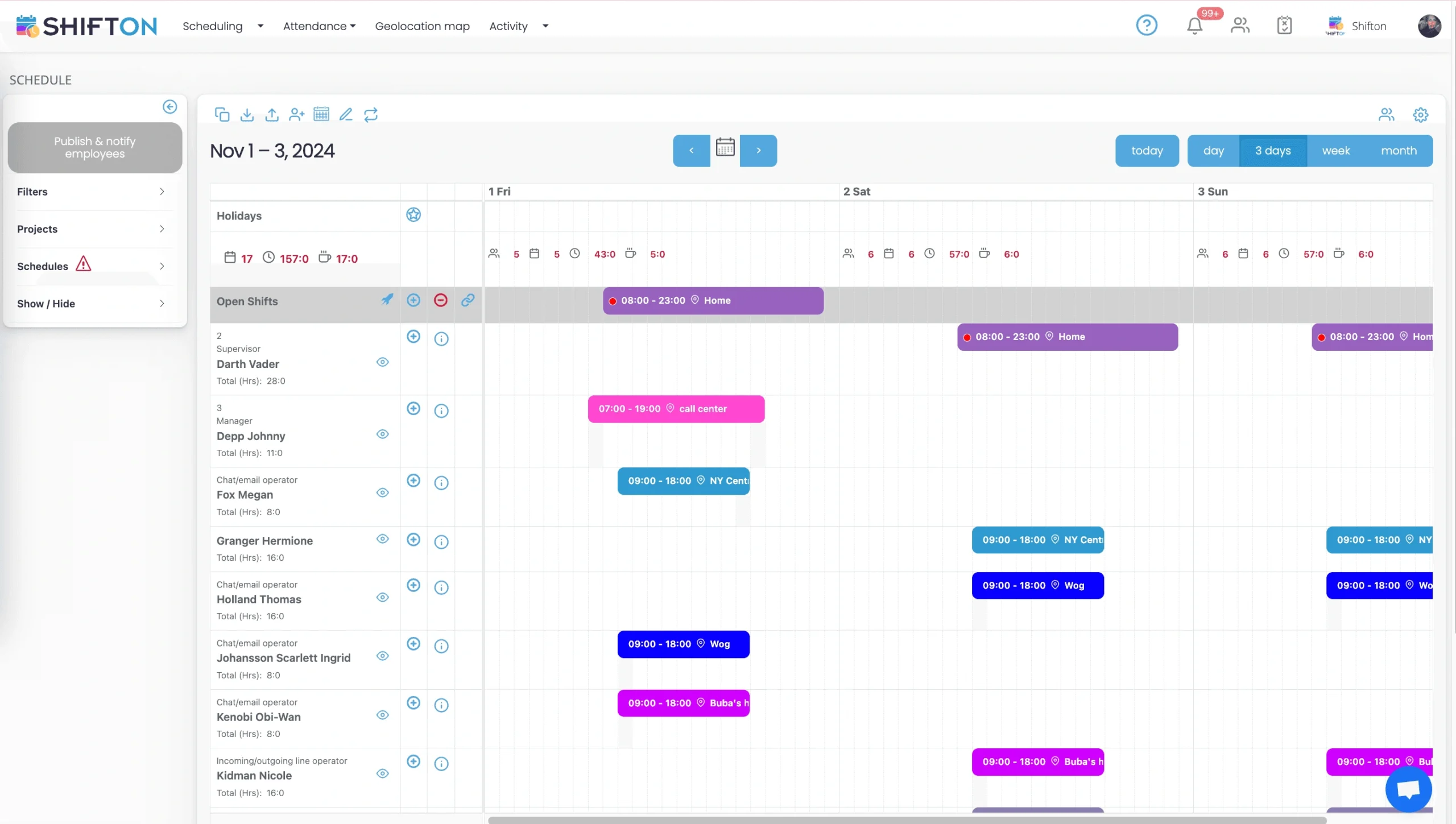
Who is on which job over the next three days
On a live remodel the only horizon that matters is the next couple of days. The short view lists each person's upcoming shifts labelled with the job they belong to, with a running hours total beside every name, which is the fastest way to answer where somebody is meant to be tomorrow.
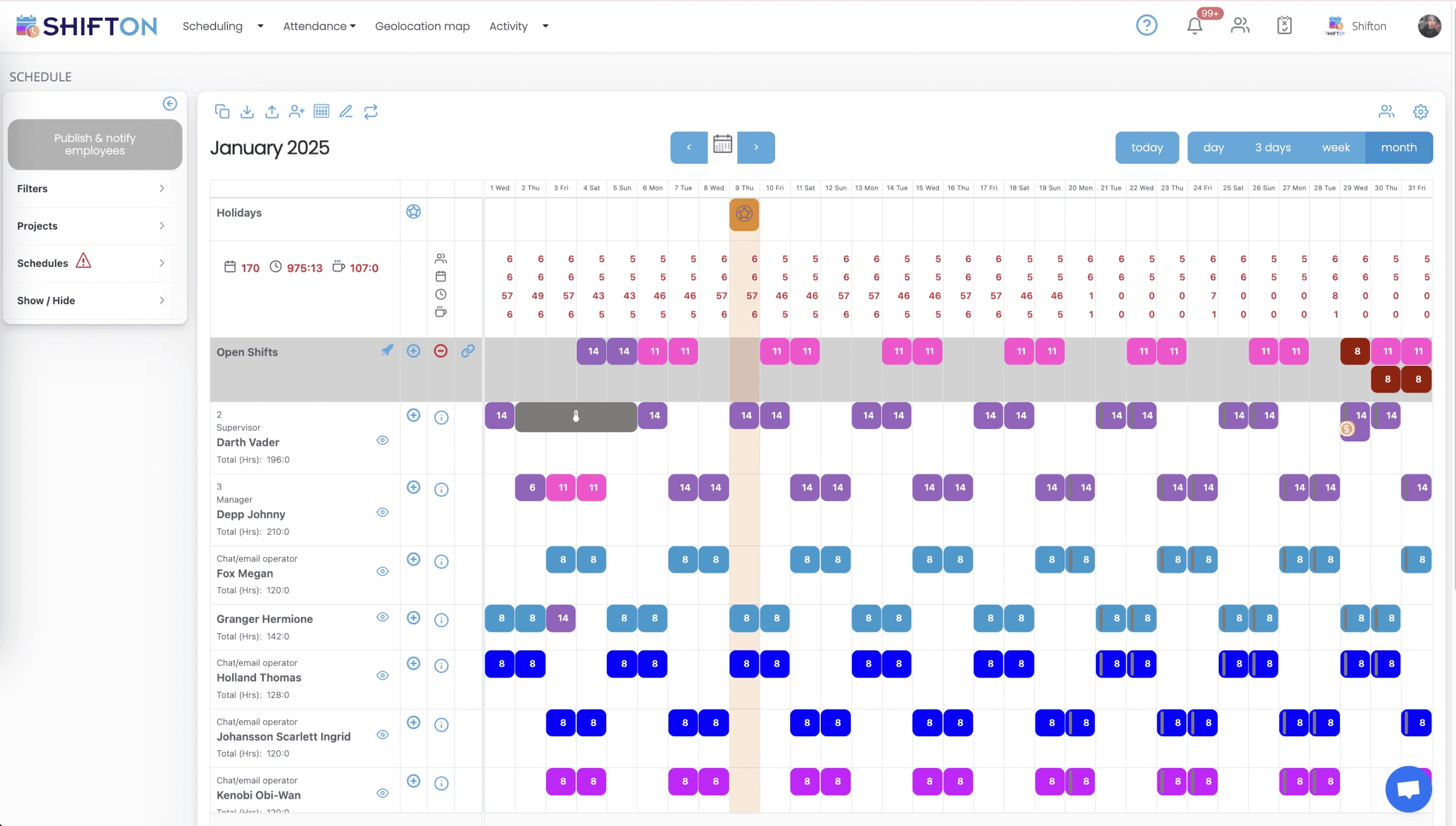
A month ahead, hours spread where you need them
Jobs are sold months before they start, so the useful question is whether the coming month is loaded evenly. The month view shows each person's total hours for the period, marks the holidays that will interrupt work, and displays the hours you still have unassigned as numbers per day.
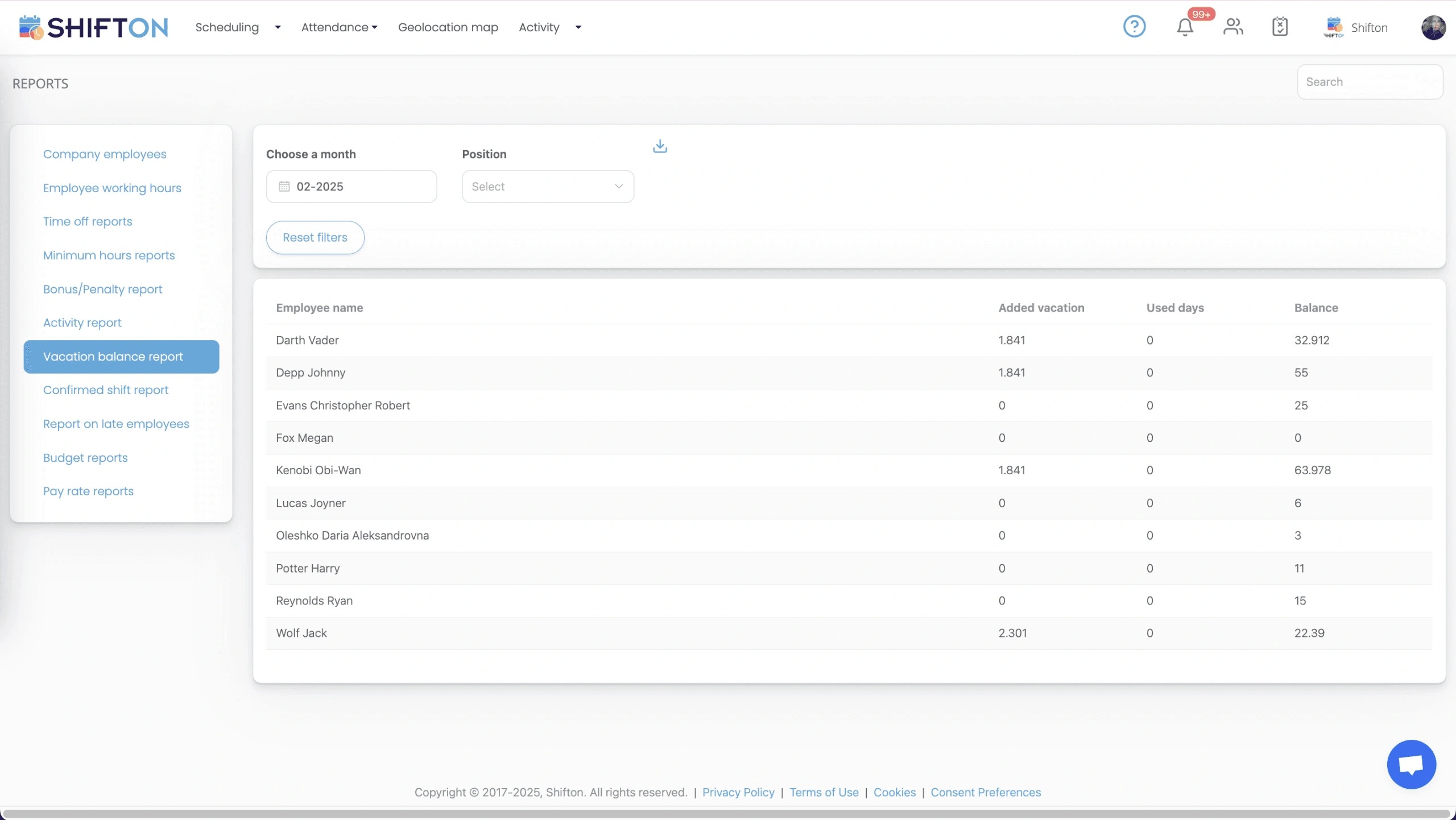
Reports that tell you what a job absorbed
Renovation margin is decided by labour, and labour is only knowable if it is recorded. The reports screen holds working hours per person, budget and pay rate reporting, time-off balances and a late-arrival report, all filterable by job and period and ready to export.
Start with the Free Plan
No time limits. Get full access to core features and upgrade when you're ready.
Read the full guide to remodeling crew scheduling
A remodel is a sequence, and the sequence is fragile. Demolition has to finish before framing starts, rough-in has to pass before anything gets closed up, and a tiler standing in a room that is not ready is a day billed against nothing. Remodeling scheduling software is what holds that sequence together when three jobs are live and one of them slips a week.
Renovation is harder to staff than new build for a specific reason. You are working inside somebody's house, on a footprint you did not create, with surprises behind every wall. Dates move constantly. A job that was going to release a crew on Thursday releases them the following Tuesday, and everything booked behind it has to move as well. Labour is the cost that absorbs every one of those slips, which makes the schedule the control point rather than an administrative chore.
What remodeling scheduling software has to solve
Three problems, and they pull against each other. Get the right trade onto the right job on the right day. Keep every crew member usefully occupied without double-booking anybody. And know, once the job closes, how many labour hours it genuinely absorbed. Remodeling contractor scheduling software that only draws a nice calendar answers the first and leaves the other two exactly where they were, which is why so many firms end up with a calendar in one place and a spreadsheet of hours in another that never quite agree. Remodeling employee scheduling software is only worth having if both live in the same system.
Sequencing trades on a single job
The value of a written sequence is that everyone works to the same version of it. In Shifton each job is a project, and every shift is booked against that project with the times you expect people on site, so the order of trades is readable in the grid rather than held in a site lead's head. When an inspection date moves, you drag the affected shifts and republish. Push notifications carry the change to the people who need it, which is what stops a crew driving to a job that is not ready for them. Firms searching for kitchen remodeling scheduling software or bathroom remodeling crew scheduling software are usually running both types of job at once out of the same list of names, and that is exactly the case a single grid handles better than separate plans per job.
Repeat job types are where templates pay off. A renovation schedule template built from work you have done twenty times can be applied to the next one instead of drawn again, and a remodeling schedule template or home renovation schedule template already sitting in a spreadsheet imports rather than being retyped. What changes between jobs is usually the names and the dates, not the shape of the work.
Crews spread across several jobs at once
Very few renovation companies run one job at a time, and none of them enjoy the arithmetic that comes with running four. Remodeling shift planning software has to answer the people question before the work question. The constraint is people rather than work: two jobs both wanting the same finish carpenter on the same Tuesday is the normal failure, and it is invisible until somebody notices. Because every shift carries a job tag, the three-day and weekly views show a person's real commitments rather than a per-job wish list, and a running hours total sits next to each name. Remodeling crew scheduling software is worth the licence at the point where you can no longer keep all of that in your head, which for most firms is the third simultaneous job. Some contractors search for remodeling dispatch software instead, but on a renovation the dispatch problem is really a sequencing problem, and remodeling crew management software solves it from the roster rather than from a map. Firms comparing remodeler scheduling software tend to start with the calendar view; the more useful test is whether it stops one person being promised to two jobs on the same morning.
Start times, occupied homes and the client's morning
An occupied remodel has social constraints a new build does not. A start time agreed with a homeowner is part of the contract in practice even when it is not in writing, and a crew arriving forty minutes early costs goodwill that is expensive to rebuild. Shift times are set per job and visible to the crew before the day starts, and the late-arrival report shows where mornings are drifting so it can be addressed as a pattern rather than as an argument. New-build work behaves differently and has its own page for crews on construction sites, but on renovation jobs the client is standing in the room, and the schedule has to respect that.
Punch lists and the last ten percent of a job
The tail of a remodel is where profit quietly disappears. Snagging is short, scattered, needs specific people, and rarely fills a full day, so it gets postponed until it becomes a fortnight of half-days. Tasks can be attached to a shift, which turns a punch list into scheduled work with a name and a time against it instead of a note on a phone, and the crew sees it in the remodeling schedule app next to their shifts rather than in a message thread. Our task management feature covers how that works alongside the roster. The practical gain is that finishing work stops competing with the next job's start date on equal terms.
Labour hours, change orders and the real cost of a job
Nothing about job costing improves until the hours are recorded rather than remembered. Remodeling time tracking software has to log clock-in and clock-out against the job, not just the day, or every figure downstream of it is an estimate wearing a decimal point. Remodeling timesheet software that lives apart from the roster always drifts, because two systems mean two versions of a Tuesday, so treat remodeling labor scheduling software and time tracking as one job rather than two purchases. With that in place the reporting screen does the rest.
- Employee working hours, with worked and overtime hours as separate columns per person.
- Breaks, late starts and early finishes captured per shift rather than reconstructed on payday.
- Budget and pay rate reports that turn hours into a labour cost you can compare against the quote.
- Filters by job and date range, so one project or one pay period comes out on its own.
Change orders benefit most. Extra work billed on time and materials is only as defensible as the hours behind it, and an exportable report per job is a considerably stronger position than a recollection. QuickBooks and Zapier integrations pass the results on without a second round of typing.
Subcontractors, employees and what the software can honestly do
Remodeling staff scheduling software has to cope with a mixed workforce. Renovation runs on your own people plus regular trades who work for themselves. Anyone you add to the team gets a position, an authority level and app access, so a subcontractor you use every month can sit in the same roster as your employees and receive the same notifications. What Shifton does not do is invoice them, price the job or produce a takeoff. It is remodeling workforce management software: it plans people, records hours and reports on both. Being clear about that boundary before a trial saves everyone a fortnight, because the market is full of listings that imply one product does all of it. Read it as renovation crew scheduling software and the edges are obvious.
Shifton for a remodeling company
There is no best remodeling scheduling software in the abstract, and a remodeling scheduling tool is only as good as your site leads' willingness to open it every morning. A renovation firm rarely needs more software. It needs the schedule and the hours to be the same system, so that the plan you published and the hours you pay from cannot drift apart. Under 10 team members Shifton is free with no time limit, and that free plan covers shift scheduling, basic time clock and attendance, the mobile app and reports, which is enough to run a single-crew remodeling business permanently. As you add crews and run more jobs in parallel, pricing moves per employee per month with forecasting, automatic distribution and geolocation available as paid modules. What you get out of it is narrow and worth having: trades that arrive in the right order, crews who know which job they are on, and a labour figure per project that survives being questioned.
Frequently Asked Questions
What is remodeling scheduling software?
It plans which crew member works on which job on which day, and records the hours they put in. Shifton builds the weekly and monthly roster, tags every shift with the job it belongs to, publishes it to the crew's phones, and reports worked and overtime hours per project.
Can it keep trades in the right order on one job?
Yes. Remodeling shift scheduling software should make the order visible in one grid, and Shifton does that by booking each trade's shifts against the job with the dates and hours you want them on site. When an inspection or a delivery slips, you move the affected shifts and republish, and everyone downstream is notified at once.
How do crews see the schedule on site?
Through the mobile app on iOS and Android, which shows their own shifts with times and the job each one belongs to. Changes arrive as push notifications, and staff can claim open shifts or request a swap without calling the office.
Does it track labour hours per job for costing?
It does. Clock-in and clock-out are recorded against the shift and the job rather than just the day, and the working hours report separates worked hours from overtime, breaks, lateness and early leave. Budget and pay rate reports convert those hours into a cost per project.
Can subcontractors be scheduled alongside our own crew?
Anyone you add to the team can be given shifts, a position and app access, so a regular subcontractor can sit in the same schedule as your employees. Shifton records shifts and hours rather than handling invoices, so their billing stays with your accounts process.
Is there a free version for a small remodeling company?
Up to 10 team members Shifton is free with no time limit, including shift scheduling, basic time clock and attendance, the mobile app and reports. Paid modules such as demand forecasting, automatic distribution and geolocation are charged per employee per month, so it works as home renovation scheduling software for a two-person outfit and for a firm running eight jobs at once.






Keep every remodeling crew on the right job this week
Start free with up to 10 team members and get your crews, trades and labour hours onto one schedule.