

Esports Management Software for Teams, Staff and Crews
Esports management software that puts players, coaching staff, production and event crews on one schedule, across every time zone the organisation works in.

Build the week and publish it to everyone
The weekly grid holds the whole organisation in one view. People sit as rows, every block carries its own start and end time, and the open shifts line at the top keeps anything still unassigned visible. Filters by project or schedule let you work through the competitive side, then production, without losing the shape of the week.
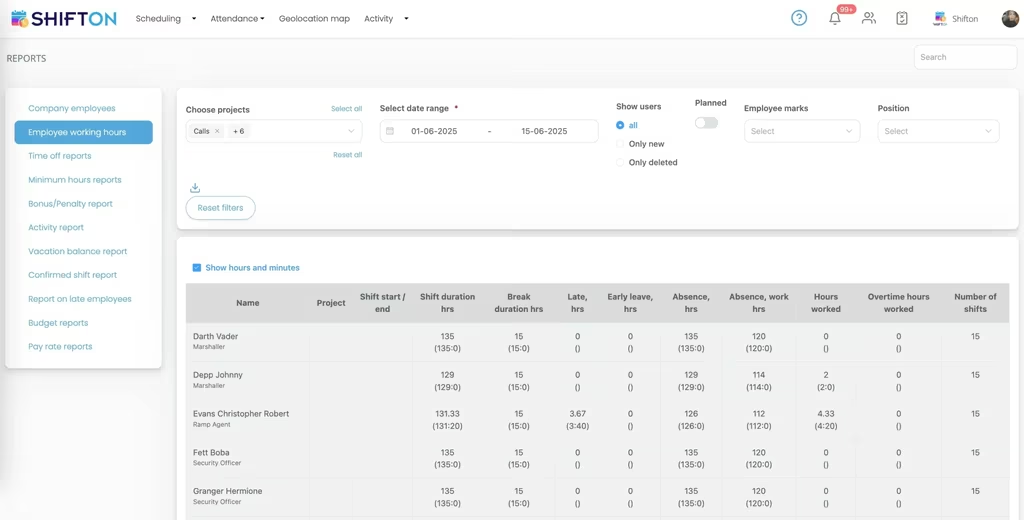
Hours worked, overtime and attendance in detail
The working hours report breaks a period down person by person. Each row shows the project, the shift start and end, shift duration, break duration, late hours, early leave, absence, hours actually worked, overtime worked and the number of shifts. Filters narrow it to a project, a date range or a position.
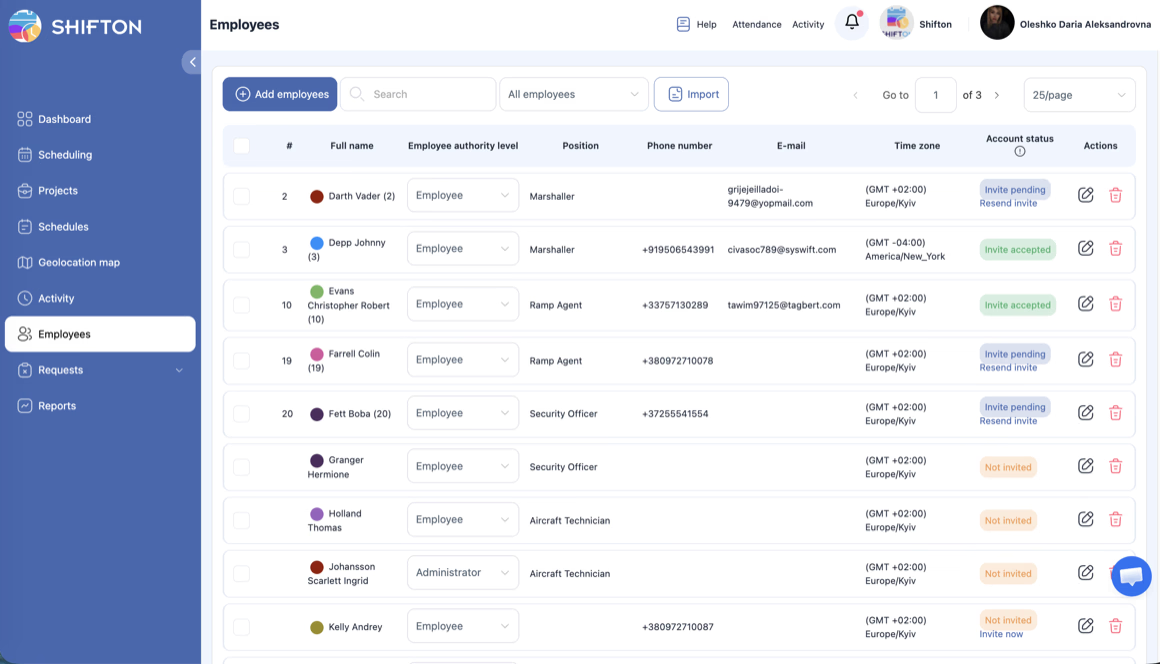
One roster with roles, positions and time zones
The employees table is the single record of who belongs to the organisation. Each person carries a position, contact details and their own time zone, so a schedule built in one place still reads correctly for someone working from another. Authority level sets who is an administrator and who is a standard employee.
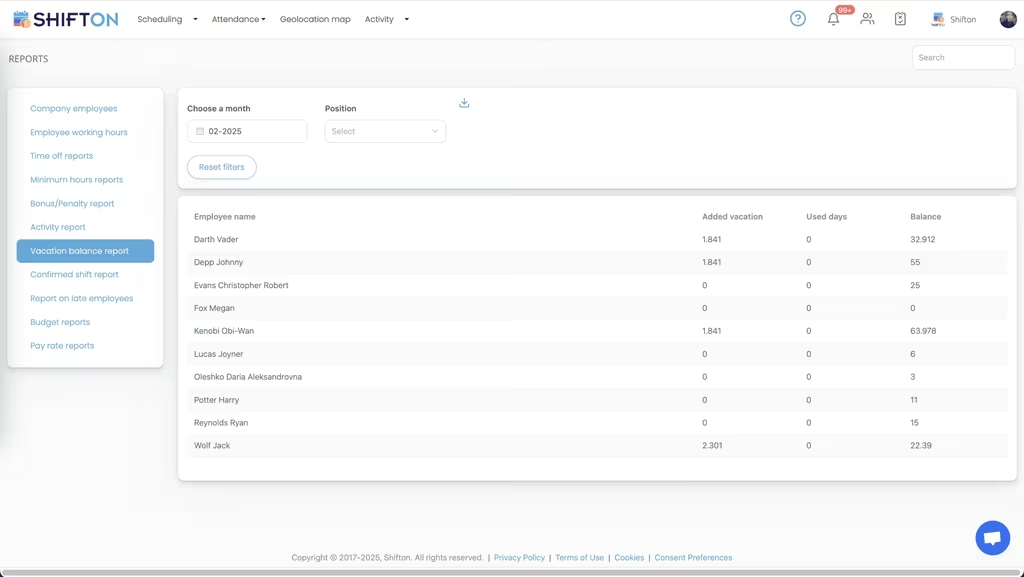
Reports for time off, budget and pay rates
The reports menu covers the rest of the picture. Company employees, working hours, time off, minimum hours, bonus and penalty totals, activity, vacation balances, confirmed shifts, late arrivals, budget reports and pay rate reports all sit together, filtered by month and position and ready to export.
Start with the Free Plan
No time limits. Get full access to core features and upgrade when you're ready.
Read the full guide to esports staff scheduling
An esports organisation is several businesses sharing a name. A competitive roster with coaching and analyst staff. A content and production team shipping video and live broadcasts. An events side that puts crews into venues and studios. Support functions that keep all of it running. Esports management software has to hold those groups in one schedule without pretending they work the same hours, because they do not.
The complication is that almost none of it happens in one place. Players may live on three continents. Editors work asynchronously. A broadcast crew works to a fixed slot that ignores everyone else's day. The schedule is the only artefact that ties them together, and when it lives in a pinned message it stops being true within about a week.
What esports management software actually has to do
Set aside the category name and the requirements are concrete. Publish one schedule that everybody reads in their own local time. Keep practice, production and event work visibly separate while still adding up to a total. Reach people who are not sitting at a desk waiting for an email. Record hours accurately enough to pay staff and settle contractor invoices without a reconstruction exercise at the end of the month.
Anything beyond that is optional. An esports team management software tool that gets those four right removes more friction than a platform with a long feature list nobody in the organisation opens twice.
Time zones are the actual scheduling problem
Most organisations discover this the moment they sign a player outside their home region. A block posted as three in the afternoon is meaningful to whoever posted it and ambiguous to everyone else. Converting by hand works until somebody is tired, and then a scrim starts one short or a caller misses a production call.
Storing a time zone on each person's profile fixes the ambiguity at the source. The schedule is built once and read locally by whoever opens it, so there is no mental arithmetic and no rounds of clarification in chat. For a distributed organisation this single mechanism removes more missed sessions than any amount of reminder discipline. It also makes access from anywhere genuinely useful rather than a checkbox, since people are checking the schedule from wherever they happen to be.
Practice blocks and the competitive calendar
Competitive schedules are rigid in some places and completely fluid in others. Match days are fixed months ahead. Practice, review sessions and individual coaching move constantly around them, and they compete with the same coaching staff who are also expected to prepare and analyse.
Treating a practice block as a shift is what makes this manageable. It has a start, an end, a set of people attached and a place in the week that can be seen against everything else. Recurring patterns become templates rather than a weekly rebuild. Availability collected in advance means a session is not scheduled into somebody's declared downtime, which matters more in a discipline where burnout is a recognised operational risk rather than an abstract concern. When the calendar shifts, the change is published once and lands on every phone instead of being relayed by whoever is awake.
Content and production run on a different clock
The production side has its own rhythm and it rarely lines up with the competitive one. Broadcast shifts are fixed to air times. Editing and design work in longer stretches with soft deadlines. Social coverage is heaviest exactly when everyone else is playing, which is usually evenings and weekends.
Keeping production in its own project, on the same grid, is the compromise that holds. You can plan a broadcast crew against a slot and see immediately whether the same people are already committed elsewhere. Open shifts cover the gaps: an evening stream or a late edit turnaround can be offered to everyone qualified at once and claimed in minutes, rather than worked out through a round of direct messages. For freelancers and part-time contributors, the hours report is the record that settles invoicing later.
Event and tournament crews
Live events concentrate a year's staffing complexity into a few days. Crews are larger than the permanent team, half of them are temporary, shifts run long and overlap, and the schedule changes on site. Build and teardown days have their own patterns that look nothing like a normal week.
Multi-project scheduling handles this by keeping each event separate from day-to-day operations while both remain in one system. Every shift is tagged with the location it belongs to, roles and positions decide who can be assigned where, and hours accumulate against the event so its staffing cost can be read on its own afterwards. Organisations that run events as a regular line of business will find more detail on the event staffing side of this.
Roles, access and one accurate roster
Esports organisations grow in bursts, and the record of who actually works there tends to lag behind. People join as contractors and become permanent. Trials end. A content hire picks up event work. Without one authoritative list, scheduling is done from memory and access is granted the same way.
Esports roster management is not really a list of names, it is a set of commitments, and it only works when the list underneath it is current. A single employees table with a position and an authority level per person is the correction. Administrators can build and publish schedules, employees see their own, and the difference is set explicitly rather than by convention. New people are invited by email and their account status is visible until they accept, so nobody is quietly missing from a schedule they were meant to be on. Importing a list in one pass matters when an event crew arrives all at once.
Hours, contracts and paying people correctly
Staff cost is the largest controllable line in most esports organisations, and it is spread across salaried staff, part-timers and freelancers with different arrangements. Reconstructing who worked what from chat logs at the end of a month is slow and disputed.
Time tracking that records the real start and end of each shift replaces that entirely. Breaks are recorded on the shift, lateness and early departure are shown as separate figures rather than folded into a total, and overtime is reported apart from ordinary hours. Bonuses and penalties attach to the shift they relate to, and premium rates cover unsocial hours where they apply. Because the working hours table filters by project and period and exports cleanly, contractor billing and payroll both come from the same source rather than two competing spreadsheets.
Choosing an esports team management system
Judge any platform on the two things that decide adoption. Does a person get their schedule without asking anybody, and does a change reach them fast enough to act on? Everything else is secondary, because a schedule the team does not trust gets replaced by a pinned message inside a month. That test applies just as much to a gaming organisation running two rosters as to one fielding six, and it is the reason most esports staff scheduling software fails quietly rather than loudly.
Shifton covers the workforce side of an esports organisation end to end: shift scheduling in day, week and month views, open shifts and swaps, availability and time-off requests, reusable templates, automatic distribution, per-person time zones, a time clock with breaks, bonuses and penalties, multi-project structure, and reporting that turns all of it into numbers. It manages people and hours, not brackets or servers. Up to ten team members it is free with no time limit, which covers a small organisation outright, and paid modules add depth as the roster and the production team grow. The quickest way to test it is to put next week in it, time zones and all, and see how many questions stop being asked.
Frequently Asked Questions
What does this software manage for an esports organisation?
The people side rather than the competition itself. It handles who is working when, across players, coaching staff, content and production teams and event crews, along with time zones, availability, hours worked, overtime and staff cost reporting. It does not run brackets or game servers.
How does it handle staff spread across time zones?
Each person has a time zone stored on their profile, and the schedule is read in local time by whoever opens it. That means a practice block or a broadcast call published once does not need translating in a group chat, and nobody joins an hour late because they converted the time in their head.
Can players, production and event crews be scheduled separately?
Yes. Positions separate the groups and projects separate the work, so a competitive roster, a content team and an event crew can each be planned on their own while total coverage and total hours stay visible on one screen. Filters let you look at any one of them in isolation.
Does it track hours for part-time and contract staff?
It does. The time clock records the real start and end of every shift, and the working hours report shows hours worked, overtime, breaks, lateness, absence and the number of shifts per person for any period. That table exports, which is usually enough for contractor invoicing and payroll.
How do people find out about a schedule change?
When a schedule is published or edited, everyone affected gets a push notification through the Shifton mobile app on iOS and Android, with SMS available as well. Staff can also check their upcoming blocks, request time off, offer a shift for swap or claim an open one from the same app.
Is there a free plan for a small esports organisation?
Yes. For up to 10 team members Shifton is free with no time limit, covering shift scheduling, open shifts, shift swaps, the mobile app and reports. Larger organisations move to paid modules charged per employee per month, which add multi-project depth, geolocation clock-in and deeper cost reporting.




Put your esports organisation on one schedule
Start free for up to 10 team members and plan practice blocks, broadcasts and event shifts in one place.