

Manufacturing Scheduling Software for Production Teams
Manufacturing scheduling software for the people on the line: run continuous rotations, staff each hour to expected demand and keep premium hours under control.


Build the week and publish it to the floor
The weekly grid puts the whole crew on one screen: operators as rows, days as columns, each shift colour-coded with its start and end time. Positions still unstaffed sit in the Open Shifts row, so a gap on a line is visible before the week starts instead of at handover.
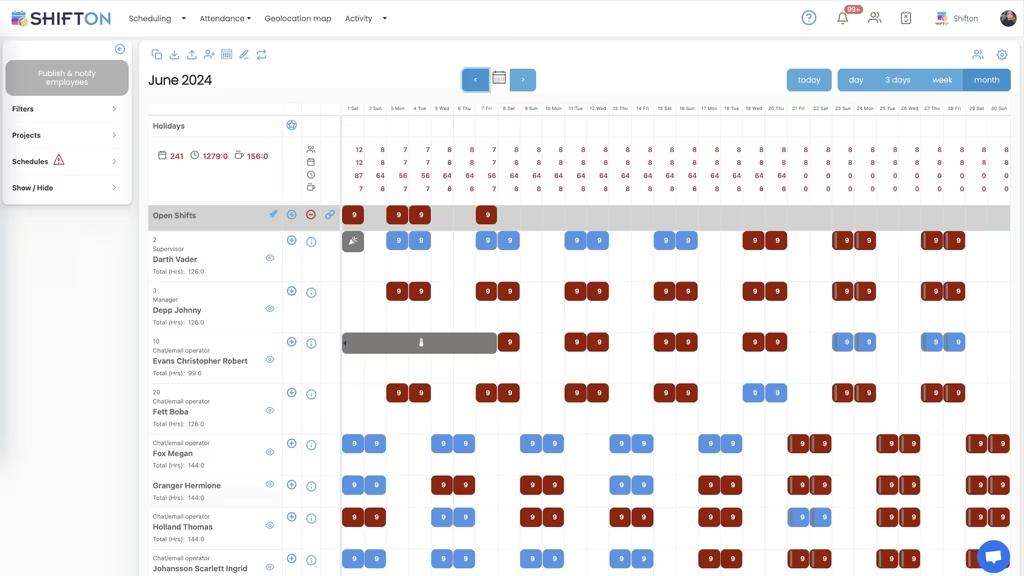
Day and night rotations across the month
The month view shows a rotating pattern as it really runs: alternating nine-hour day and night blocks in two colours, so the cycle is readable at a glance. Each operator carries a monthly hour total next to their name, which is how you check that a rotation shares nights fairly instead of loading them onto the same people.
Staff each hour to the demand you expect
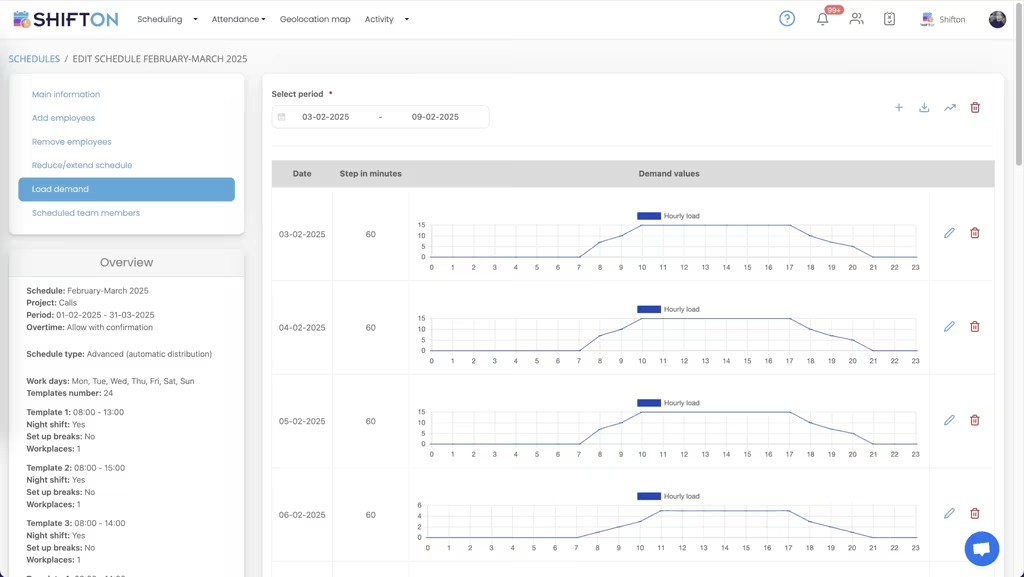
Load demand records how much work is expected on each date and, at a chosen step in minutes, across each hour of the day. Shift templates sit beside it with their own times, night flag and number of workplaces. With the schedule set to automatic distribution, the system builds the roster against that demand curve, and the overtime rule decides whether extra hours are allowed with confirmation.
Pay rate reports: which hours cost what
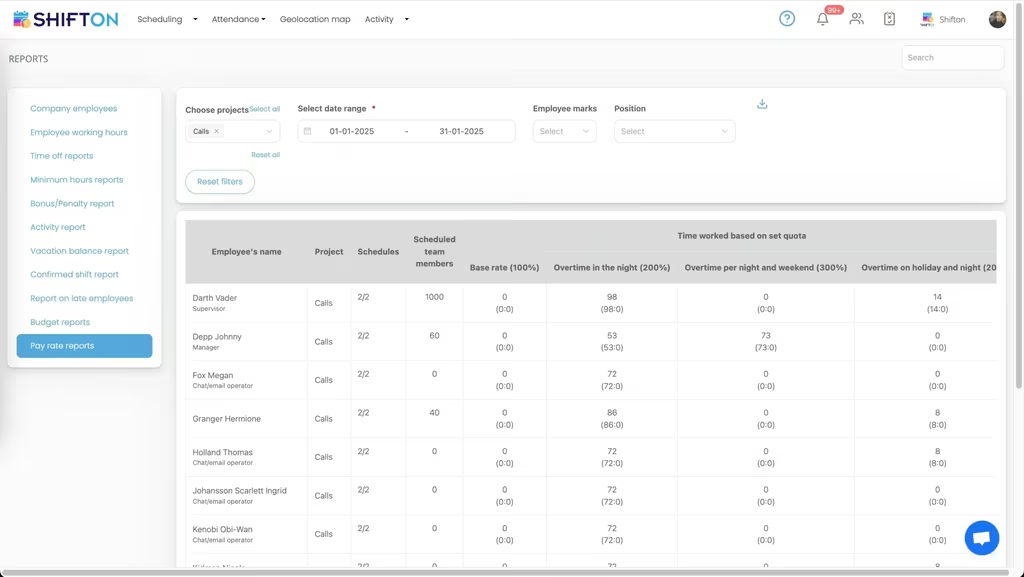
The pay rate report splits hours worked into the tier that paid for them: base rate at 100%, night overtime at 200%, night and weekend overtime at 300%, and holiday night hours on a line of their own. Filter by project, position, employee marks or date range and the premium load stops being a monthly surprise.
Start with the Free Plan
No time limits. Get full access to core features and upgrade when you're ready.
Read the full guide to manufacturing staff scheduling
A plant runs on two schedules at once. One sequences orders and machines. The other decides which people stand where, for how long, and at what rate. Manufacturing scheduling software in the sense this page means it is the second one, and it is usually the weaker of the two: the order book has a system behind it while the crew rotation lives in a spreadsheet somebody rebuilds every month.
That gap costs money in a specific way. Lines run short-handed because an absence was noticed too late. Premium hours pile up on the same few operators. Nobody can say what an extra night shift actually cost until payroll closes. None of that is a planning failure, it is a visibility failure.
What manufacturing scheduling software has to cover
Four requirements, and the rest is optional. Express a continuous rotation without rebuilding it by hand. Staff each part of the week to the load actually expected. Keep individual hours inside contract and legal limits while you assign, not afterwards. And report hours in the tiers that will be paid, so labour cost is a number rather than an argument.
Shifton is built to that shape: day, week and month views, shift templates, automatic distribution against recorded demand, open shifts, swaps, availability and time-off requests, a mobile time clock, and pay rate reporting. Plants comparing manufacturing staff scheduling software against their current spreadsheet usually find the difference on the last two points.
The search terms vary with who is doing the buying. Operations write down manufacturing employee scheduling software, HR asks for manufacturing workforce management software, and a plant manager simply wants next month's rotation to exist. Employee scheduling software for manufacturing has to satisfy all three without becoming a project.
This schedules people, not machines or work orders
The same phrase is used for two completely different categories of product, so it is worth being blunt. Shifton does not sequence jobs, allocate equipment, calculate material requirements or optimise throughput. It has no order book and no bill of materials.
What it does is the labour layer that those systems assume already exists. Once the order book says how many hours of work each day needs, someone still has to decide which qualified operators cover them, who is on nights, who is at their hour limit, and who is owed a day off. That is the job here. In practice the two live side by side: the production system says what has to be made, and staff scheduling software for manufacturing says who is present to make it.
Continuous rotations and round-the-clock coverage
Manufacturing shift patterns are the hardest part of this to fake. Four-on-four-off, three-shift cycles, alternating day and night weeks: all of them are simple to describe and painful to maintain by hand, because every absence pushes the pattern out of alignment.
Templates carry the pattern instead of a person's memory. Build the cycle once as a manufacturing schedule template, apply it across the months it covers, and adjust only where reality intervenes. The month view shows the rotation as alternating colour blocks with each operator's total hours alongside, which makes an unbalanced rotation obvious in seconds. That balance matters more than it sounds: uneven night loading is one of the reliable causes of turnover on a shop floor, and manufacturing rostering software that hides the totals lets it build up quietly. Manufacturing shift scheduling software has to make the pattern and its cost visible in the same view, otherwise fairness becomes a matter of opinion. The named continuous rotations, panama and DuPont among them, are laid out on our page on factory shift schedules.
Staffing to expected demand instead of to last week
Volume moves. A schedule copied from the previous week is staffed for the previous week's orders, which is how a plant ends up paying overtime on one line while another sends people home early.
Shifton lets you record expected load per date and per hour at a chosen interval, define the shift templates that exist, then let automatic distribution build the roster against that curve. Overtime behaviour is a setting rather than an accident: allow it, block it, or require confirmation before anyone goes over. This is where shop floor scheduling software separates from a shared calendar, because the calendar has no concept of how much work the hour contains. A shop floor scheduling system that starts from demand rather than from last week's grid is also what most buyers mean when they type production line scheduling software and find machine tools instead. Our shift schedule feature page covers how templates and distribution fit together.
Certifications and who is allowed on which station
Operators are not interchangeable. Forklift tickets, machine authorisations, first aid, quality sign-off: the roster has to respect all of it or it produces schedules that cannot legally run. Positions and marks on each employee record describe what a person is cleared to do, and filters let a planner build one line or one skill group at a time without losing sight of the whole plant. Assembly line rostering software that treats headcount as coverage will keep producing shifts that look full and are not, and the same is true of assembly line scheduling software bolted onto a generic calendar.
Overtime, premiums and labour cost per shift
Labour is the largest controllable cost in most plants and premium hours are where it inflates. The same shift costs different amounts depending on when it falls, so a rotation that looks balanced on hours can be badly unbalanced on money.
Pay rate reports split a period into base rate, night, night-and-weekend and holiday premium tiers, per operator and per line. Combined with clock-in and clock-out data, manufacturing time tracking software becomes a cost tool rather than an attendance log: you can see which line, which pattern and which week generated the premium hours, and change the rotation before the next cycle repeats it. Budget and minimum-hours reports sit in the same panel, so a supervisor preparing for a cost review is not assembling it from three exports. That combination is what turns shop floor time tracking software into something finance will actually read, and it is the practical test of any manufacturing time and attendance software.
Handover, notifications and one version of the schedule
On a rotating crew the biggest risk is people working from an old copy. Shifton publishes to phones and pushes notifications when anything moves, so the schedule on the floor and the schedule in the office are the same document. Operators see only their own shifts, submit availability and time-off requests in the app, and swap shifts with supervisor confirmation. Nothing becomes final without approval, which keeps a self-service rota from turning into a free-for-all.
Choosing a manufacturing scheduling system
Test any manufacturing scheduling system against your hardest pattern, not your easiest one. Build a full rotation cycle and see how long it takes to apply forward three months. Force an operator past their hour cap and check whether the tool warns you. Enter a demand curve and see whether automatic distribution produces something a supervisor would actually sign. Then pull the reports and check that premium hours are separated rather than totalled. Published lists of the best manufacturing scheduling software rarely survive that exercise in order, because a manufacturing scheduling platform only reveals its limits under a real rotation, and time tracking software for manufacturing only proves itself at the end of a pay period. Whether you end up calling it manufacturing schedule software or a shop floor scheduling solution matters far less than whether a supervisor can rebuild next month in ten minutes.
Plants with distribution attached can also look at our warehouse staff scheduling page, which handles the same problem on the goods side. Shifton is free for up to ten team members with no time limit, which covers a small workshop outright, and paid plans are per employee per month as headcount grows; the pricing page shows where each module sits. Import the crew, build one rotation, publish it, and see how much of the monthly rebuild disappears.
Frequently Asked Questions
Does this schedule people, or machines and orders?
People. Shifton schedules operators, assemblers, technicians and supervisors: who works which shift, on which line, for how many hours, and at what rate. It does not sequence work orders, allocate machines or plan materials. Plants normally run it alongside whatever system controls the order book, with Shifton owning the labour side.
Can Shifton run a 4-on-4-off or rotating day and night pattern?
Yes. Shifts can be any length and can cross midnight, so twelve-hour and nine-hour rotations are counted against the correct day and pay tier. A cycle is saved as a set of templates and applied forward across the months it covers, and the month view shows day and night blocks in different colours with each operator's hour total beside their name.
How does staffing to demand work?
You record the expected load for each date and for each hour of the day at a chosen step in minutes, then define the shift templates available. With the schedule set to automatic distribution, Shifton builds the roster against that curve rather than repeating last week, and the overtime setting controls whether hours beyond the limit are blocked or allowed with confirmation.
Can it track hours and overtime for payroll?
Operators clock in and out on the mobile app or web, and those timestamps sit against the shift with breaks, bonuses and penalties. Reports then separate worked hours from overtime and split a period into base and premium pay tiers per person and per line. The output is payroll reporting and exports, including a QuickBooks integration, rather than payroll processing.
Is there a free manufacturing scheduling software plan?
The free plan covers up to 10 team members with no time limit and includes shift scheduling, a basic time clock, the mobile app and reports. That fits a small workshop. Larger plants move to a paid plan charged per employee per month, with optional modules such as the geolocation map added separately.
How do operators find out about a schedule change?
Push and SMS notifications go out when a shift is added, moved or reassigned, and each person sees only their own schedule in the app on iOS or Android. Swap requests and time-off requests are submitted there and confirmed by a supervisor, so the published roster and the one on the floor stay the same document.






Put your production rotation on one screen
Build the next cycle, publish it to every operator's phone, and see the hour totals before the shift starts.