

Food and Beverage Management Software for Staff Scheduling
Food and beverage management software that plans kitchen and counter together, holds hours inside their caps and sends the finished week to every phone.


Build and publish the week in one pass
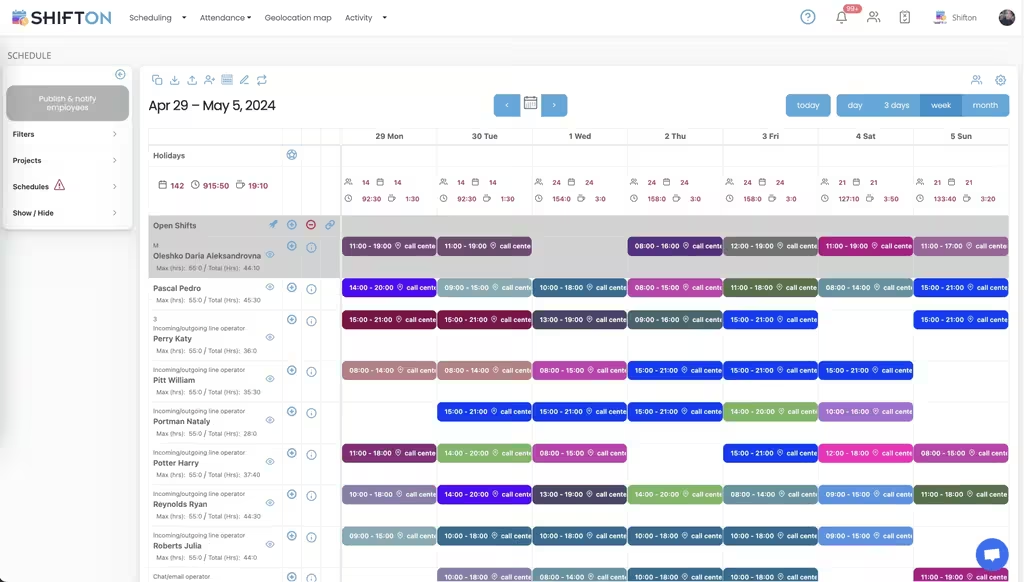
The weekly grid is where a food and beverage rota is actually decided. Employees sit as rows, each shift carries its own start and end time, and the open shifts line at the top holds every slot still waiting for a name. Filters by project or schedule let you work through the kitchen team first, then the counter, without losing sight of the whole week.
Hour caps and overtime under control
Every employee row carries a maximum hours figure next to the total already assigned, so a contract limit stays visible while you are still building rather than after payroll has run. Shifts are tagged with the work location they belong to, and each day column totals the headcount and the hours planned for it.
See what each shift actually cost
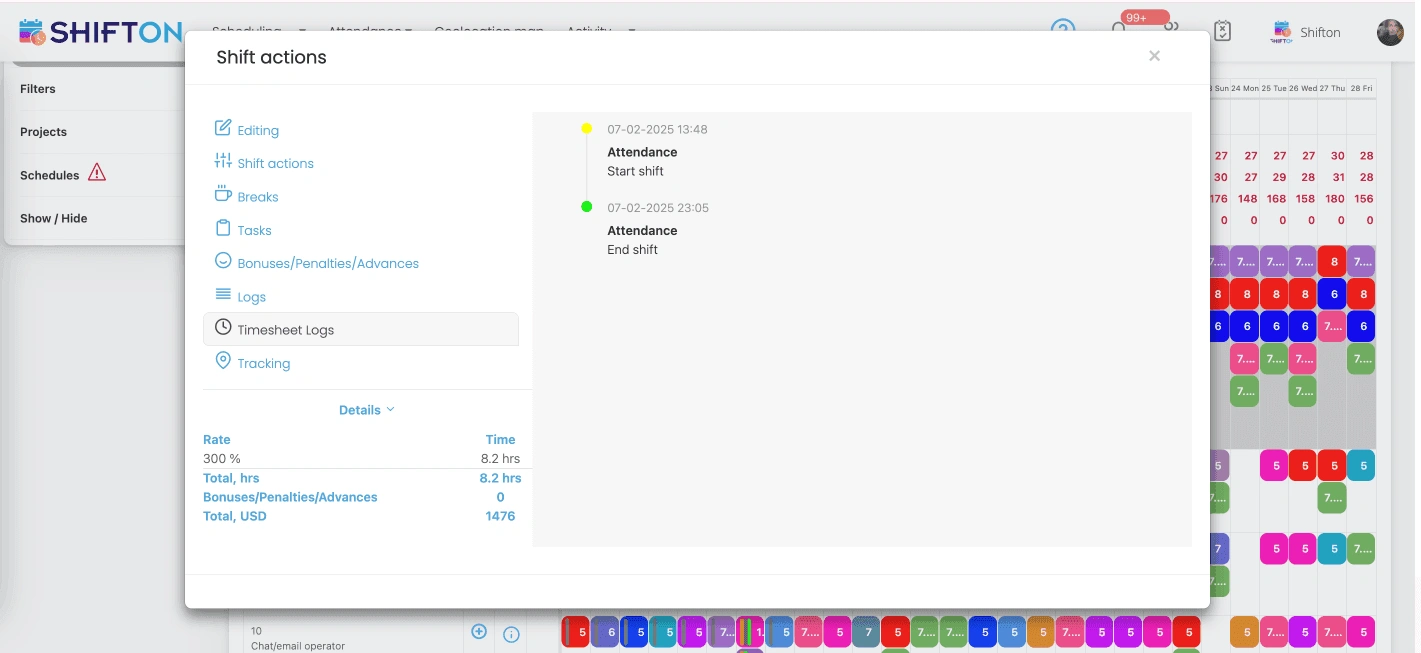
Open any shift and the record shows what really happened on it: the actual clock-in and clock-out times against the plan, the break taken, and the pay detail attached. Premium rates, bonuses and penalties are applied on the shift itself, and the value of the shift is calculated from the hours worked.
Reports that show where the hours went
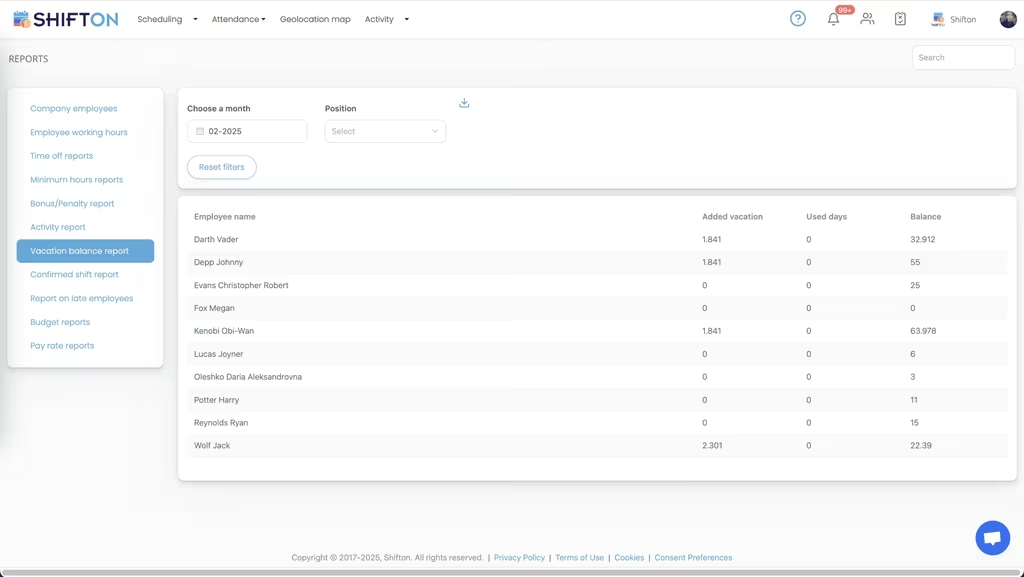
The reports screen turns a month of shifts into figures you can act on. Working hours, time off, minimum hours, bonus and penalty totals, late arrivals, vacation balances, budget and pay rate reports all sit in one menu, filtered by month and position and ready to export.
Start with the Free Plan
No time limits. Get full access to core features and upgrade when you're ready.
Read the full guide to food and beverage scheduling
Food and beverage operations live or die on labour. It is the one cost a manager can move hour by hour, and it swings faster than anything else in the business. Food and beverage management software on the workforce side exists to make that swing predictable: the right heads on at the right hours, kitchen and counter covered together, and every hour logged accurately enough to pay from without a second pass.
What makes this sector genuinely hard to roster is the shape of demand. Trade arrives in waves rather than a steady line, and the waves differ by format. A canteen peaks twice and empties in between. A coffee shop front-loads the morning. A quick service counter runs flat until the evening surge, and fast food sites often peak again late at night. Staff are part-time, student-heavy and turn over quickly, and the person building the rota is usually working a station while they do it.
What food and beverage management software has to do
Strip out the feature lists and the job is short. Build a full week fast, from a phone if that is what is to hand. Keep hours inside the caps and the budget you set before anything is published. Get the finished rota to people who do not read email. And hold together when somebody calls in sick two hours before service.
A food and beverage management system that clears those four is worth more than one with fifty modules nobody opens. That is the standard any scheduling software for food service should be judged against, whether it is running a single site or a group.
Workforce software, not a till or a stock system
The same phrase gets attached to two very different product categories, and it is worth separating them before you shortlist anything. One kind sits on the trading side: taking orders, moving money, tracking stock levels, costing dishes. The other sits on the people side: who works, when, for how many hours, at what rate, and what that adds up to at the end of the month.
Shifton is firmly the second. Food and beverage workforce management software covers rotas, availability, open shifts, swaps, clock-in and clock-out, breaks, premium pay rates and the reporting that ties planned hours to actual hours. It does not price a dish, order stock or run a till, and it is not trying to. Most operators run one of each, and the workforce tool is usually the one that pays back first, because labour is both the larger line and the one you can still change on a Tuesday afternoon.
Kitchen and counter on one schedule
Back of house and front of house work to different clocks. Prep starts long before the doors open, the pass runs hardest through service, and the counter needs bodies from the first customer to the last. Kitchen staff scheduling software that ignores the floor produces two rotas that quietly disagree with each other, and the gap shows up on the busiest day of the week.
Building both in one grid removes that. You still plan them by role or project, but coverage and total hours stay visible on a single screen, and you can hold a minimum number of each position on every shift so nothing opens short-handed. Chefs, baristas, counter staff, drivers and cleaners each carry their own position, and open shifts are offered only to the people who can genuinely work them.
Hour caps, overtime and the labour line
Overtime rarely arrives as a decision. It accumulates. A shift extended by an hour, a favour on a Saturday, a cover that pushed somebody past their contracted week. By the time it appears in the wage bill the money is already gone.
Setting a maximum weekly hours figure per employee and watching the running total next to it while you build changes the sequence. Good F&B scheduling software flags a week heading over its cap before the rota is published, not after payroll closes. Combined with budget reporting, that is where most of the saving actually sits: not in dramatic cuts, but in the fifteen or twenty hours a month nobody meant to schedule.
Cafes, canteens, counters and mobile units
Few operators stay single-site for long. A second cafe, a canteen contract, a unit in a food court, a trailer working weekends, and coordination stops being a rota and becomes logistics. One unit is slammed while another is dead, and a trained barista sits idle three streets away.
Multi-location scheduling puts every unit in the same place. Shifts carry the site they belong to, so somebody working across two locations still finishes the week with one clean set of hours. Cafe scheduling software, canteen management software and food truck scheduling software are not really separate products; they are the same rota engine applied to a different footprint. Templates make the point plainly: build a working week once, then roll it out to a new unit rather than starting from an empty grid. When the kitchen belongs to a hotel, food and beverage becomes one department among several, and hotel staff scheduling covers the rest.
Time tracking that survives a service rush
Paper timesheets are a known weak point in food service. Hours get rounded up, a signature covers a shift that ran short, and nobody has time mid-service to argue about ten minutes. A proper time clock closes the gap by recording the real start and end of each shift against what was planned, so the number you pay is the number that was worked.
The detail matters more than the headline. Breaks recorded on the shift itself. Late arrivals and early leaves visible as their own figures instead of being buried in a total. Premium rates for night, holiday or peak hours applied where they belong. Bonuses and penalties attached to the shift they relate to. When payroll runs, the timesheet log behind every hour shows who changed what and when, which ends most disputes before they start. You can see how time tracking feeds those figures in more detail.
Reports that answer the questions you actually ask
The useful reports here are not complicated ones. How many hours did each person work last month, and how many of them were overtime? What did labour cost at each site? Who is running short of holiday? Who has been late more than twice? A food and beverage management system should answer those in a couple of clicks and export the answer for payroll or accounting.
Working hours, time off, minimum hours, vacation balance, bonus and penalty, budget and pay rate reports each cover a different corner of the same picture. Read together they tell you whether the rota you planned is the rota you paid for, which is the only real test of any food service management software.
Choosing a food and beverage scheduling system
Test any platform the way the team will use it, not the way a demo shows it. Open it on the oldest phone in the building, because that is what weekend staff carry. Build a full week and time yourself. Push a change through and see how long it takes to land. Ask what an employee has to do to swap a shift, because if that takes more effort than a message in a group chat, the group chat wins and the system dies quietly.
Watch the pricing shape too. Coffee shop scheduling software bought for a nine-person site and a platform built for a group running four canteens solve different problems, and paying for enterprise forecasting nobody will open is a fast route to abandoning the tool. Formats with their own patterns are covered separately, including restaurant scheduling and catering teams.
Shifton covers the workforce side of food and beverage operations from end to end: shift scheduling in day, week and month views, open shifts and swaps, availability and time-off requests, reusable templates, automatic distribution, demand forecasting, a time clock with breaks, bonuses and penalties, and the reports that turn all of it into numbers. Staff carry the schedule on iOS and Android, and push notifications mean a change reaches them without a phone call.
Up to ten team members the free plan handles the whole job with no time limit, which is enough for a single cafe or a small counter operation. Past that, paid modules add multi-location depth, geolocation-based clock-in and richer cost reporting. Whether you run a coffee shop, a canteen, a quick service counter or a mobile unit, the fastest way to judge food and beverage scheduling software is to build next week inside it and see how long it takes.
Frequently Asked Questions
Is this software for stock and tills or for staff?
For staff. The same phrase gets used for two product categories: one handles the trading side, such as orders, stock levels and dish costing. Shifton is the other kind, a food and beverage management system for the workforce, covering rotas, availability, hours worked, pay rates and labour reporting.
Can one system schedule kitchen and counter staff together?
Yes. Both teams are planned in the same grid, with positions such as chef, barista, counter staff or cleaner held separately. You can keep a minimum number of each position on every shift, so prep, service and close are all covered without building two rotas that contradict each other.
Is a kitchen staff schedule template enough for a small site?
A spreadsheet template works until the first change. Once swaps, sickness and hour caps enter the picture, the version on the wall stops matching the version in the manager's head. Kitchen staff scheduling software keeps one live copy that updates for everyone at the same moment.
How do staff find out about a shift change?
When you publish or edit the rota, everyone affected gets a push notification on the Shifton mobile app for iOS and Android, with SMS available as well. Staff open the app to see their own upcoming shifts, request time off, offer a shift for swap or claim an open one.
Does it handle several cafes, canteens or mobile units?
It does. Every shift is tagged with its work location, so a person moving between sites still ends the week with one clean total. Multi-location scheduling shows all units in one view, and a proven weekly template can be rolled out to a new unit instead of starting from an empty grid.
Is there a free plan for a small coffee shop?
Yes. Up to 10 team members Shifton is free with no time limit, and that includes shift scheduling, the basic time clock, the mobile app and reports. Larger teams move to paid modules charged per employee per month, which add multi-location depth, geolocation clock-in and deeper cost reporting.





Take control of your food and beverage rota
Start free for up to 10 team members and build next week for your kitchen and counter in one place.