

Trade Show Scheduling Software for Exhibition Centre Teams
Plan build-up, show days and breakdown in one roster, staff every hall through the peak and keep hours accurate with trade show scheduling software.


Headcount That Doubles and Halves Between Shows
An exhibition centre staffs to a calendar of events, not to a steady week. Between shows a small permanent team keeps the building running, and then build-up, show days and breakdown need many times that number, often at hours nobody works the rest of the month. Exhibition centre workforce management software has to absorb that swing without the roster being rebuilt from nothing for every event.
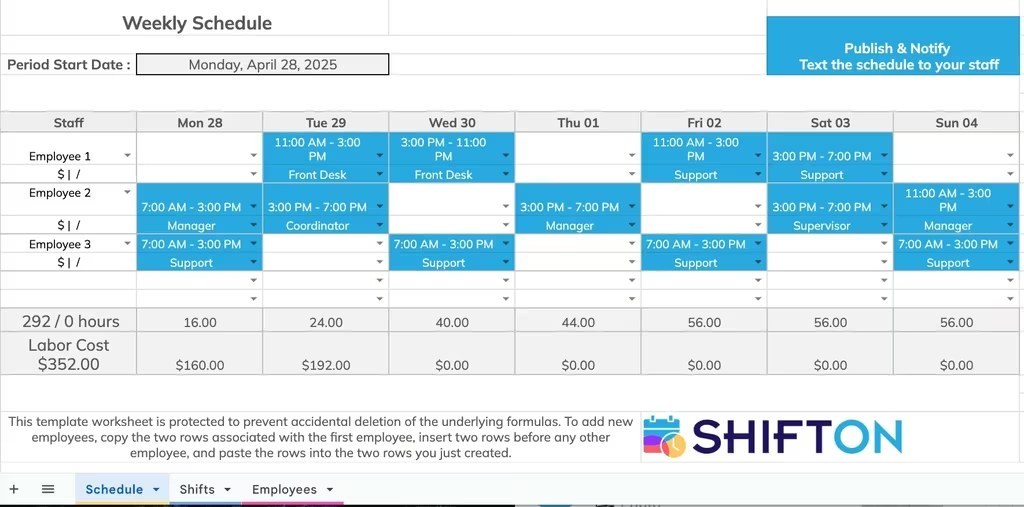
Start From a Template, Not a Blank Grid
Events differ in size but rarely in shape, so the same shift patterns come round again and again: early build-up starts, long show days, an overnight clear. Keeping those patterns as a reusable schedule template means a new event begins as a working draft rather than an empty grid, and the only decisions left are the ones that are genuinely new. It is the difference between planning a show in an afternoon and planning it over a week.
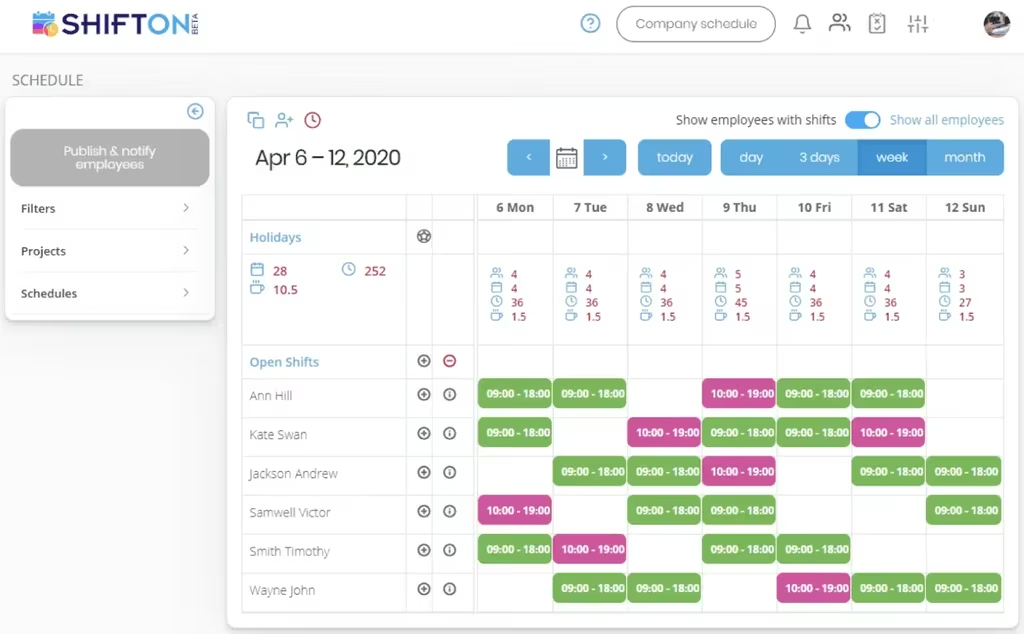
Lay Out the Event Week and Send It Out
The weekly grid is where the show is actually staffed. Every person has a row, unassigned work sits in the open shifts row above them, and the standard patterns run side by side so a 09:00-18:00 hall shift and a 10:00-19:00 late cover are visible against each other on the same day. Each day column carries its own totals for headcount, shift count, hours and break hours, which is how a manager sees an understaffed day before it arrives rather than on the morning it fails.
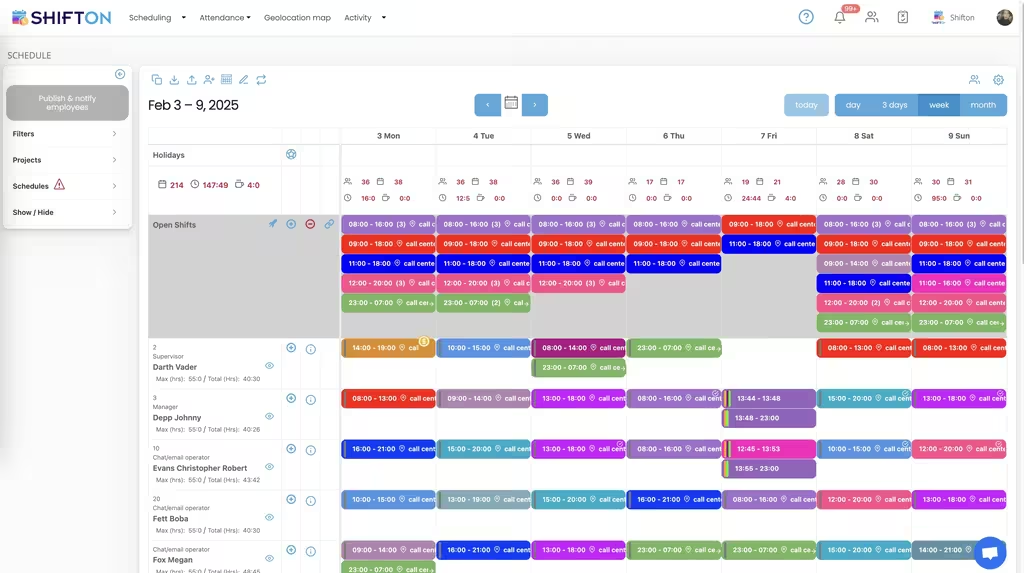
Round-the-Clock Cover for Build-Up and Breakdown
The days around a show do not fit a single shift. Build-up starts before the halls open to anyone else, show days run long, and breakdown often runs overnight from 23:00 to 07:00 because the floor has to be clear for the next tenancy. The week view holds several shifts a day and shows roles beside names, so a supervisor is on every block by design rather than by chance, with each person's maximum and total hours in view while the roster is being packed.
Start with the Free Plan
No time limits. Get full access to core features and upgrade when you're ready.
Read the full guide to exhibition centre staff scheduling
An exhibition centre does not have a stable workforce. It has a run of short, intense staffing peaks separated by quiet weeks, and each peak comes in three parts: a build-up crew that arrives days before the doors open, show-day staff who work the halls while the event runs, and a breakdown team that clears the floor once the last visitor has gone. Trade show scheduling software exists to hold all three in one plan instead of three spreadsheets, a printout and a group chat.
The difficulty is not the size of the team. It is the speed of the change. A venue can go from twenty people on site to two hundred and back inside ten days, several times a quarter, using a mix of permanent staff, casuals and agency workers who may never work two events in a row.
What trade show scheduling software actually covers
The term gets used loosely, so it is worth being precise about what this kind of system does. It plans who is on duty, in which hall, for which hours, across every phase of an event. It posts the shifts nobody has been assigned to yet, collects availability from the casual pool, records when people actually started and finished, and reports the hours back by event and by person. That is the whole job, and for most venues it is the part still being run manually long after everything commercial has been modernised.
What it does not do is sell floor space or manage exhibitors. That is a separate category, and it is the one most people find first when they search. Keeping the two apart makes the buying decision much easier, because a venue almost always needs both and neither product does the other well.
Build-up, show days and breakdown are three different rosters
Treating an event as one staffing block is what makes venue rotas go wrong. Build-up is a small, skilled crew working long days, often starting before anyone else is in the building. Show days need the largest headcount, spread across halls, entrances, stands and back of house, with cover for breaks that cannot be left to chance. Breakdown is the most compressed of the three and frequently the most expensive, because it runs overnight against a hard deadline set by the next tenancy.
Planning them as separate sets of shifts on the same grid keeps each phase honest about what it needs. It also makes the overlap visible: the point where build-up staff are still on site and show-day staff have already arrived is exactly where venues either double up or leave a gap. Our shift scheduling views are built around that kind of side-by-side reading.
The headcount swing between events
Very few industries move headcount as violently as this one. A quiet week and a show week can differ by an order of magnitude, and the schedule has to represent both without becoming unreadable. That means a planner needs to see the whole team at once during a peak, then narrow to the handful of people working a quiet Tuesday, without maintaining two separate systems.
It also means the roster has to be quick to build. If setting up a large event takes days of manual work, the plan is always late, and late plans are what force last-minute agency bookings at premium rates. Exhibition centre rostering software earns its place mostly by cutting the time between deciding what an event needs and telling people to turn up.
Casual and agency staff who work a handful of days
A large share of an exhibition centre's roster is people who work three days this quarter and possibly none the next. They are not going to learn a complicated system, they are not sitting at a desk, and they will not chase the office for their shift times. Whatever the venue uses has to work on a phone, first time, with no training.
Practically, that means published shifts arrive as a notification rather than a message somebody has to find, availability is submitted by the worker instead of collected by a coordinator, and open shifts can be claimed rather than allocated one call at a time. A venue that publishes an event roster and has the casual pool fill the gaps itself has removed most of the coordination work that used to sit with one overloaded person.
One venue, several halls, one schedule
Larger centres regularly run more than one event at a time, and the halls have different needs on the same day: one in build-up, one open to visitors, one being cleared. If the schedule cannot separate them, the totals stop meaning anything and nobody can tell which event is actually short of people.
Tagging shifts to their hall or project solves this in both directions. Planning happens hall by hall, review happens venue-wide, and the hours report back per event afterwards, which is what turns staffing into a number a commercial team can use. Venues that also run conferences and hospitality alongside exhibitions face the same structure across more room types, and our event staff scheduling page covers that side in more detail.
Getting the hours right when people are paid by the day
Casual and agency work is usually paid on hours or day rates, and errors are noticed immediately by everyone involved. A worker who is short-paid for an overnight breakdown will not answer the phone for the next show, and an agency invoice that does not match the venue's own record takes hours to argue over.
This is where the time clock stops being an administrative detail. A recorded start and finish against the scheduled shift gives a single number both sides can work from, breaks are logged rather than assumed, and late arrivals show up in a report instead of in somebody's memory. Hours then break down by pay rate and export for payroll, so time tracking for an exhibition centre becomes a matter of reading a report rather than reconstructing the week. Working hours, lateness and pay rate reports all come from the same underlying record.
Where staff scheduling stops and event platforms start
It is worth stating the boundary plainly, because it saves a lot of wasted evaluation. Trade show management software, convention centre management systems and ticketing platforms hold exhibitors, stand allocations, floor plans and visitor registration. Shifton holds none of that. It holds the workforce: schedules and templates, open shifts, availability and time-off requests, the time clock, worked and overtime hours, breaks, task assignment, hour reports and exports, and integrations with Usedesk, Zapier, Intercom and QuickBooks.
Venues comparing an expo centre scheduling system against a full event platform are usually comparing two things they will end up owning separately. The question is not which one wins, but which of the two is currently costing more in manual work, and for most centres that is the roster.
Choosing an exhibition centre scheduling system
Test any platform against your busiest week rather than a quiet one. Build a full event, including the overnight breakdown, and see how long it takes and how the totals read. Then remove two people from the show-day roster and watch how quickly the gap can be reposted and filled, because that is the situation that actually costs money. Open it on the oldest phone you can find, since that is what a casual worker will be using.
Shifton is free for up to 10 team members with no time limit, which suits a small permanent venue crew, and paid plans are charged per employee per month as the casual pool grows around it. If your event staffing currently lives in a spreadsheet one coordinator maintains and a phone that rings all weekend, the first thing worth fixing is how fast a change in the roster reaches the floor.
Frequently Asked Questions
What is exhibition centre scheduling software?
It is the system that decides who works which shift at the venue and gets that decision to them. For an exhibition centre that means rostering build-up, show-day and breakdown crews around each event, posting open shifts the casual pool can claim, recording worked hours and reporting what those hours came to. It is the staffing layer of the venue, separate from anything that sells space or handles exhibitors.
How do you schedule build-up and breakdown crews around an event?
Each phase is planned as its own set of shifts on the same grid, because they need different numbers of people at different hours. Build-up and breakdown usually mean early starts and overnight work, so those shifts are created with their real times rather than being squeezed into a standard day. Saving the pattern as a template means the next event of the same size starts from a working plan instead of a blank week.
Can exhibition centre staff scheduling software handle casual and agency workers?
Yes, and that is most of the point. People who work only a few days a year go on the roster the same way permanent staff do, with their own positions and access level, and they see their shifts in the mobile app rather than waiting for a call. Open shifts let the venue publish work to the pool and have it claimed, which is far quicker than ringing round a list for every event.
How do you staff several halls running different events at once?
Shifts are tagged to the hall or project they belong to, so one schedule can carry more than one event without the two blurring together. Filters narrow the view down to a single hall when it is being planned and open back up to the whole venue when the manager needs to check total cover. Hours then report per project, which shows what each event consumed rather than what the month did in total.
Does Shifton handle trade show management as well?
No. Trade show management software is a different product class covering exhibitors, stand space, floor plans and registration. Shifton staffs the venue team: schedules and templates, open shifts, availability and time off, the time clock, worked and overtime hours, and hour reports. Many venues run one of each, keeping the event platform for the show and moving the workforce side across.
Is there a free exhibition centre scheduling app for a small venue team?
Shifton is free for up to 10 team members with no time limit, which covers a small permanent venue crew, and includes shift scheduling, the basic time clock, the mobile app and standard reports. Larger rosters, and the casual pool that comes with them, move to paid plans charged per employee per month. Geolocation and work location are a paid module rather than part of the free plan.






Roster Your Exhibition Centre Team With Shifton
Build the event week, fill open shifts for build-up and breakdown, and put the published roster on every phone in one action.