

Time Tracking Software for Freelancers and Contractors
Time tracking software for freelancers and small contract teams: log hours against every project, catch overtime early, and export totals you can bill from.


Plan the week across every client project
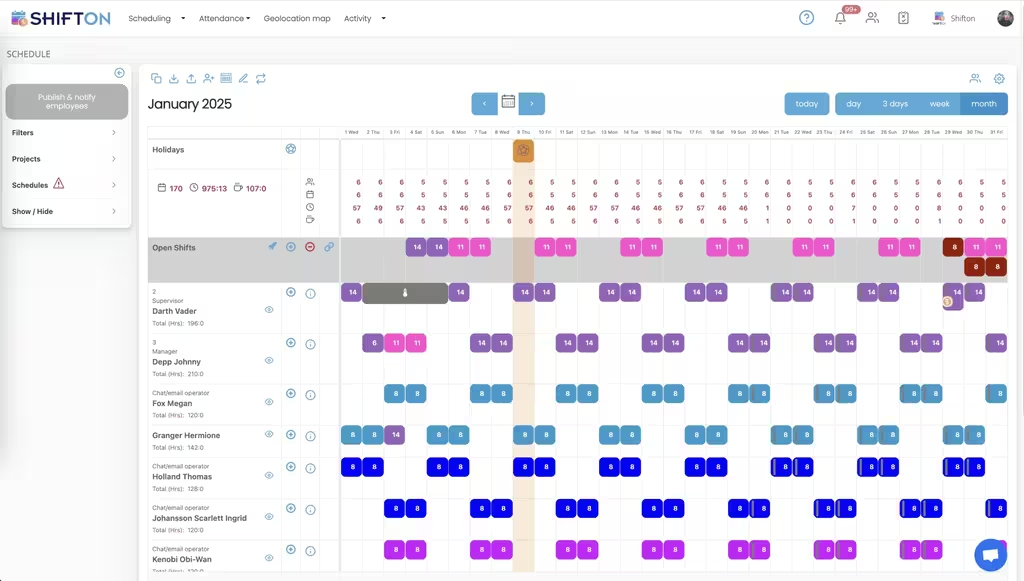
The weekly grid puts each person on a row and every committed block of work into a coloured slot with its start and end time. Projects sit in the filter panel, so one client's work can be viewed on its own or alongside everything else before you agree to take on more.
The hours report you bill from
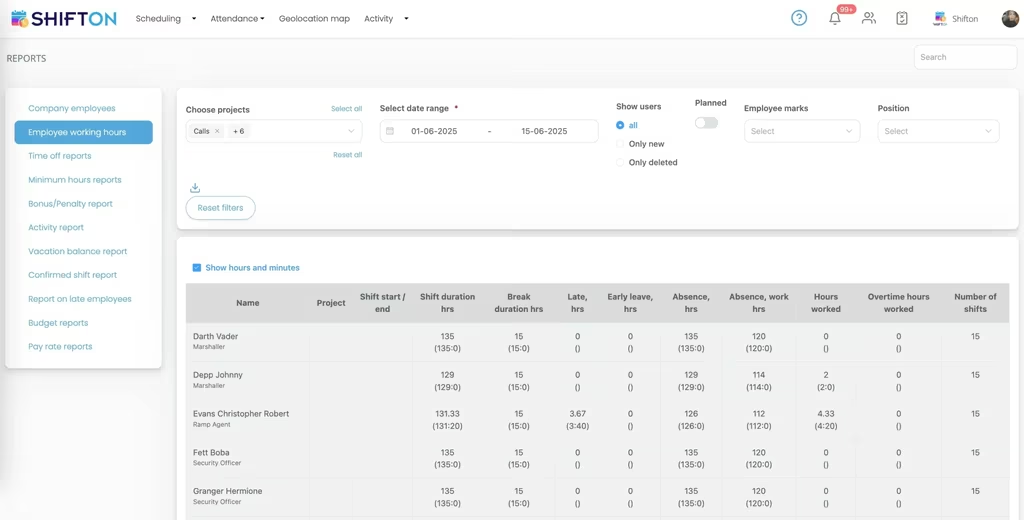
Employee working hours is the report that turns tracked time into a figure you can invoice against. Every row carries the person, the project, the shift start and end, hours worked, overtime, break time, lateness, early leave and absence, filtered down to the client and date range you need.
See a month of workload before you take more
The month view lays out committed hours day by day, with a monthly total sitting against every name. Work that is not yet assigned shows as hour figures on the days it falls, and holidays are already marked, so remaining capacity for the month is a number instead of a feeling.
Reports for billing, payroll and time off
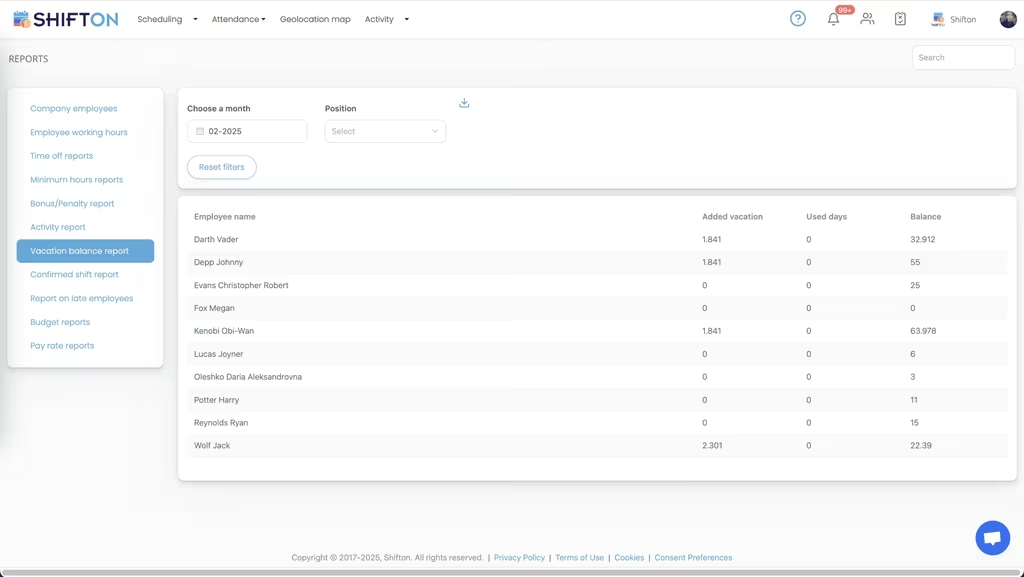
The reports section keeps a separate view for each question that surfaces at the end of a period. Working hours, time off balances, confirmed shifts, late starts, bonuses and pay rates are all filtered by month and position, and every table exports.
Start with the Free Plan
No time limits. Get full access to core features and upgrade when you're ready.
Read the full guide to freelance time tracking
Freelance income is measured in hours, and hours are the easiest thing in the business to lose track of. Work that ran two hours past the estimate, a call that never made it onto any sheet, a month reconstructed from memory on the last Sunday before invoicing. Time tracking software for freelancers exists to close that gap, because every unrecorded hour is either money you do not bill or a quote you will get wrong next time.
The pattern is specific to independent work. There is no manager watching the clock and no payroll department to catch mistakes, so accuracy is entirely self-imposed. Work arrives in uneven blocks from several clients at once. And the same person doing the work is the one doing the admin, usually at the point in the week when they have the least appetite for it.
What time tracking software for freelancers has to get right
The requirements are narrower than a corporate tool suggests. Recording time has to take seconds, or it stops happening by the second week. Every hour has to carry the client or project it belongs to, since untagged time is almost impossible to allocate later. The totals have to come out in a form you can put in front of a client or an accountant. And the tool has to show what is already committed before you say yes to the next piece of work.
Anything beyond that is optional. A freelance time tracking app that nails those four beats a heavyweight system whose reporting you will never open.
Billable hours and the gap between planned and worked
The most expensive number in freelancing is the difference between the hours you quoted and the hours you spent. It stays invisible while time lives in your head, and it repeats itself on every similar job you take afterwards.
Recorded start and end times make that difference explicit. The working hours report holds planned duration, hours actually worked and overtime as separate columns, so a job that consistently runs long stops being a vague feeling and becomes evidence for repricing it. Freelancer time tracking software that only totals a week without splitting regular from overtime hours hides exactly the thing you needed to see. Proper time tracking is a pricing instrument as much as a billing one.
Several clients, several projects, one week
Independent work rarely arrives one project at a time. Two or three run in parallel, each with its own deadline, and the real skill is knowing how much of the week is already sold before agreeing to the next brief.
Projects in Shifton are first-class, so every block of time is tagged to one and the schedule can be filtered down to a single client. That single filter answers two questions at once: how much has this client had this month, and what is left of the week for everyone else. Scheduling software for freelancers that treats all hours as one undifferentiated pile cannot answer either. Independent contractor scheduling software is only useful when the client attribution survives all the way through to the report.
The same tagging pays off when a client comes back six months later and asks what the last engagement really involved. Pull the project, set the dates, and the answer is a table rather than an archaeology exercise through old files. A scheduling app for freelancers that keeps projects and hours joined up is doing more work for you than the calendar it replaced.
Why a freelance timesheet app beats the spreadsheet
Almost every independent starts with a spreadsheet, and for a single client it works. It falls apart on volume. Rows get filled in from memory days later. Overtime is calculated by hand or not at all. Two devices produce two versions. And the file cannot tell you anything about next week, only about the last one.
A freelance timesheet software approach fixes this by recording time at the moment it happens rather than at the moment you remember it. Start and end are stamped against the shift. Breaks come off automatically. The month closes itself, and the export is ready when you are. Anyone still working from a freelance timesheet template is doing the same job with more steps and less accuracy.
Planning a month ahead instead of a week
Most freelance stress is capacity stress, and it comes from planning in seven-day windows. A week looks fine right up until three deadlines land in the same fortnight.
The month view shows committed hours per person day by day with a running monthly total, which turns capacity into arithmetic. Heavy weeks are visible while there is still time to move something. Quiet weeks are visible early enough to fill them. Freelance scheduling software that only goes seven days out keeps you permanently reactive, and that is the state where underpriced work gets accepted.
When one freelancer becomes a small team
The transition from solo to small team is where informal tracking collapses completely. Subcontractors send hours in different formats and at different times, and someone has to reconcile them before anything can be billed. As soon as several people share the client work, the same arithmetic applies to scheduling for marketing teams, where hours stay attached to each client.
Running everyone in one account removes the reconciliation entirely. Each person logs against the same projects, hours and overtime land in the same report, and the totals for a client come out as one table rather than four attachments. Scheduling software for independent contractors matters most here, because it is the point at which the coordination cost starts eating the margin the extra people were supposed to add. The same reporting that covered you alone now covers the whole group.
A record that stands up months later
Independent work generates questions after the fact. A client queries a line on an invoice. An accountant asks for the detail behind a quarter. Something disputed needs more than a recollection. The value of a timesheet is not only in the billing, it is in producing the underlying detail long afterwards without rebuilding it from scratch.
Shifton keeps timesheet logs behind every shift, so an edited entry carries a history instead of quietly overwriting itself, and confirmed shift reports show what was agreed against what was actually worked. Freelancer timesheet software that stores only a final total leaves you defending a number with nothing behind it. Independent contractor time tracking software that keeps the project, the dates, the breaks and the edit trail attached tends to end that conversation in one message.
What to look for in a freelance time tracking app
Judge any tool on the days you are busiest, not the day you set it up. Log a block of time on a phone between tasks and count the taps. Pull last month's hours for one client and see how much editing the export needs. Check that overtime is separated without you doing the maths. Confirm that time off and non-working days are part of the same picture, since capacity you cannot see is capacity you will oversell.
A self employed time tracking app is only worth keeping if it survives a genuinely busy week. That is also the week it saves you the most.
Shifton is free for up to 10 people with no time limit, which covers a solo freelancer and most small contract teams, and includes scheduling, open shifts, shift swaps, the mobile app and reports. Beyond that, pricing is per person per month for the modules you turn on. What you get either way is the same thing: hours that reflect the work, projects that stay attached to them, and a report ready the moment you decide to bill.
Frequently Asked Questions
What is freelancer time tracking software?
It is a tool that records the hours actually spent on work, ties each block of time to a client or project, and turns the result into a report you can bill or file from. It replaces the running note, the phone timer and the end-of-month reconstruction. Shifton does the tracking, the reporting and the forward planning in one account.
Can I track hours separately for each client?
Yes. Every shift is tagged to a project, and the working hours report filters by project and date range. That means you can pull one client's hours for a month without unpicking them from everything else you did in the same period.
Is there a free freelance time tracking app?
Shifton is free for up to 10 people with no time limit, which covers a solo operator and most small contract teams. Scheduling, open shifts, shift swaps, the mobile app and reports are all included. Paid modules are charged per person per month, and location-based clock-in is one of them.
Does this work for a solo freelancer or only for teams?
Both. On your own it works as a freelance timesheet app: you log the hours, tag them to a project and export the totals. When you start bringing in subcontractors, the same account becomes scheduling software for freelancers working together, with everyone's hours reported the same way.
Can I export timesheets for invoicing?
Yes. The working hours report exports as a table with hours, overtime, breaks and project per row, which is the data an invoice or a payroll run needs. Shifton produces the hours and the reports rather than the invoice itself, so the file goes into whatever billing or accounting tool you already use.
Is this better than a freelance timesheet template?
A template only records what you remember to write down, and it goes stale the moment two people edit it. An independent contractor time tracking app records the real start and end of each block, keeps the project attached, and separates overtime from regular hours automatically. The reconstruction at month end disappears.





Start tracking freelance hours with Shifton
Free for up to 10 people, with every job on one schedule and budget and hours reports ready whenever you need them.