

 English
  Español
  Português
  Deutsch
  Français
  Italiano
  日本語
日本語  中文
中文  हिन्दी
  עברית
עברית  العربية
  한국어
한국어  Nederlands
  Polski
  Türkçe
  Українська
  Русский
  Magyar
  Română
  Български
  Čeština
  Ελληνικά
  Svenska
  Dansk
Dansk  Norsk
Norsk  Suomi
Suomi  Bahasa Indonesia
  Tiếng Việt
  Tagalog
  ไทย
ไทย  Latviešu
  Lietuvių
  Eesti
Eesti  Slovenčina
  Slovenščina
  Hrvatski
  Македонски
  Қазақша
  Azərbaycan
  Afrikaans
  বাংলা
বাংলা Garage Door Scheduling Software for Technicians and Crews
Garage door scheduling software that keeps service technicians and install crews covered, ties every shift to a site and turns worked hours into payroll-ready numbers.


Build the week and publish it to the crew
The weekly grid holds the whole operation in one view. Technicians sit as rows, each shift carries its own start and end time, and the open shifts line at the top keeps every slot that still has no name against it. Filters by project or schedule let you work through the service side and the install side without losing the week as a whole.
See what every shift actually cost
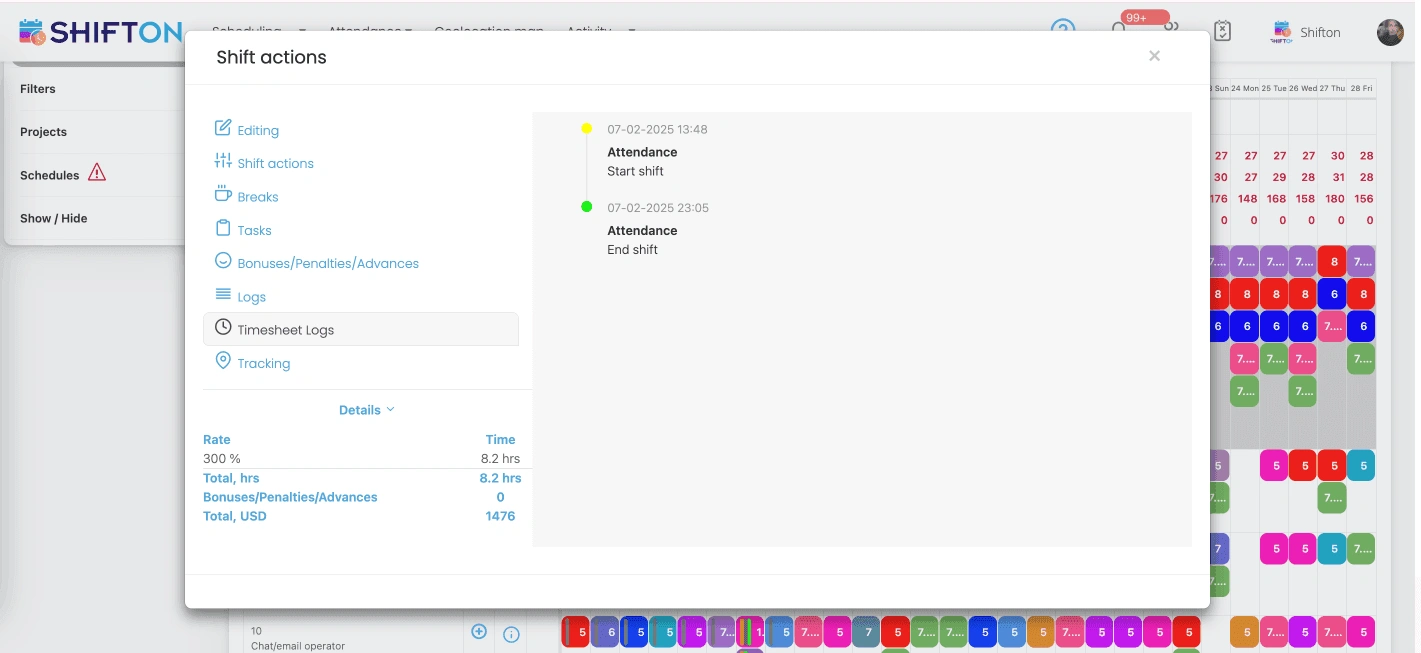
Open a shift and the record shows what happened on it rather than what was planned. Actual clock-in and clock-out times sit next to the scheduled ones, the break is recorded on the shift, and pay detail is attached directly. Premium rates, bonuses and penalties apply per shift, and the value of the shift is calculated from the hours worked.
Know who is where over the next few days
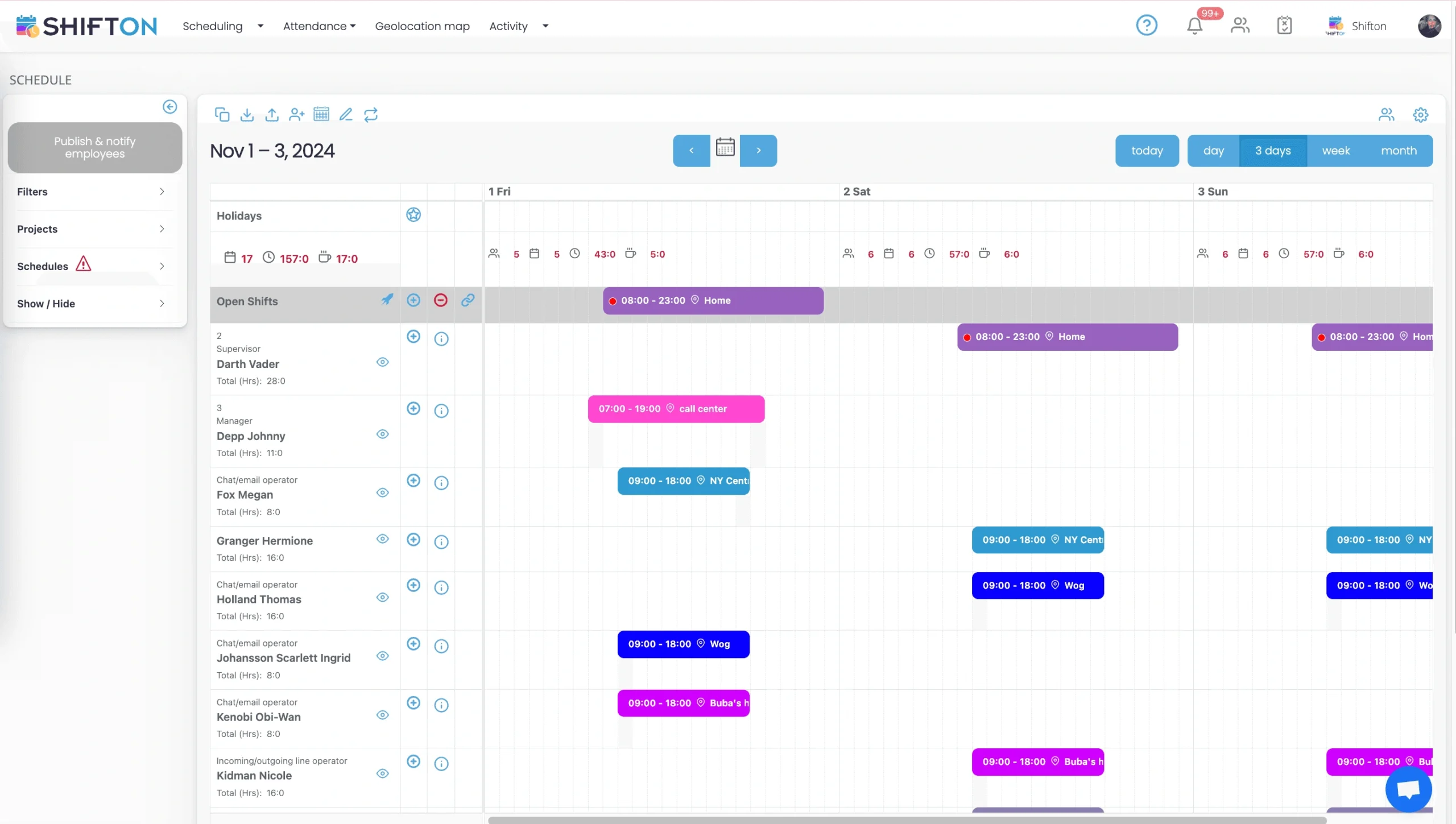
The short-range view narrows the schedule to the next few days, which is the window most service work is decided in. Each shift is tagged with the work location it belongs to, so a technician assigned to a site, a branch or a call centre shift is labelled as such. Running hour totals per person sit beside the names, and the open shifts row stays at the top.
Reports for payroll, budget and attendance
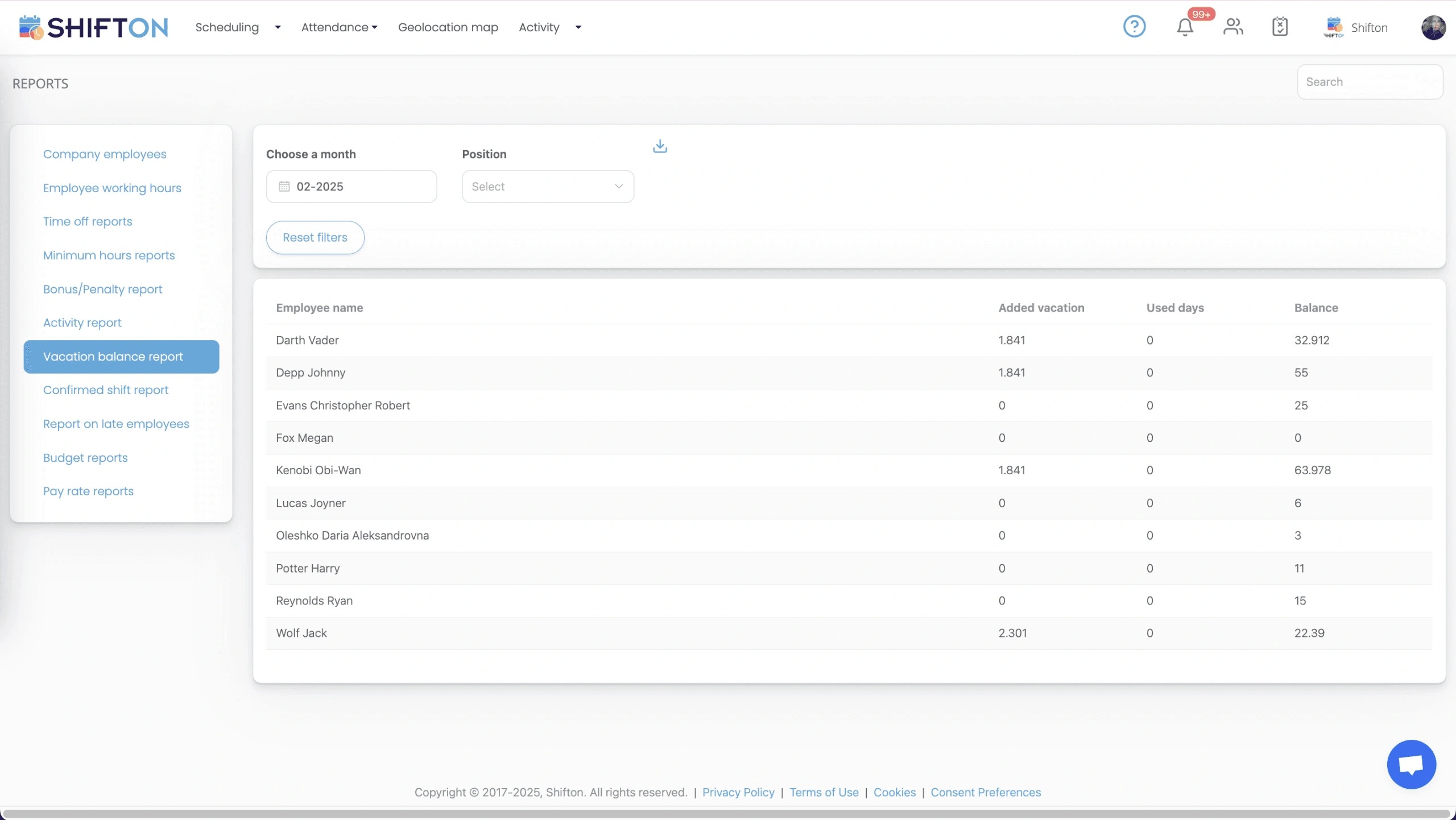
The reports screen turns a month of shifts into figures you can hand straight to accounting. Working hours, time off, minimum hours, bonus and penalty totals, late arrivals, vacation balances, budget and pay rate reports all sit in one menu, filtered by month and position and ready to export.
Start with the Free Plan
No time limits. Get full access to core features and upgrade when you're ready.
Read the full guide to garage door scheduling
A garage door company sells time. Technician hours turn into service calls and installs, and everything else in the business follows from how well those hours are planned. Garage door scheduling software is the layer that decides whether a week runs at full capacity or leaks three hours a day to gaps, double-booked people and calls nobody was free to take.
The operating pattern is what makes it awkward. Work splits between short service visits at residential addresses and longer commercial installs that tie up a crew for days. Same-day requests arrive without warning. Weather moves the install calendar. Someone calls in sick and the dispatcher spends the morning rebuilding a plan that was fine at seven o'clock.
What garage door scheduling software has to cover
Set the marketing aside and the job comes down to four things. Show who is available before the week is committed. Keep hours inside contracted limits so overtime is a choice rather than a surprise. Get changes to technicians who are already out on the road. And record what was actually worked, accurately enough that payroll does not need a second pass.
Anything that clears those four is doing more for a garage door business than a system with a long feature list that the office abandons after a month. That is the bar to hold garage door management software to when you compare options.
Scheduling and dispatch are not the same layer
The two words get used interchangeably in the trades, and the difference matters when you are buying. Dispatch decides which technician takes which call and in what order. Scheduling decides who is working at all that day, from which location, for how many hours, and at what rate.
Shifton sits firmly in the second layer. It does not plan driving routes or sequence calls. What it does is give whoever assigns work an accurate answer to the only question that matters first: who is genuinely on shift, qualified and not already at their hour limit. Plenty of teams searching for garage door dispatch software actually have a workforce problem rather than a routing one, because a routing engine fed a stale roster produces confident nonsense. Get the roster right and the rest of the day gets easier.
Service technicians and install crews need different rotas
A service technician works a run of short visits and needs to be reachable and flexible. An install crew works as a unit, often on a single site for several days, and needs to arrive complete or not at all. Building both in the same grid without separating them is how a two-person install ends up one person short on the morning it starts.
Positions and projects keep them apart. Each technician carries a position, each job or site can be its own project, and shifts are filtered by either. Coverage and total hours stay readable on one screen, so you can see that Tuesday has enough service capacity while the install crew is committed elsewhere. Garage door installer scheduling software that cannot make that distinction forces the office to keep a second plan in a spreadsheet, which is where the errors come from. The same applies to any garage door technician scheduling software you trial: if it treats every worker as interchangeable, it will not survive a busy install week.
Same-day calls and after-hours coverage
Emergency and same-day work is where most garage door service scheduling software gets tested. A door that will not close is not a job that waits until Thursday, and the response depends entirely on whether somebody is free and reachable in the next hour.
Two mechanisms carry most of the load. Open shifts let you broadcast an uncovered evening, weekend or callout slot to every qualified technician at once, so it is claimed in minutes instead of after a round of phone calls. Availability and time-off requests collected in advance mean you already know who cannot be asked. Premium rates handle the pay side: after-hours, weekend and holiday multipliers are applied on the shift itself, so callout pay is calculated rather than negotiated later. Firms that also take heating and cooling callouts will find the same mechanisms on the page about HVAC technician scheduling.
Hours, overtime and the cost of a week
Overtime in the trades rarely arrives as a decision. It accumulates through a job that ran long, a favour on a Saturday and a cover shift that pushed somebody past their contracted week. By the time it lands in the wage bill, the money has already been committed.
A maximum hours figure per technician, with the running total visible while the week is being built, turns that around. The system flags a week heading over its cap before it is published. Combined with budget and pay rate reporting, this is where most of the saving sits in practice: not in cutting crews, but in the fifteen or twenty hours a month nobody meant to schedule. Garage door time tracking software should also close the gap between the hours claimed and the hours worked, which paper sheets never do.
Shifts tied to a site or a branch
Once a company runs more than one branch, or holds contracts across a wide service area, the schedule stops being a list of names and becomes a map of commitments. Tagging every shift with its work location is what keeps that legible. A technician who splits the week between two branches still ends up with one clean hour total, and each site can be read on its own when you need to know whether it is covered. Companies trading as overhead door contractors, and those running a mixed residential and commercial book, tend to feel this first, because the branch that looks fully staffed on paper is often the one lending people to the other.
For teams that need proof of arrival, geolocation-based clock-in records where a shift was started and shows employee movement on a map. That module is paid rather than part of the free plan, and it is worth adding only if confirming site arrival genuinely matters to your contracts.
Reporting that survives a payroll question
The reports that get used in a garage door business are not elaborate ones. How many hours did each technician work last month, and how many were overtime? What did labour cost per branch? Who is short on holiday? Who has been late more than twice this quarter? Garage door business management software should answer those in a couple of clicks and export the answer for accounting.
Working hours, time off, minimum hours, vacation balance and bonus or penalty reports each cover a corner of the same picture, while budget reports and pay rate reports put a figure on it. Read together they show whether the week you planned is the week you paid for, which is the only honest test of garage door service management software. Detailed time tracking is what makes those numbers trustworthy.
Choosing a system your technicians will actually use
Test any platform the way the crew will use it, not the way a demo runs. Open it on the oldest phone in the van. Build a full week and time yourself. Push a change and see how long it takes to reach somebody who is already on site. Ask how a technician swaps a shift, because if that is harder than sending a message, the message wins and the schedule drifts out of date within a fortnight. A garage door rostering system is only as good as the schedule app the crew keeps open.
Shifton covers the workforce side end to end: shift scheduling in day, week and month views, open shifts and swaps, availability and time-off requests, reusable templates, automatic distribution, a time clock with breaks, bonuses and penalties, multi-location projects, and reports that turn all of it into numbers. Teams in neighbouring trades run the same way, including refrigeration service teams. Up to ten team members the free plan handles the whole job with no time limit, and beyond that the paid modules add multi-location depth and richer cost reporting. The fastest way to judge garage door workforce management software is to build next week inside it and watch how quickly the crew stops asking who is on.
Frequently Asked Questions
What does scheduling software do for a garage door business?
It manages the workforce side of the operation: who is on shift, which site each shift belongs to, who is qualified for install work, how many hours each technician has accumulated and what those hours cost. Schedules are published to the mobile app, and worked hours feed reports for payroll.
Does the software plan technician driving routes?
No. Shifton is a workforce platform, not a routing tool. It answers who is working, when, from which location and at what rate. Many garage door companies pair it with whatever they already use to assign calls, because the routing tool still needs an accurate picture of who is actually on shift.
How do technicians see their shifts and changes?
Through the Shifton mobile app on iOS and Android. When a schedule is published or edited, everyone affected receives a push notification, with SMS available as well. Technicians can also view their hours, request time off, offer a shift for swap and claim open shifts from the same app.
Can install crews and service technicians be scheduled separately?
Yes. Positions and projects keep the two apart while both stay visible in one grid. You can build the install crew rota against a job that runs several days and the service rota against daily coverage, then read total headcount and total hours for the week on a single screen.
How does it handle on-call and after-hours coverage?
After-hours and weekend cover is scheduled as its own shift pattern, and premium pay rates are applied on the shift so overtime and callout pay are calculated rather than estimated. Open shifts let you broadcast an uncovered evening or weekend slot to every qualified technician at once.
Is there a free plan for a small garage door company?
Yes. For up to 10 team members Shifton is free with no time limit, and that covers shift scheduling, the basic time clock, the mobile app and reports. Larger teams move to paid modules priced per employee per month, which add multi-location depth, geolocation clock-in and deeper cost reporting.





Get your garage door crews on one schedule
Start free for up to 10 team members and plan next week of service coverage and installs in one place.