

Staff Management Software for Scheduling Teams of Any Size
Plan shifts for every department, fill open slots without a group chat, and keep hours, requests and approvals in one staff scheduling system your team reads on a phone.


Build and Publish the Weekly Schedule
The weekly grid is where most of the work happens. Every person sits on their own row, shifts are colour-coded with start and end times, and uncovered work sits in the open shifts row at the top, so a thin day is visible before anyone commits to it.
Forecast Demand and Distribute Shifts
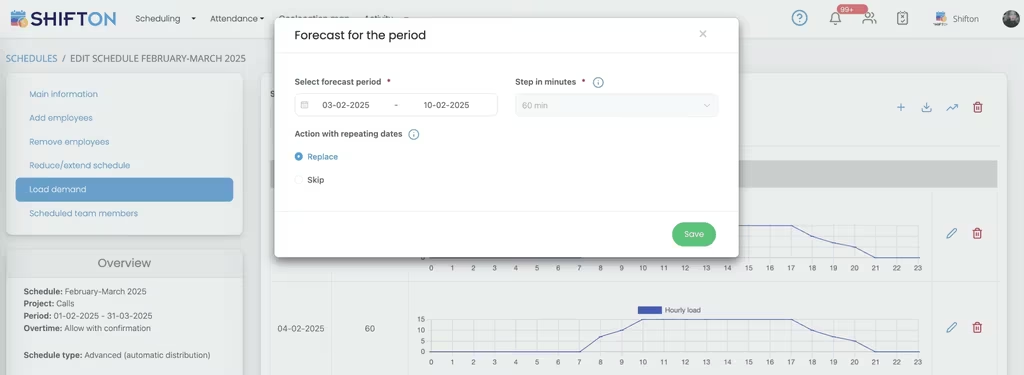
Staffing to a flat headcount overpays on quiet hours and leaves the busy ones short. Loading demand for a chosen period draws an hourly workload curve across the full day, and the schedule is then built against that curve instead of a guess.
One Team Roster With Roles and Access
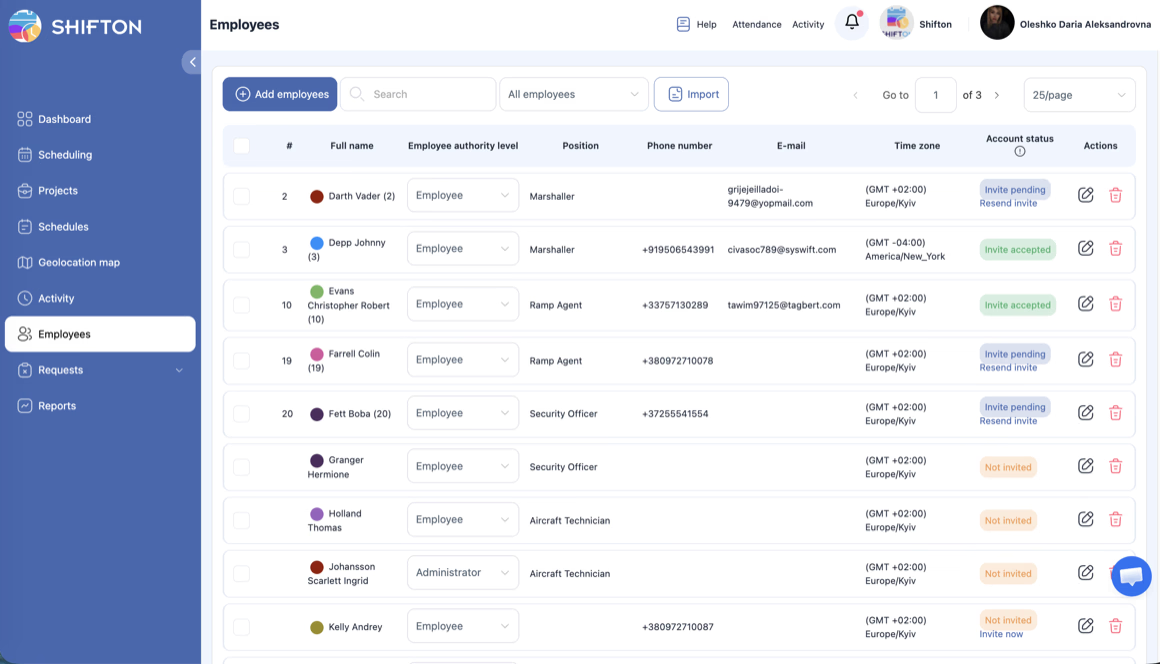
Everyone who can be scheduled lives in a single roster. Each record holds a position, contact details and a time zone, plus an authority level that decides whether a person only sees their own shifts or can edit the schedule for the whole team.
Connect Payroll, Support and Automation
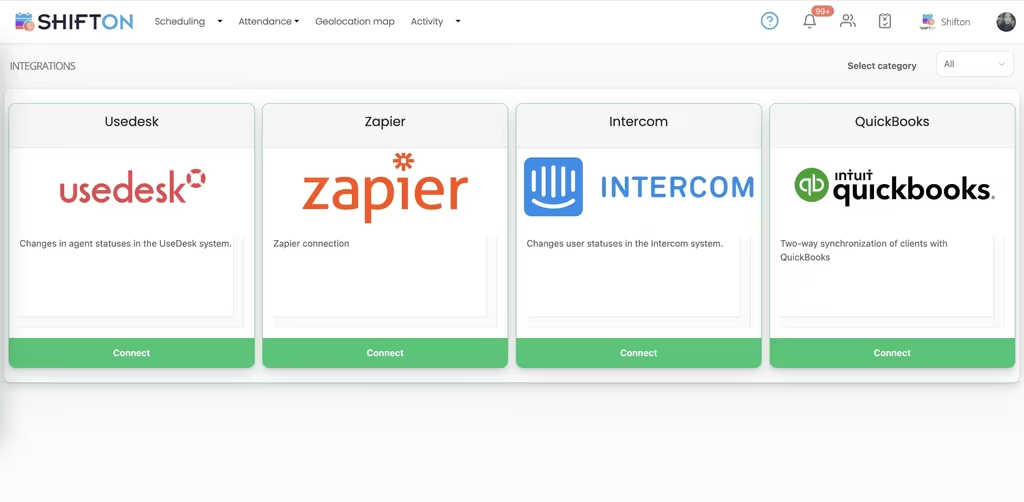
A schedule creates work for other systems. The integrations screen connects the tools your operation already runs, so hours and events move between them instead of being copied by hand at the end of every period.
Start with the Free Plan
No time limits. Get full access to core features and upgrade when you're ready.
Read the full guide to staff scheduling software
Scheduling gets harder in steps rather than gradually. One team on a shared spreadsheet works until a second team starts covering the same hours, someone goes part time, and a manager begins spending Friday afternoons rebuilding a grid nobody else can read. That is the point where staff management software stops being an upgrade and starts being the thing holding the week together.
The requirement is not complicated. People need to know when they are working, managers need to know the hours are covered and affordable, and both need the same version of the truth.
What staff management software has to do well
Four jobs matter more than the feature list. Build a full week or month quickly, without starting from a blank grid every time. Reach the team on their phones, since most shift workers never open a work email. Keep hours inside limits before the schedule is published rather than after payroll runs. And handle change without a rebuild, because the plan always moves.
Anything beyond that is optional. A staff scheduling system that nails those four will outlast a heavier platform solving problems the team does not have, whether it is sold as a staff scheduling app, a crew scheduling software or a department scheduling software.
Building a schedule without starting from scratch
Most teams do not need a new schedule every week. They need last week's pattern with three changes. Saving a working pattern as a staff schedule template turns a two-hour job into a ten-minute one, and a team schedule template can be reused across departments: apply the template to a department, adjust for holidays and requests, publish. Recurring shifts and rotations roll forward the same way, so a rotating pattern is set once rather than typed out month after month.
The parts that change are handled separately. Open shifts cover work nobody is assigned to yet, broadcast to everyone qualified instead of offered one person at a time. Swaps are proposed by staff and approved by a manager in a tap. Availability and time-off requests are collected before the grid is built, which is what removes most of the back-and-forth that follows a published rota.
Scale is handled by separation rather than one enormous grid. Departments, sites and contracts each become their own project or schedule, so a lead filters down to the board they are responsible for while the owner still sees everything. Anyone covering two teams appears once, which keeps their total hours honest instead of split across two files nobody reconciles. This is the point where a spreadsheet stops being a team schedule maker and starts being a liability.
Matching staffing to real demand
Flat staffing is expensive in both directions. Too many people on a quiet morning burns margin; too few on a peak costs service. Demand forecasting draws the expected workload as an hourly curve across the day, and shifts are then distributed against that curve rather than a fixed headcount.
Automatic distribution takes the first pass at it, placing shifts where demand sits and respecting the overtime rules you set. A manager reviews and adjusts rather than starting from nothing. For operations with predictable peaks, this is the single change that moves workforce scheduling software from a record-keeping tool to something that affects the numbers. Event staff scheduling software lives or dies on it, since demand there arrives in blocks rather than a steady line.
Publishing early matters as much as publishing accurately. A schedule that lands a week ahead lets people arrange the rest of their lives around it, and the volume of last-minute swap requests falls as a result. Teams that publish the day before they need cover spend the difference in phone calls and goodwill, and that cost never appears on any report.
Hours, overtime and cost control
Labor is usually the largest line a manager can influence week to week, and on a spreadsheet the damage is invisible until the wage bill arrives. A shift that ran long, an extra person called in for a quiet afternoon, an hour cap crossed by accident: none of it shows up while there is still time to act.
Hour limits per person and running weekly totals make overtime a decision rather than a discovery. Overtime rules can require explicit confirmation before extra hours are assigned. Afterwards, budget and pay rate reports show what each published schedule actually cost by position and period. That loop is the difference between crew management software that reports history and a crew management system that changes it.
Time tracking, attendance and clean timesheets
The schedule is the plan; the timesheet is what happened. Used as staff attendance software, it works the same way in both directions: staff clock in and out from the mobile app, breaks are recorded on the shift, and bonuses, penalties and rate changes sit alongside the hours rather than in a separate note. Every edit is kept in the timesheet log, so an hours dispute is settled from the record.
Reporting turns those entries into something payroll can use. Working hours, minimum hours, confirmed shifts, late arrivals, time off and vacation balances all export by month and position. A staff timesheet app that captures this at the point of work removes the monthly reconstruction entirely. Teams that need location evidence can add the geolocation map, which is a paid module rather than part of the free plan. The mechanics of clock-in and timesheets are covered on our time tracking page.
Roles, permissions and onboarding people
Once more than one person builds schedules, access matters. Every team member carries a position and an authority level, so a department lead can manage their own board while the account owner keeps the full picture. Positions also let a manager read coverage by role instead of counting names, which is what makes the grid useful at forty people rather than four.
Onboarding is bulk work at any real size. People can be imported rather than added one at a time, each with a position, contact details and a time zone, and invite status shows who has accepted and who has not. Distributed teams working across time zones see their shifts in local time, which removes a common source of missed starts.
Requests, approvals and fewer interruptions
A large share of a manager's scheduling time goes on requests rather than the schedule itself. Holiday, unpaid leave, shift changes and availability updates arrive by message, get half-remembered, and surface again when the rota is wrong.
Running them through one queue changes the shape of the week. Requests are submitted in the app, approved or declined in one place, and reflected on the board immediately, with balances visible so nothing is approved twice. Our time off management feature covers how requests, approvals and balances fit together across teams.
Choosing staff scheduling software for your team
Test any staff rostering software the way your team will use it, whether you are comparing the best staff scheduling software on a shortlist or replacing a spreadsheet. Build a real week and time yourself. Open it on the oldest phone in the building. Publish, then change one shift and check that everyone affected knows within a minute. Export a working hours report and see whether payroll could use it as it stands. Then check what happens as you grow: another department, another site, another twenty people.
Shifton is built for that path. Day, week and month views, templates and rotations, open shifts and swaps, availability and time-off requests, demand forecasting with automatic distribution, hour caps and overtime rules, time clock with timesheet logs, integrations with QuickBooks and Zapier, and reporting on hours, budget and pay rates. Up to 10 people run on the free plan with no time limit, which makes it a genuinely free staff scheduling app for a small team, and paid modules are priced per employee per month, with the detail on our pricing page.
Whatever your team does, the schedule is the part everything else depends on. Build your first week and see how much of the admin disappears with it.
Frequently Asked Questions
What is staff management software?
Staff management software plans who works when, publishes that plan to the team, and records the hours actually worked. Shifton covers shift scheduling in day, week and month views, open shifts and swaps, availability and time-off requests, time clock and attendance, and reporting on hours and cost.
Can I schedule several teams or departments in one account?
Yes. Departments, sites and contracts can be set up as separate projects and schedules inside one account, and the board filters down to any of them. People who work across more than one team appear once, so their total hours stay accurate.
How do staff see their shifts and request changes?
The Shifton mobile app for iOS and Android works as a team schedule app on every phone. Staff claim open shifts, propose swaps and submit time-off requests from the app, managers approve or decline, and push and SMS notifications keep everyone on the current version.
Does Shifton track hours as well as build the rota?
Yes. The time clock records the real start and end of each shift with breaks, and every entry lands in the timesheet log. Working hours, minimum hours, late arrival and confirmed shift reports export by month and position for payroll.
Can I reuse a staff schedule template each week?
Yes. Save any working pattern as a template and apply it to a team, a department or a whole month rather than rebuilding the grid each time. Templates can be adjusted after they are applied, so a recurring pattern stays a starting point, not a constraint.
Is there a free plan for a small team?
Shifton is free for up to 10 team members with no time limit, including shift scheduling, basic time clock and attendance, the mobile app and reports. Beyond that, and for add-on modules such as the geolocation map, pricing is per employee per month.






Bring every team onto one schedule
Build rotas, publish shifts to every phone and track hours across all your teams in one place. Free for teams of up to 10.