

 English
  Español
  Português
  Deutsch
  Français
  Italiano
  日本語
日本語  中文
中文  हिन्दी
  עברית
עברית  العربية
  한국어
한국어  Nederlands
  Polski
  Türkçe
  Українська
  Русский
  Magyar
  Română
  Български
  Čeština
  Ελληνικά
  Svenska
  Dansk
Dansk  Norsk
Norsk  Suomi
Suomi  Bahasa Indonesia
  Tiếng Việt
  Tagalog
  ไทย
ไทย  Latviešu
  Lietuvių
  Eesti
Eesti  Slovenčina
  Slovenščina
  Hrvatski
  Македонски
  Қазақша
  Azərbaycan
  Afrikaans
  বাংলা
বাংলা Plumbing Scheduling Software for Callout and On-Call Rotas
Build emergency callout rotas, share on-call duty fairly and account for every out-of-hours hour with plumbing scheduling software made for plumbing teams.


Build the Week and Send It to Every Plumber
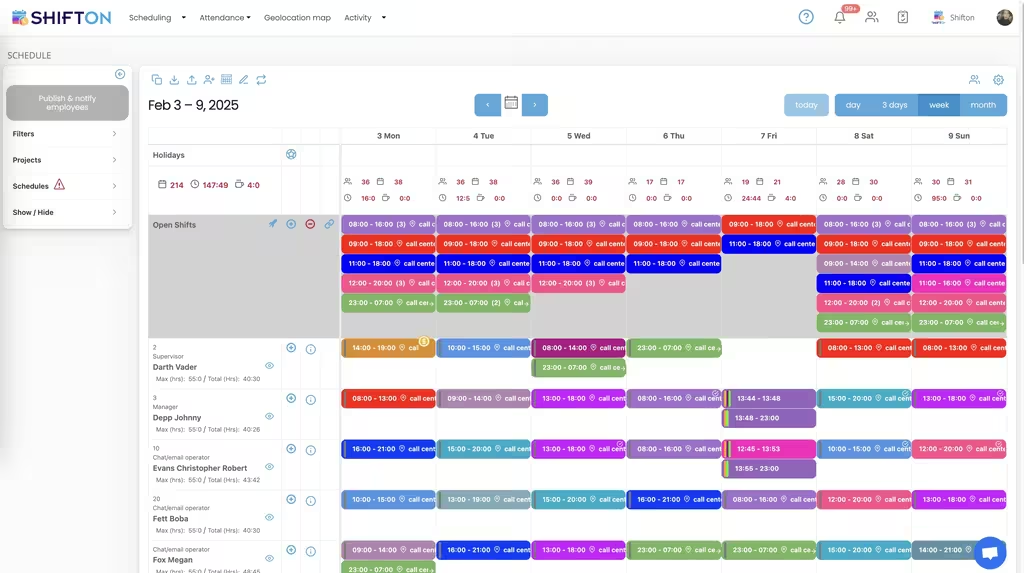
Most plumbing weeks are decided on a Friday afternoon and changed twice before Monday. The weekly calendar gives every plumber a row, with colour-coded shifts showing start and end times and an Open Shifts row for the cover nobody has picked up yet. Filters by project and schedule keep one branch or one crew in view.
A Month of Cover, With Import and Export
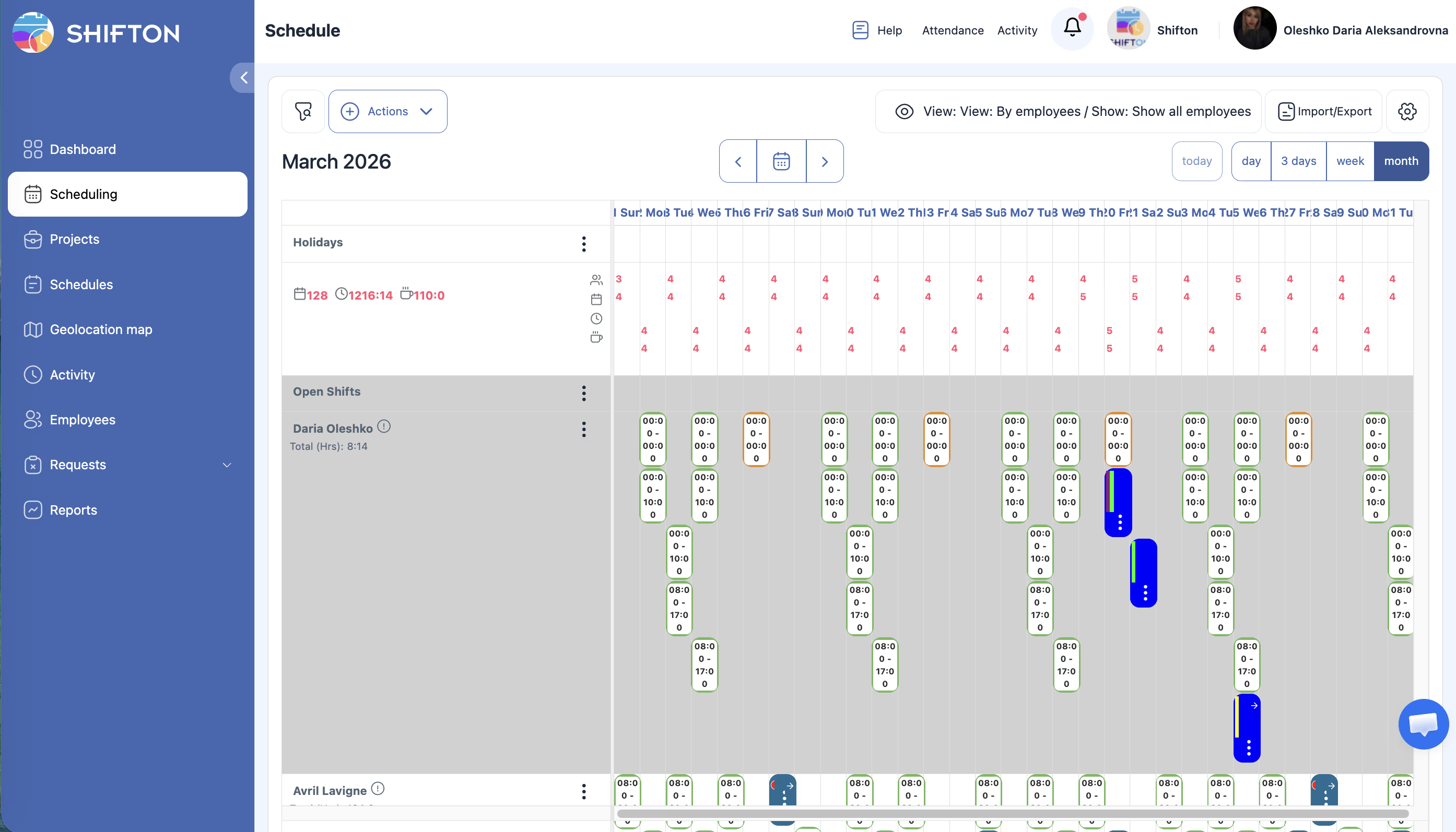
On-call duty is planned in months, not days. The month view shows the whole period per employee, with open shifts still waiting for an owner, and you can switch between a single person and the full team. Import and export move a schedule in or out, and the left-hand menu keeps projects, requests and reports one click away.
Emergency Cover Around the Clock
Burst pipes do not wait for opening hours. This week carries several shifts a day, including the 23:00 to 07:00 overnight block, with a role shown beside each name so there is always someone senior on. Max and total hours sit next to every person, which keeps a heavy emergency week from quietly turning into a payroll problem.
Site Visits on the Geolocation Map
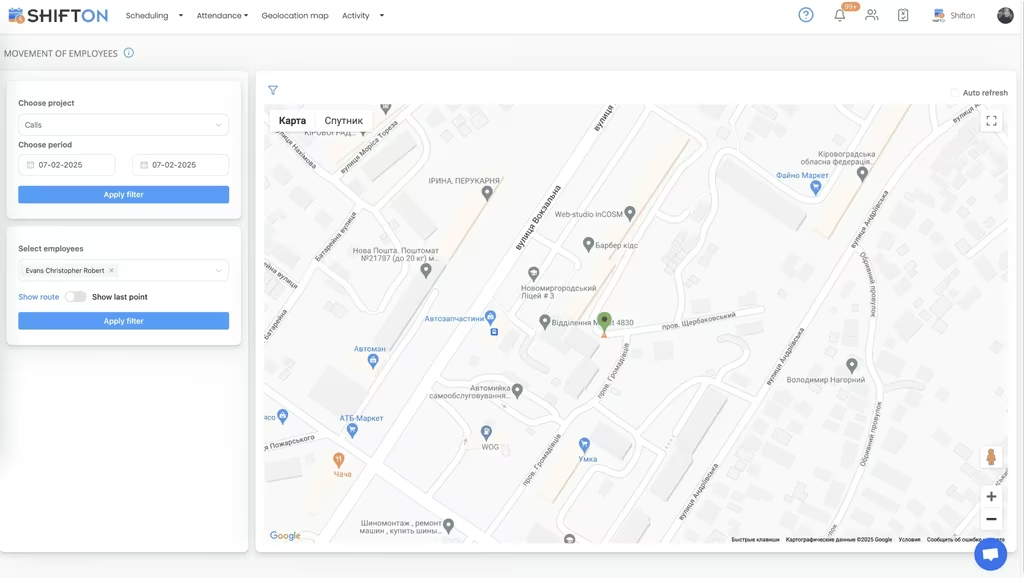
When jobs are spread across a county, the schedule alone does not prove anybody reached the address. The movement of employees screen filters by project and period, picks a plumber and shows their location pins on the map, with a route toggle for the sequence of the day. It is a paid module, and it settles attendance questions without a phone call.
Start with the Free Plan
No time limits. Get full access to core features and upgrade when you're ready.
Read the full guide to plumbing shift scheduling
A plumbing rota is never finished. A boiler fails at seven in the evening, a commercial contract asks for a Saturday crew, an apprentice cannot be sent alone, and the plan that looked settled on Friday has been rewritten twice by Monday lunchtime. Plumbing scheduling software exists to absorb that churn without a chain of phone calls, and to leave behind an accurate record of who worked what.
The problem is rarely a lack of work. It is knowing, at any hour, who is on duty, who is on standby, who is already close to their weekly limit, and what a night callout is going to cost when the wage bill lands. Those questions are answered badly by a whiteboard and a group chat, which is what most plumbing firms are still running on.
What plumbing scheduling software has to cover
Four things carry the weight. Build a week quickly and change it without redrawing it. Show cover across nights, weekends and standby so the gaps appear before a customer finds them. Get the rota onto phones, because the team is in vans and not at a desk. And record real hours, because out-of-hours work is paid differently and disputed more often.
A plumbing scheduling app that does those four beats a longer feature list every time. It is also the difference between a rota your team checks on their phone and one they ring the office about.
A typical plumbing week is built from a few repeating pieces:
- Planned maintenance and contract work in normal daytime hours
- Standby duty covering evenings, nights and the weekend
- Second shifts and early starts when a job runs long or a contract demands cover
- Apprentice shifts that have to sit alongside a supervising plumber
Once those pieces live on one grid instead of four places, the week stops being a memory exercise. Scheduling software for plumbing teams is mostly a way of making that grid honest.
The callout rota and on-call duty
Standby is the part most firms handle worst. Duty needs to rotate fairly, everyone needs to know weeks ahead which nights are theirs, and swaps have to be recorded somewhere other than a text message. Planning it on a month view makes the rotation visible: you can see the pattern across the team, spot the plumber who has taken three weekends in a row, and fix it before anyone complains.
Cover that nobody has claimed sits in an Open Shifts row rather than in a blank cell, so the hole in next month's standby is obvious while it is still easy to fill. Scheduling software for plumbers earns most of its keep in that gap between noticing a problem and being forced to solve it at eight on a Friday evening.
Nights, weekends and the shifts nobody wants
Emergency plumbing runs on unsociable hours, and unsociable hours are where costs escape. An overnight 23:00 to 07:00 block, an early start, a bank holiday call, a second shift stacked on someone who already worked a full day. Each of those is fine on its own and expensive in aggregate.
Holding all of them on the same weekly grid, with max hours shown next to hours already assigned, turns overtime into something you decide on. The person building the rota sees the plumber heading past their limit before the week is published, not when the payroll report comes back. That is also how a plumbing company scheduling software keeps a fatigue policy from being a document nobody applies.
Time off pulls in the same direction. Holiday requests arrive through the app and sit against the rota, so the person planning August can see who is already booked away before promising a customer a crew. Approve it and the schedule updates for everyone at once, which is the whole point of a plumber scheduling app rather than a shared file.
Apprentices, supervision and role-based cover
Not everyone on the van list is interchangeable. Apprentices need supervision, some contracts require a qualified name on site, and a shift is only genuinely covered if the right role is on it. Showing roles beside names on the schedule means cover is checked by capability rather than by headcount, and a shift that has three people but no supervisor is visible as a problem rather than a full column.
Positions, access levels and contact details live on the team roster, so an office manager can add a new starter, invite them and put them on next week's rota without touching a spreadsheet. Utilities and other trades run the same pattern, and our utility workforce scheduling page covers standby cover at larger scale.
Hours, overtime and what the month actually cost
Plumbers clock in and out from the mobile app, so each shift stores an actual start, end and break against what was planned. Working hours reports then show hours worked, overtime worked, lateness and absence per plumber and per project, and pay rate reports split the period into base and premium tiers so night and weekend work is separated from ordinary hours.
Two things follow from that. Payroll gets a file instead of a conversation, and a disputed timesheet takes two minutes to settle because the clock-in record is attached to the shift. Firms searching for plumbing business dispatch software often find that the hours, not the routing, were the part actually costing them money.
Proving the visit happened
Work spread across a service area creates a question that no schedule answers on its own: did the plumber reach the address, and when. The movement of employees map filters by project and period, shows location pins for the chosen employee and can display the sequence of the day. It is a paid module rather than part of the free plan, and it is usually bought by firms with commercial contracts that require attendance evidence. Shifts can also carry a work location so the rota itself says where each person is expected to be.
Where field service suites end and the rota begins
It is worth being direct about the boundary. Plumbing management software, plumber management apps and full field service suites are built around the job: quotes, parts, invoices and getting a van to a door. Shifton does not do any of that. It is the workforce layer, and it answers a different set of questions: who is rostered, who is on standby, who clocked in, how many hours were worked, and how many of them were overtime.
Plenty of plumbing businesses run both, and the split is clean. The job system owns the customer, Shifton owns the rota and the timesheet. Firms that only need the second half often find that a plumbing technician scheduling software with proper hours reporting replaces more of the spreadsheet work than a full suite ever did.
Getting a plumbing team onto a scheduling app
Adoption is a phone question. If the schedule in the app is the true schedule, every time, plumbers stop ringing the office. That means changes published to everyone at once, requests handled in the same place, and hours that match what people actually worked.
Under 10 team members, Shifton's free plan handles the whole job with no time limit, which is most independent plumbing businesses. Beyond that, paid plans are billed per employee per month and add deeper reporting and controls, with geolocation and work location as a paid module on top. Whatever size you run, the aim is the same: cover you can rely on at three in the morning, and an hours figure nobody has to argue about.
Frequently Asked Questions
What is plumbing scheduling software?
Plumbing scheduling software plans which plumber works which shift, publishes that plan to the team and records the hours worked afterwards. Shifton covers shift building, open shifts, on-call rotations, availability and time-off requests, clock-in and clock-out, and hours reports. It handles the rota and the hours rather than quoting or billing the job.
Can Shifton manage an on-call and emergency callout rota?
Yes. Standby and callout duty is planned as shifts on the same calendar as normal work, including overnight and weekend blocks, and rotated across the team over a month so the same people do not carry every night. Open shifts let cover be released to the whole team, and everyone sees the change the moment it is published.
Is Shifton the same as plumbing dispatch software?
Not quite. Plumbing management software and field service suites focus on jobs: quoting, parts, billing and getting a van to an address. Shifton is the workforce layer underneath, planning who is on duty, tracking their hours and producing the pay and overtime figures. Many plumbing firms run one of each.
How do plumbers see their shifts?
Each plumber has the schedule in the Shifton mobile app on iOS and Android, along with their own hours, requests and any tasks attached to a shift. Push notifications go out when the rota is published or changed, so nobody works from a printed sheet that was accurate last Tuesday.
Does Shifton track out-of-hours and overtime pay for plumbers?
Yes. Clock-in and clock-out times are recorded against each shift, so worked hours and overtime hours are reported separately per person and per project. Pay rate reports break the period into base and premium hours, which is what makes night and weekend callout work easy to settle at month end.
Is there a free plan for a small plumbing business?
Shifton is free for up to 10 team members with no time limit, which covers most independent plumbing businesses and small crews. Shift scheduling, the mobile app, basic time clock and reports are included. Larger teams pay per employee per month, and the geolocation and work location module is paid on any plan.





Run Your Plumbing Rota on Shifton
Plan the callout rota once, publish it to every van, and know exactly who worked which hours.