

EMS Scheduling Software for Police, Fire and EMS Crews
Plan 24/48 rotations, keep minimum staffing on every shift and settle swaps in minutes with EMS scheduling software built for police, fire and ambulance crews.


Build the Week and Publish It to Every Crew
A station week begins as a grid of gaps. The weekly calendar puts every officer, medic and firefighter on their own row, with colour-coded shifts showing start and end times and an Open Shifts row across the top for slots nobody has taken yet. Filters by project and schedule keep one district or station in view instead of the whole agency.
Rotation Patterns and Monthly Hour Balance
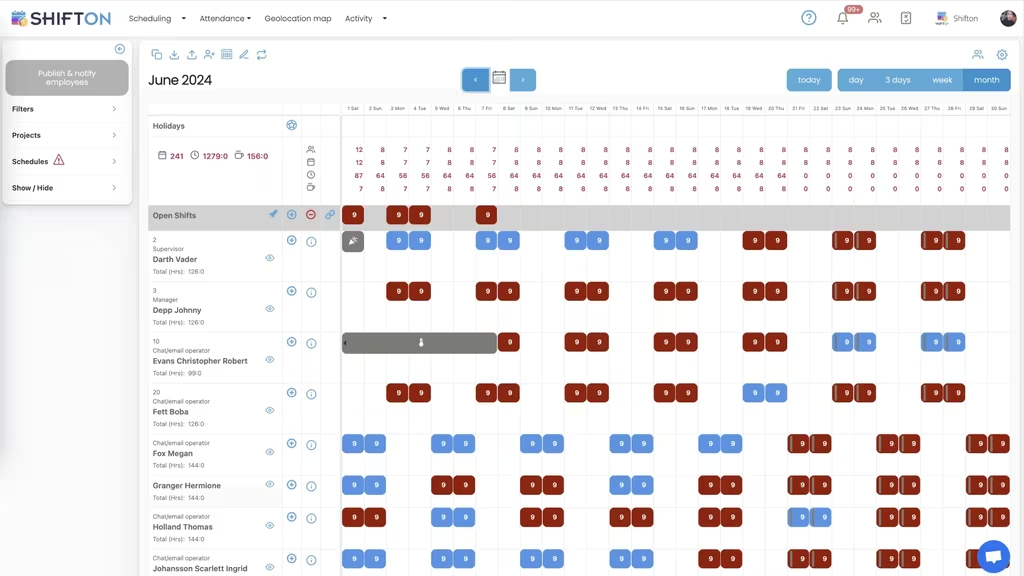
Shift patterns in public safety repeat over months, not weeks. The month view lays the whole rotation out in one grid, alternating day and night blocks across the roster, with a running hour total beside each name. Before the pattern reaches the crew, you can see whether it holds and whether the hours land evenly.
Round-the-Clock Cover, Shift by Shift
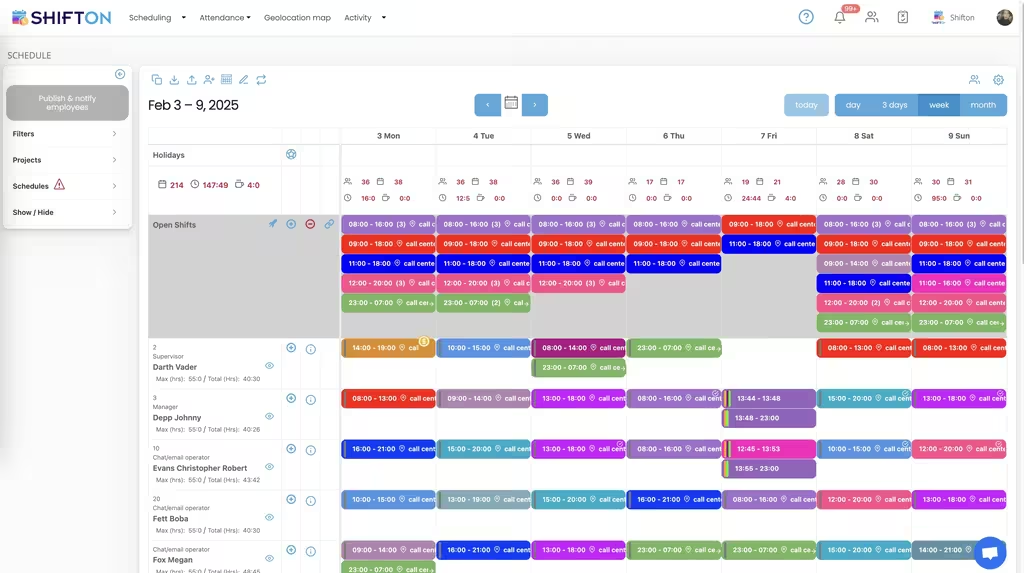
Emergency cover does not stop at five. This week carries several shifts a day, including the 23:00 to 07:00 overnight block, with a role shown next to every name so a supervisor is on duty for each one. Max and total hours sit beside each person, which makes a heavy week visible while it can still be changed.
Which Hours Landed on Which Pay Rate
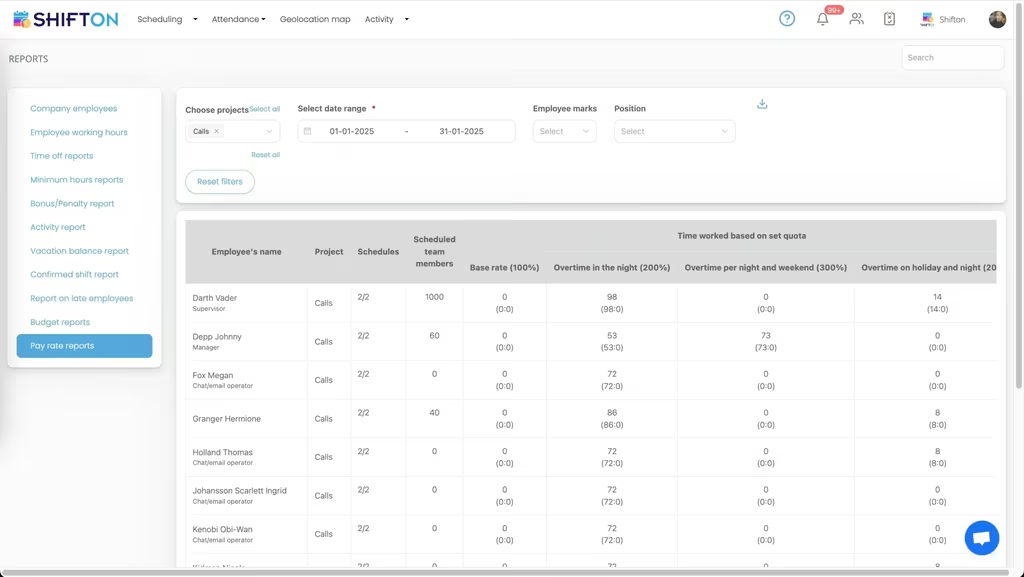
Overtime in a 24-hour service is never one number. The pay rate report splits each person's hours by the rate they earned: base at 100 percent, night overtime at 200, night and weekend at 300, and holiday hours on their own line. Broken down by project and schedule, it shows where the wage bill actually came from.
Start with the Free Plan
No time limits. Get full access to core features and upgrade when you're ready.
Read the full guide to public safety shift scheduling
Cover is the whole job. A police shift schedule, a fire department roster and an EMS crew plan all answer the same question in different uniforms: is there a qualified person on duty at three in the morning, and what happens when one of them calls in sick an hour before the shift. EMS scheduling software exists so that answer comes from a system instead of from whoever is holding the clipboard that day.
Emergency services also carry a scheduling load that ordinary employers never see. The roster runs every hour of every day of the year. Patterns repeat over months rather than weeks. Hours are capped by policy and by agreement, overtime is expensive and politically visible, and people are regularly unavailable for reasons - court, training, recovery after a long callout - that a generic staff scheduler has nowhere to record.
What EMS scheduling software actually has to do
Strip the feature lists away and the work comes down to four things. Build a full cycle quickly, without redrawing the same pattern every month. Show whether minimum staffing holds on every shift before the roster is published, not after a watch commander notices a hole. Reach crews on their phones, because nobody on shift is checking a noticeboard. And hold together when the plan breaks, which in emergency services is most weeks.
Everything beyond that is convenience. An ems scheduling system that gets those four right beats one with fifty features aimed at problems a station does not have. That is the bar a police scheduling app or fire department scheduling software has to clear before anyone will use it past the first month.
Shift patterns: 24/48, 48/96 and the Kelly day
Fire and EMS rosters live on repeating cycles. A 24/48 rotation, a 48/96, a four-platoon cycle with a Kelly day dropped in to bring average hours back under the contract limit - each is a pattern that has to run cleanly for months and stay fair across every platoon. Building that in a spreadsheet is possible and it is also how mistakes get made, because a single inserted row shifts the whole cycle out of alignment and nobody notices until the wrong crew turns up.
A firefighter shift schedule built from a saved template repeats forward instead. The month view shows the full cycle at once, so you can check the pattern before it reaches anyone, and per-person hour totals show whether the rotation is distributing hours evenly or quietly loading the same three people. Shift patterns are the reason a fire department schedule app has to think in months while most rostering software thinks in weeks.
Minimum staffing and the shifts nobody has taken
Minimum staffing is the number that matters most and gets tracked worst. Two medics per ambulance, a supervisor per watch, a set number of officers per district per shift. The gap is easy to spot the day before and almost impossible to spot four weeks out on a printed police schedule template.
Putting the roster in shift scheduling software makes the gaps visible while they are still cheap to fix. Unfilled slots sit in an Open Shifts row instead of hiding in a blank cell, and any qualified person can pick one up from their phone. What used to be a round of calls at 6am becomes a notification that goes out to everyone eligible at once. That single change is why most departments that trial a police department scheduling software eventually keep it.
Swaps, time off and court time
Rosters change constantly, and in public safety they change for reasons the original plan could not have known. Court appearances land after the schedule is published. Training courses move. Someone finishes a 14-hour incident and cannot safely start their next tour.
Handled on paper, each of those becomes a chain of messages and a scribble that half the team never sees. Handled in a police schedule app, the request goes in from the phone, a supervisor approves it, and the published roster updates for everyone at the same moment. Time-off requests and availability are recorded in one place rather than in a supervisor's memory, which also means the person building next month's cycle can see who is already committed before the pattern is drawn.
Overnight cover and the handover
Round-the-clock services live or die on the boundaries between shifts. The 23:00 to 07:00 block, the early relief, the moment when one crew hands responsibility to the next. Those transitions have to be staffed with the right roles, not just the right number of bodies, and the plan needs to show a supervisor on duty for every one of them.
A week view that carries several shifts a day, each labelled with a role, gives a watch commander the whole picture on one screen. Ems shift scheduling software that only handles a single daytime shift per person cannot describe how an emergency service actually runs.
Hours, overtime and what the month really cost
Overtime in emergency services is not a rounding error, it is a line item that gets read by people outside the department. Controlling it starts with knowing where it came from. Crews clock in and out from the mobile app, so each shift carries actual start, end and break time against what was planned. Working hours reports then show hours worked, overtime worked, lateness and absence per person, and the pay rate report splits those hours into base, night, weekend and holiday tiers.
That breakdown answers the question a chief actually gets asked: not how much overtime was worked, but which stations, which shifts and which parts of the pattern generated it. Certification currency, compliance detail and deeper cost analysis belong to our public safety workforce management page. This one stays on the roster itself.
Where scheduling stops and dispatch begins
It is worth drawing the line clearly, because search results mix the two categories constantly. Ems dispatch software and police dispatch software handle live incidents: calls coming in, units assigned, status changing minute by minute. Fire department management software and ems management systems sit around that, covering records, assets and reporting. None of them build the roster.
Shifton is the workforce side. It decides and records who is on duty, for how long, at what rate, and it hands clean hours to payroll afterwards. Departments run it alongside their dispatch platform, and comms rooms use it for their own console rosters, where 911 dispatch scheduling software has exactly the same 24/7 problem as the field.
Rolling it out across a department
Adoption in public safety is mostly a trust question. Officers and medics need the schedule on their phone to be the schedule that is true, every time, or they go back to asking their sergeant. That means publishing changes to everyone at once, keeping requests in the same system that produces the roster, and making sure the hours that appear in a report are the hours someone actually worked.
Under 10 people, Shifton's free plan covers the whole job with no time limit, which suits a volunteer company or a small ambulance service. Beyond that, paid plans are billed per employee per month and add the reporting and control a full department needs, with geolocation and work location available as a paid module. Whether you are replacing a police schedule maker built in a spreadsheet or a wall chart that has survived three chiefs, the aim is the same: a cycle that holds, cover you can prove, and an overtime figure nobody has to guess at.
Frequently Asked Questions
What is EMS scheduling software?
EMS scheduling software builds and shares crew rosters for ambulance and emergency medical services. Shifton assigns shifts, publishes them to every phone, collects availability and time-off requests, and records hours worked against overtime. It covers the roster and the hours behind it, not call handling.
Can Shifton build a 24/48 firefighter shift schedule?
Yes. A 24/48 rotation, a 48/96 cycle or a four-platoon pattern with Kelly days is built once and repeated forward from a saved template, so each new month starts from the pattern rather than a blank grid. The month view shows the whole cycle, and per-person hour totals show how the pattern distributes hours across the roster.
Is there free police scheduling software?
Shifton has a free plan for up to 10 team members with no time limit, which covers a small unit, volunteer company or single watch. Shift scheduling, the mobile app, open shifts, shift swaps and reports are included. Larger departments move to a paid plan billed per employee per month, and the geolocation and work location module is paid on every plan.
How do officers swap shifts without a phone tree?
A shift swap is requested in the app and approved by a supervisor, and the roster updates for everyone at once. Open shifts can be released to the team so qualified staff claim them directly instead of a sergeant working the phone. Everyone is looking at the same published schedule, so there is no printed sheet drifting out of date on the wall.
Does Shifton replace police dispatch software?
No. Dispatch platforms track live calls and unit status in the moment; Shifton plans who is rostered on before those calls arrive and records what they worked afterwards. Departments normally run both, and Shifton also works as 911 dispatch scheduling software for the comms room itself, where the console has to be staffed around the clock.
How does Shifton track overtime hours for emergency crews?
Crews clock in and out from the mobile app, and each shift stores actual start, end and break time against the planned shift. Working hours reports show hours worked, overtime worked, lateness and absence per person, and pay rate reports split those hours into base and premium tiers. Both export for payroll.






Run Your Station Rota on Shifton
Build the pattern once, publish it to every phone, and see exactly which hours turned into overtime.