
 English (US)
  Español (ES)
  Português (PT)
  Deutsch (DE)
  Français (FR)
  Italiano
  日本語
日本語  中文
中文  हिन्दी
  עברית
עברית  العربية
  한국어
한국어  Nederlands
  Polski
  Türkçe
  Українська
  Русский
  Magyar
  Română
  Български
  Čeština
  Ελληνικά
  Svenska
  Dansk
Dansk  Norsk
Norsk  Suomi
Suomi  Bahasa
  Tiếng Việt
  Tagalog
  ไทย
ไทย  Latviešu
  Lietuvių
  Eesti
Eesti  Slovenčina
  Slovenščina
  Hrvatski
  Македонски
  Қазақ
Қазақ  Azərbaycan
  Afrikaans
  বাংলা
বাংলা 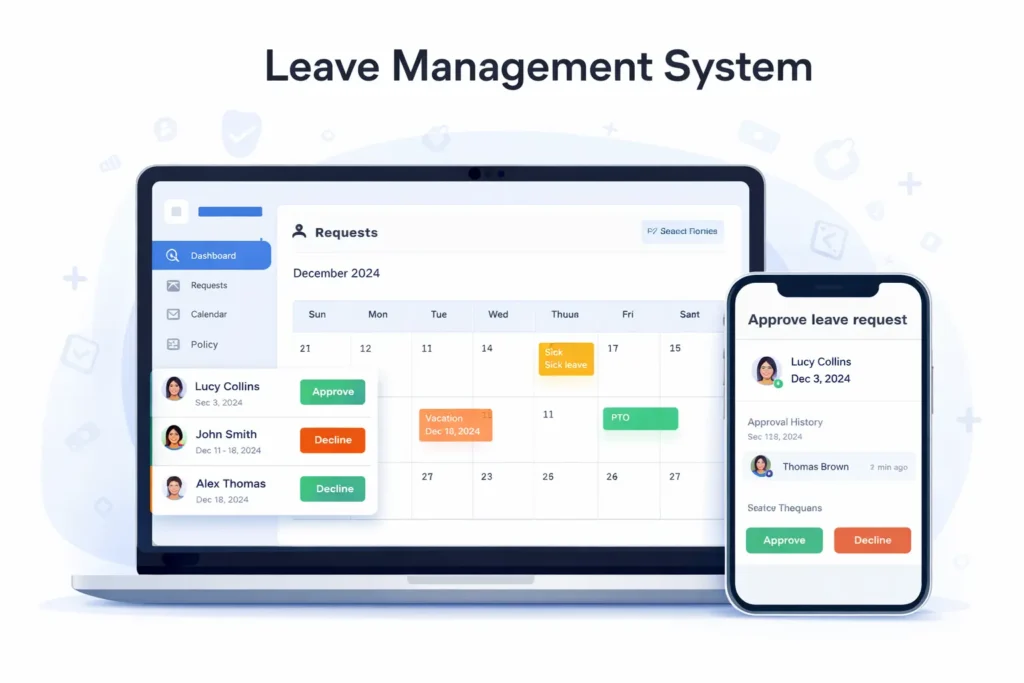
Time off should not feel like a fight. But in many teams it does. Someone asks for vacation in a chat message. A manager replies hours later. HR updates a spreadsheet. Payroll finds out too late. The schedule breaks, and the team ends up stressed.
A leave management system fixes this by giving everyone one clear path: request, approve, track, and plan. It replaces messy messages with a simple leave approval workflow, so managers can protect coverage, and employees can plan their lives without guessing.
If you want a simple starting point for workforce workflows beyond time off, you can look at the core platform here: see how Shifton works
What a leave management system should do
A good system is not just a form. It is a process that reduces mistakes and makes decisions predictable.
It should handle time off requests in a way that feels natural for employees, including mobile use. It should show the status clearly, so nobody asks “did you approve it” five times. It should support employee leave tracking with a clean history of who requested, who approved, and what dates were involved.
It should also help managers plan, not just approve. That means a clear leave calendar, visibility into overlapping requests, and a way to avoid staffing gaps before they happen.
For HR, it should support leave policy management with rules that stay consistent. For payroll, it should support paid leave tracking and clean totals that do not require manual fixes at the end of the month.
Vacation management should not be harder than requesting a day off. Sick leave tracking should be fast, because sick days rarely come with a week of notice.
Why spreadsheets and chats fail
Spreadsheets break because they depend on perfect humans. One person forgets to update a cell. Another person edits the wrong row. A manager approves something verbally and nobody logs it. Soon you have two truths and zero trust.
Chat approvals feel fast, but they create confusion. Messages disappear under new conversations. A new manager cannot see what happened last quarter. HR cannot answer basic questions without digging through screenshots.
A proper absence management process needs a single source of truth that is easy to use, not a patchwork of tools.
The real cost of messy time off tracking
Bad leave management is not just annoying. It is expensive.
When managers cannot see time off clearly, they overstaff just to feel safe. Or they understaff and burn out the team. When employees do not trust the process, they stop planning ahead. They take last-minute leave, and the business runs in panic mode.
It also creates unfairness. Some people get approvals quickly because they know who to message. Others wait longer because they follow the rules. Over time, that feels personal, even when it is not.
A good leave management system makes the process visible and consistent, so decisions feel fair and easy to explain.
How to set up leave management that works daily
You do not need complicated rules. You need clear rules that everyone can follow.
Set leave types that match real life
Start with a small list that people actually use. Most teams only need vacation, sick leave, personal leave, and unpaid leave. Keep the names simple. If people cannot tell the difference between two similar options, they will pick the wrong one.
This helps HR leave software stay clean and prevents reporting from turning into a guessing game.
Make approvals fast and predictable
Slow approvals destroy trust. The best approach is usually one direct manager approval for most requests, and a second step only for special cases.
Define what fast means in your team. Managers respond within one business day. If a manager is away, the request routes to a backup approver. That is how you prevent stuck requests and reduce last-minute schedule changes.
Use a leave calendar to protect coverage
A leave calendar is where planning becomes real.
Managers should be able to spot overlap at a glance. Employees should be able to see if a week is already crowded, so they avoid conflicts before they even request. This lowers rejection rates and reduces conflict.
When your calendar is reliable, people stop double booking life, and you stop double booking staff.
Connect leave to scheduling and attendance
Time off should change availability. If someone is approved for leave, they should not appear as available for shifts during those dates. That is the difference between a system that stores requests and a system that protects operations.
If you manage shift-based teams, pairing time off with scheduling makes a big difference. Shifton supports this kind of flow here: time off request and approval tools
When you also need clean totals for attendance and payroll, connect leave decisions with hours tracking here: track work hours without manual timesheets
Leave management for teams with shifts and coverage risks
Some teams can survive messy leave tracking longer than others. An office team might feel pain, but a shift team feels disaster.
In healthcare, one missing person can overload a whole unit. In retail, a gap during peak hours hurts revenue and customer experience. In facility work, one missing technician can delay critical tasks.
If your work depends on coverage, a leave management system is not just HR hygiene. It is operational safety.
Facility teams are a strong example because they need reliable coverage every day. This page shows the kind of coverage thinking that matters most: how facility teams stay covered
Best practices that make employees trust the process
A system only works if employees believe it is fair. Trust comes from clarity, not from strictness.
Show balances clearly. If people do not know how much PTO tracking is available, they will keep asking HR or they will stop requesting properly.
Make rules visible before someone submits a request. If there are blackout dates, minimum notice rules, or limits on overlapping leave, show that early. Do not wait until after the request is sent.
Keep decisions explainable. When a manager rejects a request, the reason should be simple and consistent, like coverage limits or overlap.
Keep history. When questions come up later, you want facts, not opinions.
For teams in the US, it helps to reference trustworthy guidance on wage and hour basics: official wage and hour basics
A rollout plan that does not annoy the team
Most rollouts fail because they feel like more work. A good rollout feels like less work from day one.
First, set up leave types and rules in a way that matches how people already talk. Then train managers on one habit: approve fast and check coverage. After that, switch requests to the system and stop accepting approvals in chat. If you keep two channels open, people will always pick the messy one.
Finally, review what happens in the first two weeks. If employees keep choosing the wrong leave type, rename it. If approvals are slow, set a backup approver. Keep improving the process until it feels effortless.
If you want the fastest way to test the workflow with your own team, start here: create your Shifton workspace
FAQ
What is a leave management system?
A leave management system is software that helps employees submit time off requests and helps managers approve them while keeping accurate records, balances, and a shared leave calendar.
What should a good leave approval workflow look like?
It should route requests to the right manager, show status clearly, keep a history of decisions, and prevent requests from getting stuck when someone is away.
How does this help with absence management?
It gives one reliable source of truth for who is away and when, so you can plan coverage early and avoid last-minute staffing gaps.
Can it handle PTO tracking and paid leave tracking?
Yes. A proper system tracks balances and leave totals so employees know what is available and payroll can process time off without manual corrections.
How should we handle sick leave tracking?
Make it fast and simple. Sick leave often happens without notice, so the system should allow quick requests and clear documentation without extra steps.
What is the biggest reason teams fail to adopt HR leave software?
They keep approving time off in chat while also asking people to use the system. Pick one channel, train managers to respond fast, and the habit will stick.
How do we reduce conflicts in vacation management?
Use a leave calendar that shows overlap and staffing limits early. When employees can see conflicts before they submit, requests become smarter and approvals become faster.