English
  Español
  Português
  Deutsch
  Français
  Italiano
  日本語
日本語  中文
中文  हिन्दी
  עברית
עברית  العربية
  한국어
한국어  Nederlands
  Polski
  Türkçe
  Українська
  Русский
  Magyar
  Română
  Čeština
  Български
  Ελληνικά
  Svenska
  Dansk
Dansk  Norsk
Norsk  Suomi
Suomi  Bahasa
  Tiếng Việt
  Tagalog
  ไทย
ไทย  Latviešu
  Lietuvių
  Eesti
Eesti  Slovenčina
  Slovenščina
  Hrvatski
  Македонски
  Қазақ
Қазақ  Azərbaycan
  Afrikaans
  বাংলা
বাংলা 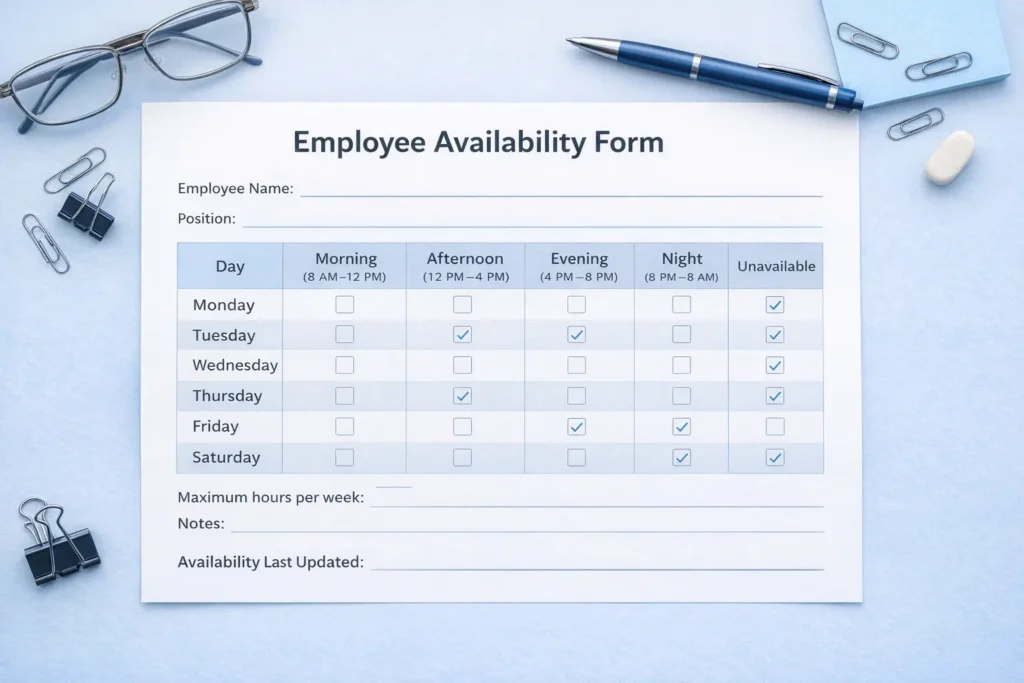
What is an employee availability form?
An employee availability form is a document that shows when a worker is available to take shifts. It usually includes days of the week, time ranges, preferred shifts, and any restrictions that would affect scheduling. The goal is simple: replace assumptions with real information. Instead of guessing who can work evenings, weekends, or early mornings, managers ask employees directly and keep that information in one place. For small teams, the form may be a simple spreadsheet or printable template. For larger teams, it is usually easier to connect availability directly to a shift scheduling workflow so schedule planning and availability changes are not managed in separate systems.Why availability forms matter more than people think
A lot of businesses treat availability like a minor detail. In reality, it affects fairness, attendance, and employee trust. When people are repeatedly scheduled outside their real availability, they start seeing the schedule as something being imposed on them rather than something built with operational reality in mind. It also creates extra admin work. Managers end up filling gaps, moving people around, and solving problems that could have been prevented before the schedule was published. Researchers from the national bureau of economic research have shown that unstable and mismatched schedules can affect worker well-being and income predictability, which is one reason schedule accuracy matters more than many teams first assume.What should an employee availability form include?
A useful form does not need to be complicated, but it should answer the questions a manager actually has when building the schedule.- Employee name and role
- Days they are available
- Days they are unavailable
- Preferred start and end times
- Maximum hours per week
- Temporary restrictions, such as school or childcare
- Date of the last update
Employee availability form example
A practical form usually works best when it is easy to scan. One simple version includes a weekly grid with each day listed beside time windows such as morning, afternoon, evening, and night. Employees then mark when they are available and note anything that changes week to week. For example, a part-time employee might show:- Monday to Thursday: available after 4 PM
- Friday: available all day
- Saturday: unavailable
- Sunday: available mornings only
When teams should collect availability
Many businesses collect availability only during hiring, then forget about it. That is one of the biggest mistakes they make. Availability should usually be reviewed:- when a new employee starts
- before a new semester or season
- when schedules or shift patterns change
- when an employee changes role
- when coverage problems start appearing repeatedly
How availability forms reduce scheduling conflicts
Most schedule conflicts are not random. They happen because something important was missing before the rota was built. An availability form helps managers catch those issues early. It also improves fairness. When employees believe their stated availability is respected, they are less likely to see the schedule as biased or chaotic. That matters because fairness affects more than morale. It affects whether the team trusts the process at all. The broader issue of schedule stability and employee relations is also discussed by the society for human resource management, which regularly highlights how clear scheduling practices support retention and reduce avoidable friction.Common mistakes managers make with availability forms
Treating the form as permanent
Availability changes. Students get new timetables. Parents adjust routines. People move, take second jobs, or change commuting patterns. A form that is not updated regularly becomes less useful every week.Collecting the information but ignoring it
This is worse than not collecting it at all. When employees fill out availability forms and are still scheduled outside those times, trust drops quickly.Making the form too vague
“Available weekdays” is not enough if the role includes mornings, afternoons, evenings, and nights. The form should match the way your business actually schedules work.Paper form or digital system?
A paper form can work for very small teams. It is easy to create and easy to understand. The problem starts when the team grows or availability changes often. That is when digital tracking becomes useful. Instead of storing updates across chats, spreadsheets, and printed notes, managers can keep availability in one place and build schedules around current data. This also connects naturally to broader planning decisions. For example, when availability gaps appear every weekend or every evening, managers may realize the issue is not just scheduling but staffing. That is where articles like capacity planning become relevant, because repeated availability shortages often point to larger coverage problems.How to use an availability form without creating friction
Employees should understand that the form is not a promise that they will only ever receive ideal shifts. It is a tool for improving fit and reducing avoidable conflicts. The business still has coverage needs, but those needs should be balanced against realistic availability whenever possible. The best approach is simple:- keep the form easy to complete
- review updates regularly
- make shift rules clear
- explain how availability affects scheduling decisions