

Roster Management: How to Build Shift Rosters That Actually Work

What Is Roster Management?
Friday afternoon, 4:47 PM. A shift supervisor at a hotel chain realizes that Sunday morning has two front-desk agents instead of four. One called in sick, the other swapped shifts without telling anyone. The manager spends the next hour texting, calling, borderline begging. By the time coverage is confirmed, it’s nearly seven.
Roster management – also called rota management or staff rostering – is how an organization assigns people to shifts, roles, and locations over a defined period. A work roster is more than a timetable. It maps who works where, when they start and finish, what role they fill, and who’s available as backup. When it works, nobody notices. When it breaks, everyone does.
The concept sounds simple. The execution isn’t. Duty rosters have to balance business demand against employee availability, labor law constraints, skill requirements, fairness expectations, and budget limits – simultaneously. Most managers we’ve talked to describe it as the single most time-consuming admin task they do each week. And the cost of doing it badly goes far beyond a few overtime hours.
Why Roster Management Matters More Than You Think
A poorly built staff roster creates problems that look unrelated on the surface. High absenteeism? Often a scheduling issue – people who can’t swap shifts just stop showing up. Rising overtime costs? Probably understaffing in specific time slots that nobody noticed until payroll landed. Even the patterns behind people quitting trace back to schedule quality more often than managers expect.
According to the European Foundation for the Improvement of Living and Working Conditions, irregular and unpredictable working hours are directly associated with poorer work-life balance and higher rates of health problems among employees. This isn’t a soft metric. It shows up in absenteeism numbers, disability claims, and retention rates.
Good employee scheduling does three things at once. It controls labor costs by matching headcount to actual demand. It keeps service levels consistent by placing qualified people in the right slots. And it gives employees enough predictability to plan their lives outside of work – which, for hourly staff, matters more than almost any other perk.
Core Components of an Effective Work Roster
Not every roster looks the same. A hospital ward and a retail store have different rhythms, peak hours, and compliance requirements. But the building blocks of a well-functioning shift roster are consistent everywhere.
Demand forecasting
Before you write a single name on a schedule, you need to know how many people you actually need per hour. This depends on historical data – foot traffic, ticket volume, production targets, whatever your business tracks. Most schedule optimization starts here: count the work first, then assign people to it. Sounds obvious, but the number of managers who build rosters based on “what we did last week” rather than what the data says is staggering.
Skills and certifications
Filling a shift isn’t just about having a warm body in a seat. You need someone who can actually do the job. A restaurant needs at least one trained bartender behind the bar, not three servers who’ve never touched a cocktail shaker. Crew scheduling in manufacturing gets even more specific – forklift certifications, safety training levels, machine qualifications.
Tracking who can do what in a spreadsheet works until it doesn’t. And the moment it doesn’t is usually when someone’s covering a role they’re not qualified for and something goes wrong.
Employee availability and preferences
This is where roster planning either earns trust or breaks it. Employees who get schedules that consistently ignore their availability requests stop requesting. They start looking for a new job instead. Letting people set preferred shifts, block out unavailable days, and request time off within a clear system is the minimum. Your documented workplace policies should spell out exactly how this works so there’s no ambiguity.
Compliance guardrails
Minimum rest periods between shifts. Maximum weekly hours. Overtime thresholds. Youth worker restrictions. The rules vary by jurisdiction, but they all share one thing in common – violating them is expensive. A solid workforce scheduling process bakes these constraints into the roster before it’s published, not after a compliance audit flags them.
Common Roster Management Mistakes
Some of these will sound painfully familiar. That’s because most shift-based operations make the same handful of errors – and keep making them until someone actually measures the impact.
Publishing schedules too late
If your team sees next week’s roster on Thursday night, you’ve already failed. They can’t arrange childcare, can’t plan appointments, can’t commit to anything outside of work. Two weeks’ notice is the baseline. Three is better. Late publishing is the fastest way to guarantee no-shows and shift swap chaos.
Ignoring the data you already have
Your POS system knows which hours are busiest. Your attendance records show who calls in sick most often and on which days. Your overtime reports reveal which departments are chronically understaffed. But if nobody’s looking at the scheduling data sitting in your system, you’re building rosters on gut feeling – and gut feeling tends to favor the manager’s convenience over the team’s reality.
Over-relying on the same people
Every team has a go-to person – the one who says yes to extra shifts, picks up last-minute gaps, never complains. Managers lean on them because it’s easy. Until that person burns out and hands in their notice. Equitable shift allocation isn’t just about fairness. It’s about risk management. If your operation falls apart when one specific person calls in sick, your roster has a single point of failure.
How to Build a Better Staff Roster
There’s no magic formula, but there is a repeatable process. The best operations we’ve worked with follow roughly the same sequence, whether they’re scheduling a kitchen crew of 12 or a logistics team of 200.
Start with the work, not the people
Map out coverage needs first. How many people do you need per role, per time slot, per day? Use historical demand patterns, not assumptions. A staffing schedule built on “we always had three people on Tuesday mornings” breaks the moment business patterns shift – seasonal changes, local events, a new competitor opening nearby.
Layer in constraints
Before you start assigning names, overlay the non-negotiables: labor law limits, approved time-off requests, skill requirements, contract hours. Think of these as the walls of the puzzle. They don’t move. What moves is who fills which slot within those walls. This becomes especially critical for evening and extended shift planning, where handoff timing, fatigue rules, and consecutive-shift limits add layers of constraint that morning-only rosters rarely face.
This is where team scheduling tools earn their keep. Doing this manually for a team of 30+ with varying contracts, availability windows, and certifications is like solving a Rubik’s cube blindfolded. Possible, technically. Sensible, no. We compare five of the most common picks – Shifton, Connecteam, Deputy, Sling, and When I Work – in our guide to the best employee roster apps.
Make swaps easy and visible
Shift swaps happen. Pretending they won’t is a recipe for off-the-books trades that nobody tracks. A transparent swap process – where employees request trades, managers approve or auto-approve based on rules, and the shift scheduling system updates in real time – keeps the roster accurate without micromanaging every change.
Review and adjust weekly
A roster isn’t a document you publish and forget. After each cycle, look at what went wrong. Were there uncovered shifts? Overtime spikes? No-shows on the same day pattern? Five minutes of review after each week makes the next week’s roster measurably better. This is labor scheduling as a continuous improvement process, not a one-time task – and choosing an HR platform that supports this workflow makes the difference between doing it and meaning to.
Manual Rosters vs. Software: When to Switch
Spreadsheets and paper rosters work fine for very small teams with predictable schedules. A coffee shop with five baristas on fixed shifts doesn’t need dedicated software. But the moment any of these become true, the math changes:
- More than 15-20 employees with rotating shift patterns
- Multiple locations or departments sharing staff
- Compliance rules that differ by employee type (part-time, minors, contracted hours)
- Shift swap requests coming in by text, email, and hallway conversations simultaneously
At that point, the hours a manager spends building and fixing rosters manually cost more than any software subscription would. And the errors – double-bookings, missed rest periods, untracked overtime – carry their own price tag. Comparing a short list of schedule maker apps side by side is the quickest way to see what that switch actually buys.
The shift from manual to digital isn’t really about technology. It’s about whether your current process can handle complexity without breaking. If you’ve ever published a roster and gotten four “I can’t work that day” messages within an hour, you already know the answer.
And roster management is just one piece of the HR picture. If you’re also evaluating what else belongs in a lean HR stack for a team under 100 people, the overview of small business hr software by use case covers where scheduling tools fit alongside payroll and HRIS options.
Build rosters that actually hold up
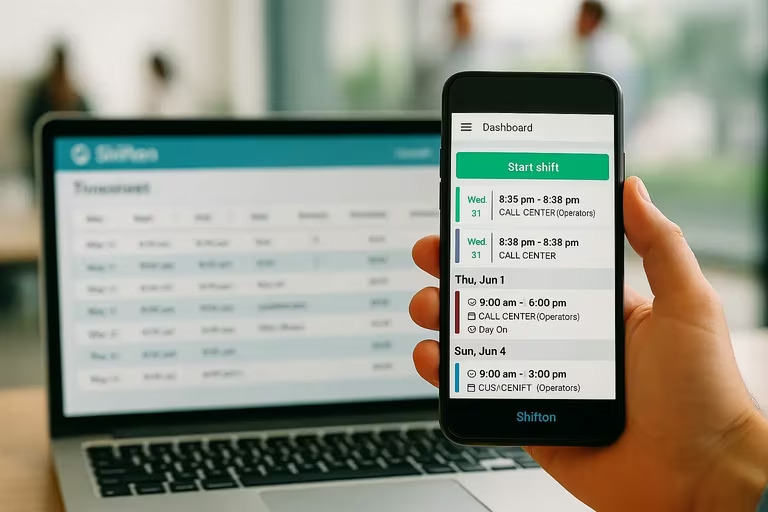
Shifton handles shift allocation, availability, swaps, and compliance rules – so you can publish a roster once and stop patching it all week.
FAQ
What is the difference between a roster and a schedule?
In practice, the terms overlap. A schedule is usually the broader plan – who works which days. A roster adds detail: specific roles, locations, break times, and backup assignments. Think of the schedule as the skeleton and the roster as the full picture. Most workforce scheduling tools handle both.
How far in advance should rosters be published?
Two weeks minimum. Some jurisdictions actually require it by law – predictive scheduling ordinances in cities like San Francisco and New York mandate 14 days’ notice for certain industries. Even where it’s not legally required, publishing early reduces no-shows and gives people time to arrange swaps.
Can small businesses benefit from roster management software?
Yes, if the scheduling is complex enough. A bakery with three staff on fixed hours – probably not. A cleaning company with 15 part-timers across different client sites – absolutely. The breakpoint isn’t company size. It’s scheduling complexity.
What should I look for in a rostering tool?
Availability management, shift swap workflows, compliance rule enforcement, mobile access for employees, and integration with your payroll or time tracking system. Fancy AI features are nice, but get the basics right first. If your team can’t view their shifts from a phone, nothing else matters.



Start making changes today!
Optimize processes, improve team management, and increase efficiency.