

Employee Availability Form That Makes Scheduling Easier
- What is an employee availability form
- What to include in a work availability form
- Employee availability form template
- Filled-out availability form examples
- How to collect employee availability without friction
- Paper form vs digital availability tracking
- Common mistakes that make availability forms useless
- How availability data connects to shift scheduling
- FAQ
Schedules break when managers assign shifts without knowing when people can actually work. Someone has classes in the morning. Someone else cannot do weekends. Another employee switched to a second job and never mentioned it. When this information is missing or outdated, every published schedule becomes a source of last-minute swaps, no-shows, and overtime costs.
An employee availability form fixes this at the source. Before shifts are assigned, each team member states which days and times they can work, any restrictions, and how many hours they want. The result: fewer conflicts, fewer call-outs, and a schedule that reflects reality instead of guesswork.
This matters most in shift-based operations (retail, healthcare, hospitality, logistics, food service) where staff availability changes often and coverage gaps cost real money.
Use the free template below – or stop collecting availability on paper altogether
Everything on this page is free to use. Copy the availability form template, print it, or rebuild it in a spreadsheet in a few minutes – there is nothing to request and no one to email. It is a ready-made template, not a service we fill in for you.
If you would rather skip paper forms, Shifton’s employee scheduling software – used by retail, healthcare, hospitality and field service teams – lets staff submit their availability from a phone and builds the schedule around it automatically. Start free for up to 10 people.
What is an employee availability form
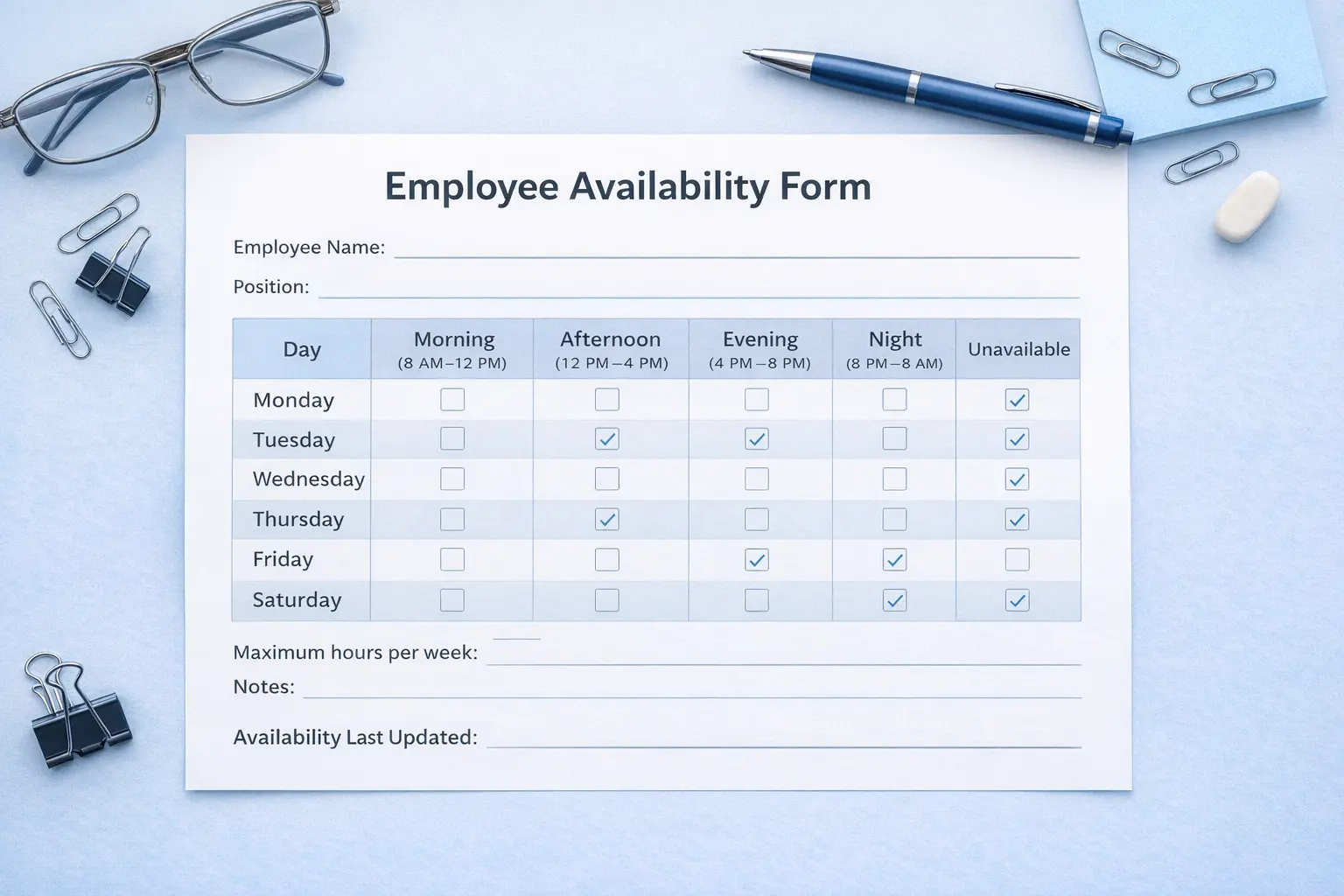
An employee availability form is a written or digital document where workers indicate the days and times they can work. It typically covers a full week, broken into time blocks (morning, afternoon, evening, night) so managers can see exactly when each person is and is not available.
Before these forms existed in most workplaces, availability was handled through verbal agreements, hallway conversations, and memory. A shift leader might remember that Jake cannot work Sundays, but forget that Maria switched her college schedule last month. That kind of informal tracking breaks down fast once a team exceeds five or six people.
The form replaces guesswork with a written record. Think of it as a staff availability sheet that every team member fills out at regular intervals. It records more than “available” or “unavailable”: preferences, maximum hours, and recurring restrictions all go on it. For teams running structured rotations like a 2-2-3 work schedule, having accurate availability data before building the rota prevents the most common scheduling breakdowns.
What to include in a work availability form
An availability template does not need to be long. It needs to be specific enough that a manager can make real decisions from it. Here is what belongs on the form:
- Employee name and position. Obvious, but often missing from generic templates people download online.
- Department or team. This matters in larger operations where multiple managers share a pool of staff.
- Date submitted and effective date. Without this, there is no way to know if the form is current. A six-month-old availability sheet is a liability, not an asset.
- Weekly availability grid. Each day of the week broken into time blocks. Employees mark each block as available, unavailable, or preferred.
- Maximum hours per week. A part-time college student who can technically work Monday through Friday does not necessarily want 40 hours. This field prevents overloading.
- Recurring restrictions. These are ongoing commitments like classes, childcare pickups, a second job, or religious observance. These rarely change week to week but get forgotten if not written down.
- Temporary changes. These are short-term adjustments with specific start and end dates. A worker covering for a spouse’s medical appointments for three weeks, for example.
- Shift preferences. Not the same as availability. Someone available for nights may still strongly prefer mornings. Recording preferences helps with retention.
Keep the form to one page. Anything longer and completion rates drop. Anything shorter and you will not get enough detail to schedule accurately.
Employee availability form template
Below is an example of a filled-out weekly availability grid. The format uses four time blocks per day, which works well for most shift-based operations.
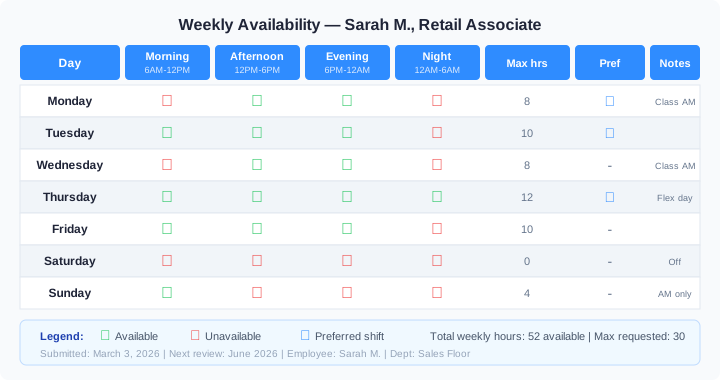
This availability template shows a retail associate named Sarah who has morning classes on Monday and Wednesday, full flexibility on Thursday, and no availability on Saturday. Her manager can see at a glance that she is best scheduled for afternoon and evening shifts early in the week, with Thursday as her strongest day for longer coverage.
Here is a blank weekly availability form template. Copy it into a document or print it, and have each team member mark every block as available, unavailable, or preferred:
| Day | Morning | Afternoon | Evening | Night | Notes |
|---|---|---|---|---|---|
| Monday | |||||
| Tuesday | |||||
| Wednesday | |||||
| Thursday | |||||
| Friday | |||||
| Saturday | |||||
| Sunday |
Add lines above the grid for name, position, date submitted, and maximum weekly hours, and keep the whole form to one page.
You can use this same layout for your own team. Recreate the grid in a spreadsheet or, better yet, skip the manual step entirely. Paper forms go stale within weeks, and managers end up chasing updates through messages and sticky notes. A faster approach: let employees submit their availability directly inside the scheduling tool. Shifton collects weekly availability, flags conflicts, and builds the shift schedule around real data, with no spreadsheets, no outdated printouts.
Tired of chasing paper forms every scheduling cycle?
Let your team submit availability in Shifton. The app flags conflicts and builds the schedule around real data, free for up to 10 people.
Filled-out availability form examples
Different industries need different levels of detail on their availability sheets. Here are three real-world examples showing how the same basic form adapts to different work environments.
Retail worker: part-time college student
Marcus works at a sporting goods store and takes classes Tuesday and Thursday mornings. His work availability form looks like this:
| Day | Morning 6 AM-12 PM | Afternoon 12 PM-6 PM | Evening 6 PM-10 PM | Notes |
|---|---|---|---|---|
| Monday | Available | Available | Available | Flexible all day |
| Tuesday | Unavailable | Available | Available | Class until 11:30 |
| Wednesday | Available | Available | Available | Flexible all day |
| Thursday | Unavailable | Available | Available | Class until 11:30 |
| Friday | Available | Available | Available | Preferred day for long shifts |
| Saturday | Available | Available | Unavailable | Available until 5 PM only |
| Sunday | Unavailable | Unavailable | Unavailable | Off, study day |
Max hours: 25/week. Recurring restriction: College semester runs August through December. Key detail for the manager: Marcus gains full availability during winter and summer breaks, so his form should be updated at the start of each semester.
Healthcare worker: rotating CNA
Diana is a certified nursing assistant at a long-term care facility. Her availability is broader, but she has firm limits around night shifts because she is a single parent with school-age children.
| Day | Day shift 7 AM-3 PM | Evening shift 3 PM-11 PM | Night shift 11 PM-7 AM | Notes |
|---|---|---|---|---|
| Mon-Fri | Available | Available | Unavailable | No nights (childcare) |
| Saturday | Available | Available | Available | Kids with their father |
| Sunday | Available | Unavailable | Unavailable | AM only, picks up kids at 2 PM |
Max hours: 40/week. Recurring restriction: Cannot work night shifts on school nights. Key detail: Healthcare facilities running 9/80 schedules or 12-hour rotations need to cross-reference this kind of restriction against every rotation cycle, not just a single week.
Restaurant server: weekend availability only
Alex is a server at a mid-volume restaurant and works a full-time office job during the week. The restaurant is his second source of income.
| Day | Lunch 11 AM-3 PM | Dinner 5 PM-11 PM | Notes |
|---|---|---|---|
| Mon-Thu | Unavailable | Unavailable | Primary job 9-6 |
| Friday | Unavailable | Available | After 6 PM only |
| Saturday | Available | Available | Full day, preferred doubles |
| Sunday | Available | Unavailable | Brunch only, leaves at 3 PM |
Max hours: 20/week. Recurring restriction: Weekday office job. Key detail: Restaurant managers dealing with employees who have second jobs need tighter availability windows on the form. A generic “available/unavailable” is not enough. Exact start and end times matter because a dinner shift that starts at 4:30 PM versus 6 PM makes or breaks whether Alex can be there.
Notice how each industry adapts the time blocks. Retail uses morning/afternoon/evening. Healthcare uses 8-hour shift windows. Restaurants split by lunch and dinner service. Your availability form should match how your operation actually schedules work.
How to collect employee availability without friction
The best availability form in the world is useless if people do not fill it out. Here is what actually works for getting staff availability data on time and keeping it accurate.
Hand it out during onboarding. New employees should complete an availability sheet on their first day, before they are ever added to the weekly schedule. Waiting until the second or third week creates a window where the manager is guessing.
Set a recurring review cycle. Pick a rhythm that matches your business. Retail stores often update at the start of each academic semester (January, May, August) because many employees are students. Healthcare facilities may do it quarterly. Restaurants often need monthly updates during peak seasons like summer or the holidays.
Keep the form short. One page, five minutes to complete. If employees need more than ten minutes, the form has too many fields. Strip it back to what you actually use when building the schedule.
Make the deadline clear. “Submit your updated work availability form by Friday at 5 PM. The new schedule goes out Monday.” Vague deadlines get vague compliance.
Do not punish honesty. If a worker marks Saturday as unavailable and then gets scheduled every Saturday anyway, they will stop bothering with the form. Respect the data you collect, and people will keep giving you accurate data. That does not mean every preference is guaranteed, but patterns should align with what employees reported.
Paper form vs digital availability tracking
Paper forms work fine for small teams, say under 15 employees with relatively stable availability. You print the employee schedule template, hand it out, collect it, and file it. The overhead is low and there is no learning curve.
The problems start when the team grows or turnover picks up. Paper forms get lost. Updates require printing and redistributing. Comparing 30 different sheets side by side while building a schedule is slow and error-prone.
Digital systems solve the scaling problem. When availability lives in the same platform where schedules are built, a manager can see conflicts instantly. An employee updates their availability on their phone, and the next schedule draft already reflects the change. No manual cross-referencing. An employee scheduling app for shift workers keeps that update on the employee’s own phone.
Shifton handles this by letting employees submit and update their availability directly inside the scheduling tool, so availability data and shift scheduling stay connected. That removes the gap between “collecting availability” and “actually using it,” which is where most paper-based systems fail.
For teams not ready for full software adoption, a shared spreadsheet (Google Sheets, for example) is a reasonable middle step. It is not as integrated as a scheduling platform, but it beats a stack of paper forms in a desk drawer. Small businesses ready for a first dedicated tool can compare employee scheduling software for small business.
Common mistakes that make availability forms useless
Collecting availability once and never updating it
A form filled out during onboarding in March is often wrong by June. People change routines, pick up new commitments, drop old ones. If you only collect availability at hire, you are scheduling based on outdated information within a few months. Build a review cycle: quarterly at minimum, monthly if your workforce has high turnover or a lot of students.
Using vague time blocks that do not match your shifts
A form that asks “Are you available mornings?” is too vague if your morning shift starts at 5 AM and some employees think “morning” means 9 AM. Match the blocks on your scheduling template to the actual shift start and end times your business uses. If your first shift is 5 AM to 1 PM, the form should say exactly that, not “morning.”
Ignoring the data when building the schedule
Nothing destroys trust faster. When employees take the time to fill out a work availability form and then see themselves scheduled during times they clearly marked unavailable, they stop treating the form as meaningful. After a few rounds of this, compliance drops and the manager is back to guessing. If you collect the data, use it. If coverage demands make it impossible to honor every restriction every week, communicate that clearly before publishing the schedule.
Making the form unnecessarily complicated
Some templates floating around online have 15+ fields, checkboxes for every possible scenario, and multi-page layouts. Real employees look at these and either skip half the fields or do not complete the form at all. One page. Core fields only. A simple weekly grid with room for notes covers 90% of scheduling needs.
How availability data connects to shift scheduling
Availability is step one. Step two is turning that data into a schedule that actually works. The connection between these steps is where most teams lose efficiency.
When availability lives in one system and the schedule lives in another, or worse in a manager’s head, mismatches are inevitable. A better approach is to feed availability directly into your scheduling workflow. That way, when the manager opens the scheduling tool, they already see which employees are available for each slot.
This also helps with capacity planning. If the availability data shows that only three people can work Saturday nights but your operation needs six, that gap is visible before the schedule is published, not after. You can recruit, adjust shifts, or reallocate hours while there is still time to fix the problem.
Teams using Shifton’s scheduling features connect these pieces automatically. Employees update their availability, the system flags conflicts during schedule creation, and managers resolve gaps before anyone sees a broken rota.
For operations running complex patterns (rotating 12-hour shifts, compressed workweeks, or split shifts), the connection between availability and scheduling becomes even more important. A scheduling template that does not account for real availability is just a wish list. For recurring patterns like these, the best employee roster apps are worth comparing.
Collect availability online. Schedule shifts in minutes
Availability and time off are two sides of the same coverage problem – Shifton’s absence and leave management tracks PTO and leave alongside the schedule.
Employees submit their weekly availability in Shifton. The schedule builds around real data. Conflicts, overtime limits, and time-off requests are handled automatically.
FAQ
What is an employee availability form?
An employee availability form is a document, paper or digital, where workers record the days and times they are able to work. It typically includes a weekly grid with time blocks, space for recurring restrictions like classes or childcare, and fields for maximum hours and shift preferences. Managers use it as the foundation for building weekly or monthly schedules.
Why is an employee availability form important?
Without one, managers schedule based on assumptions. That leads to conflicts: employees assigned to shifts they cannot work, last-minute call-outs, and constant rescheduling. A simple availability form catches 80-90% of these problems before the schedule is published. It also builds trust. Employees who see their stated availability reflected in the rota are less likely to view scheduling as unfair or arbitrary.
What should be included in an employee availability form?
At minimum: employee name, position, date submitted, a weekly availability grid matching your actual shift times, maximum weekly hours, recurring restrictions, and space for temporary changes. Optional but useful: shift preferences (morning vs evening vs night) and a signature line. Keep it to one page to maximize completion rates.
How often should employee availability be updated?
At least quarterly for stable workforces. Monthly during seasonal peaks or for teams with high turnover. Immediately when an employee reports a life change: new school term, new childcare arrangement, second job. Some businesses set a standing rule: availability resets at the start of each scheduling cycle unless the employee confirms no changes.
Can small businesses use availability forms?
Absolutely. A five-person coffee shop benefits just as much as a 200-person warehouse. The scale is different. A small team might use a printed form or a shared Google Sheet, but the principle is the same. Collecting availability in writing prevents the “I thought you knew I can’t work Tuesdays” conversation that derails small-team schedules every week.
Is a paper availability form enough?
For teams under 15 with low turnover, paper is fine. Once the team grows, a paper system becomes hard to manage. Forms get lost, updates require redistribution, and comparing multiple sheets while building a schedule is slow. A shared spreadsheet or a scheduling tool like Shifton makes updates faster and keeps everything in one place.
Do availability forms guarantee preferred shifts?
No. An availability form tells the manager when you can work, not when you will work. Business needs, seniority policies, and coverage requirements all influence the final schedule. But a well-managed process means preferences are considered whenever possible, and employees are not scheduled during times they clearly marked unavailable.
Can availability forms improve employee trust?
Yes, but only if the data is actually used. Collecting availability and then ignoring it does more harm than not collecting it at all. When employees see that their forms influence the schedule, even if every preference cannot be honored every week, they view the scheduling process as fair. That perception of fairness reduces complaints, lowers no-show rates, and makes the team more willing to help with coverage gaps when they arise.
Where can I get a free employee availability form?
Right here. The template on this page is free to copy, print, or rebuild in a spreadsheet, with no sign-up and nothing to request. If you would rather collect availability digitally, Shifton lets employees submit it in the app and builds the schedule around it.
Can employees submit their availability online instead of on paper?
Yes. In Shifton, each employee sets their weekly availability from their phone, and the schedule builds around it. The manager sees conflicts during scheduling instead of after the rota is published, which is the main advantage over a paper form or a spreadsheet.
What is the best way to collect employee availability?
For a small, stable team, a one-page printed form or a shared spreadsheet works. Once the team grows past 15 people or availability changes often, a scheduling tool that collects availability and builds the schedule in the same place saves the most time and removes the errors that come from cross-referencing forms by hand.



Start making changes today!
Optimize processes, improve team management, and increase efficiency.