

Best Time Management Tools and Apps for Small Business Owners
Most small business owners do not have a time management problem. They have a too-many-roles problem. The owner is also the operations lead, the bookkeeper, the customer service rep, and the closer of every loop nobody else picks up. The day disappears not because of bad planning but because every hat takes a bite.
The fix is rarely “try harder.” It is offloading the parts of the day a tool can absorb – shift coverage, time tracking, the running task list, the focus block, the recurring weekly report – so the owner gets the hours back for the work only the owner can do. The list below covers six time management tools, apps, and platforms that small business owners actually use, paired with productivity tips that make each one stick. Current pricing, real features, and the use case each tool fits.
This guide leans on the principle that a 5-person business needs a different time management software than a 50-person one. Solo founders need a personal productivity tool. Owners running shift-based teams need a workforce management platform first. The tools below are sorted with that hierarchy in mind.
This might interest you:Shifton’s time tracking feature – attendance, GPS location control, and payroll data as paid modules for shift-based small businesses.
5 time management principles before you pick a tool
A tool only multiplies whatever discipline you already have. If the underlying habits are loose, no app rescues them. Five principles do most of the work, and a good tool just enforces them automatically.
- ›Map an average day in 15-minute blocks. Most owners overestimate strategic work and underestimate the meeting-and-message tax. The first map is uncomfortable – that is the point.
- ›Pick the 20% that produces 80%. Pareto applies to the calendar too. Two or three activities usually account for almost all the revenue. Protect those slots and let the rest move.
- ›Delegate before you need to. Owners who wait until they are buried hand off badly. Document the recurring tasks now, even if the only person they get handed to is a future hire.
- ›Batch shallow work. Email, invoice review, payroll approval – cluster these into one or two windows a day instead of letting them interrupt deep work.
- ›Audit weekly. Friday afternoon, fifteen minutes – what got done, what slipped, what can be automated next week. The audit catches what the calendar hides.
With those principles in hand, the tool stops being a magic fix and starts being a force multiplier. A complete walk-through is in our companion piece on 17 effective time management tips for mastering time at work – useful for owners who want the framework before the software.
Quick comparison: 6 time management tools at a glance
| Tool | Best for | Free plan | Paid from |
|---|---|---|---|
| Shifton | SMBs running shift-based or frontline teams | Up to 10 users, no time limit while no paid module is on | Modular, per feature |
| Toggl Track | Solo founders & consultancies | 5 users, unlimited tracking | $9/user/mo |
| Clockify | Free tracking for small teams | Unlimited users | $3.99/user/mo |
| Todoist | Personal task management | 5 projects | $5/user/mo |
| RescueTime | Automated time audits & focus | 14-day trial only | $7/mo |
| Notion | All-in-one docs, tasks, projects | 10 external guests, basic | $10/user/mo |
Shifton
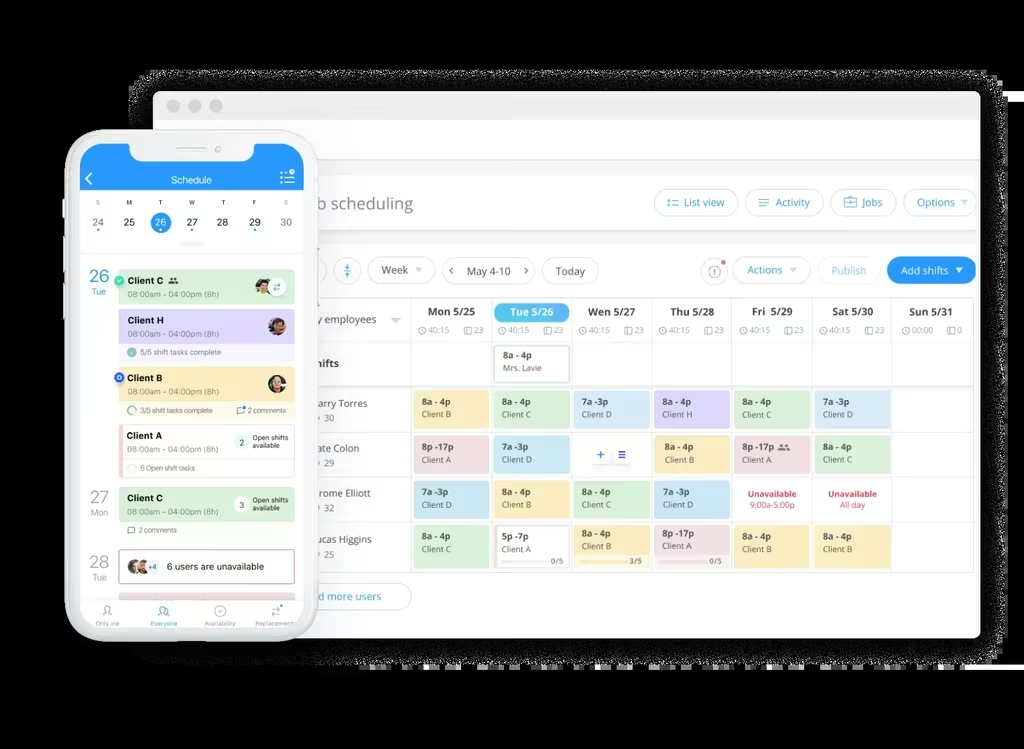
For small business owners running shift-based teams – retail, hospitality, healthcare, security, cleaning, contact centers, field services – time management is not a personal productivity problem. It is a coordination problem. The owner is wasting hours every week on the same loop: build the schedule, chase changes, collect timesheets, fix the payroll mistakes that came from manual entry. Shifton collapses that loop into one screen.
The platform is modular. The free base covers what most small businesses start with: a drag-and-drop schedule builder, rotation templates, shift swaps, and a mobile app the team will actually open. Optional attendance, GPS location control, payroll, vacation, and reporting modules layer on top – you pay only for what you use, not for a tier bundle. Up to 10 employees, the base is free with no time limit while no paid module is on, which is why most growing small businesses start there.
- ›Drag-and-drop scheduling with rotation templates, conflict detection, and one-tap shift swaps from the mobile app.
- ›Time tracking and attendance come with the paid Attendance module ($1 per employee), and hours reach payroll through the paid Payroll module ($0.50); GPS location tracking comes via the paid Work location control add-on ($5 per employee).
- ›Vacation and time-off requests handled in-app with the paid Time off requests and Vacation Management modules ($1 per employee each), with balances tracked automatically.
- ›Reports on labor budget and minimum hours per week are in the base plan, while working-hours reports come with a paid module.
- ›Mobile app for iOS and Android – employees see their schedule and request swaps, and clock in with the paid Attendance module.
Pricing: Free up to 10 employees while no paid module is on. Paid use is modular – a typical small business stack adds Attendance ($1 per employee a month) and Payroll ($0.50), with a trial of up to 60 days, and any paid module also starts the $1 per employee a month for Basic functions.
Best for: Small business owners with 3 to 50 hourly or shift-based employees who want scheduling, time tracking, and payroll on one platform.
Get the hours back you spend chasing timesheets
Shifton handles scheduling on one screen, with time tracking and payroll as paid modules – so a small business owner spends the morning building the business, not collecting paper sheets.
Toggl Track
Toggl Track is the time tracker most consultancies, agencies, and solo founders end up on. The model is simple: hit start when you begin a task, stop when you switch, tag the time to a project. Reports tell you where the hours actually went – usually a different story than the one in your head.
The Free plan covers up to five users with unlimited tracking, web/desktop/mobile apps, and 100-plus integrations through the browser extension. Starter at $9 per user per month adds billable rates, project estimates, revenue analysis, and team collaboration. Premium at $18 per user per month adds profitability analysis, scheduled reports, timesheet approvals, and SSO.
Where Toggl shines: solo founders and small consultancies that bill by the hour or need accurate project profitability. Where it slips: shift-based teams. There is no schedule, no clock-in compliance, and no payroll bridge – so an owner running 15 hourly employees ends up bolting Toggl onto something else.
Best for: Solo founders, consultants, and small teams that bill by the hour or need project-level profitability.
Clockify
Clockify is the free time tracking tool of choice when budget is the binding constraint. The free tier supports unlimited users with timer, timesheet, auto tracker, calendar, and basic reports – which is rare in this category and often enough for very small teams.
Paid plans scale up if you need more: Basic at $3.99 per user per month adds bulk editing, kiosk mode, and project templates. Standard at $5.49 covers time off, invoicing, approvals, and QuickBooks integration. Pro at $7.99 adds scheduling, GPS tracking, screenshots, and labor cost analysis. Enterprise at $11.99 adds SSO, SCIM, audit logs, and custom subdomain.
Clockify’s pricing is aggressive but the product trades polish for breadth. Reports take more clicks than they should, and the mobile app is less refined than Toggl’s. For a small business that wants free-to-start time tracking with room to grow without per-user shock, it is hard to beat.
Best for: Small businesses that need free time tracking now and a clear paid path as the team grows.
Todoist
Todoist is the personal task management app that has aged best. Where most to-do tools either over-complicate or under-deliver, Todoist sits in the middle: quick-add with natural language (“call John tomorrow at 3”), recurring tasks, project hierarchies, and labels. It is what gets the loose mental list out of an owner’s head and onto a system that nags them at the right moments.
The Beginner (Free) plan covers five personal projects, task reminders, and smart quick-add. Pro at $5 per user per month annually (or $7 monthly) opens 300 personal projects, calendar layouts, task duration, and 150 filter views. Business at $8 per user per month annually ($10 monthly) adds shared team workspaces, up to 500 team projects, and team roles.
Todoist is not a project management platform – that is Asana or Notion’s job. It is a personal capture tool that scales gracefully into small-team task sharing. For an owner who keeps losing the running list to email and Slack, Todoist is the cheapest way back to control.
Best for: Owners who need a fast, mobile-first place to capture and execute personal tasks without project-management overhead.
RescueTime
RescueTime is the time tracker for owners who do not want to track time. It runs in the background, watches what you actually do across browsers and apps, and produces a productivity report at the end of the day. No timer to start, no project to tag – just a passive log that catches the hour you thought was deep work but was actually email.
Solo Focus is $7 per month annually (or $9 monthly) and covers automatic activity tracking, focus sessions, and goals. Solo+ at $12 per month adds timesheets, smart fill, and flexible reporting. Team Focus is $10 per user per month with team productivity reports. Team+ at $16 per user adds shared projects and role-based access. There is no free tier – just a 14-day trial.
RescueTime is best paired with another tool. It is a measurement layer, not a planning layer. The combination most owners settle on: RescueTime running in the background plus Todoist for tasks plus Shifton or Clockify for the team’s hourly tracking.
Best for: Solo founders and knowledge workers who suspect their attention is leaking and want passive proof.
Pro Tip
Run a one-week passive audit before you commit to a paid productivity plan. Most owners who think they need “more time” actually need fewer interruptions – and a passive tracker like RescueTime exposes that pattern in five workdays.
Notion
Notion is the all-in-one workspace that ate the small-business knowledge stack: docs, wikis, databases, projects, light task management. The flexibility is real, and so is the catch – somebody has to build the workspace. Owners who set it up well love it; owners who treat it as a fancy notepad never get the time-management dividend out of it.
The Free plan supports basic forms, databases, and 10 external guests with trial AI. Plus at $10 per user per month adds custom forms, unlimited charts, larger file uploads, and basic integrations. Business at $20 per user per month adds Notion Agent, AI Meeting Notes, Enterprise Search, SAML SSO, and granular permissions. Enterprise pricing is custom.
Notion’s draw for time management is not the calendar – it is the second brain. SOPs, recurring weekly review templates, project trackers, client portals – all in one searchable workspace. For an owner who wants to stop reinventing every weekly process, Notion’s templates do most of the heavy lifting.
Best for: Owners who want a single place for documentation, light project management, and recurring weekly review templates.
How to choose the right time management software for your business
The honest answer to “which one” depends on three questions: How big is your team. How does the team work. What is breaking first. The right time management platform follows from the answer, not from the longest feature list on a comparison page.
If the team is mostly hourly and shift-based – even just five people on rotating coverage – the time management tool is a workforce platform. Shifton is built for that case. Trying to manage a five-person retail crew with Toggl Track or Notion leaves the actual problem (who is working when) unsolved.
If you are a solo founder or running a small consultancy, the tool is whichever one you will actually open. Toggl Track for billable tracking, Todoist for capture, RescueTime for passive audit. Most owners settle on a stack of two or three of these rather than one.
If documentation and recurring weekly process are your gap, Notion solves a different layer. It does not replace the time tracker – it replaces the dozen scattered Google Docs and Slack threads where SOPs currently live.
For owners with shift-based teams: scheduling comes before time tracking
Once a small business has more than a couple of employees on rotating hours, the order of operations matters. The schedule is the upstream document – if it is wrong, the time tracking that follows is wrong, and payroll inherits the mess. Our roundup of the best employee scheduling software for small business goes deeper on the scheduling-first stack: which tools handle multi-location, how labor cost forecasting works, and where pricing changes shape choice. Pair that with this list and the picture is complete.
Common time management mistakes small business owners make
Three patterns waste more hours than any missing tool can recover.
The first is treating “I’m busy” as a status report. Busy is not the same as productive, and most owners cannot tell the difference until they see a passive log. The first hour with RescueTime is usually the most uncomfortable – and the most useful.
The second is using meetings as decision-making by default. A 30-minute meeting with five people is 2.5 hours of payroll. If the same decision could have been made with a Loom or a written brief, the meeting was a tax. Owners who switch to async-first for non-urgent decisions claw back four to eight hours a week.
The third is skipping the weekly audit. Without a 15-minute Friday review of where the time actually went, the calendar drifts. The audit is what makes any time management software stick. Without it, the tool is just another tab.
FAQs
What is the best time management tool for small business owners?
It depends on the team. Shifton wins for owners running shift-based or hourly teams – scheduling, time tracking, and payroll on one platform. Toggl Track is the strongest pick for solo founders and small consultancies that bill by the hour. Todoist is the cheapest way to get personal task capture under control. The right answer is usually a stack of two tools, not one.
Are there free time management apps for small business?
Yes. Shifton is free for up to 10 employees with no time limit while no paid module is on, with scheduling in the free base and time tracking as a paid module. Clockify offers unlimited users on its free plan with basic time tracking. Toggl Track’s free tier covers up to five users. Todoist’s free tier covers five projects. Notion’s free plan supports basic database and document use. Each “free” comes with a different ceiling, so check storage and feature limits before committing.
How much should I pay for time management software?
For solo founders, expect $5 to $12 per month for a single-tool subscription (Todoist, RescueTime, or Toggl Track free tier plus a Pro upgrade). For small teams, paid plans run $5 to $20 per user per month. Shifton’s modular pricing replaces tier bundles – you pay per employee for each module you switch on, so a shift-based team pays only for the modules it uses.
Can one tool handle both personal and team time management?
Not well. Personal time management is about capture and focus (Todoist, RescueTime). Team time management is about coordination and accuracy (Shifton, Clockify, Toggl Track). The owners who try to use one tool for both usually end up dropping one half of the work. The cleaner stack is one personal tool plus one team tool, even if you are the only person on payroll today.
How long does it take to see results from a time management app?
For passive trackers like RescueTime, the first useful insight comes in week one – it takes that long to see the pattern of how attention actually breaks across a day. For active trackers and schedulers like Shifton, Toggl, or Clockify, the dividend appears in week two or three: the moment payroll closes without manual reconciliation, or the schedule sets itself for the next week from a template. Tools rolled out without a 30-day patience window get abandoned and blamed for the wrong reason.



Start making changes today!
Optimize processes, improve team management, and increase efficiency.